当前位置:网站首页>进程间通信学习笔记
进程间通信学习笔记
2022-07-31 01:28:00 【小小酥诶】
进程间通信的目的
进程间通信的目的主要体现在5个方面:
- 传输数据:一个进程可能需要将它的数据传输给另外一个进程
- 资源共享:多个进程之间可能想共享同样的资源
- 通知事件:一个进程可能需要向另一个进程通知它们发生了某事件
- 进程控制:某些进程可能希望控制另一个进程的执行。
进程通信多种方式的原因
要实现进程间的相互通信就必须让这些进程“看到”同一份资源。但进程之间是相互独立的,一个进程无法看到另一个进程的资源。所以这份公共资源不能属于这些进程,而是由操作系统系统提供。操作系统提供公共资源的方式可以以文件的方式、队列的方式、也有可能是以原始内存块的方式,这也就导致了进程通信的方式有多种。
进程通信的多种方式
管道
- 匿名管道
- 命名管道
System V IPC
- System V 共享内存
- System V 消息队列
- System V 信号量
管道
匿名管道
匿名管道的五个特点:
- 1、只能单向通信的通信信道。
- 2、面向字节流。
- 3、只能“具有血缘关系”的进程进行通信,例如父子进程。
- 4、自带同步机制,写入是原子性的。
- 5、生命周期随通信进程。
站在文件描述符的角度来看管道(此处需要掌握文件描述符的知识)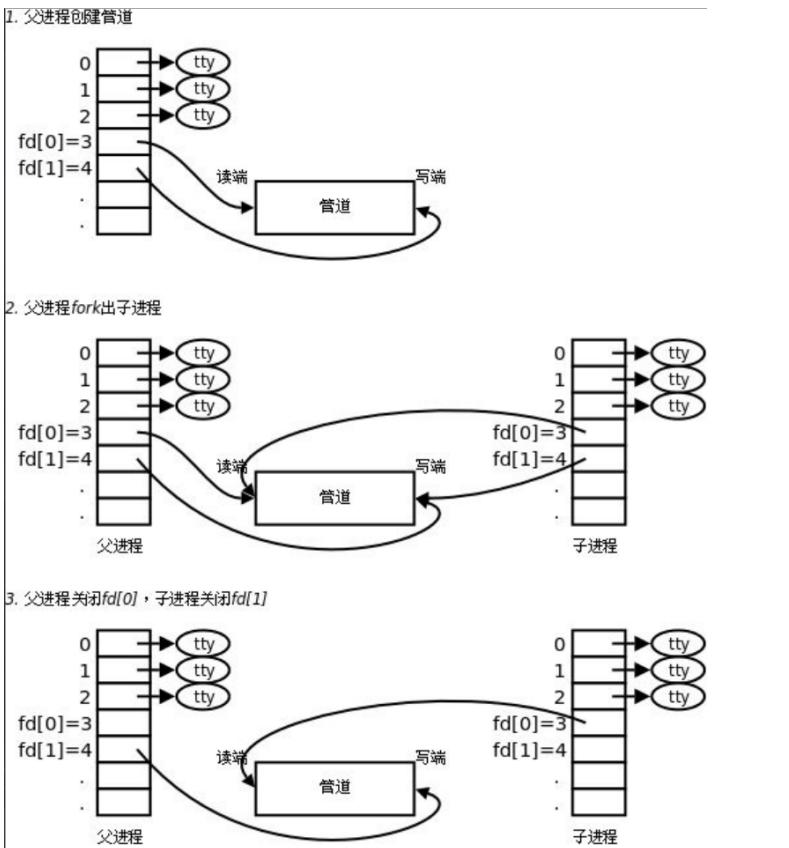
匿名管道是单向通信的通信信道,且因为子进程会继承父进程相关信息,所以父进程需要先打开读端和写端,后面再根据需要关闭读端/关闭写端,否则子进程只拥有读端/写端。管道的本质就是文件。
创建匿名管道
#include <unistd.h>
int pipe(int fildes[2]);
//fildes是文件描述符数组,一个输出型参数,用于获取读端/写端的文件描述符
//fildes[0]是读端、fildes[1]是写端
//成功返回0
//失败返回错误代码
测试
  1 #include <stdio.h>
  2 #include <unistd.h>
  3 #include <stdlib.h>
  4 #include <string.h>
  5 #include <sys/types.h>
  6 #include <sys/wait.h>
  7
  8 int main(void)
  9 {

 10   int pipe_fd[2] = {
    0};
 11   if(pipe(pipe_fd) != 0) //创建匿名管道
 12   {

 13     return 1;
 14   }
 15   printf("pipe_fd[0] = %d, pipe_fd[1] = %d\n",pipe_fd[0], pipe_fd[1]);
 16
 17   pid_t id = fork();
 18   //打算让子进程写入、父进程读取
 19   if(id < 0)
 20   {

 21     perror("fork");
 22     return 2;
 23   }
 24   else if(id == 0)
 25   {

 26     //child process
 27     //写入,则关闭读端
 28     close(pipe_fd[0]);
 29
 30     //写入,按照文件的方式
 31     const char *msg = "hello parent, I am child";
 32     while(1)
 33     {

 34        write(pipe_fd[1], msg, strlen(msg));
 35        sleep(1);
 36     }
 37     close(pipe_fd[1]);
 38     exit(0);
 39   }
 40   else
 41   {

 42
 43     //father process
 44     //读取,关闭写端
 45     close(pipe_fd[1]);
 46     char buf[64];
 47     while(1)
 48     {

 49       buf[0] = 0;
 50       ssize_t st = read(pipe_fd[0], buf, sizeof(buf));
 51       if(st > 0)
 52       {

 53         buf[st] = 0;
 54         printf("child send to pipe :%s\n", buf);
 55       }
 56       else if(st == 0)
 57       {

 58         printf("pipe file close, child quit\n");
 59         break;
 60       }
 61       else
 62       {

 63         break;
 64       }
 65     }
 66     //father wait
 67     int status = 0;
 68     pid_t ret = waitpid(-1, &status, 0);
 69     if(ret > 0)
 70     {

 71       //wait success
 72       //获取退出子进程退出状态
 73       printf("exit code:%d, sig: %d\n", (status >> 8) & 0xFF, status & 0x7F);
 74     }
 75     close(pipe_fd[0]);
 76   }
 77
 78   return 0;
 79 }
管道通信的4种情况
- a.读端不读/读端读的慢,写端等待读端
- b.读端关闭,写端会收到SIGPIPE信号直接终止
- c.写端不写/写端写的慢,读端会等待写端
- d.写端关闭,读端会读完pipe内的数据,然后再读就会读到0,表明读到文件末尾,然后读端关闭。
管道是有大小的,我们可以通过程序知道当前我们创建的匿名管道的大小。
  1 #include <stdio.h>
  2 #include <unistd.h>
  3 #include <stdlib.h>
  4 #include <string.h>
  5 #include <sys/types.h>
  6 #include <sys/wait.h>
  7
  8 //编写程序查看当前所创建的管道大小
  9 int main(void)
 10 {

 11   int pipe_fd[2] = {
    0};
 12   if(pipe(pipe_fd) != 0)
 13   {

 14     return 1;
 15   }
 16
 17   //计划子进程写入、父进程读取
 18   pid_t id = fork();
 19   if(id < 0)
 20   {

 21     perror("fork");
 22     return 2;
 23   }
 24   else if(id == 0)
 25   {

 26     //child process
 27     close(pipe_fd[0]);
 28     char c = 'x';
 29     int count = 0;
 30     while(1)
 31     {

 32       write(pipe_fd[1], &c, 1);
 33       count++;
 34       printf("count: %d\n", count);
 35     }
 36
 37     close(pipe_fd[1]);
 38     exit(0);
 39   }
 40   else
 41   {

 42     //father process
 43     close(pipe_fd[1]);
 44     sleep(20); //父进程休眠时间根据子进程来定,要保证休眠时间内管道被写满
 45
 46     char buf[64];
 47     while(1)
 48     {

 49       buf[0] = 0;//每读取一次,把缓冲区清零
 50       ssize_t st = read(pipe_fd[0], buf, sizeof(buf));
 51       if(st > 0)
 52       {

 53         buf[st] = 0;
 54         printf("child send to pipe :%s\n", buf);
 55       }
 56       else if(st == 0)
 57       {

 58         printf("pipe file close, child quit\n");
 59         break;
 60       }
 61       else
 62       {

 63         break;
 64       }
 65     }
 66     //father wait
 67     int status = 0;
 68     pid_t ret = waitpid(-1, &status, 0);
 69     if(ret > 0)
 70     {

 71       //wait success
 72       //获取退出子进程退出状态
 73       printf("exit code:%d, sig: %d\n", (status >> 8) & 0xFF, status & 0x7F);
 74     }
 75     close(pipe_fd[0]);
 76   }
 77
 78   return 0;
 79 }
得到的现象是,写端快速写入,知道写了很多次后,就暂时不写(实际上不是不写,而是在等待读端),
因为一次写入一字节,而写入65536字节后就开始等待读端了,说明此时所创建的匿名管道满了,可知大小为65536字节,也就是64KB大小。
命名管道
命名管道的5个特点:
- 1、只能单向通信的通信信道
- 2、面向字节流
- 3、用于“没有血缘关系”的进程通信
- 4、写端写入是原子性的,自带同步机制
- 5、管道生命周期随通信进程
命名管道与匿名管道的特点差异在于:
匿名管道只用于“具有血缘关系”的进程之间相互通信
命名管道用于“不具有血缘关系”的进程之间相互通信
创建命名管道
方式一:在命令行上创建,使用下面这个命令:
mkfifo filename
方式二:命名管道也可以从程序里创建,相关函数有:
#include <sys/types.h>
#include <sys/stat.h>
int mkfifo(const char *filename,mode_t mode);
//成功返回0,失败返回-1
//filename:创建出的管道文件,路径+文件名
//mode:管道文件的权限
  1 #include <stdio.h>
  2 #include <sys/stat.h>
  3 #include <sys/types.h>
  4 int main(void)
  5 {

  6   //创建命名管道,并判断是否创建成功
  7   if(mkfifo("./fifo", 0666) < 0)
  8   {

  9     perror("mkfifo");
 10     return 1;
 11   }
 12
 13   return 0;
 14 }
创建成功

但它的权限是rw-rw-r–,按8进制来显示则是0664,实际上它受到了权限掩码的影响。
//使用umask查看权限掩码
[[email protected]-0-2-centos fifo]$ umask
0002

上述例子:my_mode = 0666 & (~0002) = 0664.
解决办法之一:将权限掩码设置为0,即可不受权限掩码的影响。
//设置权限掩码
mode_t umask(mode_t mask)
命名管道的测试
上述已经给出了server.c文件,并创建出了一个命名管道。命名管道用于不具有血缘关系之间的进程进行相互通信,所以可以再创建出一个程序(运行后变成另外一个进程),以下是这次测试所创建的文件
[[email protected]-0-2-centos fifo]$ ls -l
total 16
-rw-rw-r-- 1 YDY YDY 572 Jul 27 14:56 client.c
-rw-rw-r-- 1 YDY YDY 123 Jul 27 14:26 comm.h
-rw-rw-r-- 1 YDY YDY 146 Jul 27 14:14 Makefile
-rw-rw-r-- 1 YDY YDY 970 Jul 27 14:59 server.c
Makefile文件内容
  1 .PHONY:all
  2 all: client server
  3
  4 client : client.c
  5     gcc -o [email protected] $^
  6 server:server.c
  7     gcc -o [email protected] $^
  8
  9 .PHONY:clean
 10 clean:
 11     rm -f client server fifo
comm.h文件内容
 1 #include <stdio.h>
  2 #include <sys/types.h>
  3 #include <sys/stat.h>
  4 #include <fcntl.h>
  5 #include <unistd.h>
  6 #include <string.h>
server.c文件内容
  1 #include "comm.h"
  2 #include <sys/wait.h>
  3 #include <stdlib.h>
  4
  5 int main(void)
  6 {

  7   //创建命名管道,并判断是否创建成功
  8   umask(0);
  9   if(mkfifo("./my_fifo", 0666) < 0)
 10   {

 11     perror("mkfifo");
 12     return 1;
 13   }
 14   //打开管道文件
 15   int fd =  open("./my_fifo", O_RDONLY);
 16   if(fd < 0)
 17   {

 18     perror("open");
 19     return 2;
 20   }
 21
 22   //开始业务逻辑
 23   while(1)
 24   {

 25     char buf[64];
 26     ssize_t st = read(fd, buf, sizeof(buf) - 1);
 27     if(st > 0)
 28     {

 29       buf[st] = 0;
 30       if(strcmp(buf, "show") == 0)
 31       {

 32         if(fork() == 0)
 33         {

 34           //child
 35           execl("/usr/bin/ls", "ls", "-l", NULL);
 36           exit(0);
 37         }
 38         waitpid(-1, NULL, 0);
 39       }
 40       else
 41       {

 42          printf("server read# %s\n", buf);
 43       }
 44     }
 45     else if(st == 0)
 46     {

 47       //读端、写端关闭
 48       printf("client quit!\n");
 49       break;
 50     }
 51     else
 52     {

 53       perror("read");
 54       break;
 55     }
 56
 57   }
 58   close(fd);
 59   return 0;
 60 }
client.c文件内容
  1 #include "comm.h"
  2
  3 int main(void)
  4 {

  5   //这里就不需要创建管道文件了,直接打开
  6   int fd = open("./my_fifo", O_WRONLY);
  7   if(fd < 0)
  8   {

  9     perror("open");
 10     return 2;
 11   }
 12
 13   //业务逻辑部分
 14   while(1)
 15   {

 16     printf("输入# ");
 17     fflush(stdout); //立即刷新
 18
 19     //先将标准输入里的数据拿到进程内部
 20     char buf[64];
 21     ssize_t st = read(0, buf, sizeof(buf) - 1);
 22     if(st > 0)
 23     {

 24       buf[st - 1]= 0;
 25       //将buf内的数据写入管道文件
 26       write(fd, buf, strlen(buf));
 27     }
 28   }
 29   close(fd);
 30   return 0;
 31 }
运行截图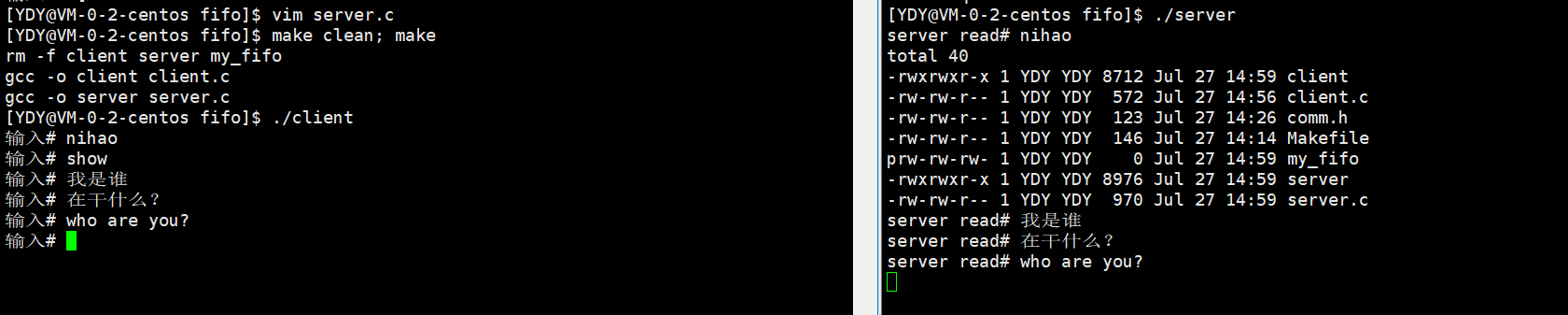
管道文件的数据不刷新到磁盘上。

为了让不同的进程看到同一个文件,这个文件必须有文件名+文件路径。
System V标准
管道是基于文件的进程间通信方式,而Systm V标准的进程间通信方式是专门在OS层面定制的,是同一主机内的进程间通信方案。
System V进程间通信,一定存在专门用来通信的system call接口。
System V 通信的三种方式:
- System V 共享内存
- System V 消息队列
- System V 信号量
System V 共享内存
共享内存的原理: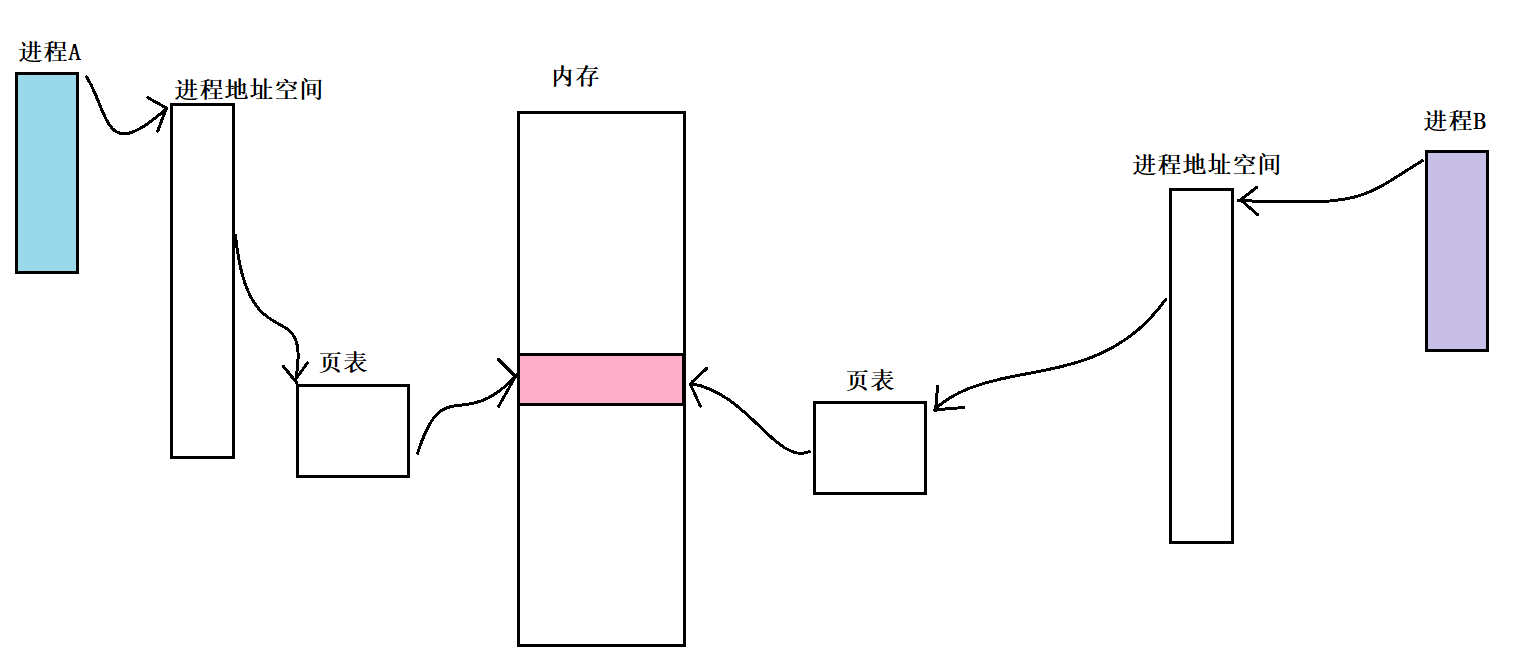
1、通过某system call,在内存中创建一份内存空间。
2、通过某system call, 让参与通信的进程都“挂接”到这份内存。
这就使得不同的进程能够看到同一份资源,进而达到通信目的。
准备工作
1、共享内存可能同时存在多份,所以OS会对共享内存进行管理,管理的办法是“先描述,后组织”。共享内存描述的方法是将它的各种信息存放在结构体中
2、共享内存有唯一标识它的标识符,目的是让不同进程能够识别到同一份共享内存资源。这个标识符需要由用户设定。
共享内存部分system call接口
- 创建/获取共享内存
#include <sys/ipc.h>
#include <shm.h>
int shmget(key_t key, size_t size, int shmflag);
- 控制共享内存
#include <sys/ipc.h>
#include <sys/shm.h>
int shmctl(int shmid, int cmd, shmid_ds *buf);
- 关联共享内存
#include <sys/types.h>
#include <sys/shm.h>
void *shmat(int shmid, const void *shmaddr, int shmflag);
- 去关联共享内存
#include <sys/types.h>
#include <sys/shm.h>
int shmdt(const void *shmaddr);
创建/获取共享内存
#include <sys/ipc.h>
#include <shm.h>
int shmget(key_t key, size_t size, int shmflag);
key是需要用户自己设定的,只要形成key的算法和原始数据相同,就能形成同一个ID,保证不同的进程能够看到同一份共享内存资源。
key可以使用函数ftok生成
ftok作用:将路径名和项目标识符转换为System V IPC的key
#include <sys/types.h>
#include <sys/ipc.h>
key_t ftok(const char* pathname, int proj_id);
//返回值,成功返回一个key值,失败返回-1
pathname必须是已经存在的可访问文件,proj_id由用户自己填写,虽然proj_id是一个int类型,但是到现在为止,它只使用低8位。如果使用同一个proj_id去标定同一个文件,ftok的返回值是一样的。
shmget中的参数size
获取的共享内存大小,建议为当前所在机器物理页面大小的整数倍。因为共享内存申请的单位是页。假设,当前机器的一个物理页面大小是4KB(4096字节),而我们申请了4097字节,OS就会申请2个页面,但它只会给我们4097个字节使用,那么就浪费了很大的一段内存空间。
shmget中的参数shmflag
可填的几种值:
- 0:创建一个共享内存,如果已经存在,返回当前已经存在的共享内存
- IPC_CREAT:创建一个共享内存,如果已经存在,返回当前已经存在的共享内存
- IPC_CREAT | IPC_EXCL:如果共享内存不存在,创建一个;如果共享内存已经存在,则返回错误。
- 还可以在前面的基础上
|上共享内存段指明的权限
返回值
成功返回一个有效的shmid(共享内存标识符)
失败返回-1
key VS shmid
key:只是用于在系统层面进行标识唯一性的,不能用于管理共享内存
shmid:是OS给用户返回的ID,用于在用户层管理共享内存。
建议一定要在最后一个参数的基础上|指明共享内存段的权限,否则后面访问不了共享内存段(访问不了,去访问就会出现段错误),那还如何利用共享内存段实现进程间的通信呢?
查看共享内存的命令ipcs -m
[[email protected]-0-2-centos shared_memory]$ ipcs -m

------ Shared Memory Segments --------
key        shmid      owner      perms      bytes      nattch     status
0x33010c0a 10         YDY        666        4096       1
查看System V IPC资源的命令ipcs
[[email protected]-0-2-centos shared_memory]$ ipcs

------ Message Queues --------
key        msqid      owner      perms      used-bytes   messages

------ Shared Memory Segments --------
key        shmid      owner      perms      bytes      nattch     status
0x33010c0a 10         YDY        666        4096       1

------ Semaphore Arrays --------
key        semid      owner      perms      nsems
删除共享内存的命令ipcrm -m shmid
[[email protected]-0-2-centos shared_memory]$ ipcrm -m 10
[[email protected]-0-2-centos shared_memory]$ ipcs -m

------ Shared Memory Segments --------
key        shmid      owner      perms      bytes      nattch     status
控制共享内存(只了解共享内存的删除)
#include <sys/ipc.h>
#include <sys/shm.h>
int shmctl(int shmid, int cmd, shmid_ds *buf);
共享内存的删除,cmd使用宏IPC_RMID即可,第三个参数设置为NULL。
共享内存的关联和去关联。
#include <sys/types.h>
#include <sys/shm.h>
//关联
void *shmat(shmid, const void* shmaddr, int shmflag);
//去关联
int shmdt(const void *shmaddr);
如果关联成功, shmat返回虚拟地址。
利用共享内存实现通信的操作,在共享内存关联成功之后,去关联之前。
共享内存的测试
共有如下测试文件
[[email protected]-0-2-centos shared_memory]$ ls -l
total 16
-rw-rw-r-- 1 YDY YDY 675 Jul 28 09:12 client.c
-rw-rw-r-- 1 YDY YDY 168 Jul 28 08:47 comm.h
-rw-rw-r-- 1 YDY YDY 141 Jul 27 16:43 Makefile
-rw-rw-r-- 1 YDY YDY 689 Jul 28 09:08 server.c
Makefile文件
 1 .PHONY:all
 2 all : client server
 3
 4 client : client.c
 5     gcc -o [email protected] $^
 6 server : server.c
 7     gcc -o [email protected] $^
 8
 9 .PHONY:clean
10 clean:
11     rm -f client server
comm.h文件
  1 #include <stdio.h>
  2 #include <sys/types.h>
  3 #include <sys/shm.h>
  4 #include <sys/ipc.h>
  5 #include <unistd.h>
  6
  7
  8 #define PATHNAME "./"
  9 #define PROJ_ID 0X333
 10 #define SIZE 4096
server.c文件
  1 #include "comm.h"
  2 #include <sys/shm.h>
  3 int main(void)
  4 {

  5   //创建共享内存
  6   key_t key = ftok(PATHNAME, PROJ_ID);
  7   if(key < 0)
  8   {

  9     perror("ftok");
 10     return 1;
 11   }
 12   int shmid = shmget(key, SIZE, IPC_CREAT | IPC_EXCL|0666);
 13   if(shmid < 0)
 14   {

 15     perror("shmget");
 16     return 2;
 17   }
 18   printf("key: %d, shmid :%d\n", key, shmid);
 19   //关联共享内存
 20   char* mem = (char*)shmat(shmid, NULL, 0);
 21   if(mem == NULL)
 22   {

 23     perror("shmat");
 24     return 1;
 25   }
 26   printf("shm attach success!\n");
 27   sleep(10);
 28   //通信
 29   //读取
 30   while(1)
 31   {

 32     sleep(1);
 33     printf("%s\n", mem);
 34   }
 35
 36   //共享内存去关联
 37   shmdt(mem);
 38   printf("shm detaches success!\n");
 39
 40   return 0;
 41 }
client.c文件
  1 #include "comm.h"
  2
  3 int main(void)
  4 {

  5   //映射到同一块共享内存
  6   key_t key = ftok(PATHNAME, PROJ_ID);
  7   if(key < 0)
  8   {

  9     perror("ftok");
 10     return 1;
 11   }
 12   int shmid = shmget(key, SIZE, IPC_CREAT | 0666);//存在,则直接获取
 13   if(shmid < 0)
 14   {

 15     perror("shmget");
 16     return 2;
 17   }
 18   //关联共享内存
 19   char* mem = (char*)shmat(shmid, NULL, 0);
 20   printf("shm attches success!\n");
 21
 22   //写入
 23   char c = 'A';
 24   while(c <= 'Z')
 25   {

 26     mem[c - 'A'] = c;
 27     c++;
 28     mem[c - 'A'] = 0;
 29     sleep(2);
 30   }
 31
 32   //去关联
 33   shmdt(mem);
 34   printf("shm detaches success!\n");
 35
 36   shmctl(shmid, IPC_RMID, 0);
 37   printf("shm delete success!\n");
 38   return 0;
 39 }
共享内存是目前所有进程间通信方式中最快的一种。
System V 信号量
准备知识:
1、临界资源:能够被多个执行流同时访问的资源。
2、临界区:用来访问临界资源的代码
3、原子性:一件事情要么一口气做完,要么不做。没有中间态。
4、互斥:任意时刻只允许有一个执行流(单核CPU)访问临界资源。
管道、共享内存、消息队列等是以传输数据为目的的,而信号量不是以传输数据为目的的,通过资源共享的方式,来达到进程同步和互斥的目的。信号量的本质,是一个计数器,用来衡量临界资源中资源数目的。
边栏推荐
- "Real" emotions dictionary based on the text sentiment analysis and LDA theme analysis
- 分布式.幂等性
- tkinter模块高级操作(二)—— 界面切换效果、立体阴影字效果及gif动图的实现
- Artificial Intelligence and Cloud Security
- typescript11-数据类型
- 系统设计.短链系统设计
- typescript15- (specify both parameter and return value types)
- 验证 XML 文档
- VS warning LNK4099: No solution found for PDB
- Word/Excel 固定表格大小,填写内容时,表格不随单元格内容变化
猜你喜欢

手把手教你配置Jenkins自动化邮件通知
Bert usage and word prediction based on Keras_bert model

ShardingSphere's unsharded table configuration combat (6)
蓝牙mesh系统开发二 mesh节点开发

The Meta Metaverse Division lost 2.8 billion in the second quarter, still want to continue to bet?Metaverse development has yet to see a way out

Jiuzhou Cloud was selected into the "Trusted Cloud's Latest Evaluation System and the List of Enterprises Passing the Evaluation in 2022"

软件测试要达到一个什么水平才能找到一份9K的工作?
In Google Cloud API gateway APISIX T2A and T2D performance test

关于Redis相关内容的基础学习

VS warning LNK4099:未找到 PDB 的解决方案
随机推荐
射频器件的基本参数1
这个项目太有极客范儿了
ROS Action communication
Know what DTU is 4GDTU equipment
设置浏览器滚动条样式
android的webview缓存相关知识收集
ROS2系列知识(3):环境配置
MySQL高级-六索引优化
Typescript14 - (type) of the specified parameters and return values alone
Multiplication, DFS order
VS warning LNK4099: No solution found for PDB
TiKV主要内存结构和OOM排查总结
Rocky/GNU之Zabbix部署(1)
查看zabbix-release-5.0-1.el8.noarch.rpm包内容
PDF 拆分/合并
倍增、DFS序
Mysql: Invalid default value for TIMESTAMP
4G通信模块CAT1和CAT4的区别
Mysql:Invalid default value for TIMESTAMP
勾股数元组 od js