当前位置:网站首页>Yapi installation
Yapi installation
2022-07-26 04:28:00 【、wook】
List of articles
Preface : yapi There are a lot of dependencies required for installation , I really don't want to do this unless the company is used to it ...
2.linux edition
1. install node
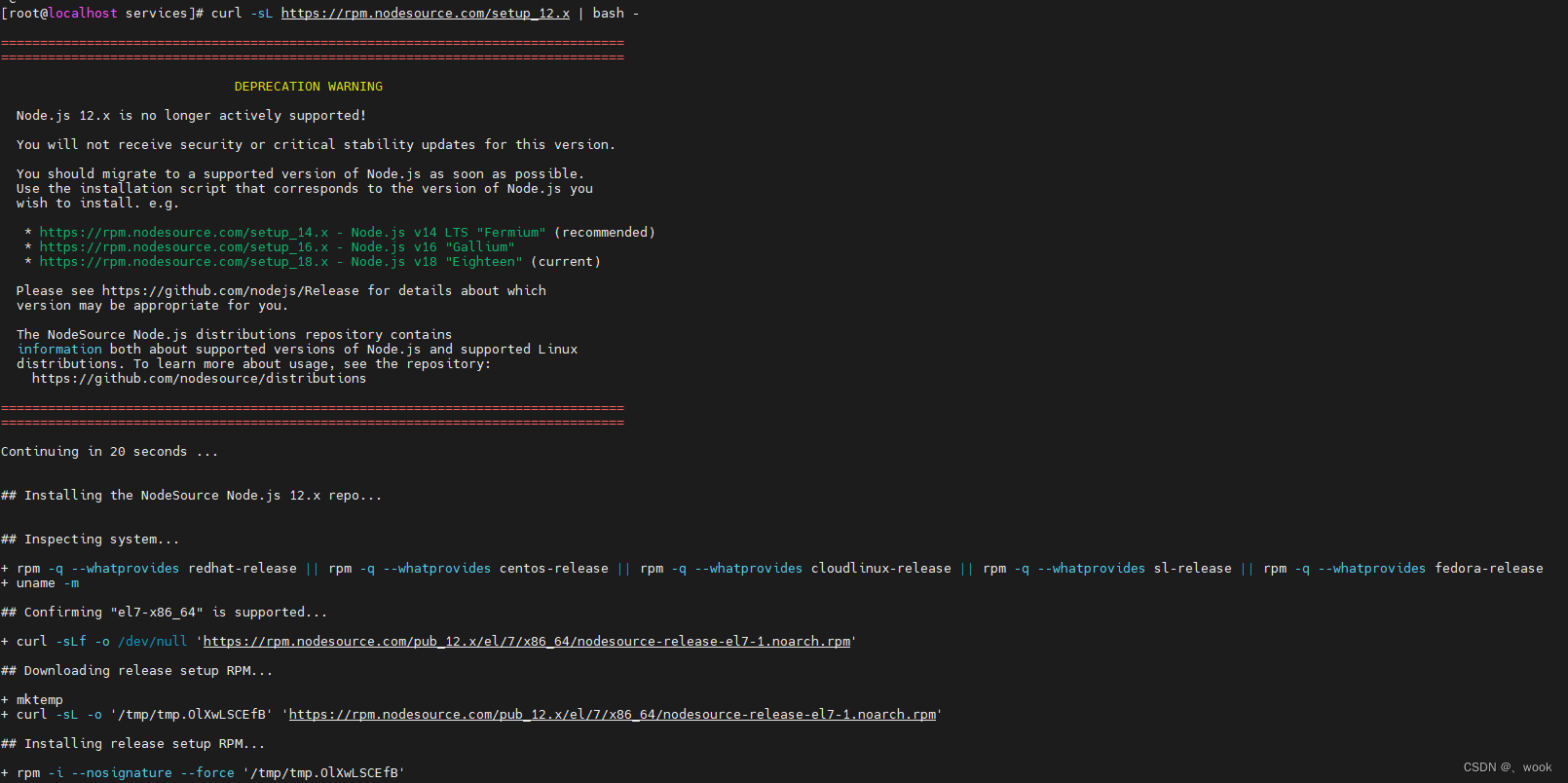
curl -sL https://rpm.nodesource.com/setup_12.x | bash -
yum install -y nodejs
node -v
#  to update yum
yum -y update

2. adopt yum install MongoDB
You can download and install the compressed package through the official website :https://www.mongodb.com/try/download/community This passage yum install .
#  establish MongoDB Source file
touch /etc/yum.repos.d/mongodb-org.repo
#  Edit and write the following program , Be careful 5.0 The location of , If you are 6.0, It's going to be changed to 6.0. Put the mouse on the above  copy link  Visible version
vim /etc/yum.repos.d/mongodb-org.repo
[mongodb-org]
name=MongoDB Repository
baseurl=http://mirrors.aliyun.com/mongodb/yum/redhat/7Server/mongodb-org/5.0/x86_64/
gpgcheck=0
enabled=1
#  install MongoDB
yum install -y mongodb-org

#  start-up MongoDB
service mongod start
If the following error occurs :( Jump directly to the third dot when there is no such thing , Start up !!!!!!!)
Redirecting to /bin/systemctl start mongod.service
Job for mongod.service failed because a fatal signal was delivered to the control process. See “systemctl status mongod.service” and “journalctl -xe” for details.
You can execute the following command to view the configuration
vim /etc/mongod.conf

You can enter systemctl status mongod.service Check error messages , If there is the same mistake as me , It's like a version problem , I tried several ways, but it didn't work , Finally, I can only reduce the version to 4.0, If it is another error, it may be a permission problem , Baidu can solve it .
Empty mongodb Related information
# Remove the installation package
sudo yum erase $(rpm -qa | grep mongodb-org)
# Delete log
sudo rm -r /var/log/mongodb
sudo rm -r /var/lib/mongo
# It seems that I have to delete  /etc/yum.repos.d/mongodb-org.repo , Then recreate
# Check again
yum list installed | grep mongo
# If there is identification information in the previous step , Copy to the next sentence  erase Delete later
#yum erase XXX (XX  example  mongodb-server.x86_64  For the last step list)
# Add an extra line  gpgkey=https://www.mongodb.org/static/pgp/server-4.0.asc
vim /etc/yum.repos.d/mongodb-org.repo
# install 4.0 edition
yum -y install mongodb-org-4.0.1 mongodb-org-mongos-4.0.1 mongodb-org-server-4.0.1 mongodb-org-shell-4.0.1 mongodb-org-tools-4.0.1
# start-up
service mongod start

3. Set boot up
chkconfig mongod on
notes : If you are prompted Failed to execute operation: No such file or directory
This is because linux The version is centos yes 7.0 Above version , You need to execute the following code , If no error is reported, ignore
systemctl enable mongod.service
# Comment out  127.0.0.1 , That is, remote access
vim /etc/mongod.conf

# restart
service mongod restart
3. install ypai
#  Open ports  3000 and  9000
vim /etc/sysconfig/iptables

# install yapi
npm install -g yapi-cli --registry https://registry.npm.taobao.org
yapi server

my yapi After the catalog is loaded, it is in /usr/software/nodejs/bin
Execute... In this directory ./yapi server
Browser access :http://ip:9090/ ( Visual deployment )
The picture shows 3000 yes yapi Backstage address ,27017 It was just installed mongondb Connection port for , Because it's an intranet , So there is no need to open the server 27017 port .( Record :/usr/software/nodejs/bin/my-yapi)
There are many strange problems ,1.4.1 By default , But there was an error when clicking start deployment , Here I replace it with 1.8.0 It was successful ...
Initialization of administrator account succeeded , Account name :“[email protected]”, password :“ymfe.org”
Deployment success , Please switch to the deployment Directory , Input : “node vendors/server/app.js” Command to start the server , Then open it in a browser http://ip:3000 visit
4. start-up yapi Background server
# The directory output above
cd /usr/software/nodejs/bin/my-yapi
# Start the service
#node vendors/server/app.js
# Background operation
service iptables restart
nohup node vendors/server/app.js &

边栏推荐
- AWS Support Plan
- Yadi started to slow down after high-end
- Soft simulation rasterization renderer
- 数据库连接数查看和修改
- dijikstra(先预处理)+dfs,relocation truncated to fit
- 一个sql server查询截止某个日期最新的记录
- How to write the summary? (including 7 easily ignored precautions and a summary of common sentence patterns in 80% of review articles)
- How is the launch of ros2 different?
- Dijikstra (preprocessing first) +dfs, relocation truncated to fit
- 低成本、快速、高效搭建数字藏品APP、H5系统,扇贝科技专业开发更放心!
猜你喜欢

Makefile knowledge rearrangement (super detailed)

二、国际知名项目-HelloWorld

How does win11 22h2 skip networking and Microsoft account login?

qt编译报错整理及Remote模块下载

RTSP/Onvif协议视频平台EasyNVR服务一键升级功能的使用教程
1. Excel的IF函数

UE4 靠近物体时显示文字,远离时文字消失

机器学习之桑基图(用于用户行为分析)

Build a maker Education Laboratory for teenagers

Phaser(一):平台跳跃收集游戏
随机推荐
数据库连接数查看和修改
MySQL log classification: error log, binary log, query log, slow query log
Graph translation model
Recognized again | saining network security has been listed in the ccsip 2022 panorama of China's network security industry
TIA botu WinCC Pro controls the display and hiding of layers through scripts
1. Mx6u-alpha development board (GPIO interrupt experiment)
SEGGER Embedded Studio找不到xxx.c或者xxx.h文件
How does win11 set the theme color of the status bar? Win11 method of setting theme color of status bar
Phaser(一):平台跳跃收集游戏
View and modify the number of database connections
Can literature | relationship research draw causal conclusions
FFmpeg 视频添加水印
A series of problems about the number of DP paths
UE4 获取玩家控制权的两种方式
What are the consequences and problems of computer system restoration
How to write the summary? (including 7 easily ignored precautions and a summary of common sentence patterns in 80% of review articles)
Makefile knowledge rearrangement (super detailed)
mongoDB为什么快
Day24 job
Use of anonymous functions