当前位置:网站首页>kubernetes资源对象介绍及常用命令(三)
kubernetes资源对象介绍及常用命令(三)
2022-07-01 23:31:00 【江小南】
Service
将一组Pods公开为网络服务的抽象方法。也可以理解为Pod的服务发现与负载均衡。
服务发现与负载均衡:Service会检测pod的状态,流量只会较为平均得分发到正常的pod中。

创建Service
暴露Deploy。端口8000。
命令行方式
[[email protected] ~]# kubectl expose deployment my-app --port=8000 --target-port=80
service/my-app exposed
[[email protected] ~]# kubectl get service
yaml方式,service.yml
apiVersion: v1
kind: Service
metadata:
  labels:
    app: my-app
  name: my-app
spec:
  selector:
    app: my-app
  ports:
  - port: 8000
    protocol: TCP
    targetPort: 80
[[email protected] ~]# kubectl apply -f service.yml
service/my-app created
[[email protected] ~]#
查看Service
[[email protected] ~]# kubectl get service -n default
NAME         TYPE        CLUSTER-IP   EXTERNAL-IP   PORT(S)    AGE
kubernetes   ClusterIP   10.96.0.1    <none>        443/TCP    23h
my-app       ClusterIP   10.96.2.98   <none>        8000/TCP   6s
[[email protected] ~]#
可以看到我们上面创建的Service的ip为10.96.2.98。
[[email protected] ~]# curl 10.96.2.98:8000
<!DOCTYPE html>
<html>
<head>
<title>Welcome to nginx!</title>
<style>
    body {
        width: 35em;
        margin: 0 auto;
        font-family: Tahoma, Verdana, Arial, sans-serif;
    }
</style>
</head>
...
</html>
[[email protected] ~]#
注意:我们这里可以使用ip:8000的形式在集群内的任意节点访问。我们也可以在pod内使用域名:端口的形式访问。域名的形式:service名称.命名空间.svc:端口。例如:my-app.default.svc:8000。
扩展:
查看pod标签
[[email protected] ~]# kubectl get pod [podname] --show-labels
NAME                      READY   STATUS    RESTARTS   AGE   LABELS
my-app-5ff664f457-l7792   1/1     Running   1          20h   app=my-app,pod-template-hash=5ff664f457
my-app-5ff664f457-r69z5   1/1     Running   1          20h   app=my-app,pod-template-hash=5ff664f457
my-app-5ff664f457-w2d6q   1/1     Running   1          20h   app=my-app,pod-template-hash=5ff664f457
my-app-5ff664f457-xsz9l   1/1     Running   1          20h   app=my-app,pod-template-hash=5ff664f457
[[email protected] ~]#
使用标签检索Pod
[[email protected] ~]# kubectl get pod -l app=my-app
NAME                      READY   STATUS    RESTARTS   AGE
my-app-5ff664f457-l7792   1/1     Running   1          20h
my-app-5ff664f457-r69z5   1/1     Running   1          20h
my-app-5ff664f457-w2d6q   1/1     Running   1          20h
my-app-5ff664f457-xsz9l   1/1     Running   1          20h
[[email protected] ~]#
删除Service
[[email protected] ~]# kubectl delete service my-app
service "my-app" deleted
[[email protected] ~]#
ClusterIP
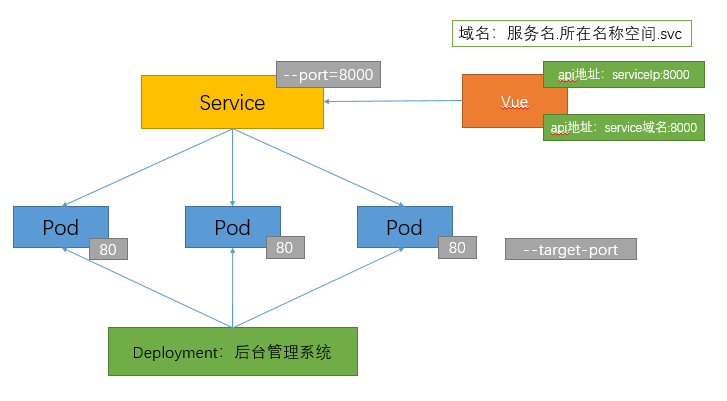
我们上面方式创建Service默认使用的是ClusterIP,称为集群ip,只能在集群内部使用。等同于:
kubectl expose deployment my-app --port=8000 --target-port=80 --type=ClusterIP
apiVersion: v1
kind: Service
metadata:
  labels:
    app: my-app
  name: my-app
spec:
  ports:
  - port: 8000
    protocol: TCP
    targetPort: 80
  selector:
    app: my-app
  type: ClusterIP
NodePort
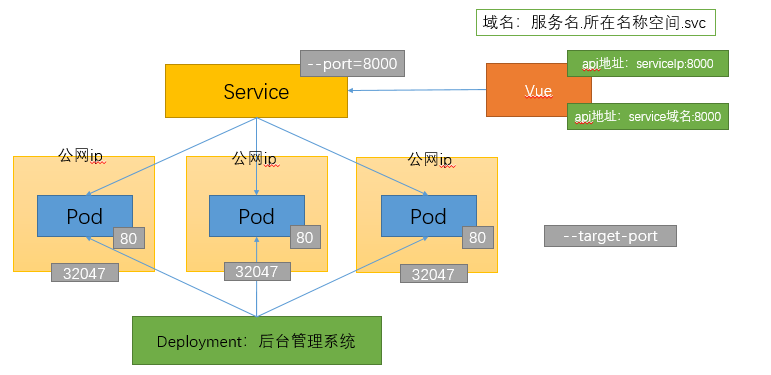
这种方式创建的Service在集群外也可以访问。因为他会在每个pod上映射一个新的端口。
命令行方式
[[email protected] ~]# kubectl expose deploy my-app --port=8000 --target-port=80 --type=NodePort
service/my-app exposed
[[email protected] ~]#
yaml方式。service.yml
apiVersion: v1
kind: Service
metadata:
  labels:
    app: my-app
  name: my-app
spec:
  ports:
  - port: 8000
    protocol: TCP
    targetPort: 80
  selector:
    app: my-app
  type: NodePort
kubectl apply -f service.yml
[[email protected] ~]# kubectl get svc
NAME         TYPE        CLUSTER-IP      EXTERNAL-IP   PORT(S)          AGE
kubernetes   ClusterIP   10.96.0.1       <none>        443/TCP          25h
my-app       NodePort    10.96.198.191   <none>        8000:32047/TCP   39s
[[email protected] ~]#
对比发现在PORT(S)中多了一个映射端口32047,这个端口在每个节点上都有,可以通过节点ip:30247的方式在集群外进行访问。

NodePort除了可以在集群外访问以外,其余和ClusterIP一致。
小结
NodePort范围在 30000-32767 之间随机生成。 ClusterIP只能在集群内使用。 NodePort可以通过 节点ip:新端口的方式在集群外访问。无论是ClusterIP还是NodePort,都会生成 CLUSTER-IP,可在集群内使用。使用 ip:端口要在集群节点上使用,而域名:端口要在pod内使用。域名的写法:服务名.所在名称空间.svc
边栏推荐
- 图的遍历之深度优先搜索和广度优先搜索
- Aaai22 | structural tagging and interaction modeling: a "slim" network for graph classification
- [understanding of opportunity-35]: Guiguzi - flying clamp - the art of remote connection, remote control and remote testing
- 小程序表单校验封装
- mt管理器测试滑雪大冒险
- Stm32f030f4 drives tim1637 nixie tube chip
- Oracle中已定义者身份执行函数AUTHID DEFINER与Postgresql行为的异同
- Is it safe to choose mobile phone for stock trading account opening in Shanghai?
- Anomaly-Transformer (ICLR 2022 Spotlight)复现过程及问题
- Microservice stability management
猜你喜欢
![[micro service sentinel] sentinel integrates openfeign](/img/8b/46156255fd980eb422c7e05d5af7ee.png)
[micro service sentinel] sentinel integrates openfeign
Linux基础 —— CentOS7 离线安装 MySQL
Matplotlib common settings
![[must] bm41 output the right view of the binary tree [medium +]](/img/a5/00b2f0df5ab448665a2b062d145e52.png)
[must] bm41 output the right view of the binary tree [medium +]

What is the relationship between modeling and later film and television?

notBlank 和 notEmpty

Zero foundation tutorial of Internet of things development
【必会】BM41 输出二叉树的右视图【中等+】
ARP报文头部格式和请求流程
Postgresql源码(57)HOT更新为什么性能差距那么大?
随机推荐
常见的积分商城游戏类型有哪些?
[swoole Series 1] what will you learn in the world of swoole?
2021 robocom world robot developer competition - preliminary competition of undergraduate group
What is the difference between memory leak and memory overflow?
PostgreSQL source code (57) why is the performance gap so large in hot update?
从第三次技术革命看企业应用三大开发趋势
Experience of practical learning of Silicon Valley products
vs2015 AdminDeployment.xml
Anomaly-Transformer (ICLR 2022 Spotlight)复现过程及问题
2021 RoboCom 世界机器人开发者大赛-本科组初赛
JPA handwritten SQL, received with user-defined entity classes
Is there a piece of code that makes you convinced by human wisdom
The difference between timer and scheduledthreadpoolexecutor
Applet form verification encapsulation
Current situation and future development trend of Internet of things
Daily three questions 6.28
Create Ca and issue certificate through go language
Door level modeling - after class exercises
2022 crane driver (limited to bridge crane) examination questions and simulation examination
Which securities company is better and which is safer to open a securities account