当前位置:网站首页>20220623 getting started with Adobe Illustrator
20220623 getting started with Adobe Illustrator
2022-06-26 08:56:00 【What's my name】
Shrinkage :Alt+ Roller
Move :space+ Left mouse button
Manipulate canvas size : Click on the sketchpad tool , Then edit

esc: Exit the currently selected
Panel layout , Choose... In the upper right corner “ Traditional basic functions ”

Pictures dragged in , If there is a fork on it , Click on “ The embedded ”, It has something to do with the panel , You can save

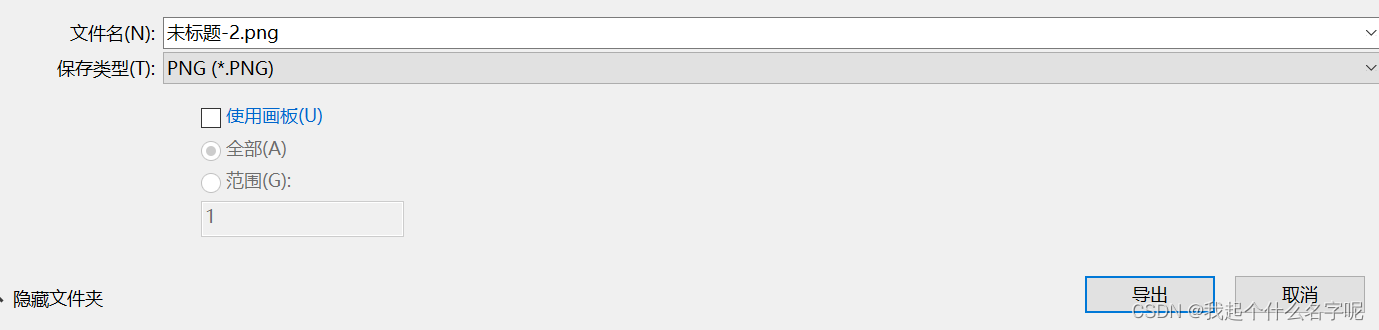
When exporting , choice “ export ”-“ Export to ”-“ Use the sketchpad ”( Color selection should be consistent with the beginning ).“ Storage ” Save as editable AI
Draw basic graphics , The front box is filled , The back box is stroke color ,

When drawing polygons , Hold down Up and down arrow You can increase the number of edges , Hold down shift The key can be placed directly .
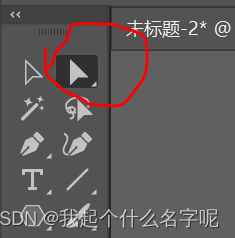
The left arrow is to select a graphic , The white arrow can select one or more anchors ,,
Graphic operation : window —— Path Finder —— Graphic operation
Copy in place :CTRL+c,ctrl+f
Hold down shift You can select multiple objects
The alignment of the two objects is here

ctrl+r: Reference line . Mark the reference line : Select the object with the blank arrow first , Then drag the horizontal and vertical reference lines directly
ctrl+d: Repeat the previous step
After selecting multiple objects , Right click to group , To select a group, you must press and hold ctrl key . Cannot create a set of objects belonging to different groups , Because they were assigned to other groups , Release first .
Rotating tools : Rotation in the left column . Select the object first , Rotate it again , Again alt+ Click a point , You can move the rotation center point

Right click - The arrangement is the next layer .
Add words : Sinister T, Click or long press the box text . The characters above 、 Paragraph formatting ( typeface , Space between words , Paragraph spacing )
Draw a curve with a pen , Press esc You can stop
Blend images . Release mix : Menu bar object - blend - Release

route 、 The concept of layers . Layers : window - Layers . stay Illustrator in , The lines produced by using drawing tools are called paths . A path is composed of one or more straight or curved line segments .
https://www.bilibili.com/video/BV1gV411f7Xt?p=4&vd_source=5138fcb56aada2b6f1c51dfff686251a
边栏推荐
- uniapp用uParse实现解析后台的富文本编辑器的内容及修改uParse样式
- Matlab drawing checkerboard (camera calibration)
- [已解决]setOnNavigationItemSelectedListener()被弃用
- Implementation of ffmpeg audio and video player
- 【IVI】15.1.2 系统稳定性优化篇(LMKD Ⅱ)PSI 压力失速信息
- 【MATLAB GUI】 键盘回调中按键识别符查找表
- [QNX Hypervisor 2.2用户手册]12.2 术语(二)
- MPC learning notes (I): push MPC formula manually
- Checkerboard generation + camera calibration + stereo matching
- Using transformers of hugging face to realize named entity recognition
猜你喜欢

Structure diagram of target detection network
Transformers loading Roberta to implement sequence annotation task

反爬之验证码识别登录 (OCR字符识别)

Detailed explanation of traditional image segmentation methods

What are the conditions for Mitsubishi PLC to realize Ethernet wireless communication?

Opencv learning notes 3

鲸会务一站式智能会议系统帮助主办方实现数字化会议管理

Intra class data member initialization of static const and static constexpr
opencv學習筆記三

【MATLAB GUI】 键盘回调中按键识别符查找表
随机推荐
XSS 跨站脚本攻击
Koa_mySQL_Ts 的整合
opencv學習筆記三
Ultrasonic image segmentation
Isinstance() function usage
Yolov5进阶之五GPU环境搭建
在同花顺开户证券安全吗,
Trimming_ nanyangjx
直播回顾 | smardaten李鸿飞解读中国低/无代码行业研究报告:风向变了
Remote centralized control of distributed sensor signals using wireless technology
The principle and function of focus
XSS cross site scripting attack
Leetcode: array fast and slow pointer method
How to use leetcode
WBC learning notes (II): practical application of WBC control
Fourier transform of image
QT_ AI
torch. fft
Matlab function foundation (directly abandon version)
Using transformers of hugging face to realize named entity recognition