当前位置:网站首页>解决在window中远程连接Linux下的MySQL
解决在window中远程连接Linux下的MySQL
2022-07-06 09:10:00 【Eric-x】
前言
在实际开发中,我们连接数据库肯定是远程连接的,那这是如何设置的呢,让我们来探究一下。
准备条件:一台装有MySQL数据库的虚拟机,一台装有MySQL数据库的window
1、问题
在用SQLyog或Navicat中配置远程连接Mysql数据库时遇到如下报错信息,这是由于Mysql配置了不支持远程连接引起的。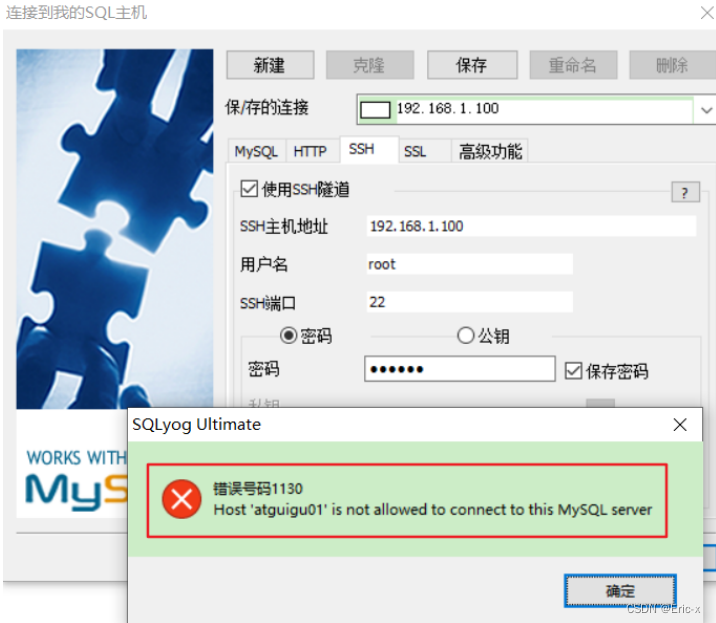
2、确认网络
在window上使用ping ip地址 保证网络畅通
例如:ping 192.168.1.150
开启window中的Telnet客户端
打开控制面板,选择小图标展示,点击程序和功能,再点击启用或关闭window功能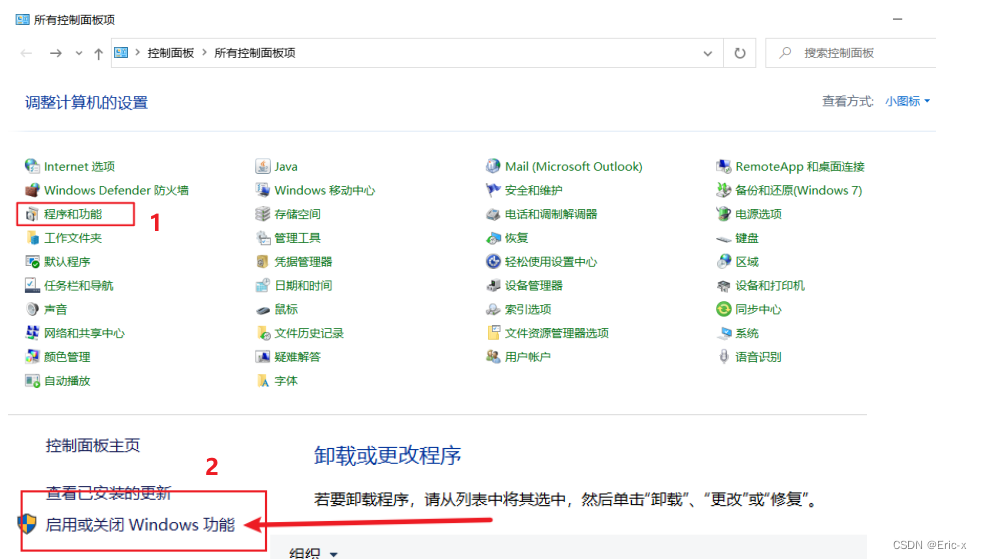
将Telnet客户端勾选上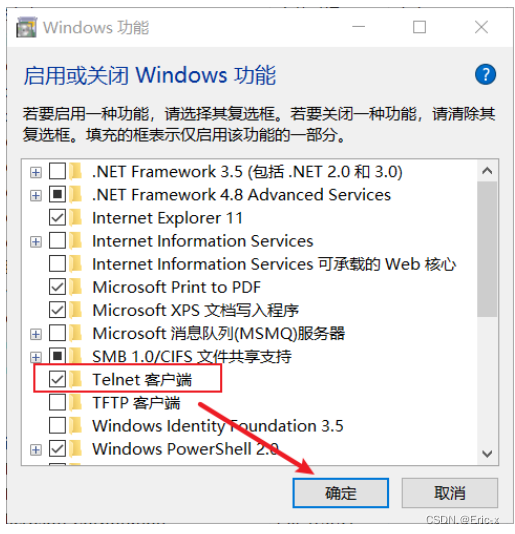
3、关闭防火墙或者开放端口
想要连接Linux下的MySQL,需要关闭防火墙或者开放端口,选择其中一种方式即可
方式1:关闭防火墙
CentOS6指令:service iptables stop
CentOS7指定:systemctl stop firewalld.service
设置开机禁用防火墙:systemctl disable firewalld.service
方式2:开放端口
//查看开放的端口号
firewall-cmd --list-all

//设置开放的端口号
firewall-cmd --add-service=http --permanent
firewall-cmd --add-port=3306/tcp --permanent

//重启防火墙
firewall-cmd --reload
4、修改Linux下的配置
1、打开虚拟机,连接Linux下的MySQL,使用如下sql
use mysql;

select Host,User from user;
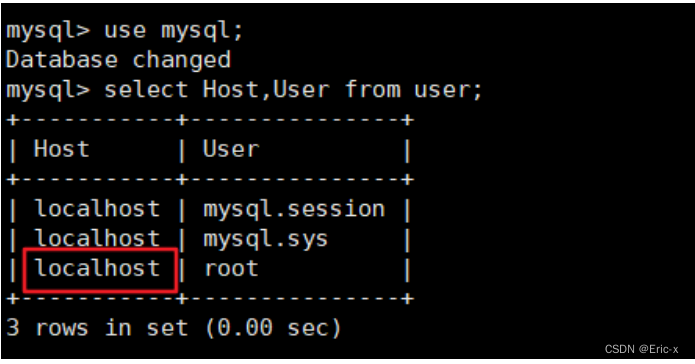 可以看到root用户的当前主机配置信息为localhost。就代表着使用root用户那么只能本地连接数据库
修改Host为通配符%
Host列指定了允许用户登录所使用的IP,比如user=root Host=192.168.1.1。这里的意思就是说root用户只能通过192.168.1.1的客户端去访问。 user=root Host=localhost,表示只能通过本机客户端去访问。而 %是个 通配符 ,如果Host=192.168.1.%,那么就表示只要是IP地址前缀为“192.168.1.”的客户端都可以连接。如果 Host=% ,表示所有IP都有连接权限。
注意:在生产环境下不能为了省事将host设置为%,这样做会存在安全问题,具体的设置可以根据生产环境的IP进行设置
update user set host = '%' where user ='root';
Host设置了“%”后便可以允许远程访问。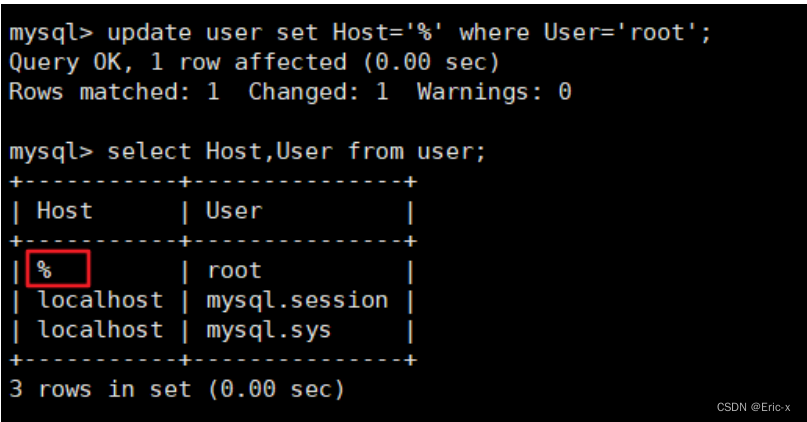
Host修改完成后记得执行flush privileges使配置立即生效:
flush privileges;
5、测试
- 如果是 MySQL5.7 版本,接下来就可以使用SQLyog或者Navicat成功连接至MySQL了。
- 如果是 MySQL8 版本,连接时还会出现如下问题:
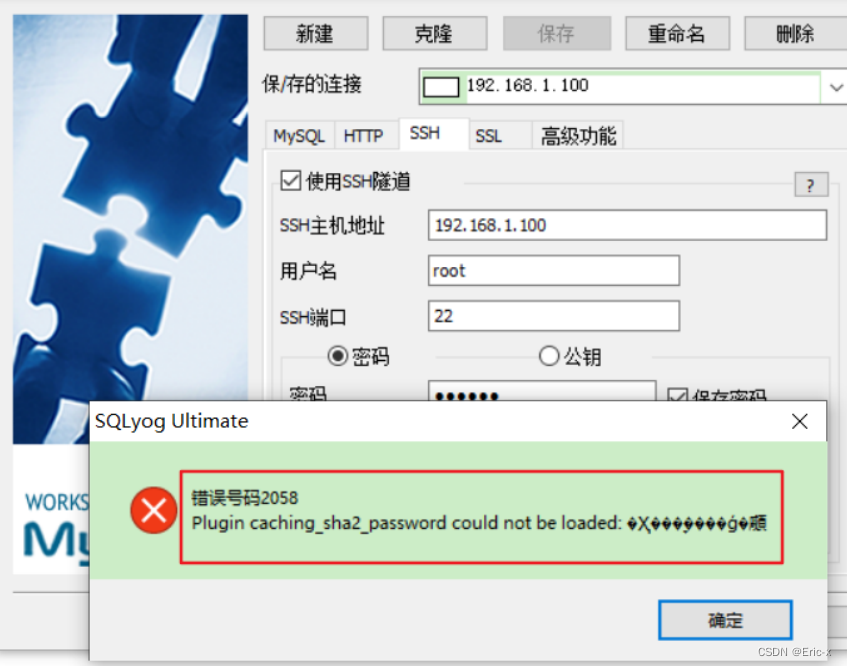
配置新连接报错:错误号码 2058,分析是 mysql 密码加密方法变了
解决方法:Linux下 mysql -u root -p 登录你的 mysql 数据库,然后 执行这条SQL:
ALTER USER 'root'@'%' IDENTIFIED WITH mysql_native_password BY 'abc123';
然后在重新配置SQLyog的连接,则可连接成功了,搞定收工。
总结
其实过程还是很简单的:
- 首先检查本机是否能ping通虚拟机IP地址
- 开启window中的Telnet客户端服务
- 关闭Linux的防火墙(或者开放3306端口)
- 修改Linux下MySQL的远程连接配置(记得立即刷新一下)
- 最后如果是MySQL8.0再使用如上SQL设置MySQL即可成功~
边栏推荐
- Automation sequences of canoe simulation functions
- 宝塔的安装和flask项目部署
- Cmooc Internet + education
- Counter attack of noodles: redis asked 52 questions in a series, with detailed pictures and pictures. Now the interview is stable
- 16 医疗挂号系统_【预约下单】
- [NLP] bert4vec: a sentence vector generation tool based on pre training
- Defensive C language programming in embedded development
- Carolyn Rosé博士的社交互通演讲记录
- MySQL实战优化高手12 Buffer Pool这个内存数据结构到底长个什么样子?
- Hugo blog graphical writing tool -- QT practice
猜你喜欢
C杂讲 动态链表操作 再讲
The replay block of canoe still needs to be combined with CAPL script to make it clear

Single chip microcomputer realizes modular programming: Thinking + example + system tutorial (the degree of practicality is appalling)
颜值爆表,推荐两款JSON可视化工具,配合Swagger使用真香
If a university wants to choose to study automation, what books can it read in advance?
Installation of pagoda and deployment of flask project
Cmooc Internet + education
The appearance is popular. Two JSON visualization tools are recommended for use with swagger. It's really fragrant

Southwest University: Hu hang - Analysis on learning behavior and learning effect

33岁可以学PLC吗
随机推荐
If a university wants to choose to study automation, what books can it read in advance?
嵌入式開發中的防禦性C語言編程
vscode 常用的指令
Listen to my advice and learn according to this embedded curriculum content and curriculum system
MySQL實戰優化高手08 生產經驗:在數據庫的壓測過程中,如何360度無死角觀察機器性能?
Why can't TN-C use 2p circuit breaker?
Routes and resources of AI
oracle sys_ Context() function
Release of the sample chapter of "uncover the secrets of asp.net core 6 framework" [200 pages /5 chapters]
cmooc互联网+教育
在CANoe中通过Panel面板控制Test Module 运行(高级)
The appearance is popular. Two JSON visualization tools are recommended for use with swagger. It's really fragrant
Canoe CAPL file operation directory collection
AI的路线和资源
寶塔的安裝和flask項目部署
MySQL实战优化高手03 用一次数据更新流程,初步了解InnoDB存储引擎的架构设计
Contest3145 - the 37th game of 2021 freshman individual training match_ B: Password
单片机实现模块化编程:思维+实例+系统教程(实用程度令人发指)
Contest3145 - the 37th game of 2021 freshman individual training match_ C: Tour guide
Counter attack of noodles: redis asked 52 questions in a series, with detailed pictures and pictures. Now the interview is stable