当前位置:网站首页>Example analysis of QT learning 18 login dialog box
Example analysis of QT learning 18 login dialog box
2022-07-03 13:58:00 【A little black sauce】
Qt Study 18 Login dialog case analysis
Login dialog It's... In the application Common parts
reflection : How to develop a login dialog that can be reused between different projects ?
Login dialog box needs analysis
- Reusable Software components
- obtain user name and password
Additional requirements
- Random verification code
Design and architecture of login dialog
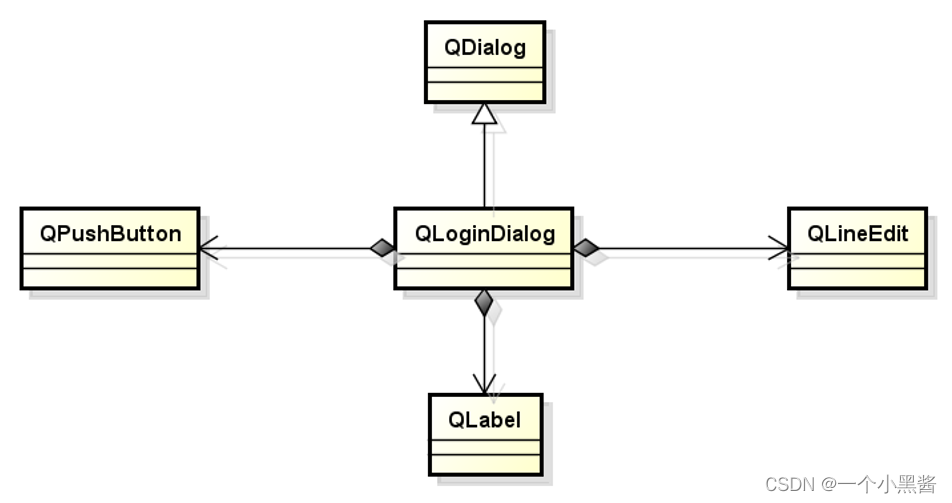
problem
- How to get user input user name and password ?
- How to transfer data in two different dialog boxes ?

Through additional Member variables and Member functions , Complete different dialog boxes, see Data transfer
Code display
#ifndef QLOGINDIALOG_H
#define QLOGINDIALOG_H

#include <QDialog>
#include <QLabel>
#include <QLineEdit>
#include <QPushButton>

class QLoginDialog : public QDialog
{

    Q_OBJECT
private:
    QLabel UserLabel;
    QLabel PwdLabel;
    QLineEdit UserEdit;
    QLineEdit PwdEdit;
    QPushButton LoginBtn;
    QPushButton CancelBtn;
    QString m_User;
    QString m_Pwd;
private slots:
    void LoginBtn_Clicked();
    void CancelBtn_Clicked();

public:
    QLoginDialog(QWidget *parent = 0);
    ~QLoginDialog();
    QString getUser();
    QString getPwd();
};

#endif // QLOGINDIALOG_H
#include "QLoginDialog.h"
#include <QDebug>

QLoginDialog::QLoginDialog(QWidget *parent) : QDialog(parent, Qt::WindowCloseButtonHint),
    UserLabel(this), PwdLabel(this), UserEdit(this), PwdEdit(this), LoginBtn(this), CancelBtn(this)
{

    UserLabel.setText("User ID:");
    UserLabel.move(20, 30);
    UserLabel.resize(60, 25);

    UserEdit.move(85, 30);
    UserEdit.resize(180, 25);

    PwdLabel.setText("Password:");
    PwdLabel.move(20, 65);
    PwdLabel.resize(60, 25);

    PwdEdit.move(85, 65);
    PwdEdit.resize(180, 25);
    PwdEdit.setEchoMode(QLineEdit::Password);

    CancelBtn.setText("Cancel");
    CancelBtn.move(85, 110);
    CancelBtn.resize(85, 30);

    LoginBtn.setText("Login");
    LoginBtn.move(180, 110);
    LoginBtn.resize(85, 30);

    setWindowTitle("Login");
    setFixedSize(285, 170);

    connect(&LoginBtn, SIGNAL(clicked()), this, SLOT(LoginBtn_Clicked()));
    connect(&CancelBtn, SIGNAL(clicked()), this, SLOT(CancelBtn_Clicked()));
}

QLoginDialog::~QLoginDialog()
{


}

QString QLoginDialog::getUser()
{

    return m_User;
}

QString QLoginDialog::getPwd()
{

    return m_Pwd;
}

void QLoginDialog::LoginBtn_Clicked()
{

    qDebug() << "LoginBtn_Clicked() begin";
    m_User = UserEdit.text().trimmed();
    m_Pwd = PwdEdit.text();
    done(Accepted);
    qDebug() << "LoginBtn_Clicked() end";
}

void QLoginDialog::CancelBtn_Clicked()
{

    qDebug() << "CancelBtn_Clicked() begin";
    done(Rejected);
    qDebug() << "CancelBtn_Clicked() end";
}
#ifndef WIDGET_H
#define WIDGET_H

#include <QWidget>
#include <QPushButton>

class Widget : public QWidget
{

    Q_OBJECT
private:
    QPushButton TestBtn;
private slots:
    void TestBtn_Clicked();

public:
    explicit Widget(QWidget *parent = 0);
    ~Widget();

};

#endif // WIDGET_H
#include "Widget.h"
#include "QLoginDialog.h"
#include <QDebug>

Widget::Widget(QWidget *parent) :
    QWidget(parent), TestBtn(this)
{

    TestBtn.setText("Test Login Dialog");
    setFixedSize(200, 50);
    connect(&TestBtn, SIGNAL(clicked()), this, SLOT(TestBtn_Clicked()));
}

Widget::~Widget()
{


}

void Widget::TestBtn_Clicked()
{

    QLoginDialog dlg;

    if (dlg.exec() == QDialog::Accepted) {

        qDebug() << "Accepted";
        qDebug() << "username:" << dlg.getUser();
        qDebug() << "password:" << dlg.getPwd();
    }
}
#include <QApplication>
#include "Widget.h"

int main(int argc, char *argv[])
{

    QApplication a(argc, argv);
    Widget w;
    w.show();

    return a.exec();
}
Further development
- Check user name and password Is it empty
- When user name or password An error is prompted when it is empty
- Random verification code
- When the verification code is input incorrectly, you will be prompted
- The verification code is refreshed randomly
Summary
- Login dialog as Reusable software components Development
- Between dialog boxes Member variables and Member functions To transfer data
- Save user data in private member variables
- Data transfer through public functions
边栏推荐
- Static linked list (subscript of array instead of pointer)
- [combinatorics] permutation and combination (two counting principles, examples of set permutation | examples of set permutation and circle permutation)
- Qt学习25 布局管理器(四)
- 核酸修饰的金属有机框架药物载体|PCN-223金属有机骨架包载Ad金刚烷|ZIF-8包裹阿霉素(DOX)
- Unity render streaming communicates with unity through JS
- Installation impression notes
- [how to earn a million passive income]
- Qt学习17 对话框及其类型
- Shell timing script, starting from 0, CSV format data is regularly imported into PostgreSQL database shell script example
- 怎样删除对象的某个属性或⽅法
猜你喜欢

GoLand 2021.2 configure go (go1.17.6)

Ocean CMS vulnerability - search php

Qt学习25 布局管理器(四)

Complete DNN deep neural network CNN training with tensorflow to complete image recognition cases
 [email "/>
Doxorubicin loaded on metal organic framework MIL-88 DOX | folic acid modified uio-66-nh2 doxorubicin loaded [email
RichView TRVStyle ListStyle 列表样式(项目符号编号)
![[développement technologique - 24]: caractéristiques des technologies de communication Internet des objets existantes](/img/f3/a219fe8e7438b8974d2226b4c3d4a4.png)
[développement technologique - 24]: caractéristiques des technologies de communication Internet des objets existantes
Qt学习21 Qt 中的标准对话框(下)

Solve MySQL 1045 access denied for user 'root' @ 'localhost' (using password: yes)
![Mysql:insert date:sql error [1292] [22001]: data truncation: incorrect date value:](/img/2f/33504391a661ecb63d42d75acf3a37.png)
Mysql:insert date:sql error [1292] [22001]: data truncation: incorrect date value:
随机推荐
掌握Cypress命令行选项,是真正掌握Cypress的基础
[556. Next larger element III]
Analysis of the characteristics of page owner
JS continues to explore...
Windos creates Cordova prompt because running scripts is prohibited on this system
Qt学习23 布局管理器(二)
NFT新的契机,多媒体NFT聚合平台OKALEIDO即将上线
可编程逻辑器件软件测试
【BW16 应用篇】安信可BW16模组与开发板更新固件烧录说明
Screenshot of the operation steps of upload labs level 4-level 9
MySQL 数据处理值增删改
如何使用lxml判断网站公告是否更新
Unity EmbeddedBrowser浏览器插件事件通讯
解决MySql 1045 Access denied for user ‘root‘@‘localhost‘ (using password: YES)
Go: send the get request and parse the return JSON (go1.16.4)
Qt学习22 布局管理器(一)
JVM系列——概述,程序计数器day1-1
Multi person collaborative data annotation based on Baidu brain easydata from scratch
Selenium browser (1)
Go 1.16.4: manage third-party libraries with Mod