当前位置:网站首页>2021-07-05c /cad secondary development create arc (4)
2021-07-05c /cad secondary development create arc (4)
2022-07-02 06:59:00 【Xu Jirong】
The code is as follows :
ArcExam.cs
using System;
using System.Collections.Generic;
using System.Text;
using Autodesk.AutoCAD.Runtime;
using Autodesk.AutoCAD.DatabaseServices;
using Autodesk.AutoCAD.Geometry;

namespace _2 Graphic Creation
{

    public class ArcExam
    {

        [CommandMethod("ArcDemo")]
        public void ArcDemo()
        {

            Arc arc1 = new Arc();
            arc1.Center = new Point3d(0, 0, 0);
            arc1.StartAngle = 0;
            arc1.EndAngle = Math.PI;
            arc1.Radius = 100;
            double startDegree = 45;
            Arc arc2 = new Arc(new Point3d(500, 500, 0), 20,BaseTool.DegreeToAngle(startDegree), Math.PI);
            Arc arc3 = new Arc(new Point3d(100, 100, 0), new Vector3d(0, 0, 1), 20, Math.PI / 4, Math.PI / 2);

            Database db = HostApplicationServices.WorkingDatabase;
            AddEnityTool.AddEnityToModelSpace(db, arc1,arc2,arc3);
        }
    }
}
Code parsing :
The above code is basically for introduction CAD The usage of the inner arc method
Arc arc1 = new Arc();
arc1.Center = new Point3d(0, 0, 0);
arc1.StartAngle = 0;
arc1.EndAngle = Math.PI;
arc1.Radius = 100;
Center The coordinates of the center of the circle ;StartAngle Start the arc ;EndAngle End arc ;Radius radius ;
Note that the attribute here is radian
double startDegree = 45;
Arc arc2 = new Arc(new Point3d(500, 500, 0), 20,BaseTool.DegreeToAngle(startDegree), Math.PI);
Here is also the radian value , We use the angle to radian method created previously to 45 Degrees to radians
From left to right , Followed by the center of the circle 、 radius 、 Start the arc 、 End arc .
arc3 involve Vector3d, I draw a two-dimensional picture , In less than , It refers to Cartesian coordinates .
Draw an arc at three points
The code is as follows :
using System;
using System.Collections.Generic;
using System.Text;
using Autodesk.AutoCAD.Runtime;
using Autodesk.AutoCAD.DatabaseServices;
using Autodesk.AutoCAD.Geometry;

namespace _2 Graphic Creation
{

    public class ArcExam
    {

        [CommandMethod("ArcDemo")]
        public void ArcDemo()
        {

            Database db = HostApplicationServices.WorkingDatabase;
            Point3d startPoint = new Point3d(100, 100, 0);
            Point3d endPoint = new Point3d(200, 200, 0);
            Point3d pointOnArc = new Point3d(150, 100, 0);
            CircularArc3d cArc = new CircularArc3d(startPoint,pointOnArc,endPoint);

            double radius = cArc.Radius;
            Point3d center = cArc.Center;
            Vector3d cs = center.GetVectorTo(startPoint);
            Vector3d ce = center.GetVectorTo(endPoint);
            Vector3d xvector = new Vector3d(1, 0, 0);
            double startAngle = cs.Y > 0 ? xvector.GetAngleTo(cs) : -xvector.GetAngleTo(cs);
            double endAngle = ce.Y > 0 ? xvector.GetAngleTo(ce) : -xvector.GetAngleTo(ce);
            Arc arc = new Arc(center,radius,startAngle,endAngle);
            AddEnityTool.AddEnityToModelSpace(db, arc);
        }
    }
}
Code interpretation :
Database db = HostApplicationServices.WorkingDatabase;
Point3d startPoint = new Point3d(100, 100, 0);
Point3d endPoint = new Point3d(200, 200, 0);
Point3d pointOnArc = new Point3d(150, 100, 0);
CircularArc3d cArc = new CircularArc3d(startPoint,pointOnArc,endPoint);
Three points are created , And then through CircularArc3d Method creates an arc object
Try to use ARC Method to realize three-point circle
double radius = cArc.Radius;
Point3d center = cArc.Center;
First, obtain the radius and center point of the upper arc .
Vector3d cs = center.GetVectorTo(startPoint);
Vector3d ce = center.GetVectorTo(endPoint);
The code here can be passed GetVectorTo Methods the vectors from the center of the circle to two points are obtained respectively .
Vector3d xvector = new Vector3d(1, 0, 0);
Create a X The unit vector of the direction
double startAngle = cs.Y > 0 ? xvector.GetAngleTo(cs) : -xvector.GetAngleTo(cs);
double endAngle = ce.Y > 0 ? xvector.GetAngleTo(ce) : -xvector.GetAngleTo(ce);
adopt GetAngleTo Get the angle between two vectors ( Radian value ), because GetAngleTo The included angle obtained ( This is the radian system ) Are positive , Take its negative value through judgment , You can draw this arc 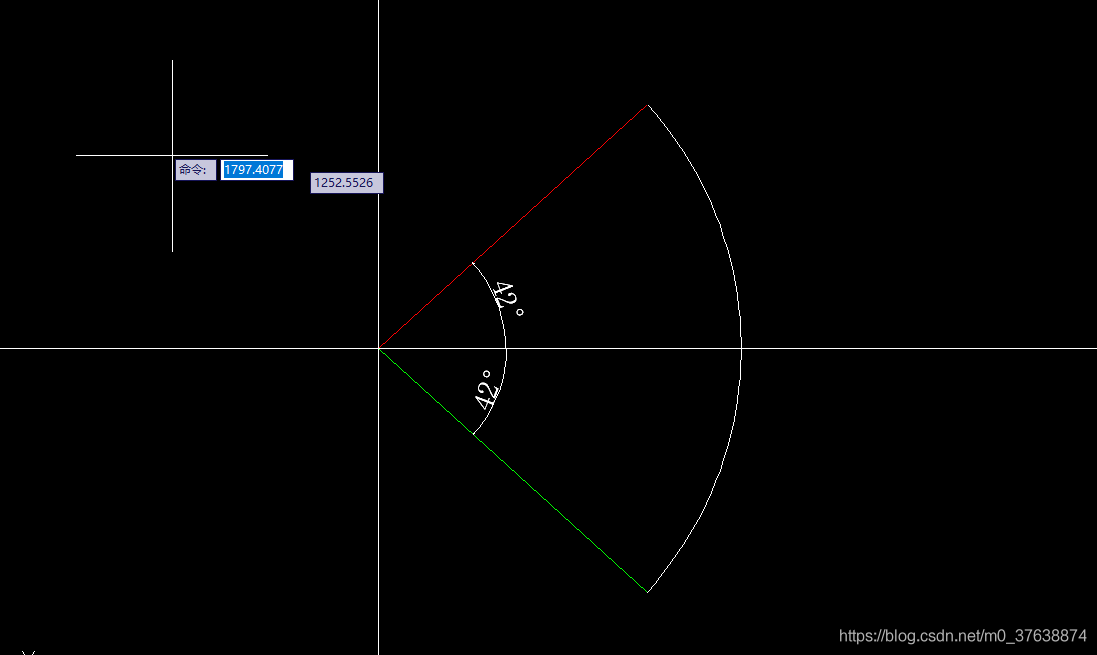
Pictured above , Red thread 、 Green line and X The included angles of the shafts are 42°,GetAngleTo The values obtained are 42° The radian value of ( Comes at a time ), So in order to distinguish , Make a judgment ,startPoint or endPoint Of Y When the coordinate is negative, a negative radian value is returned .
Encapsulate the code page that created the arc above into AddEnityTool.cs in
First, judge X The included angle of the shaft is X The code above or below the axis is encapsulated in BaseTool.cs in
        /// <summary>
        ///  Get two points in a straight line to X The Angle between the axes ( There are positive and negative )
        /// </summary>
        /// <param name="startPoint"> The starting point </param>
        /// <param name="endPoint"> End </param>
        /// <returns></returns>
        public static double GetAngleToXaxis(Point3d startPoint, Point3d endPoint)
        {

            // Declare a relationship with X A vector with parallel axes
            Vector3d temp = new Vector3d(1, 0, 0);
            // Get the vector from start to end
            Vector3d VsToe = startPoint.GetVectorTo(endPoint);
            return VsToe.Y > 0 ? temp.GetAngleTo(VsToe) : -temp.GetAngleTo(VsToe);
        }
Encapsulated in the GetAngleToXaxis Method
The three points given are not prevented from being on the same straight line , A judgment condition is also added to BaseTool.cs in
        /// <summary>
        ///  Judge whether the three points are on the same straight line
        /// </summary>
        /// <param name="firstPoint"> The first point </param>
        /// <param name="secondPoint"> Second points </param>
        /// <param name="thirdPoint"> The third point </param>
        /// <returns></returns>
        public static bool IsOnOneLine(Point3d firstPoint, Point3d secondPoint, Point3d thirdPoint)
        {

            Vector3d v21 = secondPoint.GetVectorTo(firstPoint);
            Vector3d v23 = secondPoint.GetVectorTo(thirdPoint);
            if (v21.GetAngleTo(v23) == 0 || v21.GetAngleTo(v23) == Math.PI)
            {

                return true;
            }
            else
            {

                return false;
            }
        }
Encapsulated in the IsOnOneLine Method
AddEnityTool.cs In the code
        /// <summary>
        ///  Create an arc through three points
        /// </summary>
        /// <param name="db"> Graphic database </param>
        /// <param name="startPoint"> The starting point </param>
        /// <param name="pointOnArc"> Point on arc </param>
        /// <param name="endPoint"> End </param>
        /// <returns></returns>
		public static object AddArcToModelSpace(Database db, Point3d startPoint, Point3d pointOnArc, Point3d endPoint)
        {

            // First judge whether the three points are on the same straight line
            if (BaseTool.IsOnOneLine(startPoint, pointOnArc, endPoint))
            {

                return ObjectId.Null;
            }
            CircularArc3d cArc = new CircularArc3d(startPoint, pointOnArc, endPoint);
            Arc arc = new Arc(cArc.Center, cArc.Radius, BaseTool.GetAngleToXaxis(cArc.Center,startPoint), BaseTool.GetAngleToXaxis(cArc.Center,endPoint));
            // Add graphics database
            return AddEnityTool.AddEnityToModelSpace(db,arc);
        }
Through the center of the circle 、 The starting point 、 Draw a circle with included angles (AddEnityTool.cs)
        /// <summary>
        ///  Through the center 、 The starting point 、 Draw a circle with included angles
        /// </summary>
        /// <param name="db"> Graphic database </param>
        /// <param name="center"> center of a circle </param>
        /// <param name="startPoint"> The starting point </param>
        /// <param name="degree"> Angle </param>
        /// <returns>ObjectId</returns>
        public static ObjectId AddArcToModelSpace(Database db, Point3d center, Point3d startPoint, double degree)
        {

            // Get the radius
            double radius = BaseTool.GetDistanceBetweenTwoPoint(center, startPoint);
            // Get the starting angle
            double startAngle = BaseTool.GetAngleToXaxis(center, startPoint);
            // Declare an arc object
            Arc arc = new Arc(center, radius, startAngle, startAngle + BaseTool.DegreeToAngle(degree));
            return AddEnityTool.AddEnityToModelSpace(db, arc);
        }
The code to obtain the radius is as follows (BaseTool.cs)
        /// <summary>
        ///  Get the distance between two points
        /// </summary>
        /// <param name="point1"></param>
        /// <param name="point2"></param>
        /// <returns></returns>
        public static double GetDistanceBetweenTwoPoint(Point3d point1, Point3d point2)
        {

            return Math.Sqrt((point1.X - point2.X) * (point1.X - point2.X) + (point1.Y - point2.Y) * (point1.Y - point2.Y) + (point1.Z - point2.Z) * (point1.Z - point2.Z));
        }
边栏推荐
- In depth study of JVM bottom layer (II): hotspot virtual machine object
- php中删除指定文件夹下的内容
- 2021-07-19C#CAD二次开发创建多线段
- SQLI-LABS通关(less1)
- Vscode installation, latex environment, parameter configuration, common problem solving
- js判断对象是否为空
- Deployment API_ automation_ Problems encountered during test
- Solution to the black screen of win computer screenshot
- Unexpected inconsistency caused by abnormal power failure; Run fsck manually problem resolved
- 2021-07-17C#/CAD二次开发创建圆(5)
猜你喜欢

Sqli labs customs clearance summary-page4
js中对于返回Promise对象的语句如何try catch
Redis -- cache breakdown, penetration, avalanche

Blog directory of zzq -- updated on 20210601
Sqli-labs customs clearance (less18-less20)
CAD二次开发 对象

Sqli-labs customs clearance (less6-less14)

A preliminary study on ant group G6
Implement strstr() II
CVE-2015-1635(MS15-034 )远程代码执行漏洞复现
随机推荐
How to debug wechat built-in browser applications (enterprise number, official account, subscription number)
Flex Jiugongge layout
2021-07-17C#/CAD二次开发创建圆(5)
There are multiple good constructors and room will problem
js删除字符串的最后一个字符
Recursion (maze problem, Queen 8 problem)
JS delete the last character of the string
2021-07-05C#/CAD二次开发创建圆弧(4)
In depth study of JVM bottom layer (IV): class file structure
VSCODE 安装LATEX环境,参数配置,常见问题解决
uniapp引入本地字体
Win10网络图标消失,网络图标变成灰色,打开网络设置闪退等问题解决
SQLI-LABS通关(less2-less5)
How to try catch statements that return promise objects in JS
Stack (linear structure)
Basic knowledge of software testing
Anti shake and throttling of JS
Win10:添加或者删除开机启动项,在开机启动项中添加在用户自定义的启动文件
(the 100th blog) written at the end of the second year of doctor's degree -20200818
The use of regular expressions in JS