当前位置:网站首页>bytebuffer use demo
bytebuffer use demo
2022-08-05 03:59:00 【java continuous practice】
pom文件
    <dependencies>
        <dependency>
            <groupId>org.projectlombok</groupId>
            <artifactId>lombok</artifactId>
            <version>1.16.18</version>
        </dependency>
    </dependencies>
package cn.itcast.netty.c1;

import lombok.extern.slf4j.Slf4j;

import java.io.FileInputStream;
import java.io.IOException;
import java.nio.ByteBuffer;
import java.nio.channels.FileChannel;

/** * 类名称:TestByteBuffer * @author: https://javaweixin6.blog.csdn.net/ * 创建时间:2022-07-31 13:42 */
@Slf4j
public class TestByteBuffer {


    public static void main(String[] args) {

        try (FileChannel channel = new FileInputStream("data.txt").getChannel()){

                // 准备缓冲区 缓冲10个字节
            ByteBuffer buffer = ByteBuffer.allocate(10);

            while (true) {

                // 从channel 读取数据, 向buffer写入
                int len = channel.read(buffer);
                log.debug("读取到的字节数{}", len);
                if (len == -1) {

                    break;
                }
                // 切换到buffer的读模式 .
                buffer.flip();
                // It is judged whether there is any remaining unread data
                while (buffer.hasRemaining()) {

                    // 一次读一个字节.
                    byte b = buffer.get();
                    // 打印buffer的内容
                 // System.out.println((char)b);
                    log.debug("实际字节{}", (char)b);
                }
                // 切换为写模式
                buffer.clear();
            }
        } catch (IOException e) {

        }
    }
}
创建一个txt文件, 放在项目最外层, 内容如下, 有13个字节.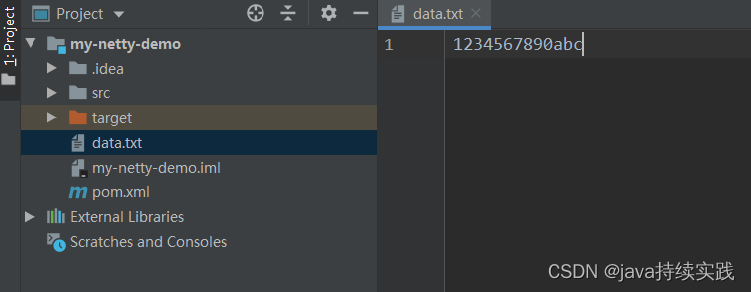
控制台打印如下:
14:30:30 [DEBUG] [main] c.i.n.c.TestByteBuffer - 读取到的字节数10
14:30:30 [DEBUG] [main] c.i.n.c.TestByteBuffer - 实际字节1
14:30:30 [DEBUG] [main] c.i.n.c.TestByteBuffer - 实际字节2
14:30:30 [DEBUG] [main] c.i.n.c.TestByteBuffer - 实际字节3
14:30:30 [DEBUG] [main] c.i.n.c.TestByteBuffer - 实际字节4
14:30:30 [DEBUG] [main] c.i.n.c.TestByteBuffer - 实际字节5
14:30:30 [DEBUG] [main] c.i.n.c.TestByteBuffer - 实际字节6
14:30:30 [DEBUG] [main] c.i.n.c.TestByteBuffer - 实际字节7
14:30:30 [DEBUG] [main] c.i.n.c.TestByteBuffer - 实际字节8
14:30:30 [DEBUG] [main] c.i.n.c.TestByteBuffer - 实际字节9
14:30:30 [DEBUG] [main] c.i.n.c.TestByteBuffer - 实际字节0
14:30:30 [DEBUG] [main] c.i.n.c.TestByteBuffer - 读取到的字节数3
14:30:30 [DEBUG] [main] c.i.n.c.TestByteBuffer - 实际字节a
14:30:30 [DEBUG] [main] c.i.n.c.TestByteBuffer - 实际字节b
14:30:30 [DEBUG] [main] c.i.n.c.TestByteBuffer - 实际字节c
14:30:30 [DEBUG] [main] c.i.n.c.TestByteBuffer - 读取到的字节数-1
see through the console, The cache is read for the first time10个字节, 1到0. 挨个把1到0打印了出来.
第二次读取了3个字节, a到c, printed out one by one.
总结步骤:
- 向buffer 写入数据: channel.read(buffer)
- 调用flip() 切换到读模式
- 从buffer 读取数据, 调用buffer.get()
- 调用clear获取compact() 切换到写模式
- 重复 1-4步骤
边栏推荐
- [SWPU2019]Web1
- 905. Interval selection
- Leading the highland of digital medicine, Zhongshan Hospital explores to create a "new paradigm" for future hospitals
- 2022-08-04T17:50:58.296+0800 ERROR Announcer-3 io.airlift.discovery.client.Announcer appears after successful startup of presto
- UE4 opens door via interaction (keyboard key)
- 数据库设计的酸(ACID)碱(BASE)原则
- 将故事写成我们
- Redis1:Redis介绍、Redis基本特性、关系型数据库、非关系型数据库、数据库发展阶段
- Android 面试题——如何徒手写一个非阻塞线程安全队列 ConcurrentLinkedQueue?
- Fifteen. Actual combat - MySQL database building table character set and collation
猜你喜欢
How to wrap markdown - md file
Web3.0 Dapps - the road to the future financial world

How to discover a valuable GameFi?
YYGH-13-Customer Service Center

Qixi Festival code confession

阿里本地生活单季营收106亿,大文娱营收72亿,菜鸟营收121亿

Index Mysql in order to optimize paper 02 】 【 10 kinds of circumstances and the principle of failure
Web3.0 Dapps——通往未来金融世界的道路
token, jwt, oauth2, session parsing

mutillidae下载及安装
随机推荐
10 years of testing experience, worthless in the face of the biological age of 35
token、jwt、oauth2、session解析
【测量学】速成汇总——摘录高数帮
SkiaSharp 之 WPF 自绘 粒子花园(案例版)
Shell script: for loop and the while loop
cross domain solution
The most comprehensive exam questions for software testing engineers in 2022
事件解析树Drain3使用方法和解释
Paparazzi: Surface Editing by way of Multi-View Image Processing
C+ +核心编程
This year's Qixi Festival, "love vegetables" are more loving than gifts
Swing有几种常用的事件处理方式?如何监听事件?
flink读取mongodb数据源
public static
List asList(T... a) What is the prototype? 2022软件测试工程师最全面试题
Dive into how it works together by simulating Vite
[GYCTF2020]EasyThinking
[MRCTF2020]Ezpop(详解)
Android 面试题——如何徒手写一个非阻塞线程安全队列 ConcurrentLinkedQueue?
You may use special comments to disable some warnings. 报错解决的三种方式