当前位置:网站首页>Js5day (event monitoring, function assignment to variables, callback function, environment object this, select all, invert selection cases, tab column cases)
Js5day (event monitoring, function assignment to variables, callback function, environment object this, select all, invert selection cases, tab column cases)
2022-07-02 12:45:00 【By the Difeng River】
List of articles
Event monitoring
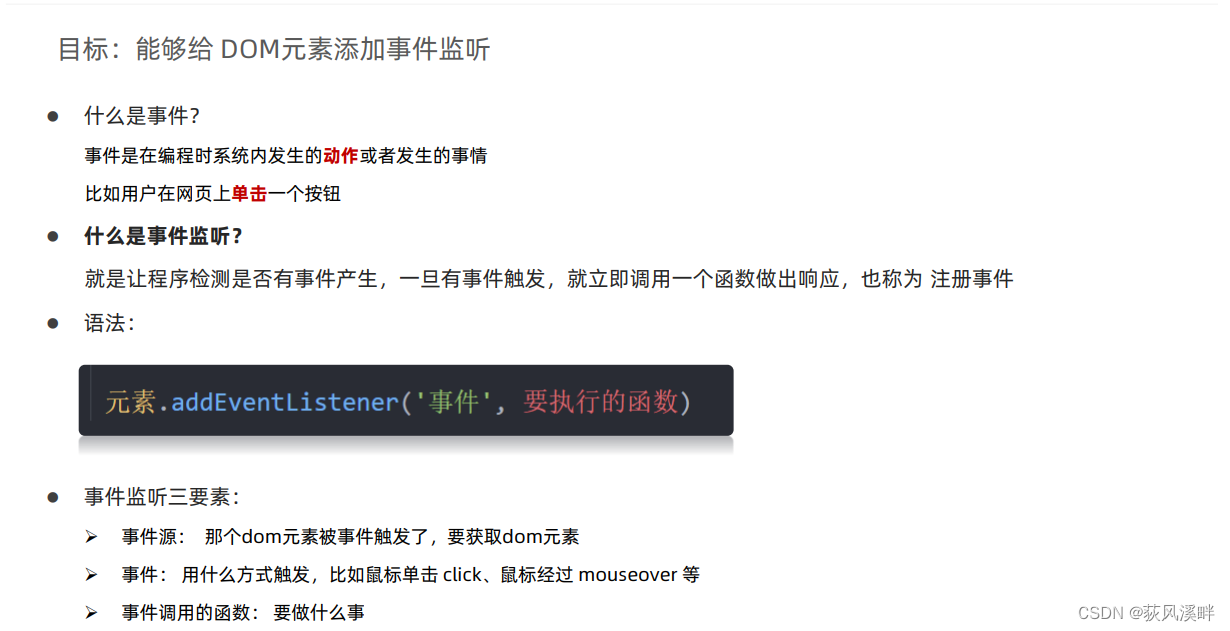
Three elements of event monitoring :
- Event source ( Who was triggered )
- event ( How to trigger , Like a mouse click
click、 Mouse overmouseoveretc. ) - Event handler ( What are you going to do )
    <button> Click on me to pop up good things </button>
    <script>
        let btn = document.querySelector('button')
        btn.addEventListener('click', function () {

            alert(' What do I do ')
        })
    </script>

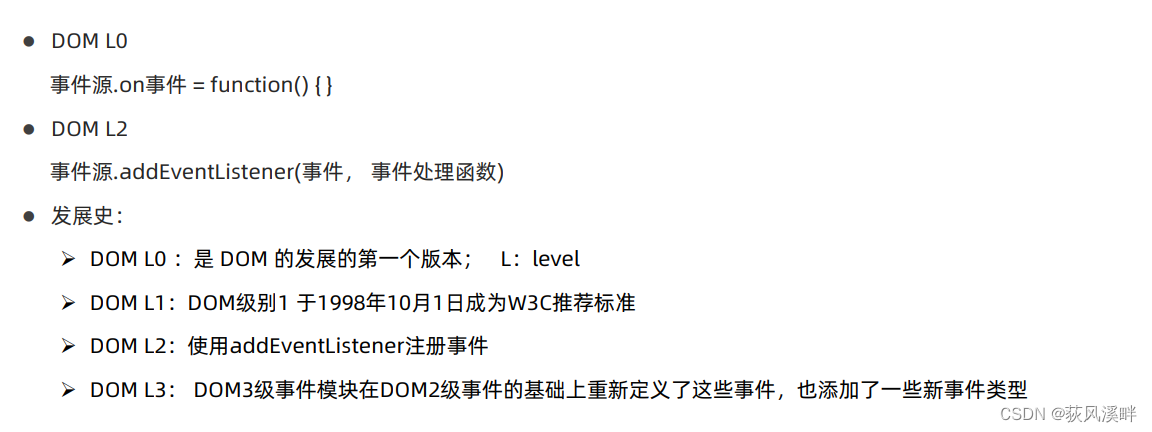
Event listening version :
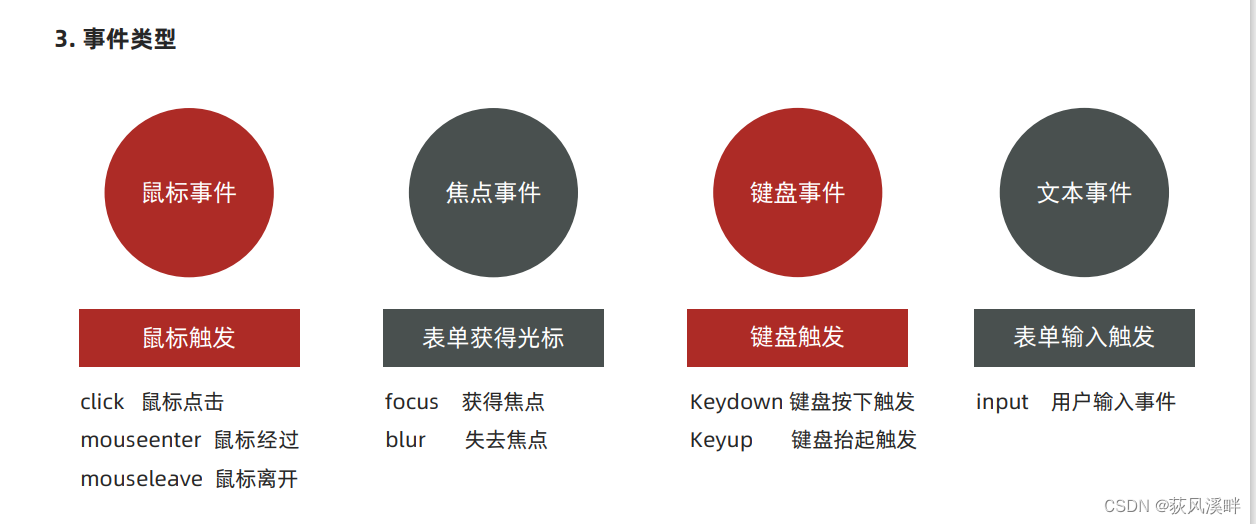
Event type
Higher order function
Higher order functions can be simply understood as advanced applications of functions ,JavaScript The middle function can Be treated as 【 value 】 To treat , Realize the advanced application of function based on this feature .
【 value 】 Namely JavaScript Data in , Such as numerical value 、 character string 、 Boolean 、 Object etc. .
Function expression
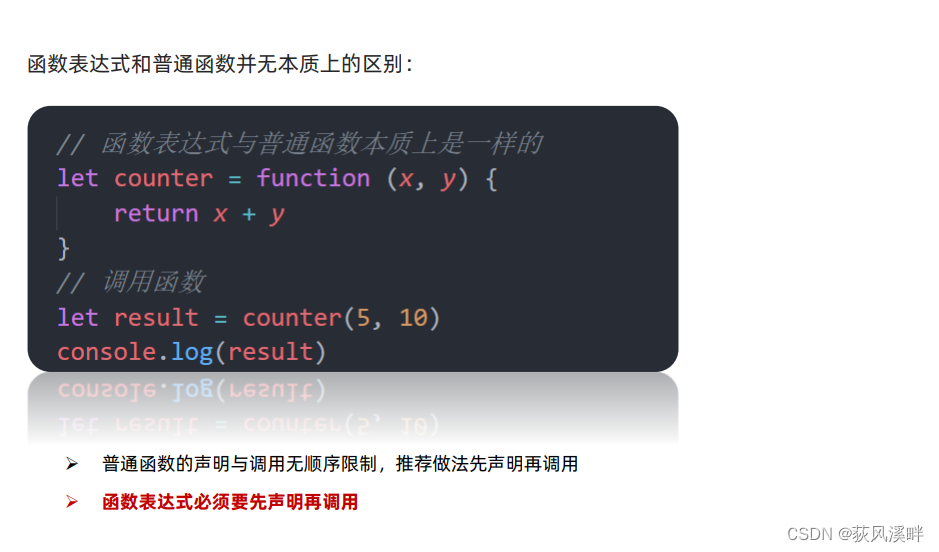
- The function is also 【 data 】
- Assign a function to a variable
Callback function

- Pass a function as an argument to another function , This function is called Callback function
- Callback function is still a function in essence , Just use it as a parameter
- It is common to use anonymous functions as callback functions
Environment object
The goal is : Be able to analyze and judge whether the function runs in different environments this The object of reference
Environment object refers to Special variables inside the function this , It represents the environment in which the current function runs
** effect :** To figure out what this The direction of , Can make our code more concise
- Functions are called in different ways ,this The objects referred to are also different
- 【 Who is calling , this Who is the 】 Is a judgment this Rough rules for pointing to
- Call function directly , In fact, it's equivalent to window. function , therefore this Refer to window
Exclusive thoughts
The current element is A state , The other elements are B state .
Use :
- Get rid of everyone
Use for loop - Resurrect himself
adopt this Or the subscript finds itself or the corresponding element
<!DOCTYPE html>
<html lang="en">

<head>
    <meta charset="UTF-8">
    <meta http-equiv="X-UA-Compatible" content="IE=edge">
    <meta name="viewport" content="width=device-width, initial-scale=1.0">
    <title>Document</title>
    <style>
        .pink {

            background: pink;
        }
    </style>
</head>

<body>
    <button> The first 1 individual </button><button> The first 2 individual </button><button> The first 3 individual </button><button> The first 4 individual </button><button> The first 5 individual </button>
    <script>
        let btns = document.querySelectorAll('button')
        for (let i = 0; i < btns.length; i++) {

            btns[i].addEventListener('click', function () {

                // this.classList.add('pink') //this Points to the current calling function btns[i]
                //  Kill all the buttons
                for (let j = 0; j < btns.length; j++) {

                    btns[j].classList.remove('pink')
                }
                // Resurrect myself
                this.classList.add('pink')
            })
        }
    </script>
</body>

</html>
improvement :( There must be a preset button here pink class , The first method does not need )
<button class="pink"> The first 1 individual </button><button> The first 2 individual </button><button> The first 3 individual </button><button> The first 4 individual </button><button> The first 5 individual </button>
    <script>
        let btns = document.querySelectorAll('button')
        for (let i = 0; i < btns.length; i++) {

            btns[i].addEventListener('click', function () {

                //  I just need to find the one  pink class , Delete
                document.querySelector('.pink').classList.remove('pink')
                //  Change myself
                this.classList.add('pink')
            })
        }
    </script>
tab Column application cases :
<!DOCTYPE html>
<html>

<head lang="en">
  <meta charset="UTF-8" />
  <title></title>
  <style type="text/css">
    * {

      margin: 0;
      padding: 0;
    }

    ul {

      list-style: none;
    }

    .wrapper {

      width: 1000px;
      height: 475px;
      margin: 0 auto;
      margin-top: 100px;
    }

    .tab {

      border: 1px solid #ddd;
      border-bottom: 0;
      height: 36px;
      width: 320px;
    }

    .tab li {

      position: relative;
      float: left;
      width: 80px;
      height: 34px;
      line-height: 34px;
      text-align: center;
      cursor: pointer;
      border-top: 4px solid #fff;
    }

    .tab span {

      position: absolute;
      right: 0;
      top: 10px;
      background: #ddd;
      width: 1px;
      height: 14px;
      overflow: hidden;
    }

    .products {

      width: 1002px;
      border: 1px solid #ddd;
      height: 476px;
    }

    .products .main {

      float: left;
      display: none;
    }

    .products .main.active {

      display: block;
    }

    .tab li.active {

      border-color: red;
      border-bottom: 0;
    }
  </style>
</head>

<body>
  <div class="wrapper">
    <ul class="tab">
      <li class="tab-item active"> Big international card <span>◆</span></li>
      <li class="tab-item"> National makeup brand <span>◆</span></li>
      <li class="tab-item"> Cleaning products <span>◆</span></li>
      <li class="tab-item"> Men's Boutique </li>
    </ul>
    <div class="products">
      <div class="main active">
        <a href="###"><img src="imgs/guojidapai.jpg" alt="" /></a>
      </div>
      <div class="main">
        <a href="###"><img src="imgs/guozhuangmingpin.jpg" alt="" /></a>
      </div>
      <div class="main">
        <a href="###"><img src="imgs/qingjieyongpin.jpg" alt="" /></a>
      </div>
      <div class="main">
        <a href="###"><img src="imgs/nanshijingpin.jpg" alt="" /></a>
      </div>
    </div>
  </div>
  <script>
    // 0.  Get elements
    //  Get all the little li,div
    let lis = document.querySelectorAll('ul.tab .tab-item')
    let divs = document.querySelectorAll('.products .main')
    // 1.  Head tab Column switching module
    // 1.1  First give 4 Small li Add click event
    for (let i = 0; i < lis.length; i++) {

      lis[i].addEventListener('click', function () {

        //tab Column transformation
        li_active = document.querySelector('.tab li.active')
        li_active.classList.remove('active')//  Find the old active  class , Remove
        this.classList.add('active')//  Add the current element
        // 2.  Show hidden modules at the bottom   Be sure to write in the click event
        div_active = document.querySelector('.products div.active')
        div_active.classList.remove('active')
        // div The one corresponding to the serial number plus active
        divs[i].classList.add('active')   // Summary , Although it's all active, But the style is different . It is suggested to change it into two different names
      })
    }
  </script>
</body>

</html>
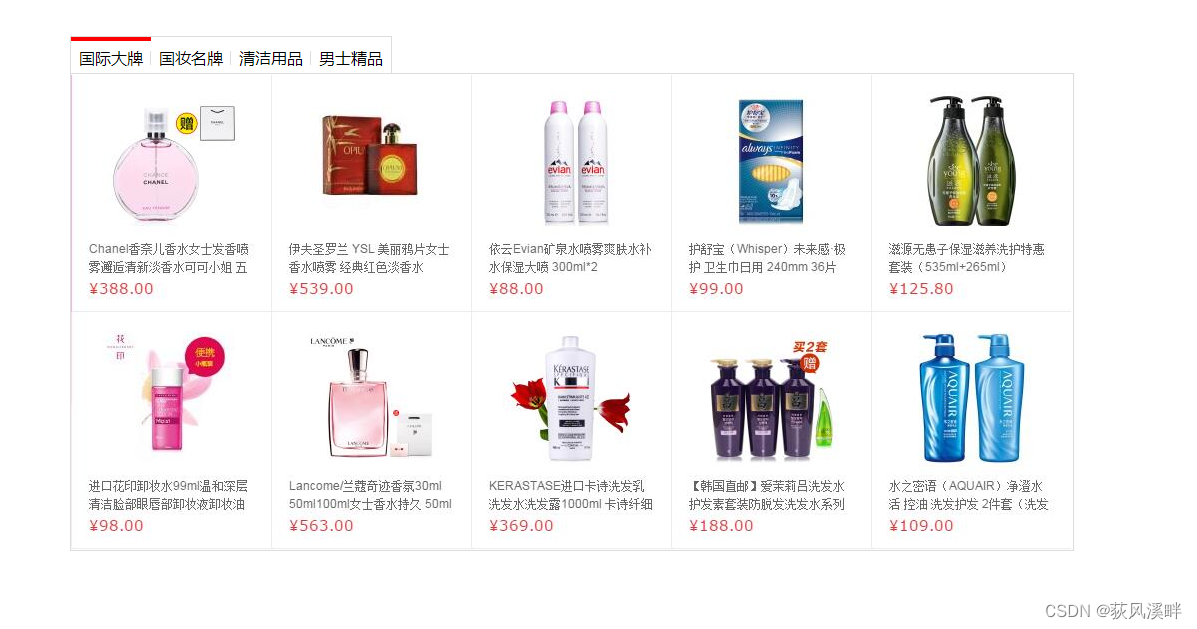
Case study
Xiaomi search box case
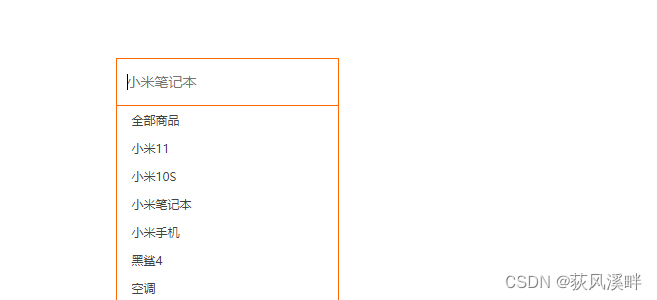
<!DOCTYPE html>
<html lang="en">

<head>
    <meta charset="UTF-8">
    <meta http-equiv="X-UA-Compatible" content="IE=edge">
    <meta name="viewport" content="width=device-width, initial-scale=1.0">
    <title>Document</title>
    <style> * {
       margin: 0; padding: 0; box-sizing: border-box; } ul {
       list-style: none; } .mi {
       position: relative; width: 223px; margin: 100px auto; } .mi input {
       width: 223px; height: 48px; padding: 0 10px; font-size: 14px; line-height: 48px; border: 1px solid #e0e0e0; outline: none; transition: all .3s; } .mi .search {
       border: 1px solid #ff6700; } .result-list {
       display: none; position: absolute; left: 0; top: 48px; width: 223px; border: 1px solid #ff6700; border-top: 0; background: #fff; } .result-list a {
       display: block; padding: 6px 15px; font-size: 12px; color: #424242; text-decoration: none; } .result-list a:hover {
       background-color: #eee; } </style>

</head>

<body>
    <div class="mi">
        <input type="search" placeholder=" Millet notebook ">
        <ul class="result-list">
            <li><a href="#"> All goods </a></li>
            <li><a href="#"> millet 11</a></li>
            <li><a href="#"> millet 10S</a></li>
            <li><a href="#"> Millet notebook </a></li>
            <li><a href="#"> Mi phones </a></li>
            <li><a href="#"> Black Shark 4</a></li>
            <li><a href="#"> Air conditioner </a></li>
        </ul>
    </div>
    <script> // 1.  Get elements  input  let search = document.querySelector('input[type="search"]') // Outer single and inner double quotation marks  let list = document.querySelector('.result-list') // 2.  Event monitoring   Get cursor event  focus search.addEventListener('focus', function () {
       //  Display the drop-down menu  list.style.display = 'block' //  The text box changes color  this.classList.add('search') }) // 3.  Event monitoring   Cursor loss event  blur search.addEventListener('blur', function () {
       //  Hide the drop-down menu  list.style.display = 'none' //  Text box decolor  this.classList.remove('search') }) </script>
</body>

</html>
Select all and choose the opposite case
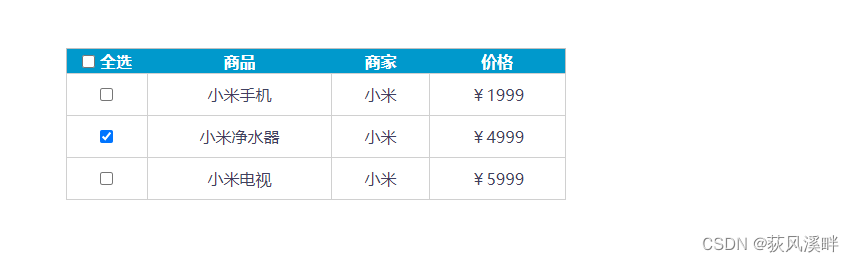
<!DOCTYPE html>
<html>

<head lang="en">
  <meta charset="UTF-8">
  <title></title>
  <style> * {
       margin: 0; padding: 0; } table {
       border-collapse: collapse; border-spacing: 0; border: 1px solid #c0c0c0; width: 500px; margin: 100px auto; text-align: center; } th {
       background-color: #09c; font: bold 16px " Microsoft YaHei "; color: #fff; height: 24px; } td {
       border: 1px solid #d0d0d0; color: #404060; padding: 10px; } .allCheck {
       width: 80px; } </style>
</head>

<body>
  <table>
    <tr>
      <th class="allCheck">
        <input type="checkbox" name="" id="checkAll"> <span class="all"> Future generations </span>
      </th>
      <th> goods </th>
      <th> merchants </th>
      <th> Price </th>
    </tr>
    <tr>
      <td>
        <input type="checkbox" name="check" class="ck">
      </td>
      <td> Mi phones </td>
      <td> millet </td>
      <td>¥1999</td>
    </tr>
    <tr>
      <td>
        <input type="checkbox" name="check" class="ck">
      </td>
      <td> Millet water purifier </td>
      <td> millet </td>
      <td>¥4999</td>
    </tr>
    <tr>
      <td>
        <input type="checkbox" name="check" class="ck">
      </td>
      <td> Millet TV </td>
      <td> millet </td>
      <td>¥5999</td>
    </tr>
  </table>
  <script> let checkall = document.querySelector('#checkAll') let cks = document.querySelectorAll('.ck') let all = document.querySelector('.all') // Listen to select all checkbox  checkall.addEventListener('click', function () {
       console.log(checkall.checked) for (let i = 0; i < cks.length; i++) {
       cks[i].checked = checkall.checked // Don't equal true Want to follow checkall The state is consistent  } if (checkall.checked) {
       // It's fine too checkall.checked === true all.innerHTML = ' Cancel ' } else {
       all.innerHTML = ' Future generations ' } }) // Listen to select all checkbox  for (let i = 0; i < cks.length; i++) {
       cks[i].addEventListener('click', function () {
       //  Just click on any small button , You have to traverse all the small buttons   for (let j = 0; j < cks.length; j++) {
       if (!cks[j].checked) {
       checkall.checked = false all.innerHTML = ' Future generations ' return } } checkall.checked = true all.innerHTML = ' Cancel ' }) } </script>
</body>

</html>
Shopping cart addition and subtraction

<!DOCTYPE html>
<html lang="en">

<head>
  <meta charset="UTF-8">
  <meta name="viewport" content="width=device-width, initial-scale=1.0">
  <meta http-equiv="X-UA-Compatible" content="ie=edge">
  <title>Document</title>
  <style>
    div {

      width: 80px;
    }

    input[type=text] {

      width: 50px;
      height: 44px;
      outline: none;
      border: 1px solid #ccc;
      text-align: center;
      border-right: 0;
    }

    input[type=button] {

      height: 24px;
      width: 22px;
      cursor: pointer;
    }

    input {

      float: left;
      border: 1px solid #ccc;

    }
  </style>
</head>

<body>
  <div>
    <input type="text" id="total" value="1" readonly>
    <input type="button" value="+" id="add">
    <input type="button" value="-" id="reduce" disabled>

  </div>
  <script>
    let total = document.querySelector('#total')
    let add = document.querySelector('#add')
    let reduce = document.querySelector('#reduce')
    add.addEventListener('click', function () {

      total.value++
      if (total.value > 1) {

        reduce.disabled = false
      }
    })
    console.log(typeof total.value)    //total.value It's a string type
    reduce.addEventListener('click', function () {

      total.value--
      if (total.value == 1) {
        // Comparison operators also have implicit conversions (total.value Convert to string )
        reduce.disabled = true
      }
    })


  </script>
</body>

</html>
边栏推荐
- Rust语言文档精简版(上)——cargo、输出、基础语法、数据类型、所有权、结构体、枚举和模式匹配
- Interesting interview questions
- spfa AcWing 852. SPFA judgement negative ring
- Record the range of data that MySQL update will lock
- Leetcode - Sword finger offer 59 - I, 59 - II
- Redis bloom filter
- BOM DOM
- Linear DP acwing 898 Number triangle
- "As a junior college student, I found out how difficult it is to counter attack after graduation."
- 百款拿来就能用的网页特效,不来看看吗?
猜你喜欢
架构师必须了解的 5 种最佳软件架构模式

AI mid stage technology research

Efficiency comparison between ArrayList and LinkedList

The coloring method determines the bipartite graph acwing 860 Chromatic judgement bipartite graph
async/await 异步函数
深拷贝 事件总线

趣味 面试题
Programmers can't find jobs after the age of 35? After reading this article, you may be able to find the answer

What is the relationship between NFT and metauniverse? How to view the market? The future market trend of NFT
Dijkstra AcWing 850. Dijkstra求最短路 II
随机推荐
js1day(输入输出语法,数据类型,数据类型转换,var和let区别)
Lekao: 22 year first-class fire engineer "technical practice" knowledge points
深拷貝 事件總線
防抖 节流
软件测试面试题-2022年大厂面试题合集
Redis introduction, scenario and data type
Shutter encapsulated button
Docker compose configuration mysql, redis, mongodb
js1day(輸入輸出語法,數據類型,數據類型轉換,var和let區別)
Sweetheart leader: Wang Xinling
[FFH] little bear driver calling process (take calling LED light driver as an example)
Linear DP acwing 895 Longest ascending subsequence
C#运算符
Hash table acwing 840 Simulated hash table
线性DP AcWing 895. 最长上升子序列
区间DP AcWing 282. 石子合并
Does C language srand need to reseed? Should srand be placed in the loop? Pseudo random function Rand
Interview questions for software testing - a collection of interview questions for large factories in 2022
Some sudden program ideas (modular processing)
The second composition template of postgraduate entrance examination English / chart composition, English chart composition is enough