当前位置:网站首页>MongoDB怎么实现创建删除数据库、创建删除表、数据增删改查
MongoDB怎么实现创建删除数据库、创建删除表、数据增删改查
2022-07-07 06:45:00 【亿速云】
MongoDB怎么实现创建删除数据库、创建删除表、数据增删改查
这篇文章主要介绍“MongoDB怎么实现创建删除数据库、创建删除表、数据增删改查”,在日常操作中,相信很多人在MongoDB怎么实现创建删除数据库、创建删除表、数据增删改查问题上存在疑惑,小编查阅了各式资料,整理出简单好用的操作方法,希望对大家解答”MongoDB怎么实现创建删除数据库、创建删除表、数据增删改查”的疑惑有所帮助!接下来,请跟着小编一起来学习吧!
一、 数据库使用
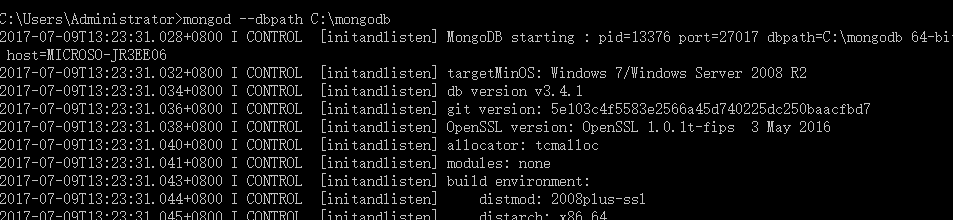
开启 mongodb 服务:要管理数据库,必须先开启服务,开启服务使用
mongod --dbpath c:\mongodb
管理 mongodb 数据库:(一定要在新的 cmd 中输入)
mongo
清屏:
cls
查看所有数据库列表
show dbs
二、 创建数据库

使用数据库、创建数据库
use student
如果真的想把这个数据库创建成功,那么必须插入一个数据。
数据库中不能直接插入数据,只能往集合(collections)中插入数据。不需要专门创建集合,只
需要写点语法插入数据就会创建集合:
插入一条数据
db.student.insert({“name”:”xiaoming”});db.student 系统发现 student 是一个陌生的集合名字,所以就自动创建了集合。
显示当前的数据集合(mysql 中叫表)
show collections
删除数据库,删除当前所在的数据库
db.dropDatabase();
删除集合,删除指定的集合 删除表
删除集合
db.COLLECTION_NAME.drop()db.user.drop()
三、插入(增加)数据
插入数据,随着数据的插入,数据库创建成功了,集合也创建成功了。
db. 表名.insert({"name":"zhangsan"}); student 集合名称(表)四、查找数据
1 、查询所有记录
db.userInfo.find();
相当于:select* from userInfo;
2 、查询去掉后的当前聚集集合中的某列的重复数据
db.userInfo.distinct("name");会过滤掉 name 中的相同数据
相当于:select distict name from userInfo;
3 、查询 age = 22 的记录
db.userInfo.find({"age": 22});相当于: select * from userInfo where age = 22;
4 、查询 age > 22 的记录
db.userInfo.find({age: {$gt: 22}});相当于:select * from userInfo where age >22;
5 、查询 age < 22 的记录
db.userInfo.find({age: {$lt: 22}});相当于:select * from userInfo where age <22;
6 、查询 age >= 25 的记录
db.userInfo.find({age: {$gte: 25}});相当于:select * from userInfo where age >= 25;
7 、查询 age <= 25 的记录
db.userInfo.find({age: {$lte: 25}});8 、查询 age >= 23 并且 age <= 26 注意书写格式
db.userInfo.find({age: {$gte: 23, $lte: 26}});9 、查询 name 中包含 mongo 的数据 模糊查询用于搜索
db.userInfo.find({name: /mongo/});相当于:%%select * from userInfo where name like ‘%mongo%’;
10 、查询 name 中以 mongo 开头的
db.userInfo.find({name: /^mongo/});相当于:select * from userInfo where name like ‘mongo%’;
11 、查询指定列 name 、age 数据
db.userInfo.find({}, {name: 1, age: 1});相当于:select name, age from userInfo;
当然 name 也可以用 true 或 false,当用 ture 的情况下河 name:1 效果一样,如果用 false 就是排除 name,显示 name 以外的列信息。
12 、查询指定列 name 、age 数据, age > 25
db.userInfo.find({age: {$gt: 25}}, {name: 1, age: 1});相当于:select name, age from userInfo where age >25;
13 、按照年龄排序 1 升序 -1 降序
升序:db.userInfo.find().sort({age: 1});降序:db.userInfo.find().sort({age: -1});14 、查询 name = zhangsan, age = 22 的数据
db.userInfo.find({name: 'zhangsan', age: 22});相当于:select * from userInfo where name = ‘zhangsan’ and age = ‘22’;
15 、查询前 5 条数据
db.userInfo.find().limit(5);
相当于:selecttop 5 * from userInfo;
16 、查询 10 条以后的数据
db.userInfo.find().skip(10);
相当于:select * from userInfo where id not in ( select top 10 * from userInfo );
五、删除数据
db.collectionsNames.remove( { "borough": "Manhattan" } )db.users.remove({age: 132});By default, the remove() method removes all documents that match the remove condition. Usethe justOne option to limit the remove operation to only one of the matching documents.db.restaurants.remove( { "borough": "Queens" }, { justOne: true }到此,关于“MongoDB怎么实现创建删除数据库、创建删除表、数据增删改查”的学习就结束了,希望能够解决大家的疑惑。理论与实践的搭配能更好的帮助大家学习,快去试试吧!若想继续学习更多相关知识,请继续关注亿速云网站,小编会继续努力为大家带来更多实用的文章!
边栏推荐
- Locust performance test 2 (interface request)
- PMP Exam Preparation experience, seek common ground while reserving differences, and successfully pass the exam
- Do you have any certificates with high gold content?
- Using JWT to realize login function
- Netease Cloud Wechat applet
- STM32 clock system
- Several stages of PMP preparation study
- Yapi test plug-in -- cross request
- PMP examination experience sharing
- Leetcode刷题记录(数组)组合总和、组合总和 II
猜你喜欢
Install pyqt5 and Matplotlib module
Locust performance test 5 (analysis)
Port multiplexing and re imaging

Serial port experiment - simple data sending and receiving
Information Security Experiment 1: implementation of DES encryption algorithm
华为HCIP-DATACOM-Core_03day
信息安全实验四:Ip包监视程序实现
Postman interface test (I. installation and use)

PMP Exam Preparation experience systematically improve project management knowledge through learning
Huawei hcip datacom core_ 03day
随机推荐
数据在内存中的存储
Mysql database lock learning notes
Kubernetes cluster capacity expansion to add node nodes
Postman interface debugging method
Pytest+request+allure+excel interface automatic construction from 0 to 1 [familiar with framework structure]
Data association between two interfaces of postman
Interview question: general layout and wiring principles of high-speed PCB
2021 year end summary
Common short chain design methods
信息安全实验一:DES加密算法的实现
C language pointer (Part 2)
Schema-validation: wrong column type encountered in column XXX in table XXX
超十万字_超详细SSM整合实践_手动实现权限管理
Leetcode question brushing record (array) combination sum, combination sum II
C语言指针(上篇)
Test Engineer Interview Questions 2022
C language pointer (exercises)
Postman interface test (II. Set global variables \ sets)
Jenkins+ant+jmeter use
Information Security Experiment 3: the use of PGP email encryption software