当前位置:网站首页>Idea view bytecode configuration
Idea view bytecode configuration
2022-07-02 09:25:00 【niceyz】
File-Settings-Tool-External Tools

show byte code
$JDKPath$\bin\javap.exe
-c $FileClass$
$OutputPath$

/********************** kafka **********************/
Kafka cluster colony
Point to point mode , Thread monitoring is required
Release / subscribe , The push speed is inconsistent with the client speed
Save the message according to topic categorize .
sender producer
The recipient consumer
Multiple instances , Each instance (server) be called broker
kafka rely on zookeeper Cluster save meta Information , Ensure system availability . Client requests can only Leader Handle
partition: Partition
Kafka Cluster colony :
Broker1 :
TopcicA(partition0) Leader
TopcicA(partition1) Follower
Broker2 :
TopcicA(partition0) Follower
TopcicA(partition1) Leader
Broker3 :
Partition0(message0、message1) topic It's divided into one area
Follower Do nothing
Consumer groups cannot consume the same partition at the same time
ConsumerA
Consumer group
ConsumerB
One consumer can consume more than one topic
mkdir logs
cd config
Set up the cluster , modify : server.properties
broker.id=0
delete.topic.enable=true
log.dirs=/opt/module
zookeeper.connect=hadoop102:2181,hadoop103:2181,hadoop104:2181
cd ..
xsync kafka/
vi server.properties
broker.id=1
broker.id=2
start-up kafka Start before Zookeeper:
zkstart.sh
Check whether the startup is successful :
/opt/module/zookeeper-3.4.10/bin/zkServer.sh status
Mode:follower Indicating successful startup .
start-up kafka:
machine 1:bin/kafka-server-start.sh config/server/properties
machine 2:bin/kafka-server-start.sh config/server/properties
machine 3:bin/kafka-server-start.sh config/server/properties
Each machine needs to be started separately
util.sh Check the startup process of three machines
establish Partition number 2 individual replications 2 individual topic name
bin/kafka-topics.sh --create --zookeeper hadoop102:2181 --partitions 2 -- replication-factor 2 --topic first
see
bin/kafka-topics.sh --list --zookeeper hadoop102:2181
Check the log
cd logs
Three machines , Number of copies set 5, Will report a mistake , Prompt for up to copies 3.
establish Partition 2 copy 5 topic name
bin/kafka-topics.sh --create --zookeeper hadoop102:2181 --partitions 2 -- replication-factor 5 --topic second
Start producer : To which topic send out
bin/kafka-console-producer.sh --broker -list hadoop102:9092 --topic first
>hello
>yz
Start consumer ( colony ) stay 103 Machine start up
Which one to consume topic, Get the latest data Consume from the beginning
bin/kafka-console-consumer.sh --zookeeper hadoop102:2181 --topic first --from-beginning
Use bootstrap-server Instead of zookeeper To eliminate the warning
Which one to consume topic, Get the latest data Consume from the beginning
bin/kafka-console-consumer.sh --bootstrap-server hadoop102:2181 --topic first --from-beginning
Data exists topic, Using machines 104 See how many topic
bin/kafka-topics.sh --list --zookeeper hadoop102:2181
__consumer_offsets explain : The system automatically creates , This should be used bootstrap after , Save to local topic
first
see topic details Description specifies topic
bin/kafka-topics.sh --zookeeper hadoop102:2181 --describeopic first
Partition Leader machine copy For election
Topic:first Partition: 0 Leader: 0 Replicas: 0,2 Isr: 0,2
Topic:first Partition: 1 Leader: 1 Replicas: 1,0 Isr: 1,0
Isr: 0,2( These two copies and leader Closest , Forward row ,leader After hanging up , Take the next one instead Leader)
machine whether Leader,Leader Only responsible for the producer to write data ,Follower Initiative from Leader Pull data .
0 Leader
1 Follower
2 Follower
Delete topic, You will be prompted to set to true
bin/kafka-topics.sh --delete --zookeeper hadoop102:2181 -topic first
Create from New topic
Partition 1 individual copy 3 individual Appoint topic name
bin/kafka-topics.sh --create --zookeeper hadoop102:2181 --partitions 1 --replication-factro 3 --topic first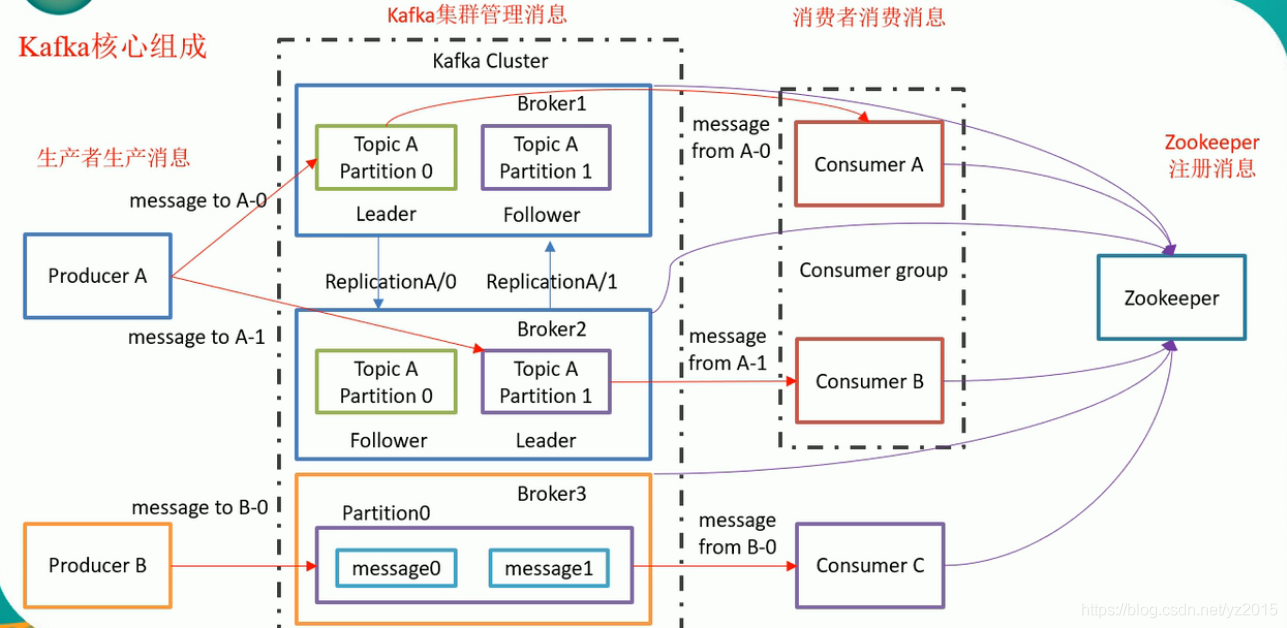
边栏推荐
- Pdf document of distributed service architecture: principle + Design + practice, (collect and see again)
- Knife4j 2.X版本文件上传无选择文件控件问题解决
- Oracle modifies tablespace names and data files
- 微服务实战|熔断器Hystrix初体验
- WSL安装、美化、网络代理和远程开发
- Ora-12514 problem solving method
- 自定义Redis连接池
- Number structure (C language -- code with comments) -- Chapter 2, linear table (updated version)
- [staff] common symbols of staff (Hualian clef | treble clef | bass clef | rest | bar line)
- Cartoon rendering - average normal stroke
猜你喜欢

Matplotlib swordsman Tour - an artist tutorial to accommodate all rivers

京东面试官问:LEFT JOIN关联表中用ON还是WHERE跟条件有什么区别
WSL installation, beautification, network agent and remote development
Microservice practice | declarative service invocation openfeign practice
![[go practical basis] how to bind and use URL parameters in gin](/img/63/84717b0da3a55d7fda9d57c8da2463.png)
[go practical basis] how to bind and use URL parameters in gin
【Go实战基础】gin 如何绑定与使用 url 参数

Statistical learning methods - Chapter 5, decision tree model and learning (Part 1)
Redis安装部署(Windows/Linux)

oracle修改数据库字符集
微服务实战|声明式服务调用OpenFeign实践
随机推荐
Oracle delete tablespace and user
微服务实战|声明式服务调用OpenFeign实践
知识点很细(代码有注释)数构(C语言)——第三章、栈和队列
C language - Blue Bridge Cup - 7 segment code
[staff] time mark and note duration (staff time mark | full note rest | half note rest | quarter note rest | eighth note rest | sixteenth note rest | thirty second note rest)
自定义Redis连接池
Cloud computing in my eyes - PAAS (platform as a service)
Solutions to Chinese garbled code in CMD window
别找了,Chrome浏览器必装插件都在这了
Oracle modifies tablespace names and data files
Avoid breaking changes caused by modifying constructor input parameters
Chrome视频下载插件–Video Downloader for Chrome
Number structure (C language -- code with comments) -- Chapter 2, linear table (updated version)
西瓜书--第六章.支持向量机(SVM)
In depth analysis of how the JVM executes Hello World
C4D quick start tutorial - C4d mapping
I've taken it. MySQL table 500W rows, but someone doesn't partition it?
Cartoon rendering - average normal stroke
Chrome浏览器标签管理插件–OneTab
告别996,IDEA中必装插件有哪些?