当前位置:网站首页>Greenplum 6.x common statements
Greenplum 6.x common statements
2022-07-07 08:47:00 【xcSpark】
One . Create directory
root Users log in to four servers , Each machine performs the following operations
[[email protected] tmp]# mkdir -p /datax/tbs_tmp
[[email protected] tmp]# mkdir -p /datax/tbs_tmp2
#  Grant authority
[[email protected] tmp]# chown gpadmin:gpadmin /datax/*
Two . Create a library
gpadmin The user login master machine
[[email protected] ~]$ psql -d postgres
psql (9.4.24)
Type "help" for help.
postgres=# create database gpdb encoding='UTF8';
CREATE DATABA
gpdb=# SELECT datname from pg_database;
  datname
-----------
 template1
 template0
 postgres
 gpperfmon
 gpdb
(5 rows)

postgres=# \q
3、 ... and . Table space
gpadmin The user login master machine
Every Greenplum Database systems have the following default table spaces .
pg_global For sharing system directories .
pg_default, Default tablespace . from template1 and template0 Database usage . These tablespaces use the default system location , That is, the location of the data directory created during system initialization .
To view tablespace information , Please use pg_tablespace The table of contents gets the object of the table space ID(OID), And then use gp_tablespace_location() Function to display the table space directory . This is an example of listing a user-defined table space myspace:
[[email protected] tmp]# su - gpadmin
#  Get into gpdb library
[[email protected] ~]$ psql -d gpdb
psql (9.4.24)
Type "help" for help.

#  Create tablespace
gpdb=# create tablespace tbs_tmp location '/datax/tbs_tmp';
CREATE TABLESPACE
gpdb=# create tablespace tbs_tmp2 location '/datax/tbs_tmp2';
CREATE TABLESPACE
gpdb=#
##########################  View tablespaces  #####################
gpdb=# SELECT oid, * FROM pg_tablespace ;
  oid  |  spcname   | spcowner |               spcacl                | spcoptions
-------+------------+----------+-------------------------------------+------------
  1663 | pg_default |       10 |                                     |
  1664 | pg_global  |       10 |                                     |
 16658 | tbs_tmp2   |       10 |                                     |
 16657 | tbs_tmp    |       10 | {
    gpadmin=C/gpadmin,guser=C/gpadmin} |
(4 rows)

# Table space  OID myspace yes 16657 .  function gp_tablespace_location() To display the tablespace location of the system consisting of two segment instances and the primary instance
gpdb=# SELECT * FROM gp_tablespace_location(16657);
 gp_segment_id |   tblspc_loc
---------------+----------------
             0 | /datax/tbs_tmp
             7 | /datax/tbs_tmp
             2 | /datax/tbs_tmp
             4 | /datax/tbs_tmp
             1 | /datax/tbs_tmp
             6 | /datax/tbs_tmp
             5 | /datax/tbs_tmp
             3 | /datax/tbs_tmp
            -1 | /datax/tbs_tmp
(9 rows)

gpdb=#

# This query uses gp_tablespace_location() Catalog gp_segment_configuration Table to display segment instance information and myspace File system location of the tablespace .

gpdb=# WITH spc AS (SELECT * FROM gp_tablespace_location(16657)) SELECT seg.role, spc.gp_segment_id as seg_id, seg.hostname, seg.datadir, tblspc_loc FROM spc, gp_segment_configuration AS seg WHERE spc.gp_segment_id = seg.content ORDER BY seg_id;
 role | seg_id | hostname |        datadir        |   tblspc_loc
------+--------+----------+-----------------------+----------------
 p    |     -1 | mdw      | /datax/master/gpseg-1 | /datax/tbs_tmp
 m    |     -1 | smdw     | /datax/master/gpseg-1 | /datax/tbs_tmp
 p    |      0 | sdw1     | /datax/primary/gpseg0 | /datax/tbs_tmp
 m    |      0 | sdw2     | /datax/mirror/gpseg0  | /datax/tbs_tmp
 m    |      1 | sdw2     | /datax/mirror/gpseg1  | /datax/tbs_tmp
 p    |      1 | sdw1     | /datax/primary/gpseg1 | /datax/tbs_tmp
 m    |      2 | sdw2     | /datax/mirror/gpseg2  | /datax/tbs_tmp
 p    |      2 | sdw1     | /datax/primary/gpseg2 | /datax/tbs_tmp
 p    |      3 | sdw1     | /datax/primary/gpseg3 | /datax/tbs_tmp
 m    |      3 | sdw2     | /datax/mirror/gpseg3  | /datax/tbs_tmp
 m    |      4 | sdw1     | /datax/mirror/gpseg4  | /datax/tbs_tmp
 p    |      4 | sdw2     | /datax/primary/gpseg4 | /datax/tbs_tmp
 p    |      5 | sdw2     | /datax/primary/gpseg5 | /datax/tbs_tmp
 m    |      5 | sdw1     | /datax/mirror/gpseg5  | /datax/tbs_tmp
 m    |      6 | sdw1     | /datax/mirror/gpseg6  | /datax/tbs_tmp
 p    |      6 | sdw2     | /datax/primary/gpseg6 | /datax/tbs_tmp
 m    |      7 | sdw1     | /datax/mirror/gpseg7  | /datax/tbs_tmp
 p    |      7 | sdw2     | /datax/primary/gpseg7 | /datax/tbs_tmp
(18 rows)

gpdb=#
Specify tablespace
SET default_tablespace = tbs_tmp;
CREATE TABLE foo(i int);
gpdb=# SET default_tablespace = tbs_tmp;
SET
gpdb=# CREATE TABLE foo(i int);
NOTICE:  Table doesn't have 'DISTRIBUTED BY' clause -- Using column named 'i' as the Greenplum Database data distribution key for this table. HINT: The 'DISTRIBUTED BY' clause determines the distribution of data. Make sure column(s) chosen are the optimal data distribution key to minimize skew.
CREATE TABLE
gpdb=#
Delete tablespace
Be careful : If the table space is not empty or stores temporary files or transaction files , The tablespace cannot be deleted .
The tablespace owner or superuser has permission to delete tablespaces . Before deleting all objects in the database that use this tablespace , You cannot delete this tablespace .
DROP TABLESPACE xxx
Four . Create and manage patterns schema
establish schema
gpdb=# create schema tmp_schema;
CREATE SCHEMA
To create or access objects in a schema , Write a qualified name consisting of schema name and table name , And separated by a period . for example
myschema.table
for example , You can create patterns owned by others , To limit user activity to a well-defined namespace
CREATE SCHEMA
schemanameAUTHORIZATIONusername;
5、 ... and . User roles
User level roles are considered database roles that can log in to the database and initiate database sessions . therefore , When you use this command to create a new user level role CREATE ROLE, You must specify LOGIN jurisdiction . for example :
CREATE ROLE jsmith WITH LOGIN;
Create the role
# guser No login rights
gpdb=# create ROLE guser password 'guser';
NOTICE:  resource queue required -- using default resource queue "pg_default"
CREATE ROLE
gpdb=# grant all on database gpdb to guser;
GRANT
#  Have login permission
gpdb=# create ROLE guser2 WITH LOGIN password 'guser2';
NOTICE:  resource queue required -- using default resource queue "pg_default"
CREATE ROLE
gpdb=#
Modify the permissions
ALTER ROLE
usernameWITH PASSWORD ‘passwd123’;
ALTER ROLE admin VALID UNTIL ‘infinity’;
ALTER ROLEusernameLOGIN;
ALTER ROLEusernameRESOURCE QUEUE que1;
ALTER ROLEusernameDENY DAY ‘Sunday’;
Role members
It is usually convenient to group users together to simplify the management of object permissions : such , You can grant or revoke permissions to an entire group .
CREATE ROLE admin CREATEROLE CREATEDB;
GRANT After the group role exists , You can use andREVOKE Command to add and remove members ( User roles )
GRANT admin TO user1, user2;
REVOKE admin FROM user3;
To manage object permissions , You will only grant appropriate permissions to group level roles , Then the member user role inherits the object permissions of the group role .
GRANT ALL ON TABLE mytable TO admin;
GRANT ALL ON SCHEMA myschema TO admin;
GRANT ALL ON DATABASE mydb TO admin;
Be careful : Character attributes LOGIN, SUPERUSER, CREATEDB, CREATEROLE,CREATEEXTTABLE and RESOURCE QUEUE It will never be inherited like the normal permissions of database objects .
User members must actually SET ROLE Only a specific role with one of these attributes can use this attribute
SET ROLE admin;
for example
gpdb=# ALTER ROLE guser2 SUPERUSER LOGIN CREATEDB;
ALTER ROLE
gpdb=#
6、 ... and . Grant authority
#  Grant tablespace permissions to guser
gpdb=# GRANT CREATE ON TABLESPACE tbs_tmp TO guser;
GRANT
7、 ... and . Create table
CREATE TABLE foo(i int) TABLESPACE tbs_tmp;
8、 ... and . Remote login
Modify file
[[email protected] ~]$ vi /datax/master/gpseg-1/pg_hba.conf

#  add to the content
host     all         guser2      0.0.0.0/0       trust
Make configuration effective
[[email protected] ~]$ gpstop -u
20220703:22:21:58:123477 gpstop:mdw:gpadmin-[INFO]:-Starting gpstop with args: -u
20220703:22:21:58:123477 gpstop:mdw:gpadmin-[INFO]:-Gathering information and validating the environment...
20220703:22:21:58:123477 gpstop:mdw:gpadmin-[INFO]:-Obtaining Greenplum Master catalog information
20220703:22:21:58:123477 gpstop:mdw:gpadmin-[INFO]:-Obtaining Segment details from master...
20220703:22:21:58:123477 gpstop:mdw:gpadmin-[INFO]:-Greenplum Version: 'postgres (Greenplum Database) 6.18.2 build commit:1242aadf0137d3b26ee42c80e579e78bd7a805c7'
20220703:22:21:58:123477 gpstop:mdw:gpadmin-[INFO]:-Signalling all postmaster processes to reload
.
20220703:22:21:59:123477 gpstop:mdw:gpadmin-[INFO]:---------------------------------------------
20220703:22:21:59:123477 gpstop:mdw:gpadmin-[INFO]:-Some segment postmasters were not reloaded
20220703:22:21:59:123477 gpstop:mdw:gpadmin-[INFO]:---------------------------------------------
20220703:22:21:59:123477 gpstop:mdw:gpadmin-[INFO]:-   Host   Datadir                 Port   Status
20220703:22:21:59:123477 gpstop:mdw:gpadmin-[INFO]:-   smdw   /datax/master/gpseg-1   5432   u
20220703:22:21:59:123477 gpstop:mdw:gpadmin-[INFO]:---------------------------------------------
[[email protected] ~]$
Invalid login
Re execution of the following is invalid
[[email protected] ~]$ pg_ctl reload -D /datax/master/gpseg-1/
server signaled
[[email protected] ~]$
usage: Use tablespaces to store database objects
# Users with tablespace permissions CREATE You can create database objects in this tablespace , Such as table 、 Index and database
#  Format :CREATE TABLE tablename(options) TABLESPACE spacename;
# In tablespace space1 Create a table in
CREATE TABLE foo(i int) TABLESPACE tbs_tmp;
# You can also use this parameter for commands that do not specify a tablespace default_tablespace Specify the default table space :CREATE TABLECREATE INDEX
SET default_tablespace = space1;
CREATE TABLE foo(i int);
Test data
gpadmin user
[[email protected] ~]$ psql -d gpdb
psql (9.4.24)
Type "help" for help.
gpdb=# SET default_tablespace = tbs_tmp;
SET
gpdb=# CREATE TABLE foo(i int);
NOTICE:  Table doesn't have 'DISTRIBUTED BY' clause -- Using column named 'i' as the Greenplum Database data distribution key for this table. HINT: The 'DISTRIBUTED BY' clause determines the distribution of data. Make sure column(s) chosen are the optimal data distribution key to minimize skew.
CREATE TABLE
gpdb=#
#  Insert 16 Data
gpdb=# insert into foo values(100000);
INSERT 0
Add data
gpdb=# select count(*) from foo;
  count
---------
 4854608
(1 row)
Initial data foo surface 16 strip , foo2 by 0 strip .
insert The data volume is as follows 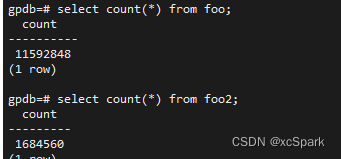
Change in size 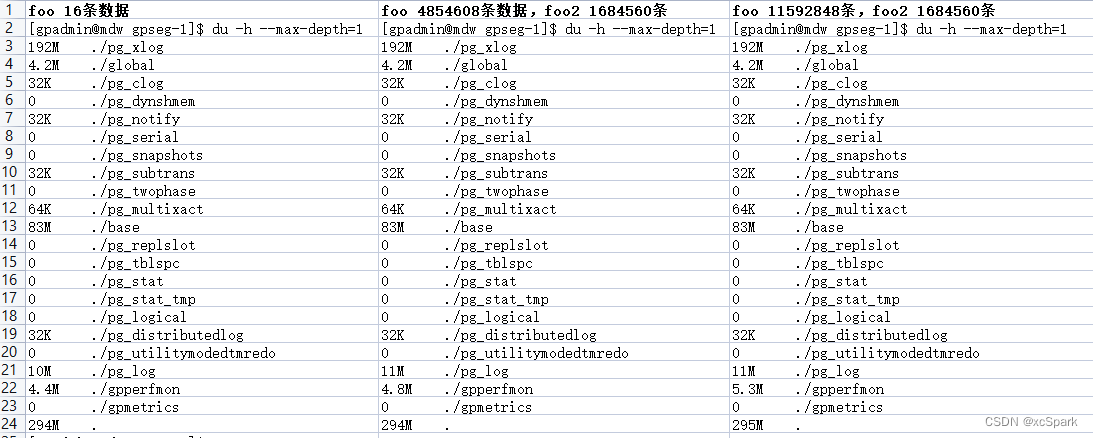
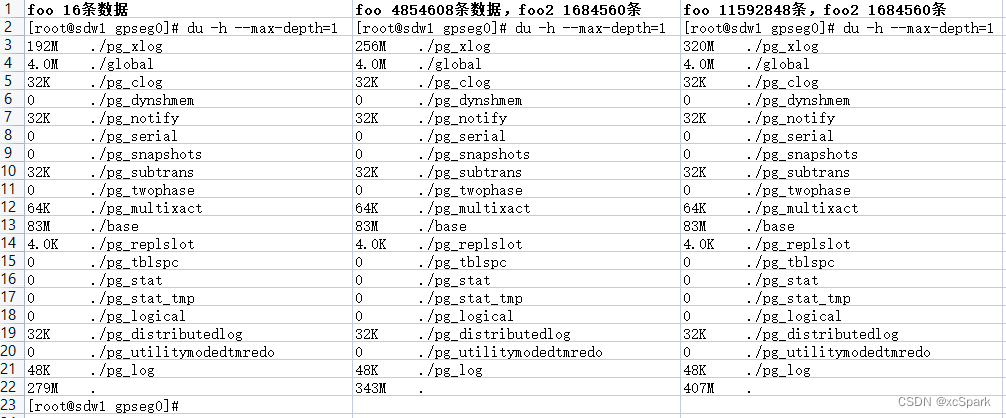
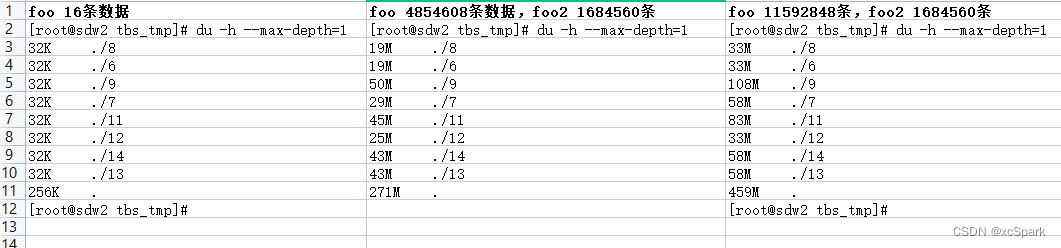
master Nodes have tbs_tmp Catalog 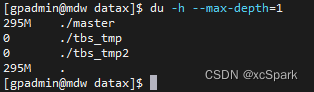
sdw2 Of gpseg0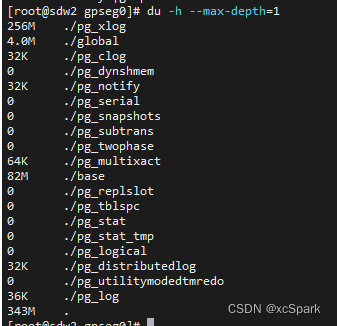
The final size comparison 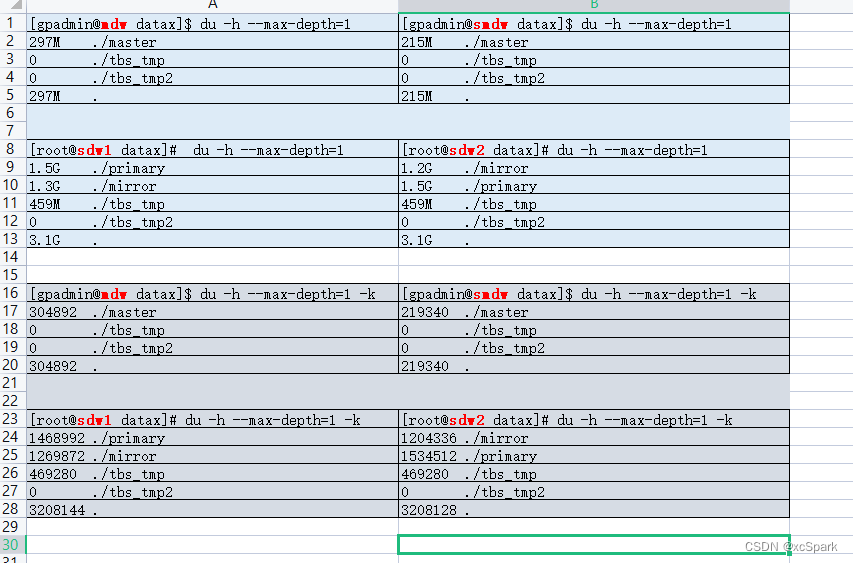
state 
边栏推荐
- oracle一次性说清楚,多种分隔符的一个字段拆分多行,再多行多列多种分隔符拆多行,最终处理超亿亿。。亿级别数据量
- How to realize the high temperature alarm of the machine room in the moving ring monitoring system
- Interpolation lookup (two methods)
- Opencv learning note 5 - gradient calculation / edge detection
- Appeler l'interface du moteur de création du service multimédia de jeu Huawei renvoie le Code d'erreur 1002, le message d'erreur: les paramètres sont l'erreur
- Go语言中,函数是一种类型
- The field value in Splunk subquery fuzzy matching CSV is*
- Splunk query CSV lookup table data dynamic query
- National SMS center number inquiry
- Merge sort and non comparison sort
猜你喜欢
let const
![[南京大学]-[软件分析]课程学习笔记(一)-introduction](/img/57/bf652b36389d2bf95388d2eb4772a1.png)
[南京大学]-[软件分析]课程学习笔记(一)-introduction
What is the method of manual wiring in PCB design in 22protel DXP_ Chengdu electromechanical Development Undertaking
关于基于kangle和EP面板使用CDN
如何在快应用中实现滑动操作组件
JS的操作
Implement your own dataset using bisenet
IP地址的类别
![[hard core science popularization] working principle of dynamic loop monitoring system](/img/d4/0c0281aec5a4f444528e8cfd401598.jpg)
[hard core science popularization] working principle of dynamic loop monitoring system
路由信息协议——RIP
随机推荐
使用AGC重签名服务前后渠道号信息异常分析
Sign and authenticate API interface or H5 interface
2-3查找樹
调用华为游戏多媒体服务的创建引擎接口返回错误码1002,错误信息:the params is error
Go语言中,函数是一种类型
Quick sorting (detailed illustration of single way, double way, three way)
Are you holding back on the publicity of the salary system for it posts such as testing, development, operation and maintenance?
Calling the creation engine interface of Huawei game multimedia service returns error code 1002, error message: the params is error
What is the method of manual wiring in PCB design in 22protel DXP_ Chengdu electromechanical Development Undertaking
How to understand distributed architecture and micro service architecture
let const
字符串操作
The field value in Splunk subquery fuzzy matching CSV is*
A bug using module project in idea
指针进阶,字符串函数
[Yu Yue education] higher vocational English reference materials of Nanjing Polytechnic University
Download and install orcale database11.2.0.4
Implementation method of data platform landing
IP地址的类别
JEditableTable的使用技巧