当前位置:网站首页>Cmake tutorial Step4 (installation and testing)
Cmake tutorial Step4 (installation and testing)
2022-07-05 17:45:00 【It's beginning to boil】
CMake Official documents
Refer to the official cmake3.24 Course translation
https://cmake.org/cmake/help/v3.24/guide/tutorial/index.html
https://gitlab.kitware.com/cmake/cmake/-/tree/master/Help/guide/tutorial
step4
https://cmake.org/cmake/help/v3.24/guide/tutorial/Installing%20and%20Testing.html
My warehouse :
https://github.com/FRBoiling/cmake-tutorial.git
Now we can start adding installation rules and test support to our project
Installation rules
The installation rules are quite simple :
about MathFunctions library , We want to install libraries and header files ,
For applications , We need to install the executable file and the configured header file .
therefore , We are MathFunctions/CMakeLists.txt Added at the end of :
install(TARGETS MathFunctions DESTINATION lib)
install(FILES math_functions.h DESTINATION include)
On the top floor Step4/CMakeLists.txt Add... At the end of the file :
install(TARGETS Tutorial DESTINATION bin)
install(FILES "${PROJECT_BINARY_DIR}/tutorial_config.h"
  DESTINATION include
  )
This is all you need to create a basic local installation for this tutorial .
Now run cmake Executable or cmake-gui To configure the project , Then build it using the build tool of your choice .
Then use the cmake command (3.15 introduce , The old version of cmake You have to use make install) Of install Option to run the installation steps . For multi configuration tools , Don't forget to use ——config Parameters to specify the configuration . If you use IDE, Just build INSTALL The goal is . This step will install the appropriate header file 、 Libraries and executables . for example :
cmake --install .
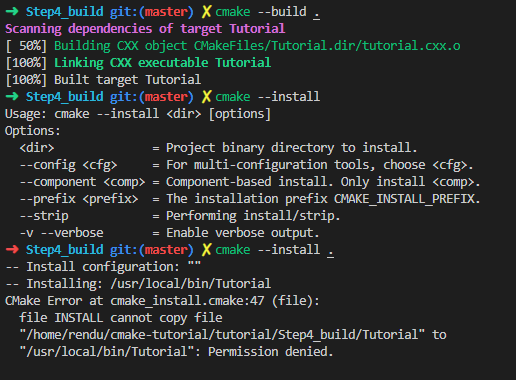
Above , The default path permission is insufficient during installation . Operation permission can be increased , Or specify a directory with appropriate permissions to install .
CMake Variable CMAKE_INSTALL_PREFIX Used to determine the root directory of the files to be installed .
If you use cmake --install command , Can pass –prefix Parameters override the installation prefix . for example :
cmake --install . --prefix "../Step4_Installdir"

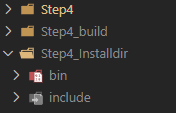
Go to the installation directory , Verify that the installed tutorial is running .
Test support
Next , Let's test the application . At the top CMakeLists.txt End of file , We can enable testing , Then add some basic tests , To verify that the application is working .
enable_testing()

# does the application run
add_test(NAME Runs COMMAND Tutorial 25)

# does the usage message work?
add_test(NAME Usage COMMAND Tutorial)
set_tests_properties(Usage
  PROPERTIES PASS_REGULAR_EXPRESSION "Usage:.*number"
  )

# define a function to simplify adding tests
function(do_test target arg result)
  add_test(NAME Comp${arg} COMMAND ${target} ${arg})
  set_tests_properties(Comp${arg}
    PROPERTIES PASS_REGULAR_EXPRESSION ${result}
    )
endfunction()

# do a bunch of result based tests
do_test(Tutorial 4 "4 is 2")
do_test(Tutorial 9 "9 is 3")
do_test(Tutorial 5 "5 is 2.236")
do_test(Tutorial 7 "7 is 2.645")
do_test(Tutorial 25 "25 is 5")
do_test(Tutorial -25 "-25 is (-nan|nan|0)")
do_test(Tutorial 0.0001 "0.0001 is 0.01")
The first test is just to verify whether the application is running , Whether there are segment errors or crashes , Whether the return value is zero . This is a CTest The basic form of testing .
The second test , Test use PASS_REGULAR_EXPRESSION Test properties to verify that the output of the test contains some strings . under these circumstances , When the number of parameters provided is incorrect , Verify that the usage message is printed .
then , We have one called do_test Function of , It runs the application and verifies that the calculated square root of a given input is correct .
do_test Every call to , Will add another test to the project , The test has a name 、 Input and expected results based on passed parameters .
Rebuild the application , Then enter Step4_build Catalog , function ctest Executable file :
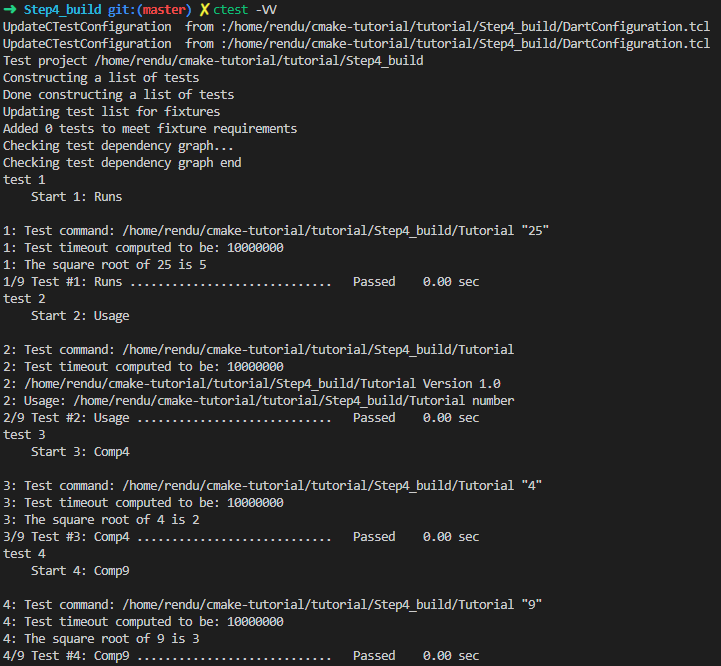
ctest -N and ctest -VV.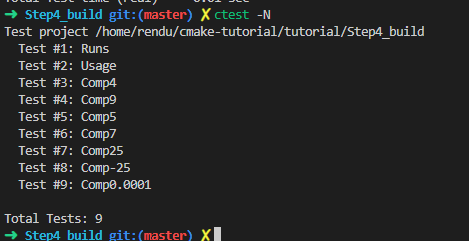
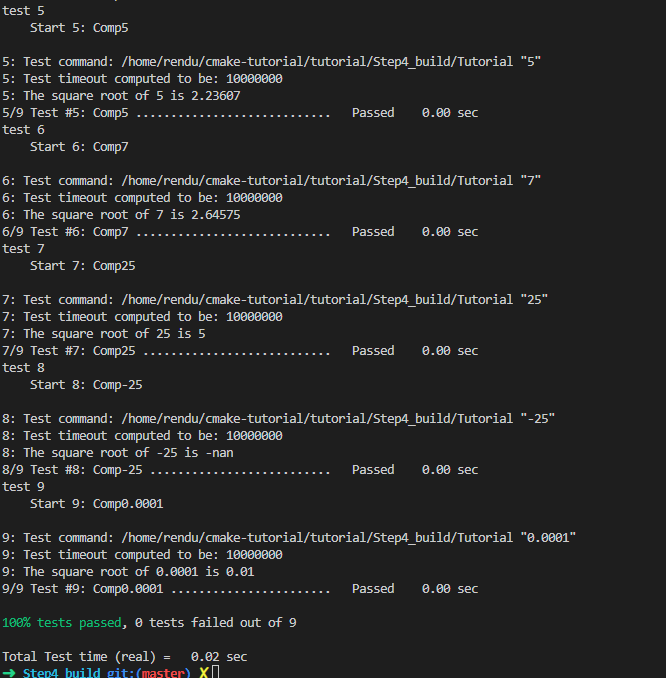
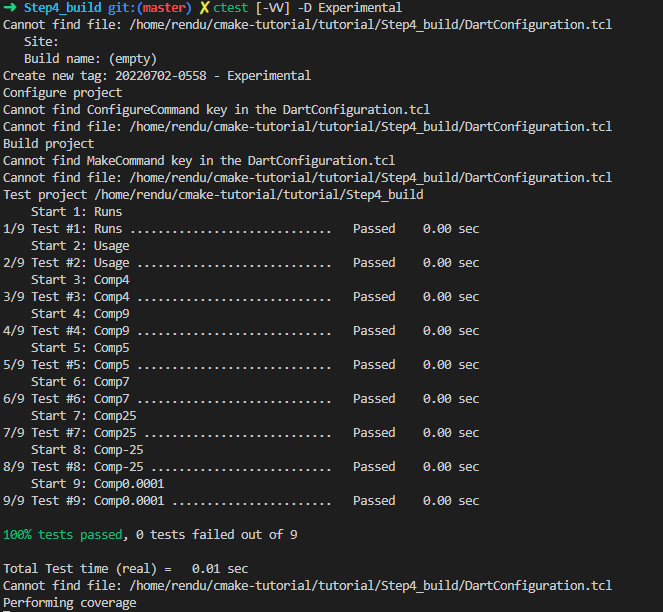
For multiple configuration generators ( for example Visual Studio), Configuration type must use -C Mark designation .
for example , To be in Debug Run the test in mode , Please use binary directory ( instead of Debug subdirectories !) Medium ctest -C Debug -VV.
Release The mode will be used from the same location -C Release. perhaps , from IDE structure RUN_TESTS The goal is .
边栏推荐
- IDEA 项目启动报错 Shorten the command line via JAR manifest or via a classpath file and rerun.
- 十个顶级自动化和编排工具
- 查看自己电脑连接过的WiFi密码
- MATLAB查阅
- Rider set the highlighted side of the selected word, remove the warning and suggest highlighting
- 得知女儿被猥亵,35岁男子将对方打至轻伤二级,法院作出不起诉决定
- The comprehensive competitiveness of Huawei cloud native containers ranks first in China!
- Redis+caffeine two-level cache enables smooth access speed
- 普通程序员看代码,顶级程序员看趋势
- 解决“双击pdf文件,弹出”请安装evernote程序
猜你喜欢
Redis+caffeine two-level cache enables smooth access speed
Check the WiFi password connected to your computer
IDEA 项目启动报错 Shorten the command line via JAR manifest or via a classpath file and rerun.

提高应用程序性能的7个DevOps实践
Kafaka技术第一课

北京内推 | 微软亚洲研究院机器学习组招聘NLP/语音合成等方向全职研究员

Which is more cost-effective, haqu K1 or haqu H1? Who is more worth starting with?
ICML 2022 | meta proposes a robust multi-objective Bayesian optimization method to effectively deal with input noise
MATLAB查阅

MySQL之知识点(七)
随机推荐
BigDecimal除法的精度问题
Knowledge points of MySQL (7)
Tips for extracting JSON fields from MySQL
Cartoon: how to multiply large integers? (integrated version)
To solve the problem of "double click PDF file, pop up", please install Evernote program
LeetCode每日一题:合并两个有序数组
为什么阳历中平年二月是28天
Cartoon: looking for the best time to buy and sell stocks
[binary tree] insufficient nodes on the root to leaf path
查看自己电脑连接过的WiFi密码
Design of electronic clock based on 51 single chip microcomputer
Is it safe to open an account online? What is the general interest rate of securities financing?
PMP认证需具备哪些条件啊?费用多少啊?
Matlab reference
独立开发,不失为程序员的一条出路
Troubleshooting - about clip not found Visual Studio
How to save the trained neural network model (pytorch version)
Flask solves the problem of CORS err
ICML 2022 | Meta提出鲁棒的多目标贝叶斯优化方法,有效应对输入噪声
请问下为啥有的表写sql能查到数据,但在数据地图里查不到啊,查表结构也搜不到