当前位置:网站首页>Wlan实验(ENSP)
Wlan实验(ENSP)
2022-07-31 05:18:00 【林箖霖】
本文作者林箖霖,转载请注明出处!
实验拓扑图

配置流程
基础配置
- LSW2交换机配置
接入层交换机和AP/汇聚层交换机的链路应该是Trunk类型
# S2 Eth0/0/1配置
[S2]interface Ethernet 0/0/1
[S2-Ethernet0/0/1]port link-type trunk
[S2-Ethernet0/0/1]port trunk pvid vlan 100
[S2-Ethernet0/0/1]port trunk allow-pass vlan 100
# S2 Eth0/0/3配置
[S2]interface Ethernet 0/0/3
[S2-Ethernet0/0/3]port link-type trunk
[S2-Ethernet0/0/3]port trunk pvid vlan 100
[S2-Ethernet0/0/3]port trunk allow-pass vlan 100
# S2 Eth0/0/2配置
[S2]interface Ethernet 0/0/2
[S2-Ethernet0/0/2]port link-type trunk
[S2-Ethernet0/0/2]port trunk allow-pass vlan 100
- LSW1交换机配置
# 创建相应的vlan
[S1]vlan batch 100 to 101
# 0/0/1接口与接入层交换机相连,配置相应的trunk模式
[S1]interface GigabitEthernet 0/0/1
[S1-GigabitEthernet0/0/1]port link-type trunk
[S1-GigabitEthernet0/0/1]port trunk allow-pass vlan 100
# 0/0/2接口和AC相连,配置好接口相应的链路类型
[S1]interface GigabitEthernet 0/0/2
[S1-GigabitEthernet0/0/2]port link-type trunk
# 这个trunk口需要通过100和101;因为到时候数据会发到AC这边
[S1-GigabitEthernet0/0/2]port trunk allow-pass vlan 100 to 101
# 用vlanif101做三层接口
[S1]interface Vlanif101
[S1-Vlanif101]ip address 10.23.101.254 255.255.255.0
- AC相应接口的配置
# 创建相应的vlan
<AC6005>system-view
[AC6005]sysname AC
[AC]vlan batch 100 to 101
# 配置0/0/1接口
[AC]interface gigabitethernet0/0/1
[AC-GigabitEthernet0/0/1]port link-type trunk
[AC-GigabitEthernet0/0/1]port trunk allow-pass vlan 100 to 101
# 用vlanif100做三层接口
[AC]interface Vlanif100
[AC-Vlanif100]ip address 10.23.100.1 255.255.255.0
# 将AC作为DHCP服务器,为AP发放IP地址
[AC]dhcp enable
[AC]interface vlanif100
[AC-Vlanif100]dhcp select interface # 选择基于接口配置

# 业务的DHCP服务器放在交换机1上。为终端设备分发IP地址。
[S1]dhcp enable
[S1]interface Vlanif101
[S1-Vlanif101]dhcp select interface
在AC中做AP的上线
- AC的配置
[AC]wlan # 进入wlan视图
[AC-wlan-view]regulatory-domain-profile name wlan # 配置管理模板
[AC-wlan-regulate-domain-wlan]country-code CN # 配置国家码
- 把域管理模板和AP组做关联
[AC]wlan  # 进入wlan视图
[AC-wlan-view]ap-group name ap  #先进入ap组
[AC-wlan-ap-group-ap]regulatory-domain-profile wlan  # 将管理模板引入ap组
Warning: Modifying the country code will clear channel, power and antenna gain configurations of the radio and reset the AP. Continue?[Y/N]:y
- 创建AC未来要和AP通信的接口;也就是创建控制隧道/数据隧道
[AC]capwap source interface vlanif100 # 配置AC与AP建立capwap隧道的源接口。
- 把AP添加到AC上去。
# 第一步做AP1和AP2的认证
[AC]wlan
[AC-wlan-view]ap auth-mode mac-auth
[AC-wlan-view]ap-id 1 ap-mac 00e0-fc7e-0310
[AC-wlan-ap-1]q
[AC-wlan-view]ap-id 2 ap-mac 00e0-fccf-5170
# 对AP1做相应配置
[AC-wlan-view]ap-id 1
[AC-wlan-ap-1]ap-name ap1 # 给ap1起个名字
[AC-wlan-ap-1]ap-group ap # 将ap跟ap组进行绑定
Warning: This operation may cause AP reset. If the country code changes, it will clear channel, power and antenna gain configurations of the radio, Whether to continue? [Y/N]:y
# 对AP2做相应配置
[AC-wlan-view]ap-id 2
[AC-wlan-ap-2]ap-name ap2 # 给ap2起个名字
[AC-wlan-ap-2]ap-group ap # 将ap跟ap组进行绑定
Warning: This operation may cause AP reset. If the country code changes, it will clear channel, power and antenna gain configurations of the radio, Whether to continue? [Y/N]:y
- 接下来要查看ap上线
[AC]dis ap all # 查看ap上线,如果上线了,状态就为nor

wlan下发
# 配置安全模板
[AC]wlan
[AC-wlan-view]security-profile name security # 设置安全模板
[AC-wlan-sec-prof-security]security wpa2 psk pass-phrase 12345678 aes # 选择认证方式
# 配置SSID模板
[AC-wlan-view]ssid-profile name ssid # 创建ssid模板
[AC-wlan-ssid-prof-ssid]ssid wifi123 # 配置你的无线的名字
# 配置vap模板
[AC]wlan
[AC-wlan-view]vap-profile name vap # 创建vap模板
[AC-wlan-vap-prof-vap]forward-mode tunnel # 配置转发的模式为tunnel
[AC-wlan-vap-prof-vap]service-vlan vlan-id 101 # 配置业务vlan
[AC-wlan-vap-prof-vap]security-profile security # 安全的策略模板加入vap模板
[AC-wlan-vap-prof-vap]ssid-profile ssid # 将ssid模板加入vap模板
# 将wap的模板推给ap组
[AC-wlan-view]ap-group name ap # 先进入ap组
[AC-wlan-ap-group-ap]vap-profile vap wlan 1 radio 0 # 1是wlan的id;radio是射频信号;射频信号是支持0-2
[AC-wlan-ap-group-ap]vap-profile vap wlan 1 radio 1
# 对AP2也进行同样的操作
[AC-wlan-view]ap-group name ap
[AC-wlan-ap-group-ap]vap-profile vap wlan 2 radio 0
[AC-wlan-ap-group-ap]vap-profile vap wlan 2 radio 1
验证过程
- PC可以接收到AP的信号

- 点击连接,输入密码
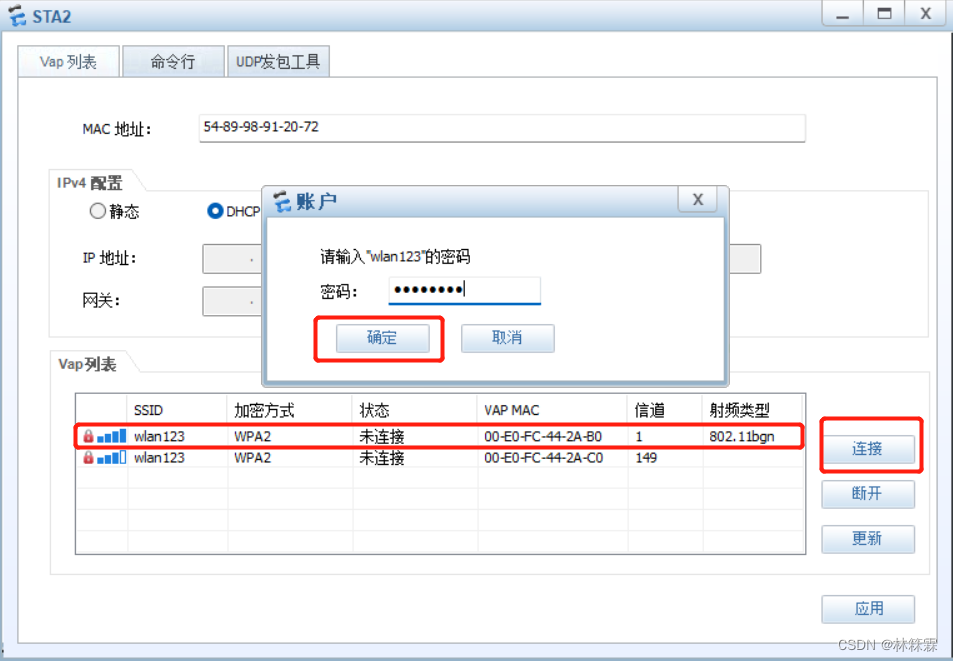
- 连接成功后可查看到信号

- 当PC1和PC2都成功连接上AP之后,查看两台PC的IP地址
PC1:
PC2:
- PC1 ping PC2,能够正常通信

边栏推荐
猜你喜欢

pyspark.ml feature transformation module

PyTorch Study Notes 08 - Loading Datasets

Unity加载GIf动画

力扣151. 颠倒字符串中的单词

DingTalk Enterprise Internal-H5 Micro Application Development
【Rhapsody学习笔记】1:Hello World
Rejection sampling note

mPEG-DSPE 178744-28-0 甲氧基-聚乙二醇-磷脂酰乙醇胺线性PEG磷脂
Embedding cutting-edge understanding
Software Testing Interview Questions 2021
随机推荐
map和set
Evaluating Machine Learning Models - Excerpt
MySQL 主从切换步骤
DingTalk Enterprise Internal-H5 Micro Application Development
Tensorflow——demo
CAS:474922-22-0 Maleimide-PEG-DSPE Phospholipid-Polyethylene Glycol-Maleimide Brief Description
UR3机器人雅克比矩阵
2021-09-30
Fluorescein-PEG-DSPE 磷脂-聚乙二醇-荧光素荧光磷脂PEG衍生物
Introduction to CLS-PEG-FITC Fluorescein-PEG-CLS Cholesterol-PEG-Fluorescein
Cholesterol-PEG-DBCO 胆固醇-聚乙二醇-二苯基环辛炔化学试剂
Research reagents Cholesterol-PEG-Maleimide, CLS-PEG-MAL, Cholesterol-PEG-Maleimide
Log jar package conflict, and its solution
Solution for MySQL The table is full
数据预处理、特征工程和特征学习-摘抄
CAS:474922-22-0 Maleimide-PEG-DSPE 磷脂-聚乙二醇-马来酰亚胺简述
2022年SQL大厂高频实战面试题(详细解析)
自然语言处理相关list
About iframe
关于Iframe