当前位置:网站首页>Visual Studio提供的 Command Prompt 到底有啥用
Visual Studio提供的 Command Prompt 到底有啥用
2022-08-01 03:53:00 【氵文大师】
在上一篇博客中:
Virtual Studio 让系统找到需要的头文件和库
折腾了半天环境变量,把需要的环境变量扔到LIB 和 INCLUDE 变量中,然而咱每次启动VS的时候,有几个黑框框,这是啥?
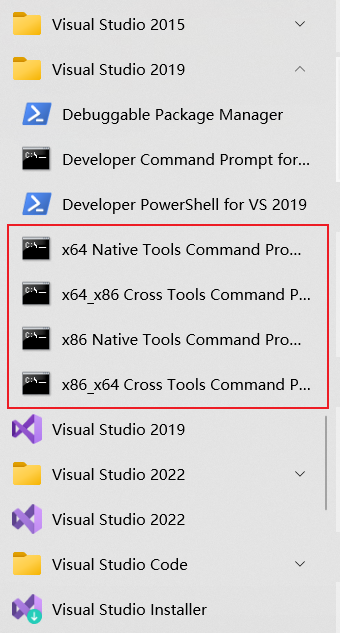
如果诸位早些时候用过 anaconda ,那就好说了,这就和他那个Anaconda Prompt 是一样儿一样儿滴
就是一个 cmd, 然后多了几个环境变量而已
Anaconda Prompt 就把 conda 那个目录添加到 %PATH% 中,有没有其他环境变量,我也不清楚…
咱随便开一个cmd,看看%LIB% 和 %INCLUDE% 是什么:
> echo %LIB%
> # 下边的输出原来没回车,我加的

C:\Program Files (x86)\Microsoft Visual Studio\2019\Community\VC\Tools\MSVC\14.29.30133\lib\x64;
C:\Program Files (x86)\Windows Kits\10\Lib\10.0.19041.0\um\x64;
C:\Program Files (x86)\Windows Kits\10\Lib\10.0.19041.0\ucrt\x64;
> echo %INCLUDE%
> # 下边的输出原来没回车,我加的

C:\Program Files (x86)\Microsoft Visual Studio\2019\Community\VC\Tools\MSVC\14.29.30133\include;
C:\Program Files (x86)\Windows Kits\10\Include\10.0.19041.0\ucrt;
C:\Program Files (x86)\Windows Kits\10\Include\10.0.19041.0\um;
C:\Program Files (x86)\Windows Kits\10\Include\10.0.19041.0\shared;
打开x64 Native Tools Command Prompt for VS 2019, 对,是就是博客开头那个截图
> echo %LIB%
> # 下边的输出原来没回车,我加的

C:\Program Files (x86)\Microsoft Visual Studio\2019\Community\VC\Tools\MSVC\14.29.30133\lib\x64;
C:\Program Files (x86)\Windows Kits\10\lib\10.0.19041.0\ucrt\x64;
C:\Program Files (x86)\Windows Kits\10\lib\10.0.19041.0\um\x64;
C:\Program Files (x86)\Microsoft Visual Studio\2019\Community\VC\Tools\MSVC\14.29.30133\lib\x64;
C:\Program Files (x86)\Windows Kits\10\Lib\10.0.19041.0\um\x64;
C:\Program Files (x86)\Windows Kits\10\Lib\10.0.19041.0\ucrt\x64
可以看到那仨环境变量又重复了一遍,这个cmd的虚拟环境将需要的环境变量又添加了一波,看来咱之前添加对了hh
> echo %INCLUDE%
> # 下边的输出原来没回车,我加的

C:\Program Files (x86)\Microsoft Visual Studio\2019\Community\VC\Tools\MSVC\14.29.30133\include;
C:\Program Files (x86)\Windows Kits\10\include\10.0.19041.0\ucrt;
C:\Program Files (x86)\Windows Kits\10\include\10.0.19041.0\shared;
C:\Program Files (x86)\Windows Kits\10\include\10.0.19041.0\um;
C:\Program Files (x86)\Windows Kits\10\include\10.0.19041.0\winrt;
C:\Program Files (x86)\Windows Kits\10\include\10.0.19041.0\cppwinrt;
C:\Program Files (x86)\Microsoft Visual Studio\2019\Community\VC\Tools\MSVC\14.29.30133\include;
C:\Program Files (x86)\Windows Kits\10\Include\10.0.19041.0\ucrt;
C:\Program Files (x86)\Windows Kits\10\Include\10.0.19041.0\um;
C:\Program Files (x86)\Windows Kits\10\Include\10.0.19041.0\shared
可以看到前6行是需要添加的路径,后几行是咱之前添加的路径
边栏推荐
- TypeScript简化运行之ts-node
- [Message Notification] How about using the official account template message?
- leetcode:126. Word Solitaire II
- HCIP(14)
- "Youth Pie 2": The new boyfriend stepped on two boats, and the relationship between Lin Miaomiao and Qian Sanyi warmed up
- 【搜索专题】看完必会的BFS解决最短路问题攻略
- Mysql中的数据类型和运算符
- Flutter “Hello world“ 程代码
- By CSDN, torn
- Character encoding and floating point calculation precision loss problem
猜你喜欢

剑指offer专项突击版第16天

项目越写越大,我是这样做拆分的
Introduction to the Elastic Stack
![[Search topic] After reading the inevitable BFS solution to the shortest path problem](/img/f8/fbe906106dc8f7f7a6bd54d2dc3bc1.png)
[Search topic] After reading the inevitable BFS solution to the shortest path problem
leetcode6132. 使数组中所有元素都等于零(简单,周赛)

HIRO: Hierarchical Reinforcement Learning 】 【 Data - Efficient Hierarchical Reinforcement Learning

The maximum quantity leetcode6133. Grouping (medium)
win10 fixed local IP
今日睡眠质量记录68分
TypeScript simplifies running ts-node
随机推荐
This article takes you to understand the past and present of Mimir, Grafana's latest open source project
动态规划 01背包
When opening a MYSQL table, some can display editing, some do not, how to set.
【愚公系列】2022年07月 Go教学课程 024-函数
【入门教程】Rollup模块打包器整合
Unity在BuildIn渲染管线下实现PlanarReflection的初级方法
HCIP(15)
win10 fixed local IP
今日睡眠质量记录68分
lambda
Dynamic Programming 01 Backpack
Introduction to Oracle
Advice given by experts with four years of development experience in Flutter tutorial
MLP neural network, GRNN neural network, SVM neural network and deep learning neural network compare and identify human health and non-health data
测试
Make your Lottie support word wrapping in text fields
简单易用的任务队列-beanstalkd
HCIP(14)
雪糕和轮胎
开源许可证 GPL、BSD、MIT、Mozilla、Apache和LGPL的区别