当前位置:网站首页>RTP 接发ps流工具改进(二)
RTP 接发ps流工具改进(二)
2022-07-02 22:44:00 【qianbo_insist】
RTP ps
上一次写了RTP工具发送RTP包,这次改进了发送和接收,真正能接收和发送图像,这次修改,使得RTP发送接收和PS流RTP发送接收都已经成功。延时在300毫秒左右。代码地址在上一篇的文章里面。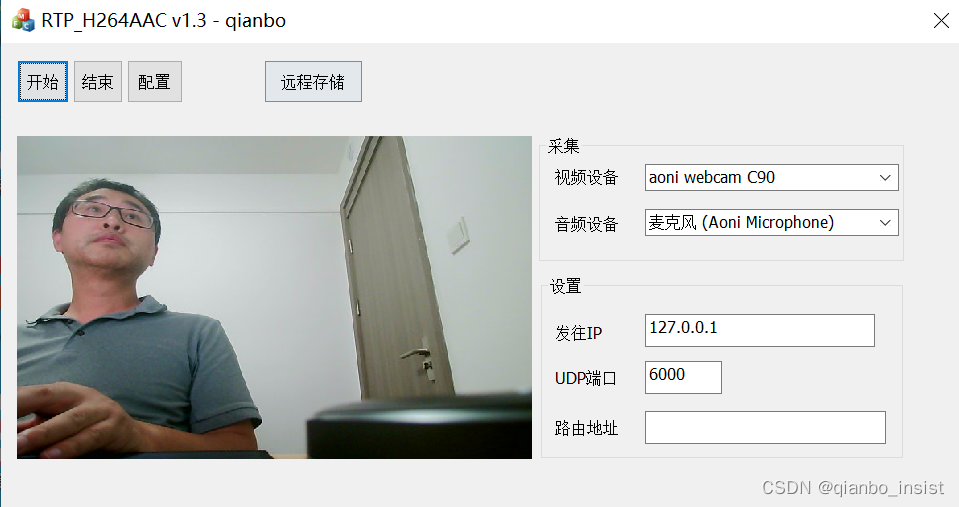
下面是接收,这次使用udp 异步接收,发送到解析线程解码显示,和主界面通信使用回调函数。里面也包含了存储h264的代码,每次500帧,这些以后都将使用配置进行,现在还不完善。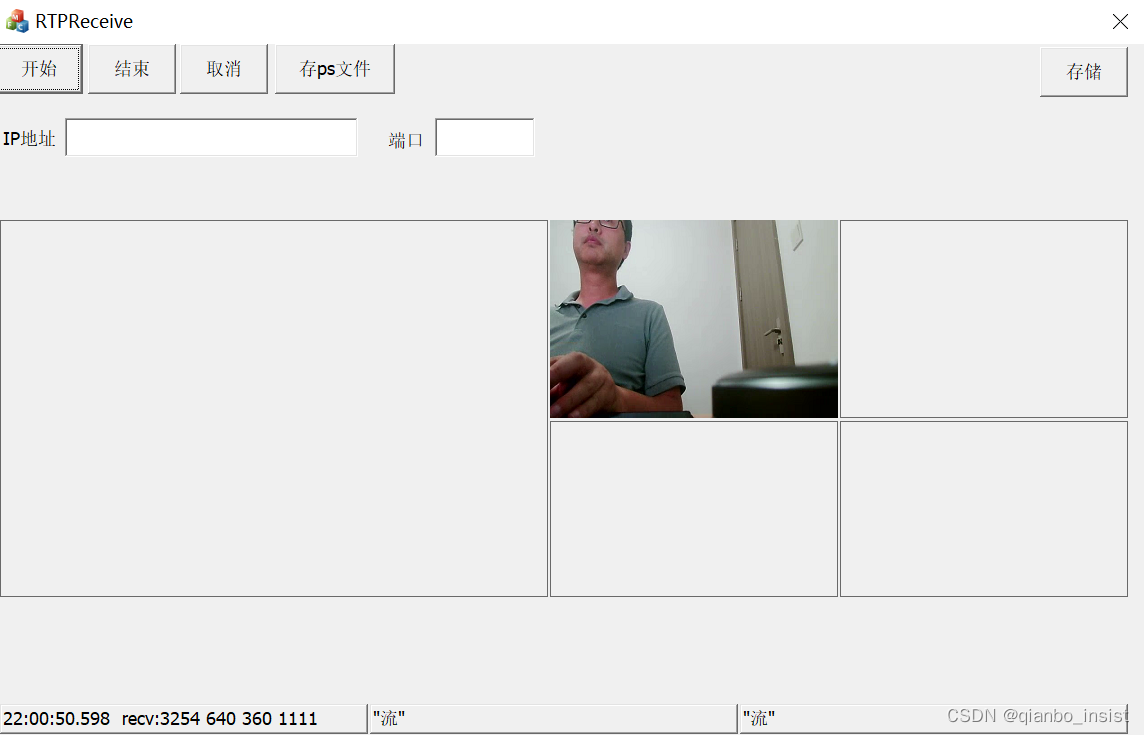
主要接收的改进在于使用了异步接收,同步接收依然保留,后面会做个开关去打开和关闭,发送和接收在界面上没有很好的做配置,以前是RTP 打包发送和接收,这次是PS流的打包发送和接收。读者暂时需要自己改动代码去使用。
UDPserver
这次使用的是boost的asio, 后面考虑单独使用c++20,和asio配合。
#pragma once

#include <cstdlib>
#include <iostream>
#include <memory>
#include <unordered_map>
#include <boost/asio.hpp>
#include <boost/asio/spawn.hpp>
#include "c_rtp.h"
#include "c_thread.h"
using namespace boost;
using boost::asio::ip::udp;

typedef void(*rtp_callback_data)(void* puser, void* pkt,int len, int w, int h, uint32_t ssrc);
typedef void(*rtp_callback_log)(void* puser, const char* log,...);
#define DEFINE_EC \ boost::system::error_code ec;


class IO_Thread;
class c_udpserver:public c_thread
{

	//asio::strand<asio::io_context::executor_type> v_strand;
	asio::io_context v_context;
	asio::ip::udp::socket v_socket;
	//ssrc rtpcontext
	std::unordered_map<uint32_t, s_rtp_context*> v_ctxs;

	s_rtp_context * getctx(uint32_t ssrc)
	{

		auto it = v_ctxs.find(ssrc);
		if (it != v_ctxs.end())
			return it->second;
		else
		{

			s_rtp_context *sc = new s_rtp_context();
			v_ctxs[ssrc] = sc;
			return sc;
		}
	}
	void data_call(s_rtp_context *ctx);

	int live_rtp_unpack_h264(s_rtp_context *ctx, uint8_t *data, int inlen);

	int live_rtp_unpack_ps(s_rtp_context *ctx,
		uint8_t *data,
		int inlen, uint32_t ssrc
	);

public:

	c_udpserver(short port):
		//v_strand(io_context.get_executor()),
		v_socket(v_context)
	{

		udp::endpoint ep(udp::v4(), port);
		v_socket.open(ep.protocol());
		v_socket.set_option(boost::asio::ip::udp::socket::reuse_address(true));
		boost::asio::socket_base::receive_buffer_size recv_option(2*1024*1024);
		v_socket.set_option(recv_option);
		v_socket.bind(ep);
	}

	~c_udpserver()
	{

		//v_context_maps.clear();
	}
	void Run();

	//to flv server
	void do_receive_rtp_head();
	void do_receive();


	void set_callback(void *puser, rtp_callback_data cb, rtp_callback_log cblog)
	{

		v_callback_data = cb;
		v_callback_log = cblog;
		v_user = puser;
	}
	void do_send(std::size_t length);

	void do_judge_spspps(s_rtp_context *ctx);
private:
	udp::endpoint sender_endpoint_;
	enum {
     max_length = 1500};
	char data_[max_length] = {
    0};
public:
	rtp_callback_data v_callback_data = NULL;
	rtp_callback_log  v_callback_log = NULL;
	void* v_user = NULL;
public:
	void Stop();
	//给线程发送信息
	void postmessage(uint32_t ssrc, int number);
	void postmessage_2interface(char* strFmt, ...);
	void postmessage_2show(void* pkt,int payload);

};
如代码所示,和界面通信主要是靠两个回调函数
rtp_callback_data v_callback_data = NULL;
rtp_callback_log v_callback_log = NULL;
其中v_user就是主界面,用空类型表示。
展示
为了不使用更多的库,先使用了GDI显示,里面也包含了SDL显示,读者可以自行修改。
class c_drawrgb24
{

public:
	c_drawrgb24(void);
	~c_drawrgb24(void);
protected:


    void CreateDoubleBuffer(HDC hdc1, int cxClient1 ,int cyClient1,HDC hdc2,int cxClient2,int cyClient2);


public:


    void Draw2(HWND hWnd,HWND hWnd2, unsigned char * buffer, int SrcW, int SrcH);
	void DrawSDL(HWND hWnd, unsigned char * buffer, int SrcW, int SrcH);
	//void DrawPInP(HWND hWnd
public:
//图像翻转
	void SetVertial();
private:
	LPBITMAPINFO m_lpBmpInfo;

	bool     m_bInit;

    HBITMAP _hBm1;
	HDC _hdc_buffer1;
	HBITMAP _hBm2;
	HDC _hdc_buffer2;
	SDLDraw _sdldraw;
};
#ifdef _WIN32
#include <SDKDDKVer.h>
#endif

#include "c_drawrgb24.h"

c_drawrgb24::c_drawrgb24(void):
	m_bInit(false),
	m_lpBmpInfo(NULL),
	_hBm1(NULL),
	_hdc_buffer1(NULL),
	_hBm2(NULL),
	_hdc_buffer2(NULL)
{

}

c_drawrgb24::~c_drawrgb24(void)
{

	if(m_lpBmpInfo)
		delete m_lpBmpInfo;
}


void c_drawrgb24::SetVertial()
{

	if(m_lpBmpInfo!=NULL)
		m_lpBmpInfo->bmiHeader.biHeight = 0-m_lpBmpInfo->bmiHeader.biHeight;
}


void c_drawrgb24::CreateDoubleBuffer(HDC hdc1, int cxClient1 ,int cyClient1,HDC hdc2,int cxClient2,int cyClient2)
{

	//创建虚拟位图
	if(hdc1!=NULL)
	{

		_hBm1 = CreateCompatibleBitmap(hdc1,cxClient1,cyClient1);
		//创建和hdc兼容的设备
		_hdc_buffer1 = CreateCompatibleDC(hdc1);
		SelectObject(_hdc_buffer1,_hBm1);
	}
	if(hdc2!=NULL)
	{

		_hBm2 = CreateCompatibleBitmap(hdc2,cxClient2,cyClient2);
		//创建和hdc兼容的设备
		_hdc_buffer1 = CreateCompatibleDC(hdc2);
		SelectObject(_hdc_buffer2,_hBm2);
	}
}


void c_drawrgb24::Draw2(HWND hWnd, HWND hWnd2,unsigned char * buffer, int SrcW, int SrcH)
{

	HDC hDCDst1 = NULL;
	HDC hDCDst2 = NULL;
	RECT destRect1;
	RECT destRect2;
	if(hWnd!=NULL)
	{

		hDCDst1 = GetDC(hWnd);
		GetClientRect(hWnd,&destRect1);
	}
	if(hWnd2!=NULL)
	{

		hDCDst2 = GetDC(hWnd2);
		GetClientRect(hWnd2,&destRect2);
	}

	if(!m_bInit)
	{

		m_bInit = true;
		m_lpBmpInfo=new BITMAPINFO;
		m_lpBmpInfo->bmiHeader.biSize  = sizeof(BITMAPINFOHEADER);
		m_lpBmpInfo->bmiHeader.biWidth =   SrcW;
		m_lpBmpInfo->bmiHeader.biHeight=   -SrcH;
		m_lpBmpInfo->bmiHeader.biPlanes= 1;
		m_lpBmpInfo->bmiHeader.biBitCount      = 24;
		m_lpBmpInfo->bmiHeader.biCompression   = 0;
		m_lpBmpInfo->bmiHeader.biSizeImage     = 0;
		m_lpBmpInfo->bmiHeader.biXPelsPerMeter = 0;
		m_lpBmpInfo->bmiHeader.biYPelsPerMeter = 0;
		m_lpBmpInfo->bmiHeader.biClrUsed=0;
		m_lpBmpInfo->bmiHeader.biClrImportant  = 0;

		//CDC * dc = CDC::FromHandle(hDCDst);
		//m_pMemDC = new CMemDC(*dc,DestRect);
	}

	if(hDCDst1!=NULL)
	{

		int DstWidth  = destRect1.right-destRect1.left;
		int DstHeight = destRect1.bottom- destRect1.top;
		SetStretchBltMode(hDCDst1,STRETCH_HALFTONE);
		::StretchDIBits(
			//m_pMemDC->GetDC().GetSafeHdc(),
			hDCDst1,
			0, 0, DstWidth, DstHeight,
			0, 0, SrcW, SrcH,
			buffer, m_lpBmpInfo, DIB_RGB_COLORS, SRCCOPY );
		ReleaseDC(hWnd,hDCDst1);
	}
	if(hDCDst2!=NULL)
	{

		int DstWidth  = destRect2.right-destRect2.left;
		int DstHeight = destRect2.bottom- destRect2.top;
		SetStretchBltMode(hDCDst2,STRETCH_HALFTONE);
		::StretchDIBits(
			//m_pMemDC->GetDC().GetSafeHdc(),
			hDCDst2,
			0, 0, DstWidth, DstHeight,
			0, 0, SrcW, SrcH,
			buffer, m_lpBmpInfo, DIB_RGB_COLORS, SRCCOPY );
		ReleaseDC(hWnd2,hDCDst2);
	}

}

void c_drawrgb24::DrawSDL(HWND hWnd, unsigned char * buffer, int SrcW, int SrcH)
{

	_sdldraw.draw_init(hWnd, SrcW, SrcH);
	_sdldraw.draw(buffer, SrcW, SrcH);
}
新的代码已经提交,读者可以从我的第一篇文章中找到开源地址。
边栏推荐
- Third party payment function test point [Hangzhou multi tester _ Wang Sir] [Hangzhou multi tester]
- JDBC練習案例
- Interface switching based on pyqt5 toolbar button -2
- MFC 获取当前时间
- leetcode 650. 2 Keys Keyboard 只有两个键的键盘(中等)
- 顶级 DevOps 工具链大盘点
- Arduino - character judgment function
- ArrayList analysis 2: pits in ITR, listiterator, and sublist
- 第三方支付功能测试点【杭州多测师_王sir】【杭州多测师】
- Agnosticism and practice makes perfect
猜你喜欢

流媒体技术优化
附加:token;(没写完,别看…)
CADD课程学习(4)-- 获取没有晶体结构的蛋白(SWISS-Model)
Program analysis and Optimization - 9 appendix XLA buffer assignment
Win11如何开启目视控制?Win11开启目视控制的方法
Intranet penetration | teach you how to conduct intranet penetration hand in hand
Print out mode of go
Connexion à distance de la tarte aux framboises en mode visionneur VNC
How can cross-border e-commerce achieve low-cost and steady growth by laying a good data base
How does win11 turn on visual control? Win11 method of turning on visual control
随机推荐
基于Pyqt5工具栏按钮可实现界面切换-2
(stinger) use pystinger Socks4 to go online and not go out of the network host
Print out mode of go
Difference between NVIDIA n card and amda card
C# MVC创建一个视图摆脱布局的影响
List of major chip Enterprises
leetcode 650. 2 Keys Keyboard 只有两个键的键盘(中等)
BBR encounters cubic
sourcetree 详细
A single element in an ordered array -- Valentine's Day mental problems
How to maintain the brand influence of clothing enterprises
Request and response
判断二叉树是否为满二叉树
顶级 DevOps 工具链大盘点
PR FAQ, what about PR preview video card?
Hisilicon VI access video process
What is the official website address of e-mail? Explanation of the login entry of the official website address of enterprise e-mail
How much do you know about synchronized?
The concepts of terminal voltage, phase voltage and line voltage in FOC vector control and BLDC control are still unclear
67页新型智慧城市整体规划建设方案(附下载)