当前位置:网站首页>QT learning diary 7 - qmainwindow
QT learning diary 7 - qmainwindow
2022-07-02 11:04:00 【herb. dr】
Catalog
One 、QMainWindow brief introduction
One 、QMainWindow brief introduction
1.1 written words
QMainWindow Is a class that provides the main window program for users , Contains a menu bar (menu bar)、 Multiple toolbars (tool bars)、 Multiple anchoring components (dock widgets)、 A status bar (status bar) And a central part (central widget), Is the foundation of many applications , Like a text editor , Picture editor, etc
1.2 Icon

Two 、 Create interface
2.1 choice QMainWindow


2.2 Create menu bar
1、 Create a menu bar without throwing it on the screen
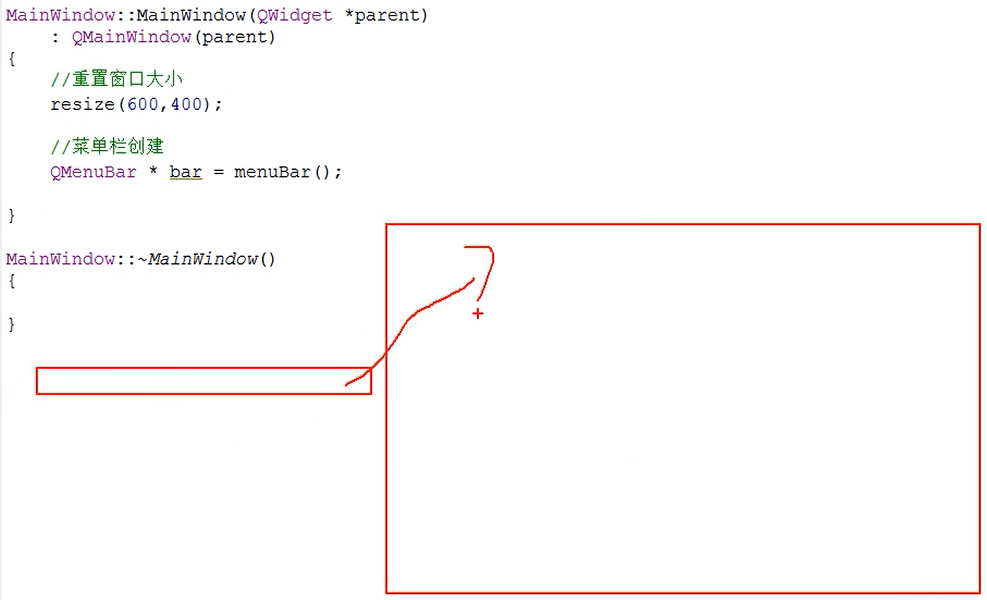
2、 Put the menu bar in the window , And create a menu
There can be at most one menu bar

#include "mainwindow.h"
#include <QMenuBar>

MainWindow::MainWindow(QWidget *parent)
    : QMainWindow(parent)
{
    //  Reset window size
    resize(600, 400);

    //  Menu bar create
    QMenuBar *bar = menuBar();

    //  Put the menu bar in the window
    setMenuBar(bar);

    //  Create a menu
    QMenu* fileMenu = bar->addMenu(" file ");
    QMenu* editMenu = bar->addMenu(" edit ");
}

MainWindow::~MainWindow()
{
}
3、 Create menu items

4、 Add separator
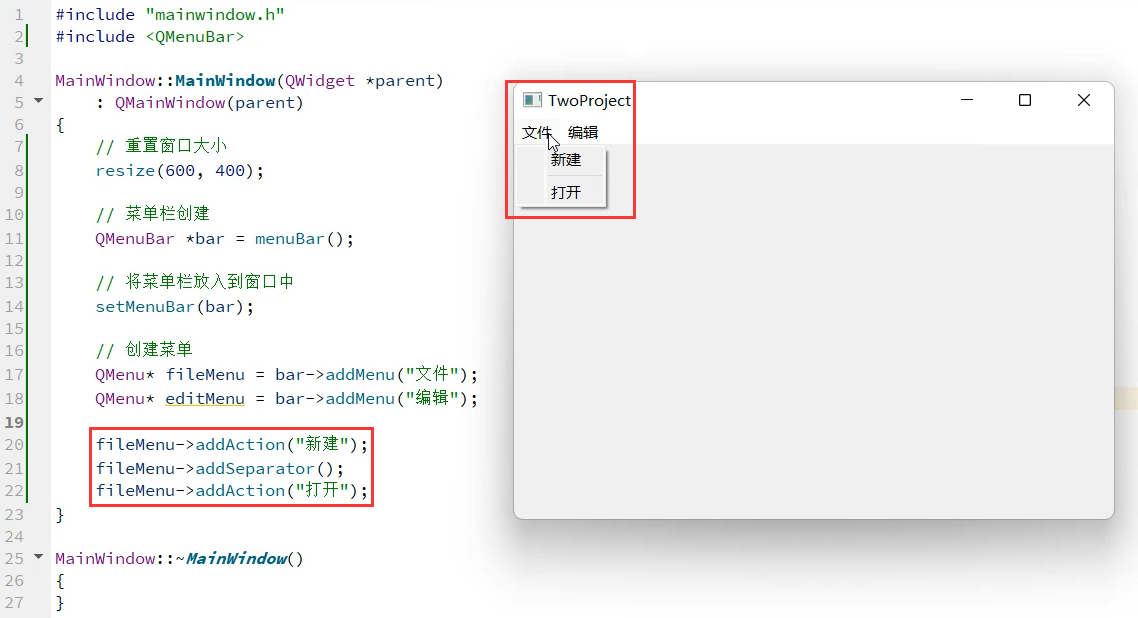
2.3 Create toolbars
1、 Default generation
#include "mainwindow.h"
#include <QMenuBar>
#include <QToolBar>
#include <QDebug>

MainWindow::MainWindow(QWidget *parent)
    : QMainWindow(parent)
{
    //  Reset window size
    resize(600, 400);

    //  Menu bar create
    QMenuBar *bar = menuBar();

    //  Put the menu bar in the window
    setMenuBar(bar);

    //  Create a menu
    QMenu* fileMenu = bar->addMenu(" file ");
    QMenu* editMenu = bar->addMenu(" edit ");

    fileMenu->addAction(" newly build ");
    fileMenu->addSeparator();
    fileMenu->addAction(" open ");

    QToolBar* toolBar = new QToolBar(this);
    addToolBar(toolBar);
}

MainWindow::~MainWindow()
{
}
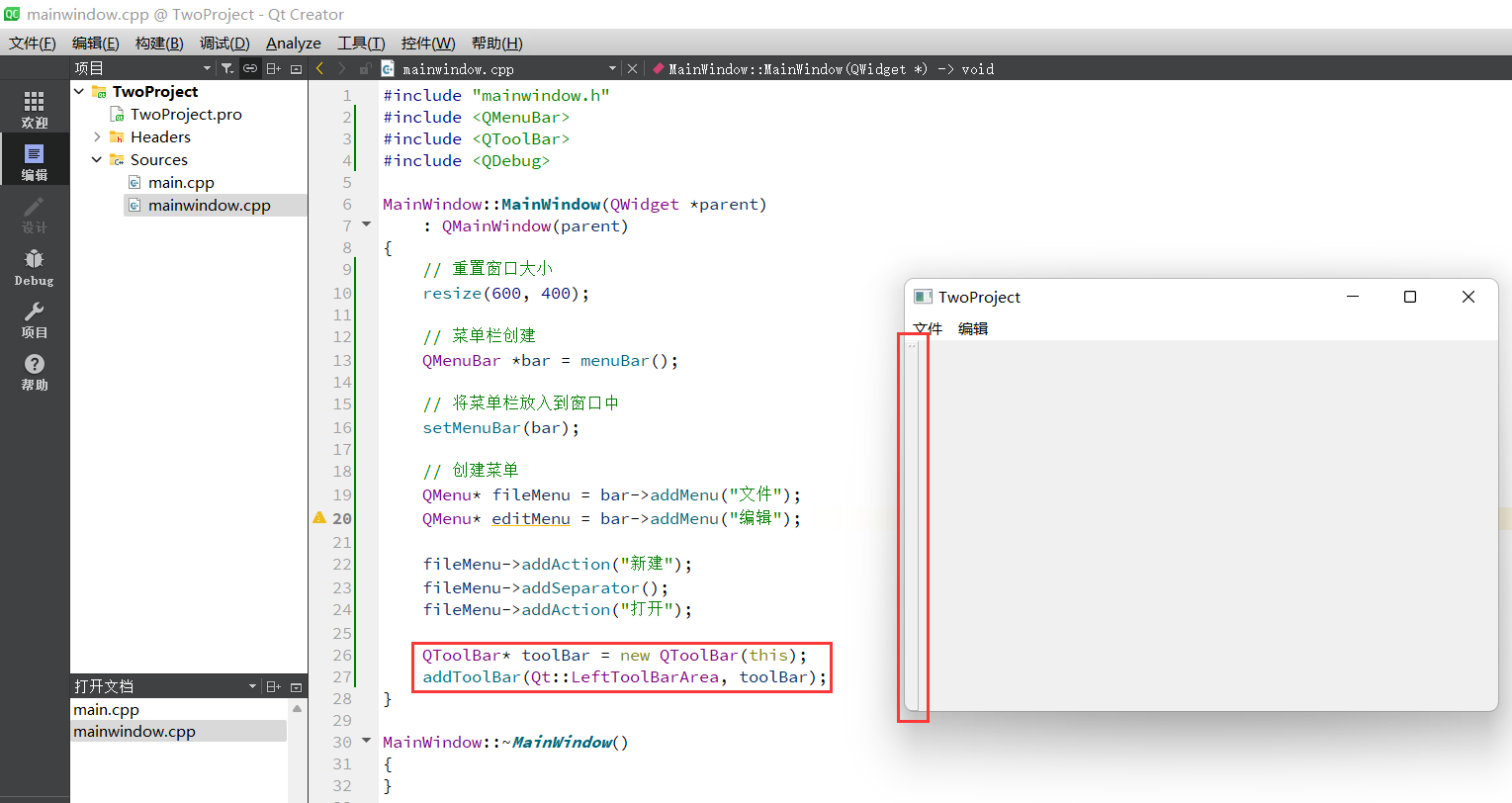
2、 Generate on the left
You can check the documentation about other parameters of this function
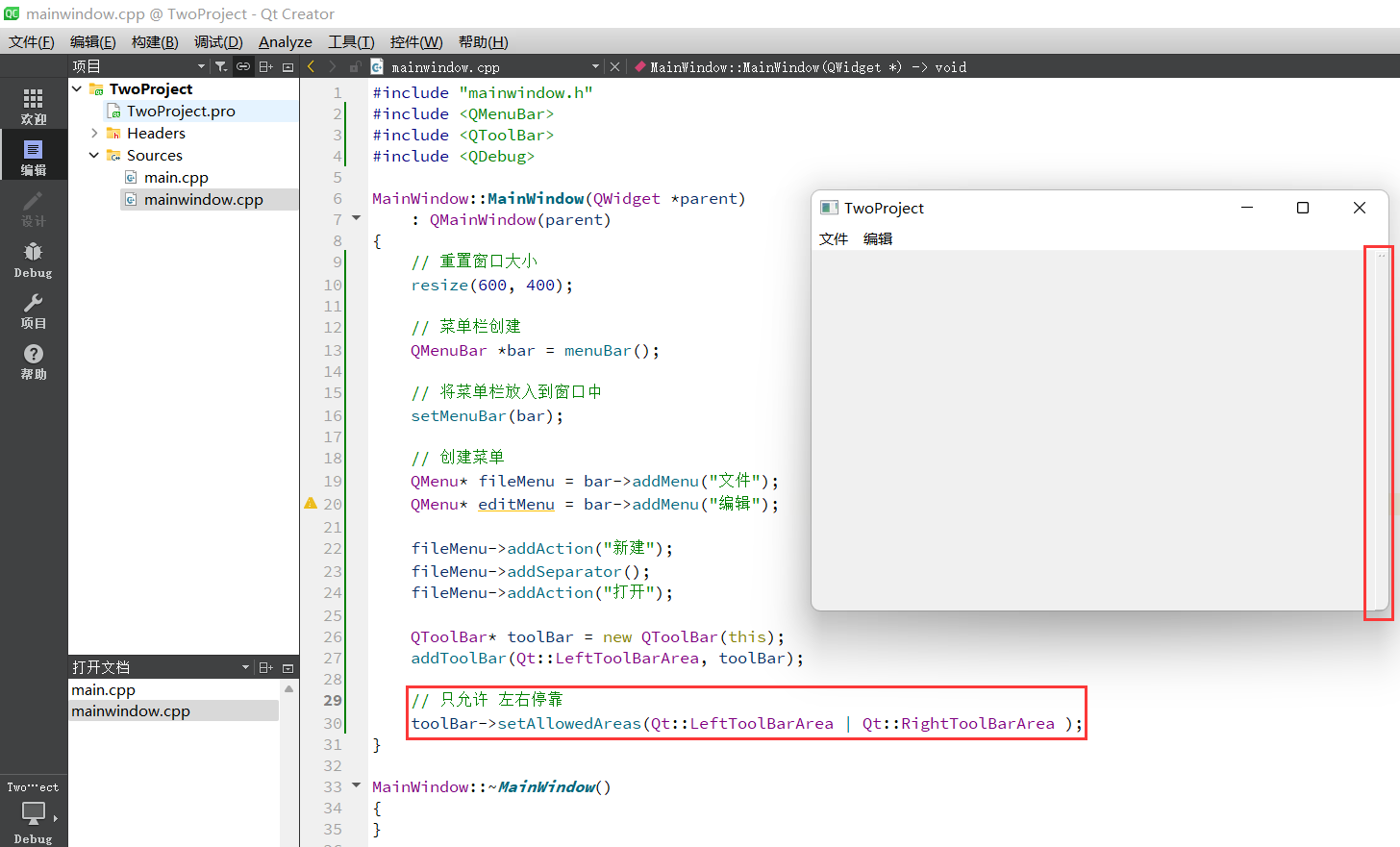
3、 Only left and right stops are allowed
4、 Floating is not allowed

5、 Mobile main switch
Turn off this switch , The above settings are meaningless
toolBar->setMovable(false);
6、 Set the content in the toolbar
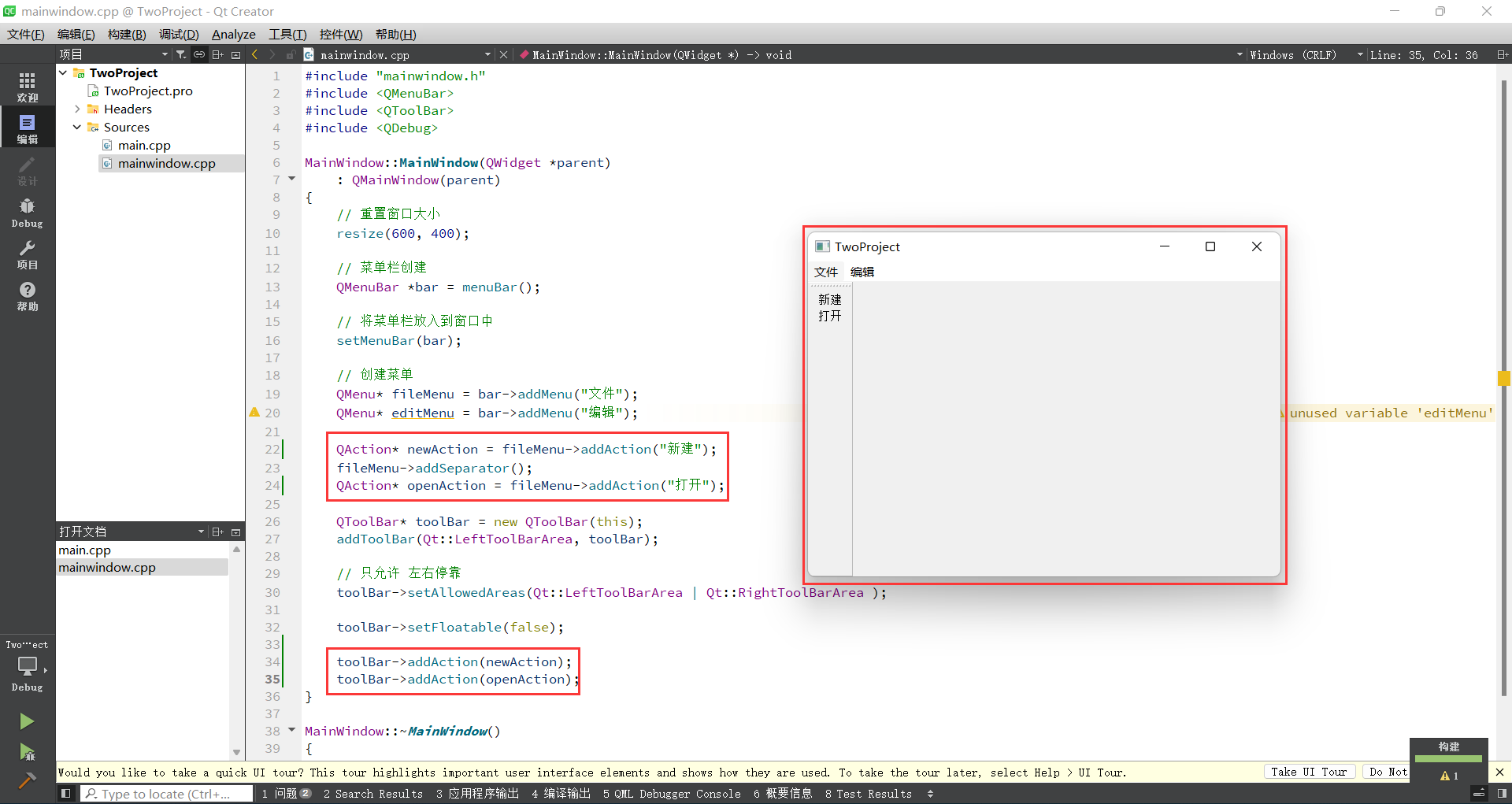
#include "mainwindow.h"
#include <QMenuBar>
#include <QToolBar>
#include <QDebug>

MainWindow::MainWindow(QWidget *parent)
    : QMainWindow(parent)
{
    //  Reset window size
    resize(600, 400);

    //  Menu bar create
    QMenuBar *bar = menuBar();

    //  Put the menu bar in the window
    setMenuBar(bar);

    //  Create a menu
    QMenu* fileMenu = bar->addMenu(" file ");
    QMenu* editMenu = bar->addMenu(" edit ");

    QAction* newAction = fileMenu->addAction(" newly build ");
    fileMenu->addSeparator();
    QAction* openAction = fileMenu->addAction(" open ");

    QToolBar* toolBar = new QToolBar(this);
    addToolBar(Qt::LeftToolBarArea, toolBar);

    //  Only   Left and right docking
    toolBar->setAllowedAreas(Qt::LeftToolBarArea | Qt::RightToolBarArea );

    toolBar->setFloatable(false);

    toolBar->addAction(newAction);
    toolBar->addAction(openAction);
}

MainWindow::~MainWindow()
{
}
Add separation lines

7、 Add controls to the toolbar
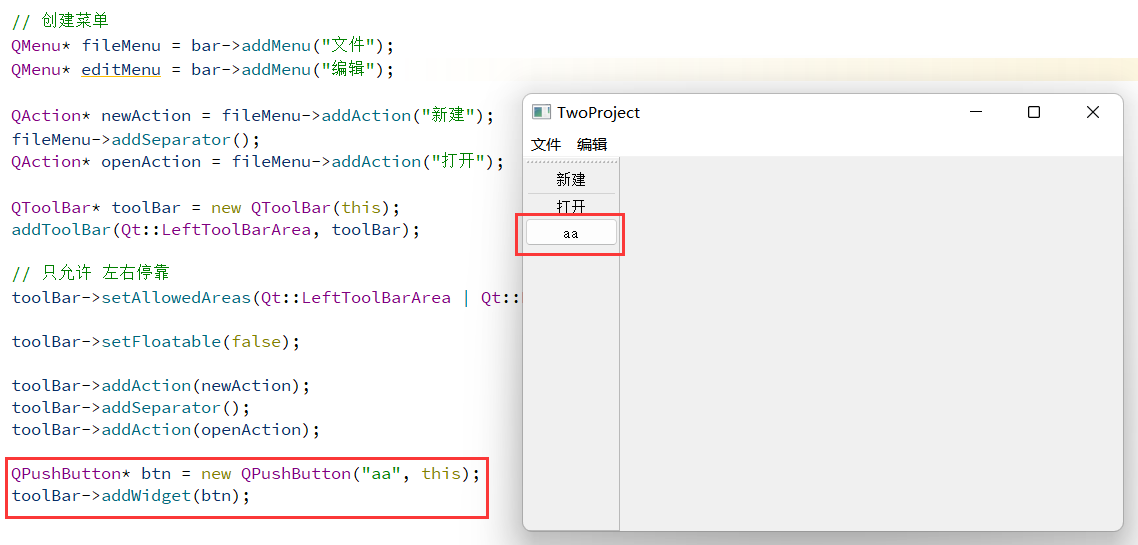
2.4 status bar
1、 status bar
There can be at most one
#include "mainwindow.h"
#include <QMenuBar>
#include <QToolBar>
#include <QDebug>
#include <QPushButton>
#include <QStatusBar>
#include <QLabel>

MainWindow::MainWindow(QWidget *parent)
    : QMainWindow(parent)
{
    //  Reset window size
    resize(600, 400);

    //  Menu bar create
    QMenuBar *bar = menuBar();

    //  Put the menu bar in the window
    setMenuBar(bar);

    //  Create a menu
    QMenu* fileMenu = bar->addMenu(" file ");
    QMenu* editMenu = bar->addMenu(" edit ");

    QAction* newAction = fileMenu->addAction(" newly build ");
    fileMenu->addSeparator();
    QAction* openAction = fileMenu->addAction(" open ");

    QToolBar* toolBar = new QToolBar(this);
    addToolBar(Qt::LeftToolBarArea, toolBar);

    //  Only   Left and right docking
    toolBar->setAllowedAreas(Qt::LeftToolBarArea | Qt::RightToolBarArea );

    toolBar->setFloatable(false);

    toolBar->addAction(newAction);
    toolBar->addSeparator();
    toolBar->addAction(openAction);

    QPushButton* btn = new QPushButton("aa", this);
    toolBar->addWidget(btn);

    //  status bar   There is at most one
    QStatusBar* stBar = statusBar();
    //  Set to the window
    setStatusBar(stBar);

    //  Create a label control
    QLabel* label = new QLabel(" Prompt information ", this);

    //  Put the label control in the status bar
    stBar->addWidget(label);
}

2、 Prompt message on the right
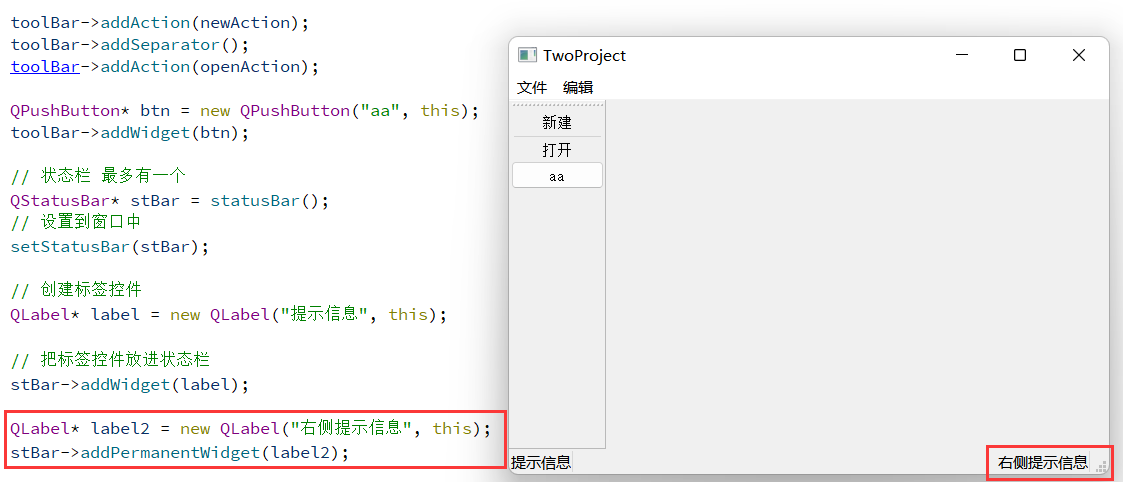
2.5 Riveted parts
Header file #include <QDockWidget>

Set the post docking area , Only up and down allowed
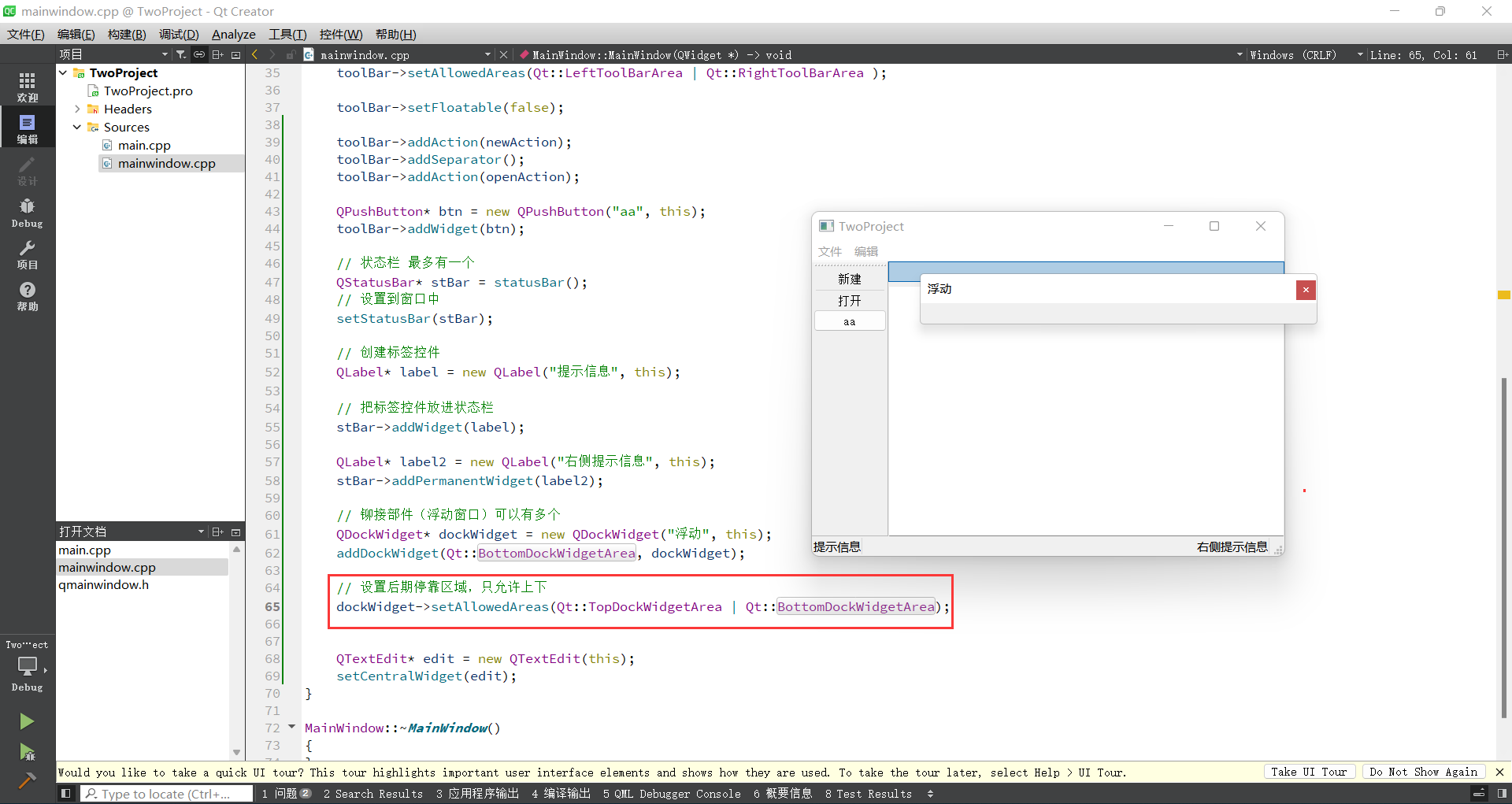
2.6 Set the center part
You can only set one
Add header file #include <QTextEdit>

边栏推荐
- 二叉树专题--【深基16.例7】普通二叉树(简化版)(multiset 求前驱 后继 哨兵法)
- 最详细MySql安装教程
- Easyexcel, a concise, fast and memory saving excel processing tool
- 点云投影图片
- PCL eigen introduction and simple use
- Jsp webshell Free from killing - The Foundation of JSP
- Hdu1228 a + B (map mapping)
- Is the account above changtou school safe?
- 华为AppLinking中统一链接的创建和使用
- [TS] 1368 seconds understand typescript generic tool types!
猜你喜欢
![[AGC] build service 3 - authentication service example](/img/89/63f367270e806e89c4ff92360dc3c5.png)
[AGC] build service 3 - authentication service example

如何用list组件实现tabbar标题栏
JSP webshell免杀——webshell免杀
flink二开,实现了个 batch lookup join(附源码)
![[play with FPGA learning 5 in simple terms ----- reset design]](/img/57/816a59787259dc32b52897c069e1a6.png)
[play with FPGA learning 5 in simple terms ----- reset design]

【AppLinking实战案例】通过AppLinking分享应用内图片
![[TS] 1368 seconds understand typescript generic tool types!](/img/2b/58a850b52ce8a9b2e6e7b6b72b0fe5.jpg)
[TS] 1368 seconds understand typescript generic tool types!

One trick to quickly realize custom application titlebar
二叉树专题--AcWing 3384. 二叉树遍历(已知先序遍历 边建树 边输出中序遍历)
最详细MySql安装教程
随机推荐
Win11 arm系统配置.net core环境变量
[TS] 1368 seconds understand typescript generic tool types!
Nodejs+express+mysql simple blog building
PCL之K-d树与八叉树
Open the encrypted SQLite method with sqlcipher
二叉树专题--P1030 [NOIP2001 普及组] 求先序排列
2022-06-17
P1055 [noip2008 popularization group] ISBN number
Flick two open, realized a batch lookup join (with source code)
MySQL keyword
Shell programming 01_ Shell foundation
一招快速实现自定义快应用titlebar
VSCode工具使用
Huawei game failed to initialize init with error code 907135000
【AppLinking实战案例】通过AppLinking分享应用内图片
最详细MySql安装教程
【深入浅出玩转FPGA学习3-----基本语法】
PCL eigen introduction and simple use
华为AppLinking中统一链接的创建和使用
MySQL environment configuration