当前位置:网站首页>One hundred questions of image processing (1-10)
One hundred questions of image processing (1-10)
2022-07-06 16:42:00 【Dog egg L】
The question comes from
Read the picture :「 The portrait is reasonable 100 Ben ノック」 Chinese version ! Designed for beginners of image processing 100 A question .
Question 1 : Channel switching
Read images , Then replace the channel with a channel .
The following code is used to extract the red channel of the image .
Be careful ,cv2.imread() The coefficients of are arranged in order !
The variables in it red It indicates that there is only the red channel of the original image imori.jpg.
answer :
import cv2

# function: BGR -> RGB


def BGR2RGB(img):
    b = img[:, :, 0].copy()
    g = img[:, :, 1].copy()
    r = img[:, :, 2].copy()

    # RGB > BGR
    img[:, :, 0] = r
    img[:, :, 1] = g
    img[:, :, 2] = b

    return img


# Read image
img = cv2.imread("imori.jpg")

# BGR -> RGB
img = BGR2RGB(img)

# Save result
cv2.imwrite("out.jpg", img)
cv2.imshow("result", img)
cv2.waitKey(0)
cv2.destroyAllWindows()
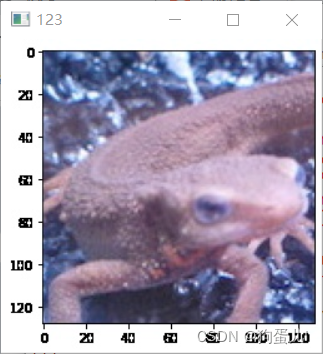
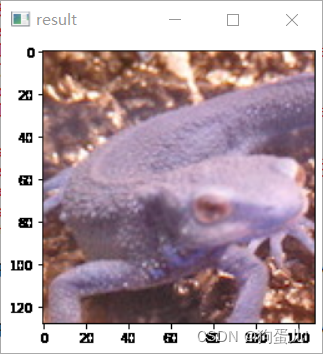
Question two : Graying (Grayscale)
Gray the image !
Gray scale is a kind of expression method of image brightness , Calculate by the following formula : Y = 0.2126 R + 0.7152 G + 0.0722 B Y = 0.2126\ R + 0.7152\ G + 0.0722\ B Y=0.2126 R+0.7152 G+0.0722 B
import cv2
import numpy as np

# Gray scale
def BGR2GRAY(img):
	b = img[:, :, 0].copy()
	g = img[:, :, 1].copy()
	r = img[:, :, 2].copy()

	# Gray scale
	out = 0.2126 * r + 0.7152 * g + 0.0722 * b
	out = out.astype(np.uint8)

	return out


# Read image
img = cv2.imread("imori.jpg").astype(np.float)

# Grayscale
out = BGR2GRAY(img)

# Save result
cv2.imwrite("out.jpg", out)
cv2.imshow("result", out)
cv2.waitKey(0)
cv2.destroyAllWindows()
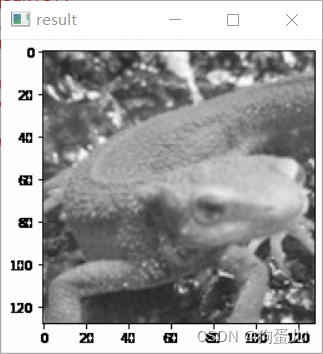
Question 3 : Two valued (Thresholding)
Binarization is a method of using black and white colors to represent images .
First, grayscale , Then take the threshold as the boundary , Greater than the threshold =255, Less than the threshold =0.
We set the threshold of grayscale to 128 To binarize , namely :
if (x>=128)x=255
else x=0
import cv2
import numpy as np

# Gray scale


def BGR2GRAY(img):
    b = img[:, :, 0].copy()
    g = img[:, :, 1].copy()
    r = img[:, :, 2].copy()

    # Gray scale
    out = 0.2126 * r + 0.7152 * g + 0.0722 * b
    out = out.astype(np.uint8)

    return out

# binalization


def binarization(img, th=128):
    img[img < th] = 0
    img[img >= th] = 255
    return img


# Read image
img = cv2.imread("imori.jpg").astype(np.float32)

# Grayscale
out = BGR2GRAY(img)

# Binarization
out = binarization(out)

# Save result
cv2.imwrite("out.jpg", out)
cv2.imshow("result", out)
cv2.waitKey(0)
cv2.destroyAllWindows()
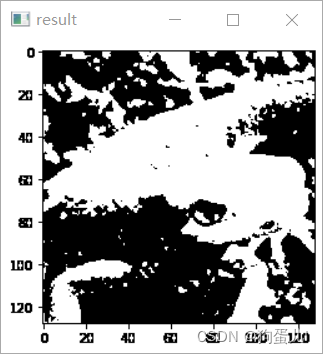
Question 4 : Otsu binarization algorithm (Otsu’s Method)
brief introduction
When we binarize the grayscale image , You need to set a segmentation threshold , We don't have a universal threshold . and Otsu Otsu algorithm is based on the information of the gray image itself , Automatically determine the best threshold , Realize the binarization of gray image with the best threshold .
It should be noted that , Otsu algorithm is not directly binarized , Instead, you get an integer number , That's the threshold , We get the threshold and then binarize .
principle
In general , We call the part we are interested in the prospect , What you are not interested in is called background .
The idea of Otsu algorithm is relatively simple , We believe that there is a big difference between the foreground and background , The pixels in the foreground are similar , The pixels in the background are similar : There are small differences in the same category , There are great differences among different classes . Then if there is a threshold , Make the image divided into foreground and background , It should conform to the minimum difference in the same category , The biggest difference among different classes , This value is the optimal threshold . According to this optimal threshold, the image segmentation effect should be the best ( The foreground and background will be completely separated ).
So the so-called “ differences ” How to say ? In fact, it is expressed by variance : If a single piece of data is more off center , that , The greater the variance . If the variance in the same category is smaller , Then it means that the difference in the same category is also small ; The greater the variance between different classes , It means the greater the difference among different classes .
topic
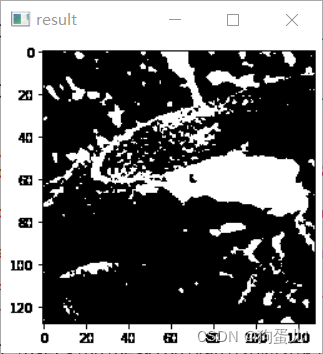
Use Otsu algorithm to binarize the image .
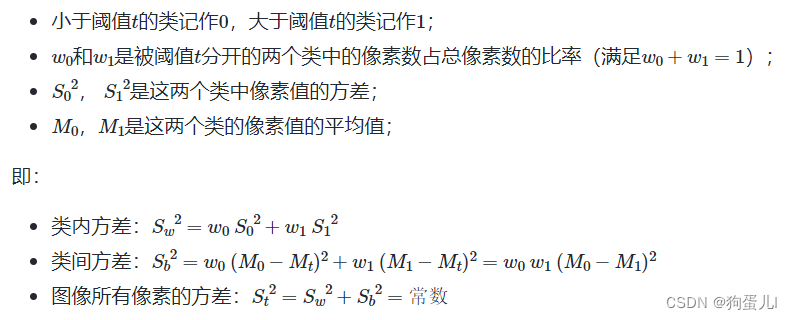
Otsu algorithm , Also known as the method of maximum interclass variance , It is an algorithm that can automatically determine the threshold in binarization .
from Within class variance and Variance between classes The ratio of :

import cv2
import numpy as np


# Gray scale
def BGR2GRAY(img):
	b = img[:, :, 0].copy()
	g = img[:, :, 1].copy()
	r = img[:, :, 2].copy()

	# Gray scale
	out = 0.2126 * r + 0.7152 * g + 0.0722 * b
	out = out.astype(np.uint8)

	return out

# Otsu Binarization
def otsu_binarization(img, th=128):
	max_sigma = 0
	max_t = 0

	# determine threshold
	for _t in range(1, 255):
		v0 = out[np.where(out < _t)]
		m0 = np.mean(v0) if len(v0) > 0 else 0.
		w0 = len(v0) / (H * W)
		v1 = out[np.where(out >= _t)]
		m1 = np.mean(v1) if len(v1) > 0 else 0.
		w1 = len(v1) / (H * W)
		sigma = w0 * w1 * ((m0 - m1) ** 2)
		if sigma > max_sigma:
			max_sigma = sigma
			max_t = _t

	# Binarization
	print("threshold >>", max_t)
	th = max_t
	out[out < th] = 0
	out[out >= th] = 255

	return out


# Read image
img = cv2.imread("imori.jpg").astype(np.float32)
H, W, C =img.shape


# Grayscale
out = BGR2GRAY(img)

# Otsu's binarization
out = otsu_binarization(out)

# Save result
cv2.imwrite("out.jpg", out)
cv2.imshow("result", out)
cv2.waitKey(0)
cv2.destroyAllWindows()
Question five : HSV \text{HSV} HSV Transformation
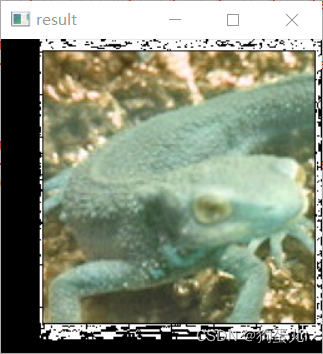
Invert the hue of the image that represents the color !
That is to use ** Hue (Hue)、 saturation (Saturation)、 Lightness (Value)** A way to express color .
- Hue : Use colors to represent , It's the name of the color , Like red 、 Blue . Hue and value correspond to the following table :
| red | yellow | green | Cyan | Blue | magenta | red |
|---|---|---|---|---|---|---|
| 0° | 60° | 120° | 180° | 240° | 300° | 360° |
- saturation : It refers to the purity of color , The lower the saturation, the darker the color ();
- Lightness : That is, the intensity of color . The higher the value, the closer it is to white , The lower the value, the closer it is to black ();
The conversion from color representation to color representation is calculated in the following way :
The value range of is , Make : Max = max ( R , G , B ) Min = min ( R , G , B ) \text{Max}=\max(R,G,B)\ \text{Min}=\min(R,G,B) Max=max(R,G,B) Min=min(R,G,B) Hue : H = { 0 ( if Min = Max ) 60 G − R Max − Min + 60 ( if Min = B ) 60 B − G Max − Min + 180 ( if Min = R ) 60 R − B Max − Min + 300 ( if Min = G ) H=\begin{cases} 0&(\text{if}\ \text{Min}=\text{Max})\ 60\ \frac{G-R}{\text{Max}-\text{Min}}+60&(\text{if}\ \text{Min}=B)\ 60\ \frac{B-G}{\text{Max}-\text{Min}}+180&(\text{if}\ \text{Min}=R)\ 60\ \frac{R-B}{\text{Max}-\text{Min}}+300&(\text{if}\ \text{Min}=G) \end{cases} H={ 0(if Min=Max) 60 Max−MinG−R+60(if Min=B) 60 Max−MinB−G+180(if Min=R) 60 Max−MinR−B+300(if Min=G) saturation : S = Max − Min S=\text{Max}-\text{Min} S=Max−Min Lightness : V = Max V=\text{Max} V=Max The conversion from color representation to color representation is calculated in the following way : C = S H ′ = H 60 X = C ( 1 − ∣ H ′ m o d 2 − 1 ∣ ) ( R , G , B ) = ( V − C ) ( 1 , 1 , 1 ) + { ( 0 , 0 , 0 ) ( if H is undefined ) ( C , X , 0 ) ( if 0 ≤ H ′ < 1 ) ( X , C , 0 ) ( if 1 ≤ H ′ < 2 ) ( 0 , C , X ) ( if 2 ≤ H ′ < 3 ) ( 0 , X , C ) ( if 3 ≤ H ′ < 4 ) ( X , 0 , C ) ( if 4 ≤ H ′ < 5 ) ( C , 0 , X ) ( if 5 ≤ H ′ < 6 ) C = S\ H' = \frac{H}{60}\ X = C\ (1 - |H' \mod 2 - 1|)\ (R,G,B)=(V-C)\ (1,1,1)+\begin{cases} (0, 0, 0)& (\text{if H is undefined})\ (C, X, 0)& (\text{if}\quad 0 \leq H' < 1)\ (X, C, 0)& (\text{if}\quad 1 \leq H' < 2)\ (0, C, X)& (\text{if}\quad 2 \leq H' < 3)\ (0, X, C)& (\text{if}\quad 3 \leq H' < 4)\ (X, 0, C)& (\text{if}\quad 4 \leq H' < 5)\ (C, 0, X)& (\text{if}\quad 5 \leq H' < 6) \end{cases} C=S H′=60H X=C (1−∣H′mod2−1∣) (R,G,B)=(V−C) (1,1,1)+{ (0,0,0)(if H is undefined) (C,X,0)(if0≤H′<1) (X,C,0)(if1≤H′<2) (0,C,X)(if2≤H′<3) (0,X,C)(if3≤H′<4) (X,0,C)(if4≤H′<5) (C,0,X)(if5≤H′<6) Please reverse the hue ( Hue value plus ), Then use color space to represent pictures .
import cv2
import numpy as np


# BGR -> HSV
def BGR2HSV(_img):
	img = _img.copy() / 255.

	hsv = np.zeros_like(img, dtype=np.float32)

	# get max and min
	max_v = np.max(img, axis=2).copy()
	min_v = np.min(img, axis=2).copy()
	min_arg = np.argmin(img, axis=2)

	# H
	hsv[..., 0][np.where(max_v == min_v)]= 0
	## if min == B
	ind = np.where(min_arg == 0)
	hsv[..., 0][ind] = 60 * (img[..., 1][ind] - img[..., 2][ind]) / (max_v[ind] - min_v[ind]) + 60
	## if min == R
	ind = np.where(min_arg == 2)
	hsv[..., 0][ind] = 60 * (img[..., 0][ind] - img[..., 1][ind]) / (max_v[ind] - min_v[ind]) + 180
	## if min == G
	ind = np.where(min_arg == 1)
	hsv[..., 0][ind] = 60 * (img[..., 2][ind] - img[..., 0][ind]) / (max_v[ind] - min_v[ind]) + 300

	# S
	hsv[..., 1] = max_v.copy() - min_v.copy()

	# V
	hsv[..., 2] = max_v.copy()

	return hsv


def HSV2BGR(_img, hsv):
	img = _img.copy() / 255.

	# get max and min
	max_v = np.max(img, axis=2).copy()
	min_v = np.min(img, axis=2).copy()

	out = np.zeros_like(img)

	H = hsv[..., 0]
	S = hsv[..., 1]
	V = hsv[..., 2]

	C = S
	H_ = H / 60.
	X = C * (1 - np.abs( H_ % 2 - 1))
	Z = np.zeros_like(H)

	vals = [[Z,X,C], [Z,C,X], [X,C,Z], [C,X,Z], [C,Z,X], [X,Z,C]]

	for i in range(6):
		ind = np.where((i <= H_) & (H_ < (i+1)))
		out[..., 0][ind] = (V - C)[ind] + vals[i][0][ind]
		out[..., 1][ind] = (V - C)[ind] + vals[i][1][ind]
		out[..., 2][ind] = (V - C)[ind] + vals[i][2][ind]

	out[np.where(max_v == min_v)] = 0
	out = np.clip(out, 0, 1)
	out = (out * 255).astype(np.uint8)

	return out


# Read image
img = cv2.imread("imori.jpg").astype(np.float32)

# RGB > HSV
hsv = BGR2HSV(img)

# Transpose Hue
hsv[..., 0] = (hsv[..., 0] + 180) % 360

# HSV > RGB
out = HSV2BGR(img, hsv)

# Save result
cv2.imwrite("out.jpg", out)
cv2.imshow("result", out)
cv2.waitKey(0)
cv2.destroyAllWindows()
Question 6 : Subtractive treatment
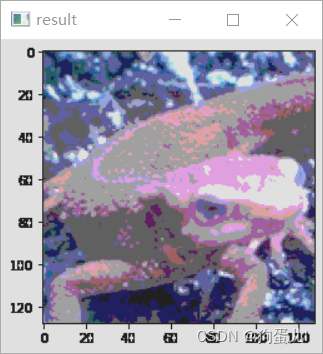
We change the value of the image from 256^ 3 Compression - 4^ 3, The value to be taken is only 32,96,160,224. This is called color quantization . The value of color is defined in the following way : val = { 32 ( 0 ≤ var < 64 ) 96 ( 64 ≤ var < 128 ) 160 ( 128 ≤ var < 192 ) 224 ( 192 ≤ var < 256 ) \text{val}= \begin{cases} 32& (0 \leq \text{var} < 64)\ 96& (64\leq \text{var}<128)\ 160&(128\leq \text{var}<192)\ 224&(192\leq \text{var}<256) \end{cases} val={ 32(0≤var<64) 96(64≤var<128) 160(128≤var<192) 224(192≤var<256)
import cv2
import numpy as np


# Dicrease color
def dicrease_color(img):
	out = img.copy()

	out = out // 64 * 64 + 32

	return out


# Read image
img = cv2.imread("imori.jpg")

# Dicrease color
out = dicrease_color(img)

cv2.imwrite("out.jpg", out)
cv2.imshow("result", out)
cv2.waitKey(0)
cv2.destroyAllWindows()
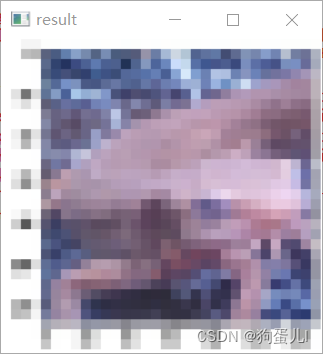
Question seven : The average pooling (Average Pooling)
Divide the image into fixed size grids , The pixel value in the grid is the average value of all pixels in the grid .
We will use the same size grid to divide the image , The operation of finding the representative value in the grid is called Pooling (Pooling).
Pool operation is Convolutional neural networks (Convolutional Neural Network) The important image processing method in . Average pooling is defined as follows : v = 1 ∣ R ∣ ∑ i = 1 R v i v=\frac{1}{|R|}\ \sum\limits_{i=1}^R\ v_i v=∣R∣1 i=1∑R vi Please put the size 128128 Of imori.jpg Use 88 The grid is pooled evenly .
import cv2
import numpy as np


# average pooling
def average_pooling(img, G=8):
    out = img.copy()

    H, W, C = img.shape
    Nh = int(H / G)
    Nw = int(W / G)

    for y in range(Nh):
        for x in range(Nw):
            for c in range(C):
                out[G*y:G*(y+1), G*x:G*(x+1), c] = np.mean(out[G*y:G*(y+1), G*x:G*(x+1), c]).astype(np.int)

    return out


# Read image
img = cv2.imread("imori.jpg")

# Average Pooling
out = average_pooling(img)

# Save result
cv2.imwrite("out.jpg", out)
cv2.imshow("result", out)
cv2.waitKey(0)
cv2.destroyAllWindows()
Question 8 : Maximum pooling (Max Pooling)
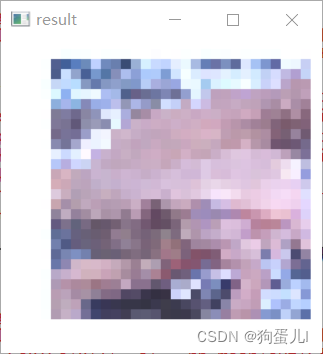
The values in the grid are not averaged , Instead, the maximum value in the grid is taken for pooling .
import cv2
import numpy as np

# max pooling
def max_pooling(img, G=8):
    # Max Pooling
    out = img.copy()

    H, W, C = img.shape
    Nh = int(H / G)
    Nw = int(W / G)

    for y in range(Nh):
        for x in range(Nw):
            for c in range(C):
                out[G*y:G*(y+1), G*x:G*(x+1), c] = np.max(out[G*y:G*(y+1), G*x:G*(x+1), c])

    return out


# Read image
img = cv2.imread("imori.jpg")

# Max pooling
out = max_pooling(img)

# Save result
cv2.imwrite("out.jpg", out)
cv2.imshow("result", out)
cv2.waitKey(0)
cv2.destroyAllWindows()
Question 9 : Gauss filtering (Gaussian Filter)
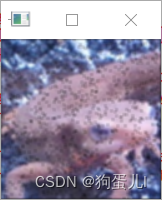
Using a Gaussian filter (3*3 size , Standard deviation σ=1.3) Come on imori_noise.jpg Noise reduction treatment !
Gaussian filter is a kind of filter that can make images smooth Filter for , Used to remove noise . There are also median filters that can be used to remove noise ( See question 10 ), Smoothing filter ( See question 11 )、LoG filter ( See question 19 ).
Gaussian filter smoothes the pixels around the central pixel according to the weighted average of Gaussian distribution . In this way ( A two-dimensional ) Weights are often referred to as convolution kernels (kernel) Or filter (filter).
however , Because the length and width of the image may not be an integral multiple of the filter size , So we need to fill in the edge of the image 0. This method is called Zero Padding. And weight g( Convolution kernel ) To normalize .
Calculate the weight according to the following Gaussian distribution formula : g ( x , y , σ ) = 1 2 π σ 2 e − x 2 + y 2 2 σ 2 g(x,y,\sigma)=\frac{1}{2\ \pi\ \sigma^2}\ e^{-\frac{x^2+y^2}{2\ \sigma^2}} g(x,y,σ)=2 π σ21 e−2 σ2x2+y2
Standard deviation σ=1.3 Of 8- The nearest neighbor Gaussian filter is as follows : K = 1 16 [ 1 2 1 2 4 2 1 2 1 ] K=\frac{1}{16}\ \left[ \begin{matrix} 1 & 2 & 1 \ 2 & 4 & 2 \ 1 & 2 & 1 \end{matrix} \right] K=161 [121 242 121]
import cv2
import numpy as np


# Gaussian filter
def gaussian_filter(img, K_size=3, sigma=1.3):
	if len(img.shape) == 3:
		H, W, C = img.shape
	else:
		img = np.expand_dims(img, axis=-1)
		H, W, C = img.shape


	## Zero padding
	pad = K_size // 2
	out = np.zeros((H + pad * 2, W + pad * 2, C), dtype=np.float)
	out[pad: pad + H, pad: pad + W] = img.copy().astype(np.float)

	## prepare Kernel
	K = np.zeros((K_size, K_size), dtype=np.float)
	for x in range(-pad, -pad + K_size):
		for y in range(-pad, -pad + K_size):
			K[y + pad, x + pad] = np.exp( -(x ** 2 + y ** 2) / (2 * (sigma ** 2)))
	K /= (2 * np.pi * sigma * sigma)
	K /= K.sum()

	tmp = out.copy()

	# filtering
	for y in range(H):
		for x in range(W):
			for c in range(C):
				out[pad + y, pad + x, c] = np.sum(K * tmp[y: y + K_size, x: x + K_size, c])

	out = np.clip(out, 0, 255)
	out = out[pad: pad + H, pad: pad + W].astype(np.uint8)

	return out


# Read image
img = cv2.imread("imori_noise.jpg")


# Gaussian Filter
out = gaussian_filter(img, K_size=3, sigma=1.3)


# Save result
cv2.imwrite("out.jpg", out)
cv2.imshow("result", out)
cv2.waitKey(0)
cv2.destroyAllWindows()
Question 10 : median filtering (Median Filter)
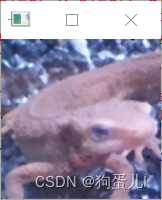
Use median filter (3*3 size ) Come on imori_noise.jpg Noise reduction treatment !
Median filter is a kind of filter that can smooth the image . This filter is used within the filter range ( Here it is. 3*3) Filter the median value of pixels , Please also use Zero Padding.
import cv2
import numpy as np


# Median filter
def median_filter(img, K_size=3):
    H, W, C = img.shape

    ## Zero padding
    pad = K_size // 2
    out = np.zeros((H + pad*2, W + pad*2, C), dtype=np.float)
    out[pad:pad+H, pad:pad+W] = img.copy().astype(np.float)

    tmp = out.copy()

    # filtering
    for y in range(H):
        for x in range(W):
            for c in range(C):
                out[pad+y, pad+x, c] = np.median(tmp[y:y+K_size, x:x+K_size, c])

    out = out[pad:pad+H, pad:pad+W].astype(np.uint8)

    return out


# Read image
img = cv2.imread("imori_noise.jpg")


# Median Filter
out = median_filter(img, K_size=3)


# Save result
cv2.imwrite("out.jpg", out)
cv2.imshow("result", out)
cv2.waitKey(0)
cv2.destroyAllWindows()
边栏推荐
- Useeffect, triggered when function components are mounted and unloaded
- Li Kou: the 81st biweekly match
- Market trend report, technical innovation and market forecast of tabletop dishwashers in China
- Codeforces Round #799 (Div. 4)A~H
- (lightoj - 1369) answering queries (thinking)
- Hbuilder x format shortcut key settings
- 简单尝试DeepFaceLab(DeepFake)的新AMP模型
- Simply try the new amp model of deepfacelab (deepfake)
- Acwing: Game 58 of the week
- Effet d'utilisation, déclenché lorsque les composants de la fonction sont montés et déchargés
猜你喜欢
我在字节跳动「修电影」
VMware Tools和open-vm-tools的安装与使用:解决虚拟机不全屏和无法传输文件的问题
Spark independent cluster dynamic online and offline worker node
SQL quick start
Chapter 1 overview of MapReduce
CMake速成
软通乐学-js求字符串中字符串当中那个字符出现的次数多 -冯浩的博客
Raspberry pie 4B installation opencv3.4.0
Discussion on QWidget code setting style sheet
Li Kou: the 81st biweekly match
随机推荐
Chapter III principles of MapReduce framework
日期加1天
Useeffect, triggered when function components are mounted and unloaded
Codeforces round 797 (Div. 3) no f
Chapter 6 datanode
Hbuilder x format shortcut key settings
Simple records of business system migration from Oracle to opengauss database
Market trend report, technical innovation and market forecast of China's desktop capacitance meter
Advancedinstaller installation package custom action open file
<li>圆点样式 list-style-type
Research Report on market supply and demand and strategy of China's four flat leadless (QFN) packaging industry
Input can only input numbers, limited input
第5章 NameNode和SecondaryNameNode
视频压缩编码和音频压缩编码基本原理
Submit several problem records of spark application (sparklauncher with cluster deploy mode)
Research Report on market supply and demand and strategy of China's tetraacetylethylenediamine (TAED) industry
Educational Codeforces Round 122 (Rated for Div. 2)
SF smart logistics Campus Technology Challenge (no T4)
Codeforces Round #798 (Div. 2)A~D
音视频开发面试题