当前位置:网站首页>el-tree渲染大量数据的解决方案(不通过懒加载)
el-tree渲染大量数据的解决方案(不通过懒加载)
2022-08-02 19:15:00 【前端开发小司机】
1.虚拟滚动树:使用@femessage element-ui。这个库是由某大神在element-ui的基础上又丰富了一些功能,我们需要的el-tree虚拟滚动树就在里面。
地址:https://femessage.github.io/element/#/zh-CN
安装过程和vue2.0的一样,树的api也基本一致,但是多了一个“height” 属性。

给树设置了height就可以开启虚拟滚动。
2.搜索功能:实际业务中,海量树往往需要结合搜索功能,但是很遗憾,虚拟滚动树自带的搜索方法会出现各种各样的问题,查看源码
<virtual-list v-if="height" :style="{ height: height + 'px', 'overflow-y': 'auto' }":data-key="getNodeKey":data-sources="visibleList":data-component="itemComponent":keeps="Math.ceil(height / 22) + extraLine":extra-props="{renderAfterExpand,showCheckbox,renderContent,onNodeExpand: handleNodeExpand}"/>
我们发现虚拟滚动树在el-tree里引入了vue-virtual-scroll-list(一个实现虚拟滚动列表的方案),作者把两者进行了一个结合,当设置了height的时候,启用 virtual-list,然后将数据和tree模板放进去。
再看element-ui 实现过滤功能的方法
`
created() {this.isTree = true;this.store = new TreeStore({key: this.nodeKey,data: this.data,lazy: this.lazy,props: this.props,load: this.load,currentNodeKey: this.currentNodeKey,checkStrictly: this.checkStrictly,checkDescendants: this.checkDescendants,defaultCheckedKeys: this.defaultCheckedKeys,defaultExpandedKeys: this.defaultExpandedKeys,autoExpandParent: this.autoExpandParent,defaultExpandAll: this.defaultExpandAll,filterNodeMethod: this.filterNodeMethod});this.root = this.store.root;let dragState = this.dragState;
` 树在初始化的时候先是生成了一个treeStore的对象用来托管数据,并且对每个数据生成对应的一个节点对象来进行托管。在store对象里就有filter方法。
tree-store.js
filter(value) {const filterNodeMethod = this.filterNodeMethod;const lazy = this.lazy;const traverse = function(node) {const childNodes = node.root ? node.root.childNodes : node.childNodes;childNodes.forEach((child) => {child.visible = filterNodeMethod.call(child, value, child.data, child);traverse(child);});if (!node.visible && childNodes.length) {let allHidden = true;allHidden = !childNodes.some(child => child.visible);if (node.root) {node.root.visible = allHidden === false;} else {node.visible = allHidden === false;}}if (!value) return;if (node.visible && !node.isLeaf && !lazy) node.expand();};traverse(this);}
我们可以看到tree在调用filter方法的时候其实是对node节点的visible属性进行设置,从而达到过滤的目的。
tree-virtual-node.vue
<divclass="el-tree-node"@click.stop="handleClick"@contextmenu="($event) => this.handleContextMenu($event)"v-show="source.visible":class="{
	'is-expanded': expanded,
	'is-current': source.isCurrent,
	'is-hidden': !source.visible,
	'is-focusable': !source.disabled,
	'is-checked': !source.disabled && source.checked,}"role="treeitem"tabindex="-1":aria-expanded="expanded":aria-disabled="source.disabled":aria-checked="source.checked"ref="node"
>.....
从v-show也能看出,后面再查看了vue-virtual-scroll-list源码,
index.js
'dataSources.length' () {this.virtual.updateParam('uniqueIds', this.getUniqueIdFromDataSources())this.virtual.handleDataSourcesChange()},
发现虚拟列表的刷新监听的是外部传入数组的长度。而我们el-tree里的筛选方法仅仅只是通过设置节点的vis属性为false,来达到隐藏节点的目的。虚拟滚动树并没有重新加载,这应该是自带的filter方法出现bug的原因(可能不严谨)。
3。解决:找到了原因,下面就是寻找解决方案了。其实也简单,只需要不用el-tree自带的搜索方法就可以了,这就需要我们自定义一个搜索方法,根据用户输入的节点信息,去把相关节点的数据过滤出来,放到el-tree的data里,类似的方法网上也很多,比如我们项目在用的是这个
 findRecord(treeData, key, value, eq = false, notIncluded = true) {const arr = [];for (const node of treeData) {let flag = false;const val = node[key];if (Array.isArray(value)) {if (eq) {if (val && value.includes(val)) {flag = true;}if (!notIncluded && val && !value.includes(val)) {flag = true;} else if (!notIncluded) {flag = false;}} else {if (val && value.findIndex(item => item.indexOf(val) > -1) > 0) {flag = true;}if (!notIncluded && val && value.findIndex(item => item.indexOf(val) === -1) > 0) {flag = true;} else if (!notIncluded) {flag = false;}}} else {if (eq) {if (val && val === value) {flag = true;}if (!notIncluded && val && val !== value) {flag = true;} else if (!notIncluded) {flag = false;}} else {if (val && val.indexOf(value) > -1) {flag = true;}if (!notIncluded && val && val.indexOf(value) === -1) {flag = true;} else if (!notIncluded) {flag = false;}}}if (flag) {arr.push(node);} else if (node.children && node.children.length) {const subArr = this.findRecord(node.children, key, value, eq, notIncluded);if (subArr && subArr.length > 0) {node.children = subArr;arr.push(node);}}}return arr;},

this.findRecord(this.allTreeData, "label", text)
根据实际需求修改一下就行。
至此,如果你的项目用的是虚拟滚动+单选+搜索,上述修改之后就可以满足需要了,但是如果还要支持多选的话,头疼的问题又来了——搜索时候树的选中状态怎么处理?
因为我们的搜索其实是手动替换了el-tree的显示数据,整个虚拟滚动组件会重新刷新,选中状态也是一样。经过思考,我们大致确定了两种方案:
1、手动去记录搜索过程中用户勾选数据,并且模仿el-tree选中逻辑去进行处理(一开始同事是按照这种方案来的,但是最后感觉用户体验其实不好,也不符合树的正常勾选逻辑,代码逻辑还十分复杂,后面放弃。)
2、在源码上做文章。因为el-tree的选中状态其实是内置的store、node对象来托管的,我们可以在固定源数据的同时,将上面我们手动筛选的节点数据,将多余的node对象过滤掉。(这边需要看一下源码)
 <divclass="el-tree"ref="elTree":class="{'el-tree--highlight-current': highlightCurrent,'is-dragging': !!dragState.draggingNode,'is-drop-not-allow': !dragState.allowDrop,'is-drop-inner': dragState.dropType === 'inner'}"role="tree"><virtual-listv-if="showData === null || showDataList.length !== 0":style="{'overflow-y': 'auto' }":data-key="getNodeKey":data-sources="showDataList":data-component="itemComponent":keeps="Math.ceil((height || $refs.elTree.offsetHeight) / 22) + extraLine":extra-props="{renderAfterExpand,showCheckbox,renderContent,onNodeExpand: handleNodeExpand}"/><!-- <el-tree-node
			v-else
			v-for="child in root.childNodes"
			:node="child"
			:props="props"
			:render-after-expand="renderAfterExpand"
			:show-checkbox="showCheckbox"
			:key="getNodeKey(child)"
			:render-content="renderContent"
			@node-expand="handleNodeExpand"
		>
		</el-tree-node> --><div class="el-tree__empty-block" v-else><span class="el-tree__empty-text">{
   { emptyText }}</span></div><div v-show="dragState.showDropIndicator" class="el-tree__drop-indicator" ref="dropIndicator"></div></div>
</template>

<script>
import TreeStore from "./model/tree-store";
import VirtualList from "vue-virtual-scroll-list";
import { getNodeKey, findNearestComponent } from "./model/util";
import ElTreeNode from "./tree-node.vue";
import ElVirtualNode from "./tree-virtual-node.vue";
import emitter from "./mixins/emitter";
import { addClass, removeClass } from "./utils/dom";

export default {name: "ElTree",mixins: [emitter],components: {VirtualList,ElTreeNode},data() {return {store: null,root: null,currentNode: null,treeItems: null,checkboxItems: [],dragState: {showDropIndicator: false,draggingNode: null,dropNode: null,allowDrop: true},itemComponent: ElVirtualNode};},props: {showData: {type: Array | null,default: () => {return null;}},data: {type: Array},emptyText: {type: String,default() {return "暂无数据";}},renderAfterExpand: {type: Boolean,default: true},nodeKey: String,checkStrictly: Boolean,defaultExpandAll: Boolean,expandOnClickNode: {type: Boolean,default: true},checkOnClickNode: Boolean,checkDescendants: {type: Boolean,default: false},autoExpandParent: {type: Boolean,default: true},defaultCheckedKeys: Array,defaultExpandedKeys: Array,currentNodeKey: [String, Number],renderContent: Function,showCheckbox: {type: Boolean,default: false},draggable: {type: Boolean,default: false},allowDrag: Function,allowDrop: Function,props: {default() {return {children: "children",label: "label",disabled: "disabled"};}},lazy: {type: Boolean,default: false},highlightCurrent: Boolean,load: Function,filterNodeMethod: Function,accordion: Boolean,indent: {type: Number,default: 18},iconClass: String,height: {type: Number,default: 0},extraLine: {type: Number,default: 8}},computed: {children: {set(value) {this.data = value;},get() {return this.data;}},treeItemArray() {return Array.prototype.slice.call(this.treeItems);},showDataList() {let treeToArray = (nodeKeyList, node) => {nodeKeyList.push(node.nodeKey);if (node.children && node.children.length > 0) {node.children.forEach(item => {treeToArray(nodeKeyList, item);});}};if (this.showData !== null) {let nodeKeyList = [];if (this.showData.length !== 0) {treeToArray(nodeKeyList, this.showData[0]);}return this.flattenTree(this.root.childNodes).filter(({ data }) => {return nodeKeyList.includes(data.nodeKey);});} else {return this.flattenTree(this.root.childNodes);}}},watch: {defaultCheckedKeys(newVal) {this.store.setDefaultCheckedKey(newVal);},defaultExpandedKeys(newVal) {this.store.defaultExpandedKeys = newVal;this.store.setDefaultExpandedKeys(newVal);},data(newVal) {this.store.setData(newVal);},checkboxItems(val) {Array.prototype.forEach.call(val, checkbox => {checkbox.setAttribute("tabindex", -1);});},checkStrictly(newVal) {this.store.checkStrictly = newVal;}},methods: {flattenTree(datas) {return datas.reduce((conn, data) => {conn.push(data);if (data.expanded && data.childNodes.length) {conn.push(...this.flattenTree(data.childNodes));}return conn;}, []);},filter(value) {if (!this.filterNodeMethod) throw new Error("[Tree] filterNodeMethod is required when filter");this.store.filter(value);},getNodeKey(node) {return getNodeKey(this.nodeKey, node.data);},getNodePath(data) {if (!this.nodeKey) throw new Error("[Tree] nodeKey is required in getNodePath");const node = this.store.getNode(data);if (!node) return [];const path = [node.data];let parent = node.parent;while (parent && parent !== this.root) {path.push(parent.data);parent = parent.parent;}return path.reverse();},getCheckedNodes(leafOnly, includeHalfChecked) {return this.store.getCheckedNodes(leafOnly, includeHalfChecked);},getCheckedKeys(leafOnly) {return this.store.getCheckedKeys(leafOnly);},getCurrentNode() {const currentNode = this.store.getCurrentNode();return currentNode ? currentNode.data : null;},getCurrentKey() {if (!this.nodeKey) throw new Error("[Tree] nodeKey is required in getCurrentKey");const currentNode = this.getCurrentNode();return currentNode ? currentNode[this.nodeKey] : null;},setCheckedNodes(nodes, leafOnly) {if (!this.nodeKey) throw new Error("[Tree] nodeKey is required in setCheckedNodes");this.store.setCheckedNodes(nodes, leafOnly);},setCheckedKeys(keys, leafOnly) {if (!this.nodeKey) throw new Error("[Tree] nodeKey is required in setCheckedKeys");this.store.setCheckedKeys(keys, leafOnly);},setChecked(data, checked, deep) {this.store.setChecked(data, checked, deep);},getHalfCheckedNodes() {return this.store.getHalfCheckedNodes();},getHalfCheckedKeys() {return this.store.getHalfCheckedKeys();},setCurrentNode(node) {if (!this.nodeKey) throw new Error("[Tree] nodeKey is required in setCurrentNode");this.store.setUserCurrentNode(node);},setCurrentKey(key) {if (!this.nodeKey) throw new Error("[Tree] nodeKey is required in setCurrentKey");this.store.setCurrentNodeKey(key);},getNode(data) {return this.store.getNode(data);},remove(data) {this.store.remove(data);},append(data, parentNode) {this.store.append(data, parentNode);},insertBefore(data, refNode) {this.store.insertBefore(data, refNode);},insertAfter(data, refNode) {this.store.insertAfter(data, refNode);},handleNodeExpand(nodeData, node, instance) {this.broadcast("ElTreeNode", "tree-node-expand", node);this.$emit("node-expand", nodeData, node, instance);},updateKeyChildren(key, data) {if (!this.nodeKey) throw new Error("[Tree] nodeKey is required in updateKeyChild");this.store.updateChildren(key, data);},initTabIndex() {this.treeItems = this.$el.querySelectorAll(".is-focusable[role=treeitem]");this.checkboxItems = this.$el.querySelectorAll("input[type=checkbox]");const checkedItem = this.$el.querySelectorAll(".is-checked[role=treeitem]");if (checkedItem.length) {checkedItem[0].setAttribute("tabindex", 0);return;}this.treeItems[0] && this.treeItems[0].setAttribute("tabindex", 0);},handleKeydown(ev) {const currentItem = ev.target;if (currentItem.className.indexOf("el-tree-node") === -1) return;const keyCode = ev.keyCode;this.treeItems = this.$el.querySelectorAll(".is-focusable[role=treeitem]");const currentIndex = this.treeItemArray.indexOf(currentItem);let nextIndex;if ([38, 40].indexOf(keyCode) > -1) {// up、downev.preventDefault();if (keyCode === 38) {// upnextIndex = currentIndex !== 0 ? currentIndex - 1 : 0;} else {nextIndex = currentIndex < this.treeItemArray.length - 1 ? currentIndex + 1 : 0;}this.treeItemArray[nextIndex].focus(); // 选中}if ([37, 39].indexOf(keyCode) > -1) {// left、right 展开ev.preventDefault();currentItem.click(); // 选中}const hasInput = currentItem.querySelector('[type="checkbox"]');if ([13, 32].indexOf(keyCode) > -1 && hasInput) {// space enter选中checkboxev.preventDefault();hasInput.click();}}},created() {this.isTree = true;this.store = new TreeStore({key: this.nodeKey,data: this.data,lazy: this.lazy,props: this.props,load: this.load,currentNodeKey: this.currentNodeKey,checkStrictly: this.checkStrictly,checkDescendants: this.checkDescendants,defaultCheckedKeys: this.defaultCheckedKeys,defaultExpandedKeys: this.defaultExpandedKeys,autoExpandParent: this.autoExpandParent,defaultExpandAll: this.defaultExpandAll,filterNodeMethod: this.filterNodeMethod});this.root = this.store.root;let dragState = this.dragState;this.$on("tree-node-drag-start", (event, treeNode) => {if (typeof this.allowDrag === "function" && !this.allowDrag(treeNode.node)) {event.preventDefault();return false;}event.dataTransfer.effectAllowed = "move";// wrap in try catch to address IE's error when first param is 'text/plain'try {// setData is required for draggable to work in FireFox// the content has to be '' so dragging a node out of the tree won't open a new tab in FireFoxevent.dataTransfer.setData("text/plain", "");} catch (e) {}dragState.draggingNode = treeNode;this.$emit("node-drag-start", treeNode.node, event);});this.$on("tree-node-drag-over", (event, treeNode) => {const dropNode = findNearestComponent(event.target, "ElTreeNode");const oldDropNode = dragState.dropNode;if (oldDropNode && oldDropNode !== dropNode) {removeClass(oldDropNode.$el, "is-drop-inner");}const draggingNode = dragState.draggingNode;if (!draggingNode || !dropNode) return;let dropPrev = true;let dropInner = true;let dropNext = true;let userAllowDropInner = true;if (typeof this.allowDrop === "function") {dropPrev = this.allowDrop(draggingNode.node, dropNode.node, "prev");userAllowDropInner = dropInner = this.allowDrop(draggingNode.node, dropNode.node, "inner");dropNext = this.allowDrop(draggingNode.node, dropNode.node, "next");}event.dataTransfer.dropEffect = dropInner ? "move" : "none";if ((dropPrev || dropInner || dropNext) && oldDropNode !== dropNode) {if (oldDropNode) {this.$emit("node-drag-leave", draggingNode.node, oldDropNode.node, event);}this.$emit("node-drag-enter", draggingNode.node, dropNode.node, event);}if (dropPrev || dropInner || dropNext) {dragState.dropNode = dropNode;}if (dropNode.node.nextSibling === draggingNode.node) {dropNext = false;}if (dropNode.node.previousSibling === draggingNode.node) {dropPrev = false;}if (dropNode.node.contains(draggingNode.node, false)) {dropInner = false;}if (draggingNode.node === dropNode.node || draggingNode.node.contains(dropNode.node)) {dropPrev = false;dropInner = false;dropNext = false;}const targetPosition = dropNode.$el.getBoundingClientRect();const treePosition = this.$el.getBoundingClientRect();let dropType;const prevPercent = dropPrev ? (dropInner ? 0.25 : dropNext ? 0.45 : 1) : -1;const nextPercent = dropNext ? (dropInner ? 0.75 : dropPrev ? 0.55 : 0) : 1;let indicatorTop = -9999;const distance = event.clientY - targetPosition.top;if (distance < targetPosition.height * prevPercent) {dropType = "before";} else if (distance > targetPosition.height * nextPercent) {dropType = "after";} else if (dropInner) {dropType = "inner";} else {dropType = "none";}const iconPosition = dropNode.$el.querySelector(".el-tree-node__expand-icon").getBoundingClientRect();const dropIndicator = this.$refs.dropIndicator;if (dropType === "before") {indicatorTop = iconPosition.top - treePosition.top;} else if (dropType === "after") {indicatorTop = iconPosition.bottom - treePosition.top;}dropIndicator.style.top = indicatorTop + "px";dropIndicator.style.left = iconPosition.right - treePosition.left + "px";if (dropType === "inner") {addClass(dropNode.$el, "is-drop-inner");} else {removeClass(dropNode.$el, "is-drop-inner");}dragState.showDropIndicator = dropType === "before" || dropType === "after";dragState.allowDrop = dragState.showDropIndicator || userAllowDropInner;dragState.dropType = dropType;this.$emit("node-drag-over", draggingNode.node, dropNode.node, event);});this.$on("tree-node-drag-end", event => {const { draggingNode, dropType, dropNode } = dragState;event.preventDefault();event.dataTransfer.dropEffect = "move";if (draggingNode && dropNode) {const draggingNodeCopy = { data: draggingNode.node.data };if (dropType !== "none") {draggingNode.node.remove();}if (dropType === "before") {dropNode.node.parent.insertBefore(draggingNodeCopy, dropNode.node);} else if (dropType === "after") {dropNode.node.parent.insertAfter(draggingNodeCopy, dropNode.node);} else if (dropType === "inner") {dropNode.node.insertChild(draggingNodeCopy);}if (dropType !== "none") {this.store.registerNode(draggingNodeCopy);}removeClass(dropNode.$el, "is-drop-inner");this.$emit("node-drag-end", draggingNode.node, dropNode.node, dropType, event);if (dropType !== "none") {this.$emit("node-drop", draggingNode.node, dropNode.node, dropType, event);}}if (draggingNode && !dropNode) {this.$emit("node-drag-end", draggingNode.node, null, dropType, event);}dragState.showDropIndicator = false;dragState.draggingNode = null;dragState.dropNode = null;dragState.allowDrop = true;});},mounted() {this.initTabIndex();this.$el.addEventListener("keydown", this.handleKeydown);},updated() {this.treeItems = this.$el.querySelectorAll("[role=treeitem]");this.checkboxItems = this.$el.querySelectorAll("input[type=checkbox]");}
};
</script>
<style lang="less" scoped>
.el-tree {
		height: 100%;
		& > div {
			height: 100%;
			overflow-y: auto;
		}
	}
</style>
主要新增了showDataList prop,可以看一下showDataList相关代码
边栏推荐
猜你喜欢
Nature Microbiology综述:聚焦藻际--浮游植物和细菌互作的生态界面
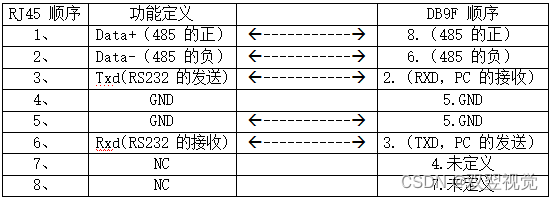
光源控制器接口定义说明

【Psychology · Characters】Issue 1
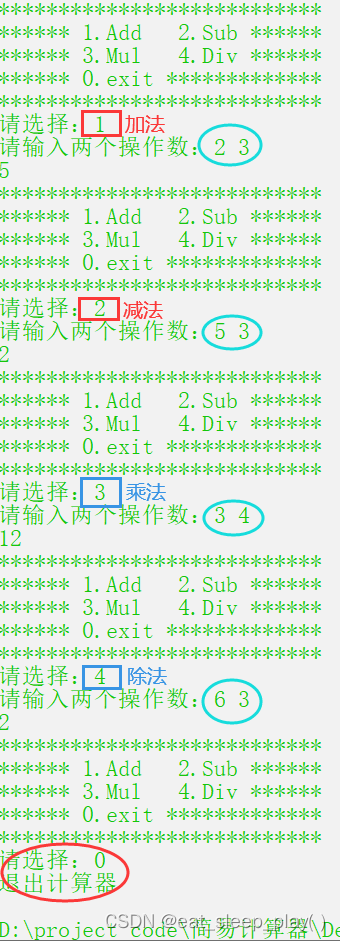
看【C语言】实现简易计算器教程,让小伙伴们为你竖起大拇指
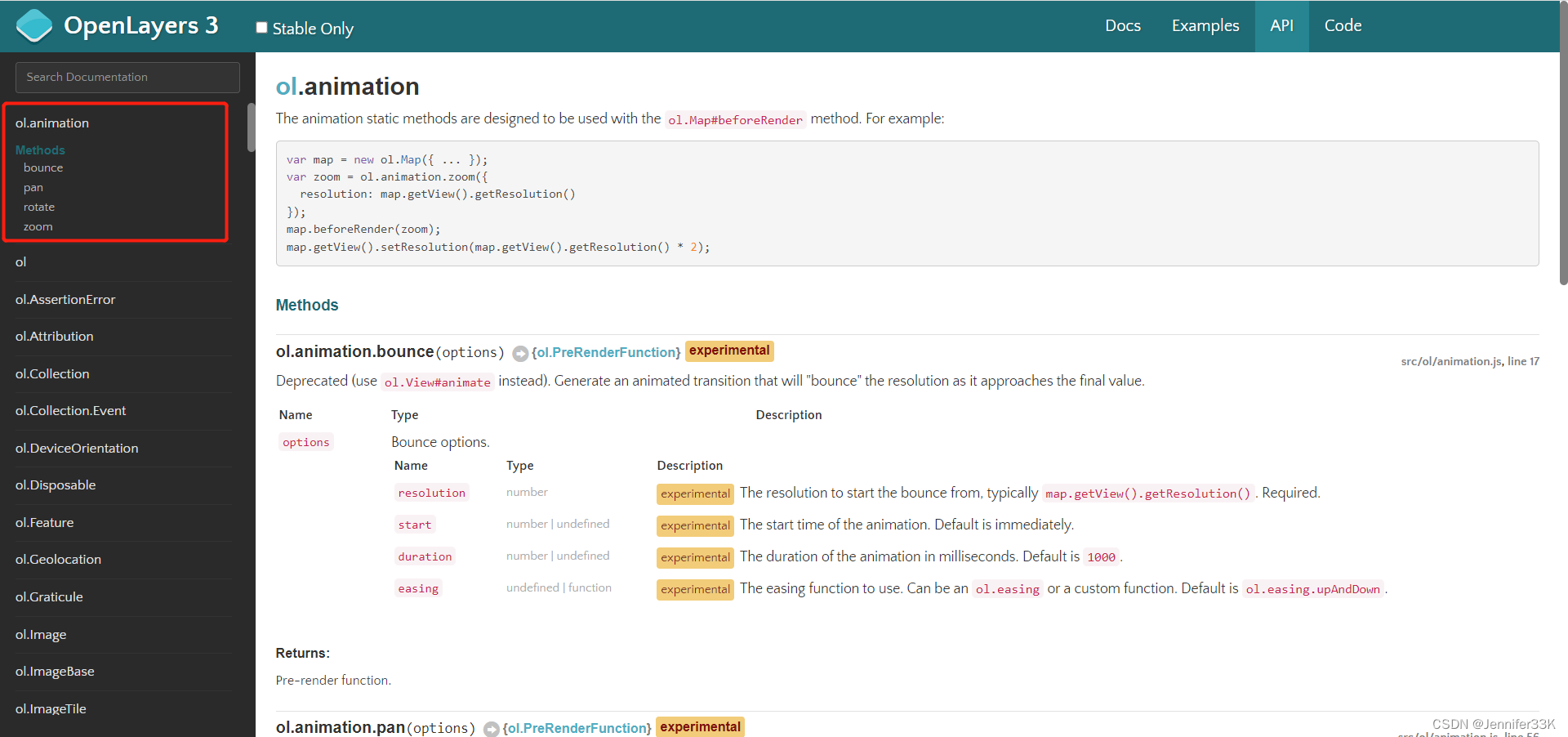
openlayers版本更新差别
![[Dynamic Programming Special Training] Basics](/img/62/a647783484d0e600f91924a345af07.png)
[Dynamic Programming Special Training] Basics
快速掌握jmeter(一)——实现自动登录与动态变量
openlayers version update difference
Based on OpenGL glaciers and firebird (illumination calculation model, visual, particle system)
MySQL 事件调度
随机推荐
golang刷leetcode 数学(1) 丑数系列
Boyun Selected as Gartner China DevOps Representative Vendor
geoserver+mysql+openlayers问题点
溜不溜是个问题
去年,一道蚂蚁金服笔试题,还行,中等难度
服务器Centos7 静默安装Oracle Database 12.2
7.23 - 每日一题 - 408
I have 8 years of experience in the Ali test, and I was able to survive by relying on this understanding.
光源控制器接口定义说明
Golang swagger :missing required param comment parameters
golang刷leetcode 经典(13) 最小高度树
golang刷leetcode 经典(9)为运算表达式设计优先级
【Psychology · Characters】Issue 1
什么是现场服务管理系统(FSM)?有什么好处?
NC | 土壤微生物组的结构和功能揭示全球湿地N2O释放
Detailed explanation of common examples of dynamic programming
研发了 5 年的时序数据库,到底要解决什么问题?
有什么好用的IT资产管理软件
thinkphp框架5.0.23安全更新问题-漏洞修复-/thinkphp/library/think/App.php具体怎么改以及为什么要这么改
实例034:调用函数