当前位置:网站首页>动态刷新日志级别
动态刷新日志级别
2022-08-02 14:01:00 【Ethan_199402】
概述
日志模块是每个项目中必须的,用来记录程序运行中的相关信息。一般在开发环境下使用DEBUG级别的日志输出,为了方便查看问题,而在线上一般都使用INFO级别的日志,主要记录业务操作的日志。那么问题来了,当线上环境出现问题希望输出DEBUG日志信息辅助排查的时候怎么办呢?修改配置文件,重新打包然后上传重启线上环境,但是这么做不优雅 而且可能会破坏现场。
本文介绍一种实现方案:通过Apollo配置中心来实现 动态调整线上日志级别。
日志级别
不同的日志框架支持不同的日志级别,其中比较常见的就是Log4j和Logback。
在Log4j中支持8种日志级别,优先级从高到低依次为:OFF、FATAL、ERROR、WARN、INFO、DEBUG、TRACE、 ALL。
Logback中支持7种日志级别,优先级从高到低分别是:OFF、ERROR、WARN、INFO、DEBUG、TRACE、ALL。
可以看到常见的ERROR、WARN、INFO、DEBUG,这两者都是支持的。
所谓设置日志的输出级别表示的是输出的日志的最低级别,也就是说,如果我们把级别设置成INFO,那么包括INFO在内以及比INFO优先级高的级别的日志都可以输出。
Spring Boot对日志的支持
Spring Boot 对log做了统一封装,代码在 org.springframework.boot.logging 包中,结构如下: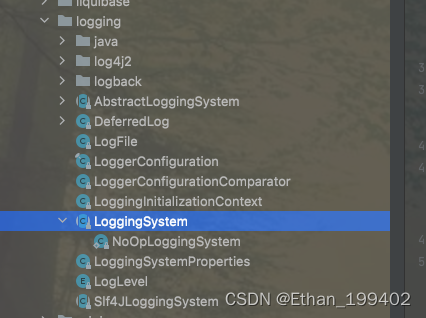
其中 org.springframework.boot.logging.LoggingSystem 是SpringBoot对日志系统的抽象,是一个顶层的抽象类,有很多具体的实现: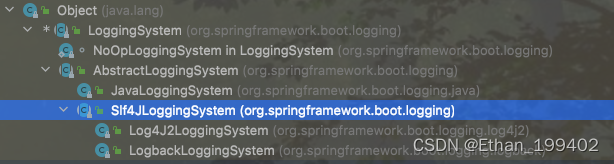
通过上图,我们可以发现目前SpringBoot目前支持3种类型的日志,分别是
- JDK内置的Log(JavaLoggingSystem)
- Log4j2(Log4J2LoggingSystem)
- Logback(LogbackLoggingSystem)。
static {

		Map<String, String> systems = new LinkedHashMap<>();
		systems.put("ch.qos.logback.core.Appender", "org.springframework.boot.logging.logback.LogbackLoggingSystem");
		systems.put("org.apache.logging.log4j.core.impl.Log4jContextFactory",
				"org.springframework.boot.logging.log4j2.Log4J2LoggingSystem");
		systems.put("java.util.logging.LogManager", "org.springframework.boot.logging.java.JavaLoggingSystem");
		SYSTEMS = Collections.unmodifiableMap(systems);
	}
LoggingSystem是个抽象类,内部有这几个方法:
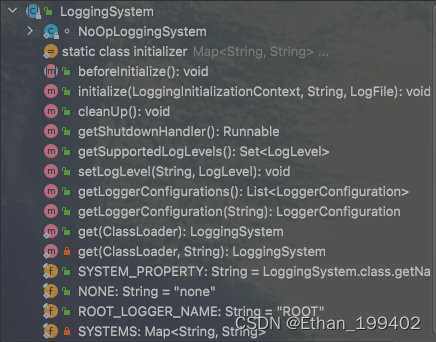
- beforeInitialize方法:日志系统初始化之前需要处理的事情。抽象方法,不同的日志架构进行不同的处理
- initialize方法:初始化日志系统。默认不进行任何处理,需子类进行初始化工作
- cleanUp方法:日志系统的清除工作。默认不进行任何处理,需子类进行清除工作
- getShutdownHandler方法:返回一个Runnable用于当jvm退出的时候处理日志系统关闭后需要进行的操作,默认返回null,也就是什么都不做
- getSupportedLogLevels: 返回日志系统实际支持的一组 LogLevel。
- setLogLevel方法:抽象方法,用于设置对应logger的级别
- get方法:检测并返回正在使用的日志系统。支持 Logback 和 Java 日志记录。
代码
我们可以将日志级别配置保存在Apollo配置中心中, 当日志级别发生变更时,我们需要通过监听该配置的变更,设置应用中的 Logger 的日志级别,从而后续的日志打印可以根据新的日志级别
@Slf4j
@Component
public class LoggingSystemAdjustListener {


    /** * 日志配置项的前缀 */
    private static final String LOGGER_PREFIX = "logging.level.";

    @Resource
    private LoggingSystem loggingSystem;

    // By default only read config in "application"
    @ApolloConfigChangeListener
    public void onChange(ConfigChangeEvent changeEvent) throws Exception {

        // <Y> 遍历配置集的每个配置项,判断是否是 logging.level 配置项
        for (String key : changeEvent.changedKeys()) {

            // 如果是 logging.level 配置项,则设置其对应的日志级别
            if (key.startsWith(LOGGER_PREFIX)) {

                String loggerName = key.replace(LOGGER_PREFIX, "");
                //
                LoggerConfiguration cfg = loggingSystem.getLoggerConfiguration(loggerName);
                if (cfg == null) {

                    if (log.isErrorEnabled()) {

                        log.error("no loggerConfiguration with loggerName:{}", loggerName);
                    }
                    continue;
                }

                // 获得日志级别
                ConfigChange change = changeEvent.getChange(key);
                // the newLevel could be null if the config is deleted from apollo
                // in this case we update it same as "root" level
                String newLevel = change.getNewValue();

                LogLevel level = null;
                // config is deleted or kept as empty string
                if (newLevel == null || newLevel.isEmpty()) {

                    level = getFallbackLogLevel(ROOT_LOGGER_NAME);
                } else {

                    try {

                        level = LogLevel.valueOf(newLevel.toUpperCase());
                    } catch (IllegalArgumentException e) {

                        // do nothing
                    }
                }

                if (level == null) {

                    if (log.isErrorEnabled()) {

                        log.error("logger:[{}]current LogLevel is invalid:{}", loggerName, newLevel);
                    }
                    continue;
                }

                if (!isSupportLevel(level)) {

                    if (log.isErrorEnabled()) {

                        log.error("LoggingSystem:[] not support current LogLevel:{}",
                            loggingSystem.getClass().getName(), newLevel);
                    }
                    continue;
                }

                if (log.isInfoEnabled()) {

                    log.info("logger:[{}] current effective level:{}, to be changed to level:{}", loggerName,
                        cfg.getEffectiveLevel(), newLevel);
                }

                // 基于springboot的日志抽象类,设置日志级别到 LoggingSystem 中
                loggingSystem.setLogLevel(loggerName, level);
            }
        }
    }

    private boolean isSupportLevel(LogLevel level) {

        for (LogLevel ll : loggingSystem.getSupportedLogLevels()) {

            if (ll == level) {

                return true;
            }
        }
        return false;
    }

    public LogLevel getFallbackLogLevel(String loggerName) {

        LoggerConfiguration cfg = loggingSystem.getLoggerConfiguration(loggerName);
        if (cfg == null) {

            if (log.isErrorEnabled()) {

                log.error("no loggerConfiguration with loggerName:{}", loggerName);
            }
            // use WARN as unexpected case
            return LogLevel.WARN;
        }

        return cfg.getEffectiveLevel();
    }

}
基于spring的日志支持,我们还可以在logback中通过logger标签对某一个包甚至类单独配置日志级别
<logger name="com.ethan.demo.log.controller" level="INFO" additivity="true">
    <appender-ref ref="${CONSOLE_APPENDER}"/>
  </logger>
边栏推荐
- els strip collision deformation judgment
- [C language] Analysis of function recursion (2)
- tinymce-plugins
- els 长条碰撞变形判断
- 乐心湖‘s Blog——MySQL入门到精通 —— 囊括 MySQL 入门 以及 SQL 语句优化 —— 索引原理 —— 性能分析 —— 存储引擎特点以及选择 —— 面试题
- 苏州大学:从 PostgreSQL 到 TDengine
- CVE-2020-27986(Sonarqube敏感信息泄漏) 漏洞修复
- SQL函数 TRUNCATE
- Fabric.js 动态设置字号大小
- 【ONE·Data || 排序入门】
猜你喜欢

苹果,与Web3 “八字不合”
MySQL - ERROR 1045 (28000): Access denied for user ‘root’@‘localhost’ (using password: YES)
RKMPP库快速上手--(一)RKMPP功能及使用详解

Interview | with questions to learn, Apache DolphinScheduler Wang Fuzheng
rhce第三天作业
logback源码阅读(一)获取ILoggerFactory、Logger
k8s之KubeSphere部署有状态数据库中间件服务 mysql、redis、mongo

RHCE第一天作业

关于市场后市的发展预测? 2021-05-23
Gstreamer Plugin注册流程详解
随机推荐
Why does a four-byte float represent a wider range than an eight-byte long
Data Organization---Chapter 6 Diagram---Graph Traversal---Multiple Choice Questions
Embedded system driver primary [2] - based on character device driver _ basic framework
机器学习——交叉验证法
泡利不相容原理适用的空间范围(系统)是多大?
GTK:Gdk-CRITICAL **: IA__gdk_draw_pixbuf: assertion ‘GDK_IS_DRAWABLE (drawable)’ failed
rust使用mysql插入数据
RowBounds[通俗易懂]
CVE-2020-27986(Sonarqube敏感信息泄漏) 漏洞修复
logback源码阅读(一)获取ILoggerFactory、Logger
FreeBSD bnxt以太网驱动源码阅读记录三:
The future of financial services will never stop, and the bull market will continue 2021-05-28
方舟生存进化淘宝面板服务器是怎么一回事?
Differences and concepts between software testing and hardware testing
rhce第三天作业
FFmpeg 的AVCodecContext结构体详解
tinymce 如何实现动态国际化
Large and comprehensive pom file example
电脑死机,Word忘了保存怎么办?怎么恢复?(编辑器是WPS)
Object detection scene SSD-Mobilenetv1-FPN