当前位置:网站首页>Log collection system
Log collection system
2022-06-27 04:06:00 【ALEX_ CYL】
1. Project background
- Every system has a log , When there is a problem with the system , Need to solve the problem through the log
- When there are fewer machines in the system , Logging in to the server to view the logs can meet the requirements
- When the system machine is large , It is almost unrealistic to log in to the machine to view the log
2. Solution
a. Collect the logs on the machine in real time , Unified storage to Central system
b. And then on these logs Index , The corresponding log can be found by searching
c. By providing a user-friendly web Interface , adopt web That is, you can complete the log search
3. Problems faced / Challenge
a. The amount of real-time logs is very large , Billions a day
b. Log quasi real time collection , The delay is controlled at the minute level
c. Be able to scale horizontally
4. Industry solutions ELK
 4.1 ELK brief introduction
Popular speaking ,ELK By Elasticsearch( Elastic search engine )、Logstash( Log collection )、Kibana( Check the log / Visual web Interface ) A combination of three open source software ,ELK yes elastic A complete set of log collection developed by the company 、 Analyze and demonstrate enterprise class solutions , Among these three software , Each software is used to perform different functions ,ELK Also known as ELKstack.
Cross reference architecture diagram , Let's take a look at the working process of the three divine beasts

1. The user sends a request to the server
2. The server sends the data of the log to be recorded to logstash
3. logstash Filter and clean the data , Again to Elasticsearch
4. Elasticsearch Responsible for creating indexes on data , For storage
5. Users access through kibana Of web page , Can real-time ( The delay is less than one second ) Check the log
reference:
elk To configure
elk detailed
4.2 elk The problem of the scheme
a. The operation and maintenance cost is high , Every additional log collection , You need to modify the configuration manually
b. Lack of monitoring , It's impossible to accurately obtain logstash The state of
5. with kafka Design of log system based on

Introduction of components :
a. Log Agent, Log collection client , Used to collect logs on the server , There is one on each server log Agent
b. Kafka, High throughput Of Distributed queues ,linkin Development ,apache Top open source projects
c. ES,elasticsearch, Open source search engine , Supply base On http restful Of web Interface
d. Hadoop, Distributed computing framework , A platform for distributed processing of large amounts of data
5.1 kafka Application scenarios :
1. Asynchronous processing , hold Noncritical Process asynchronization , Improve the system response time and Robustness, 

2. The application of decoupling , Through message queuing 
3. Traffic peak clipping
Such as double 11 second kill , A sudden surge in traffic , The message queue can effectively reduce the traffic peak , That is, limit the amount of data transferred to the backend for processing at one time 
5.2 zookeeper( Distributed storage system ) Application scenarios
In the log collection system , commonly kafka Will connect a zookeeper
1. Service registration & Service discovery 
When the service provider expands or shrinks , The service provider registers the service in the registry ;
The registry notifies service consumers of service changes , Service consumers realize automatic task scheduling optimization according to registration change information ( Assign the data to the new service provider or the provider that will stop the service makes an invocation request )
2. Configuration center ( Automatic configuration )
1. stay wep The platform has modified the business , Transfer change information to zk
2.zk Send the service business change information to the corresponding business application ,
3. The corresponding business application pulls the change information locally to modify the business configuration
Realize automatic configuration 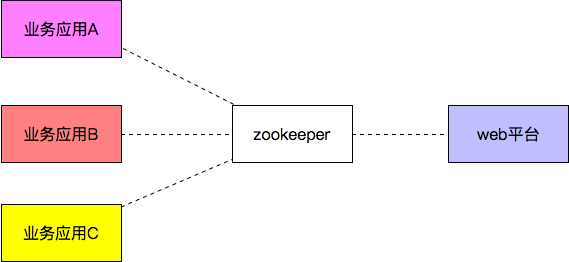
3. Distributed lock
zookeeper It's strongly consistent
Multiple clients are at the same time Zookeeper Create the same znode, Only one was created successfully
5.3 zookeeper And kafka install :
because zookeeper and kafka be based on java, Install first JDK
sudo apt-get update
sudo apt-get install openjdk-8-jdk
zookeeper install :
ubuntu install zookeeper
install zookeepr
sudo apt-get install zookeeperd
To configure zookeeper
cat /etc/zookeeper/conf/zoo.cfg | more // see zoo.cfg Configuration information
# The number of milliseconds of each tick
tickTime=2000
# The number of ticks that the initial
# synchronization phase can take
initLimit=10
# The number of ticks that can pass between
# sending a request and getting an acknowledgement
syncLimit=5
# the directory where the snapshot is stored.
dataDir=/var/lib/zookeeper
# Place the dataLogDir to a separate physical disc for better performance
# dataLogDir=/disk2/zookeeper

# the port at which the clients will connect
clientPort=2181

# specify all zookeeper servers
# The fist port is used by followers to connect to the leader
# The second one is used for leader election
server.1=zookeeper1:2888:3888
start-up zookeeper
 start-up server
$ sudo /usr/share/zookeeper/bin/zkServer.sh start
 View startup status
$ sudo /usr/share/zookeeper/bin/zkServer.sh status
 View startup information
ps -aux | grep zookeeper
link server
sudo /usr/share/zookeeper/bin/zkCli.sh -server 127.0.0.1:2181
View log information
 Log information can be configured , adopt zoo.cfg, Default in :
/var/log/zookeeper/zookeeper.log
 You can view the log information to see some errors and details
kafka install
ubuntu18.04 Next Kafka Installation and deployment
install kafka:
ubuntu You can use wget Direct download , I downloaded it to /home/cyl/kafka Catalog
wget https://dlcdn.apache.org/kafka/3.1.0/kafka_2.12-3.1.0.tgz
decompression :
tar -zxvf kafka_2.12-3.1.0.tgz
rename
mv kafka_2.12-3.1.0 ./kafka
Create log storage directory
[email protected]:~/kafka$ mkdir logs-1
modify kafka-server Configuration file for
[email protected]:~/kafka/kafka$ sudo vim config/server.properties
Modify profile 21、31、36 and 60 That's ok
broker.id=1
listeners=PLAINTEXT://10.141.184:9092 # In order to start smoothly broker
advertised.listeners=PLAINTEXT://10.141.184:9092
log.dirs=/home/wzj/kafka/logs-1
start-up Zookeeper
You have to modify config/zookeeper.properties To configure
[email protected]:~/kafka/kafka$ sudo ./bin/zookeeper-server-start.sh -daemon config/zookeeper.properties
It is recommended to use :
$ sudo /usr/share/zookeeper/bin/zkServer.sh start
 link server
$ sudo /usr/share/zookeeper/bin/zkCli.sh -server 127.0.0.1:2181
start-up Kafka service
Start process reference
Use kafka-server-start.sh start-up kafka service
[email protected]:~/kafka/kafka$ sudo ./bin/kafka-server-start.sh ./config/server.properties
establish topic
Use kafka-topics.sh Create a single partition, single copy topic test
[email protected]:~/kafka/kafka$ sudo ./bin/kafka-topics.sh --create --bootstrap-server 10.141.65.188:9092 --replication-factor 1 --partitions 1 --topic nginxLog
 Not available here localhost:9092,
Problems encountered
Question 1 : Version instruction change
bin/kafka-topics.sh --create --zookeeper localhost:2181 --replication-factor 1 --partitions 1 --topic test
Report errors “Exception in thread “main” joptsimple.UnrecognizedOptionException: zookeeper is not a recognized option”
In the latest version (2.2 And higher ) Of Kafka No longer need ZooKeeper Connection string , namely - -zookeeper localhost:2181. Use Kafka Broker Of --bootstrap-server localhost:9092 To replace - -zookeeper localhost:2181.
Question two :
WARN [AdminClient clientId=adminclient-1] Connection to node -1 (localhost/127.0.0.1:9092) could not be established. Broker may not be available. (org.apache.kafka.clients.NetworkClient)
Must be the same as that in the configuration file listeners Keep consistent , for example
listeners=PLAINTEXT://192.168.156.131:9092
#  Must also be used when the command is used 192.168.156.131:9092 As connected address , as follows
./kafka-console-producer.sh --broker-list 192.168.156.131:9092 --topic userlog
see topic list
[email protected]:~/kafka/kafka$ sudo ./bin/kafka-topics.sh --list --bootstrap-server 10.141.65.188:9092
Generate news , Creating a message producer
[email protected]:~/kafka/kafka$ sudo ./bin/kafka-console-producer.sh --broker-list 10.141.65.188:9092 --topic nginxLog
News consumption , Create message consumer
[email protected]:~/kafka/kafka$ sudo ./bin/kafka-console-consumer.sh --bootstrap-server 10.141.65.188:9092 --topic nginxLog --from-beginning
In the production message window , Input content , It can be printed in the consumption window
see Topic news
[email protected]:~/kafka/kafka$ sudo ./bin/kafka-topics.sh --describe --bootstrap-server 10.141.65.188:9092 --topic nginxLog
Topic: nginxLog	TopicId: t6M81RsMRPGj2tZVXaxltw	PartitionCount: 1	ReplicationFactor: 1	Configs: segment.bytes=1073741824
	Topic: nginxLog	Partition: 0	Leader: 1	Replicas: 1	Isr: 1
The first line gives a summary of all partitions , Each additional row gives information about a partition . Because we only have one division , So there's only one line .
“Leader”: Is the node responsible for all reads and writes for a given partition . Each node will become the leader of the randomly selected part of the partition .
“Replicas”: Is a list of nodes where this partition log is replicated , Whether they are leaders or not , Or even if they are currently active .
“Isr”: It's a group. “ Sync ” copy . This is a replications A subset of the list , Being alive and led to leaders .
Delete topic
[email protected]:~/kafka/kafka$ sudo ./bin/kafka-topics.sh --delete --bootstrap-server 10.141.65.188:9092 --topic nginxLogtest
 Start command :
bin/kafka-server-start.sh -daemon config/server.properties

 establish topic
./kafka-topics.sh --create --bootstrap-server spark01:9092 --replication-factor 1 --partitions 1 --topic test2

 see topic
./kafka-topics.sh --bootstrap-server spark01:9092 --list

 Assign to topic Medium production data
./kafka-console-producer.sh --broker-list spark01:9092 --topic test2
 for example :{
    "id":"1","name":"xiaoming","age":"20"}

 see topic The specific content
./kafka-console-consumer.sh --bootstrap-server spark01:9092 --topic test2 --from-beginning

 Create consumer groups
./kafka-console-consumer.sh --bootstrap-server spark01:9092 --topic test2 --group kafkatest

 Check out the consumer groups
./kafka-consumer-groups.sh --bootstrap-server spark01:9092 --list

 View consumer details
./kafka-consumer-groups.sh --bootstrap-server spark01:9092 --describe  --group kafkatest

 Consumption data
./kafka-console-consumer.sh --bootstrap-server spark01:9092 --topic test2 --from-beginning
6 Code implementation
logagent Implementation code github
1.kafka demo:
package kafka

import (
	"fmt"

	"github.com/Shopify/sarama"
)

func main() {


	// To configure kafka Environmental Science
	config := sarama.NewConfig()
	config.Producer.RequiredAcks = sarama.WaitForAll
	config.Producer.Partitioner = sarama.NewRandomPartitioner
	config.Producer.Return.Successes = true

	client, err := sarama.NewSyncProducer([]string{
    "10.141.65.188:9092"}, config)
	if err != nil {

		fmt.Println("producer close, err:", err)
		return
	}
	defer client.Close()

	for i := 0; i < 10; i++ {

		msg := &sarama.ProducerMessage{
    }
		msg.Topic = "nginxLogTest"
		msg.Value = sarama.StringEncoder("this is a good test, my message is good~~12")

		pid, offset, err := client.SendMessage(msg)
		if err != nil {

			fmt.Println("send message failed,", err)
			return
		}

		fmt.Printf("pid:%v offset:%v\n", pid, offset)
	}
}
- tailf demo
package tailf

import (
	"fmt"
	"time"

	"github.com/hpcloud/tail"
)

func main() {
     //main()
	filename := "./my.log"
	tails, err := tail.TailFile(filename, tail.Config{

		ReOpen:    true,
		Follow:    true,
		Location:  &tail.SeekInfo{
    Offset: 0, Whence: 2}, // Locate the read location
		MustExist: false,                                // It is required that documents must exist or be exposed
		Poll:      true,
	})
	if err != nil {

		fmt.Println("tail file err:", err)
		return
	}
	var msg *tail.Line
	var ok bool
	for {

		msg, ok = <-tails.Lines
		if !ok {

			fmt.Printf("tail file close reopen, filename:%s\n", tails.Filename)
			time.Sleep(100 * time.Millisecond)
			continue
		}
		fmt.Println("msg:", msg)
	}
}
- config demo
package main

import (
	"fmt"

	"github.com/astaxie/beego/config"
)

func main() {

	conf, err := config.NewConfig("ini", "./logcollect.conf")
	if err != nil {

		fmt.Println("new config failed, err:", err)
		return
	}

	port, err := conf.Int("server::port")
	if err != nil {

		fmt.Println("read server:port failed, err:", err)
		return
	}
	fmt.Println("Port:", port)

	log_level := conf.String("logs::log_level")
	fmt.Println("log_level:", log_level)

	log_port, err := conf.Int("logs::port")
	if err != nil {

		fmt.Println("read logs:port failed, err:", err)
		return
	}
	fmt.Println("log_Port:", log_port)

	log_path := conf.String("logs::log_path")
	fmt.Println("log_path:", log_path)
}
- logs demo
package main

import (
	"encoding/json"
	"fmt"

	"github.com/astaxie/beego/logs"
)

func main() {

	config := make(map[string]interface{
    })
	config["filename"] = "./logcollect.log"
	config["level"] = logs.LevelTrace

	configStr, err := json.Marshal(config)
	if err != nil {

		fmt.Println("marshal failed, err:", err)
		return
	}

	logs.SetLogger(logs.AdapterFile, string(configStr))

	logs.Debug("this is a test, my name is %s", "stu01~~")
	logs.Trace("this is a trace, my name is %s", "stu02~~")
	logs.Warn("this is a warn, my name is %s", "stu03~~")
}
边栏推荐
- 2021:Greedy Gradient Ensemble for Robust Visual Question Answering
- Further exploration of handler (I) (the most complete analysis of the core principle of handler)
- 语义化版本 2.0.0
- 投资理财产品的钱有保障吗?会不会没有了?
- 使用promise的基本功能【四、Promise源码】
- There are two problems when Nacos calls microservices: 1 Load balancer does not contain an instance for the service 2. Connection refused
- 2019LXMERT:Learning Cross-Modality Encoder Representations from Transformers
- 乐得瑞LDR6035 USB-C接口设备支持可充电可OTG传输数据方案。
- 文旅夜游|以沉浸式视觉体验激发游客的热情
- Ldr6028 OTG data transmission scheme for mobile devices while charging
猜你喜欢

Static timing analysis OCV and time derive

2021:passage retrieval for outside knowledgevisual question answering

Anaconda3安装过程及安装后缺失大量文件,没有scripts等目录

Why does C throw exceptions when accessing null fields?

Quickly master asp Net authentication framework identity - reset password by mail

2022-06-26:以下golang代码输出什么?A:true;B:false;C:编译错误。 package main import “fmt“ func main() { type

How to systematically learn LabVIEW?

How to make ef core 6 support dateonly type

低代码开发平台NocoBase的安装

WPF open source control library extended WPF toolkit Introduction (Classic)
随机推荐
Basic functions of promise [IV. promise source code]
2020:MUTANT: A Training Paradigm for Out-of-Distribution Generalizationin Visual Question Answering
List of best reading materials for machine learning in communication
实践 DevOps 时,可能面临的六大挑战
Argo workflows - getting started with kubernetes' workflow engine
Baidu PaddlePaddle's "universal gravitation" first stop in 2022 landed in Suzhou, comprehensively launching the SME empowerment plan
语义化版本 2.0.0
PostgreSQL basic command tutorial: create a new user admin to access PostgreSQL
Fplan power planning
Quickly master asp Net authentication framework identity - reset password by mail
Kotlin compose implicitly passes the parameter compositionlocalprovider
敏捷开发篇--Agile Development-自用
nignx配置单ip限流
MobileNet系列(4):MobileNetv3网络详解
Implementation of window encryption shell
Kotlin compose compositionlocalof and staticcompositionlocalof
Fplan powerplan instance
Overview of Tsinghua & Huawei | semantic communication: Principles and challenges
PAT甲级 1020 Tree Traversals
How to systematically learn LabVIEW?