当前位置:网站首页>MFC中如何重绘CListCtrl的表头
MFC中如何重绘CListCtrl的表头
2022-07-01 18:43:00 【mary288267】
MFC中的CListCtrl实际上是由两个控件组成,一个是表头控件,一个是列表控件。有些时候,我们需要重绘表头,使其满足特定的场景要求。
本文介绍了CListCtrl表头的重绘方法,自定义表头效果如下。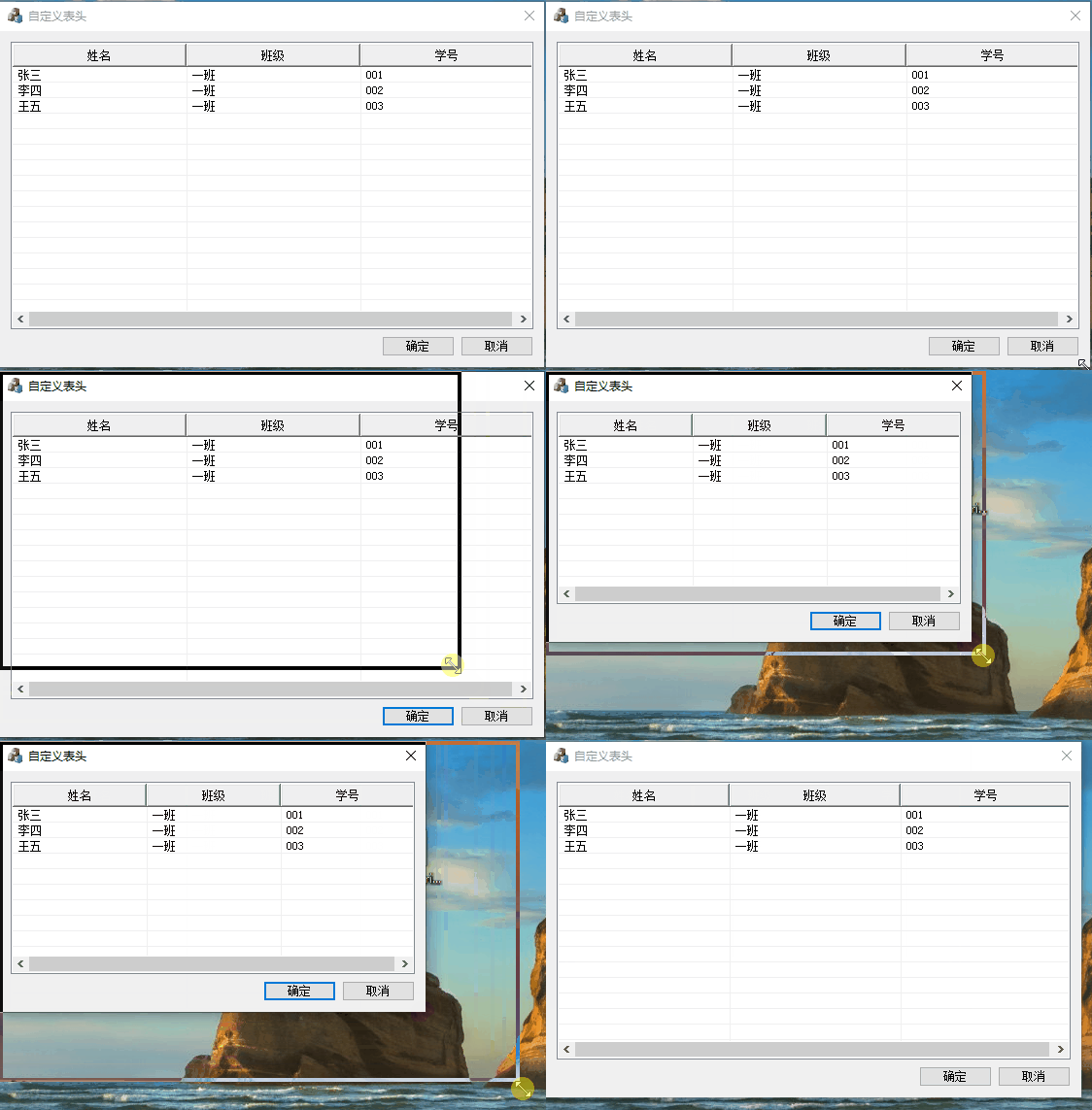
一、从CHeaderCtrl派生出自定义表头类CCustomHeader
MFC中表示表头控件的类是CHeaderCtrl,我们从它派生一个新类CCustomHeader 。
头文件为:
class CCustomHeader : public CHeaderCtrl
{

	DECLARE_DYNAMIC(CCustomHeader)

public:
	CCustomHeader();
	virtual ~CCustomHeader();
	//设置表头单元格的对齐方式,参见DrawText函数中文字对齐格式
	void SetTextAlign(UINT uFormat = DT_CENTER | DT_SINGLELINE | DT_VCENTER);

protected:
	virtual void DrawItem(LPDRAWITEMSTRUCT lpDrawItemStruct);
	DECLARE_MESSAGE_MAP()

private:
	UINT m_nTextAlignFormat;	//表头文字对齐方式
};
实现文件
// CCustomHeader.cpp: 实现文件
//

#include "pch.h"
#include "TestCustomHeader.h"
#include "CCustomHeader.h"


// CCustomHeader

IMPLEMENT_DYNAMIC(CCustomHeader, CHeaderCtrl)

CCustomHeader::CCustomHeader()
	:m_nTextAlignFormat(DT_CENTER | DT_SINGLELINE | DT_VCENTER)
{
    }

CCustomHeader::~CCustomHeader()
{
    }

void CCustomHeader::SetTextAlign(UINT uFormat)
{

	m_nTextAlignFormat = uFormat;
}

BEGIN_MESSAGE_MAP(CCustomHeader, CHeaderCtrl)
END_MESSAGE_MAP()

void CCustomHeader::DrawItem(LPDRAWITEMSTRUCT lpDrawItemStruct)
{

	ASSERT(lpDrawItemStruct->CtlType == ODT_HEADER);
	HDITEM hdi;
	TCHAR  lpBuffer[256];

	hdi.mask = HDI_TEXT;
	hdi.pszText = lpBuffer;
	hdi.cchTextMax = 256;
	GetItem(lpDrawItemStruct->itemID, &hdi);

	CDC* pDC;
	pDC = CDC::FromHandle(lpDrawItemStruct->hDC);
	HGDIOBJ hOldFont = pDC->SelectObject(GetStockObject(DEFAULT_GUI_FONT));

	// 绘制按钮边框
	::DrawFrameControl(lpDrawItemStruct->hDC, &lpDrawItemStruct->rcItem, DFC_BUTTON, DFCS_BUTTONPUSH);

	//绘制文本
	::DrawText(lpDrawItemStruct->hDC, lpBuffer, _tcslen(lpBuffer),
		&lpDrawItemStruct->rcItem, m_nTextAlignFormat);

	pDC->SelectObject(hOldFont);
}
请注意,在实现文件中,我们重写了DrawItem虚函数;因此当表头控件是自绘样式时,每次绘制都会调用DrawItem函数,在该函数中我们获取表头控件的DC,然后即可进行绘制。
另请注意在DrawItem中使用的如下函数:
BOOL GetItem( int nPos, HDITEM* pHeaderItem ) const;
说明:该函数可以获取表头控件每一项的信息(Retrieves information about a header control item.)
利用该函数,我们获取了表头中每一项的标题内容。
二、使用自定义表头类CCustomHeader
新建一个基于对话框的程序,在对话框类的头文件中增加:
	CListCtrl m_wndLstMain;		//表示列表控件本身
	CCustomHeader m_wndHeader;	//表示列表控件的表头控件
在OnInitDialog函数中增加:
BOOL CTestDlg::OnInitDialog()
{

	//.... 省略

	// TODO: 在此添加额外的初始化代码
	CRect rect;
	m_wndLstMain.GetClientRect(rect);
	m_wndLstMain.InsertColumn(0, _T("姓名"), LVCFMT_LEFT, rect.Width() / 3);
	m_wndLstMain.InsertColumn(1, _T("班级"), LVCFMT_LEFT, rect.Width() / 3);
	m_wndLstMain.InsertColumn(2, _T("学号"), LVCFMT_LEFT, rect.Width() / 3);

	m_wndLstMain.InsertItem(0, _T("张三"));
	m_wndLstMain.SetItemText(0, 1, _T("一班"));
	m_wndLstMain.SetItemText(0, 2, _T("001"));

	m_wndLstMain.InsertItem(1, _T("李四"));
	m_wndLstMain.SetItemText(1, 1, _T("一班"));
	m_wndLstMain.SetItemText(1, 2, _T("002"));

	m_wndLstMain.InsertItem(2, _T("王五"));
	m_wndLstMain.SetItemText(2, 1, _T("一班"));
	m_wndLstMain.SetItemText(2, 2, _T("003"));

	m_wndLstMain.SetExtendedStyle(LVS_EX_GRIDLINES);

	//子类化列表控件的表头
	CHeaderCtrl* pHeader = m_wndLstMain.GetHeaderCtrl();
	if(pHeader)
		m_wndHeader.SubclassWindow(pHeader->GetSafeHwnd());
	HDITEM hdItem;
	hdItem.mask = HDI_FORMAT;
	for (int i = 0; i < m_wndHeader.GetItemCount(); i++)
	{

		m_wndHeader.GetItem(i, &hdItem);
		hdItem.fmt |= HDF_OWNERDRAW;	//增加自绘样式
		m_wndHeader.SetItem(i, &hdItem);
	}

	//.... 省略
}
注意在上述函数中,我们首先初始化了CListCtrl对象,创建了多个列及多个子项,然后利用GetHeaderCtrl()函数找到了CListCtrl对象的表头控件,最后调用SubclassWindow子类化表头控件并将其绑定到m_wndHeader(这是我们重写的表头控件类对象)。
但是,仅仅如此还并未结束,我们需要将表头的每一项都改为自绘样式,这样,表头重绘时才会调用DrawItem函数,具体代码为:
	HDITEM hdItem;
	hdItem.mask = HDI_FORMAT;
	for (int i = 0; i < m_wndHeader.GetItemCount(); i++)
	{

		m_wndHeader.GetItem(i, &hdItem);
		hdItem.fmt |= HDF_OWNERDRAW;	//增加自绘样式
		m_wndHeader.SetItem(i, &hdItem);
	}
边栏推荐
- Altair HyperWorks 2022软件安装包和安装教程
- VBA simple macro programming of Excel
- AI training speed breaks Moore's law; Song shuran's team won the RSS 2022 Best Paper Award
- JS find the next adjacent element of the number in the array
- 案例分享:QinQ基本组网配置
- 【pytorch记录】自动混合精度训练 torch.cuda.amp
- PriorityQueue的用法和底层实现原理
- ES6数组方法find()、findIndex()的总结「建议收藏」
- The market value evaporated by 74billion yuan, and the big man turned and entered the prefabricated vegetables
- Chinese and English instructions human soluble advanced glycation end products receptor (sRAGE) ELISA Kit
猜你喜欢

CDGA|从事通信行业,那你应该考个数据管理证书

有关 M91 快速霍尔测量仪的更多信息

How to use the low code platform of the Internet of things for personal settings?
Netease games, radical going to sea

Bao, que se passe - t - il si le serveur 100 + O & M a mal à la tête? Utilisez le majordome xingyun!

Lake Shore continuous flow cryostat transmission line
The best landing practice of cave state in an Internet ⽹⾦ financial technology enterprise

MySQL common graphics management tools | dark horse programmers
![[quick application] there are many words in the text component. How to solve the problem that the div style next to it will be stretched](/img/5c/b0030fd5fbc07eb94013f2699c2a04.png)
[quick application] there are many words in the text component. How to solve the problem that the div style next to it will be stretched
宝,运维100+服务器很头疼怎么办?用行云管家!
随机推荐
Games202 operation 0 - environment building process & solving problems encountered
云服务器ECS夏日省钱秘籍,这次@老用户快来领走
Altair HyperWorks 2022 software installation package and installation tutorial
Stanford, salesforce|maskvit: masked vision pre training for video prediction
The market value evaporated by 74billion yuan, and the big man turned and entered the prefabricated vegetables
The former 4A executives engaged in agent operation and won an IPO
Superoptimag superconducting magnet system - SOM, Som2 series
【快应用】text组件里的文字很多,旁边的div样式会被拉伸如何解决
Huawei game failed to initialize init with error code 907135000
Love business in Little Red Book
Lake Shore M91快速霍尔测量仪
机械设备行业数字化供应链集采平台解决方案:优化资源配置,实现降本增效
[live broadcast appointment] database obcp certification comprehensive upgrade open class
The best landing practice of cave state in an Internet ⽹⾦ financial technology enterprise
AI training speed breaks Moore's law; Song shuran's team won the RSS 2022 Best Paper Award
微服务大行其道的今天,Service Mesh是怎样一种存在?
linux下清理系统缓存并释放内存
bean的生命周期核心步骤总结
华为游戏初始化init失败,返回错误码907135000
Learn MySQL from scratch - database and data table operations