当前位置:网站首页>使用easyexcel模板导出的两个坑(Map空数据列错乱和不支持嵌套对象)
使用easyexcel模板导出的两个坑(Map空数据列错乱和不支持嵌套对象)
2022-07-05 19:11:00 【lang20150928】
在项目当中,很多同事喜欢用Map来存储数据,尤其是从数据库查询数据然后存放到List<Map<String,Object>>当中。这样会导致通过excel模板导出时数据错乱。
当前easyexcel版本
 <dependency>
     <groupId>com.alibaba</groupId>
     <artifactId>easyexcel</artifactId>
     <version>3.1.1</version>
 </dependency>
假如存在以下模板(limitManage2.xlsx)。
| 日期 | 操作人 | 额度周期起始日 | 额度周期到期日 | 总额度(元) | 剩余额度(元) | 备注 | 状态 | 机构名称 | 已领用额度(元) | 备注2 |
|---|---|---|---|---|---|---|---|---|---|---|
| {bean.CREATE_DATE} | {bean.CREATOR} | {bean.LIMIT_CYCLE_START} | {bean.LIMIT_CYCLE_MTR} | {bean.TOTAL_LIMIT} | {bean.SURPLUS_LIMIT} | {bean.REMARK} | {bean.STATUS} | {bean.BRANCH_INSTITUTION_NAME} | {bean.GET_LIMIT} | {bean.fillData3.REMARK} |
首先通过List<Map<String,Object>>填充数据(故意将REMARK字段的值部分设置为空,规则是列表中索引为偶数的为空)
   private static Map<String, Object> data2(){

        Map<String, Object> params = new HashMap<>();
        List<Map<String, String>> result = new ArrayList<>();
        for (int i = 0; i < 20; i++) {

            Map<String, String> curMap = new HashMap<>();
            curMap.put("CREATE_DATE", "2018-06-12");
            curMap.put("STATUS", "已生效");
            curMap.put("LIMIT_CYCLE_START", "2018-06-12");
            curMap.put("LIMIT_CYCLE_MTR", "2018-06-12");
            curMap.put("BRANCH_INSTITUTION_NAME", "资产管理部");
            curMap.put("SURPLUS_LIMIT", "88888888" + i);
            curMap.put("CREATOR", "系统管理员" + i);
            curMap.put("GET_LIMIT", "101000000");
            curMap.put("PK", "2417");
            curMap.put("TOTAL_LIMIT", "88888888");
            if (i % 2 == 0) {

                curMap.put("REMARK", "定制额度" + i);
            }else {

// curMap.put("REMARK","");
            }
            result.add(curMap);
        }
        params.put("bean", result);
        return params;
    }
创建测试类
    @Test
    public void compositeFillMapIssue() {

        String templateFileName =
                TestFileUtil.getPath() + "demo" + File.separator + "fill" + File.separator + "limitManage2.xlsx";
        System.out.println(new File(templateFileName).getPath());
        String fileName = TestFileUtil.getPath() + "compositeFill" + System.currentTimeMillis() + ".xlsx";

        try (ExcelWriter excelWriter = EasyExcel.write(fileName).withTemplate(templateFileName).build()) {

            WriteSheet writeSheet = EasyExcel.writerSheet().build();
            Map<String, Object> data2 = data2();
            FillConfig fillConfig = FillConfig.builder().build();
            data2.forEach((key,value)->{

                excelWriter.fill(new FillWrapper(key, (List<Map<String, String>>)value),fillConfig, writeSheet);
            });
        }
        System.out.println(new File(fileName).getPath());
    }
测试类路径 src/test/java/com/alibaba/easyexcel/test/demo/fill/FillTest.java
测试模板路径 src/test/resources/demo/fill/limitManage2.xlsx
执行结果如下所示
| 额度周期到期日 | 总额度(元) | 剩余额度(元) | 备注 | 状态 | 机构名称 | 已领用额度(元) | 备注2 |
|---|---|---|---|---|---|---|---|
| 2018-06-12 | 88888888 | 888888880 | 定制额度0 | 已生效 | 资产管理部 | 101000000 | |
| 2018-06-12 | 88888888 | 888888881 | 定制额度2 | 已生效 | 资产管理部 | 101000000 | |
| 2018-06-12 | 88888888 | 888888882 | 定制额度4 | 已生效 | 资产管理部 | 101000000 | |
| 2018-06-12 | 88888888 | 888888883 | 定制额度6 | 已生效 | 资产管理部 | 101000000 | |
| 2018-06-12 | 88888888 | 888888884 | 定制额度8 | 已生效 | 资产管理部 | 101000000 | |
| 2018-06-12 | 88888888 | 888888885 | 定制额度10 | 已生效 | 资产管理部 | 101000000 | |
| 2018-06-12 | 88888888 | 888888886 | 定制额度12 | 已生效 | 资产管理部 | 101000000 | |
| 2018-06-12 | 88888888 | 888888887 | 定制额度14 | 已生效 | 资产管理部 | 101000000 | |
| 2018-06-12 | 88888888 | 888888888 | 定制额度16 | 已生效 | 资产管理部 | 101000000 | |
| 2018-06-12 | 88888888 | 888888889 | 定制额度18 | 已生效 | 资产管理部 | 101000000 | |
| 2018-06-12 | 88888888 | 8888888810 | 已生效 | 资产管理部 | 101000000 | ||
| 2018-06-12 | 88888888 | 8888888811 | 已生效 | 资产管理部 | 101000000 | ||
| 2018-06-12 | 88888888 | 8888888812 | 已生效 | 资产管理部 | 101000000 | ||
| 2018-06-12 | 88888888 | 8888888813 | 已生效 | 资产管理部 | 101000000 | ||
| 2018-06-12 | 88888888 | 8888888814 | 已生效 | 资产管理部 | 101000000 | ||
| 2018-06-12 | 88888888 | 8888888815 | 已生效 | 资产管理部 | 101000000 | ||
| 2018-06-12 | 88888888 | 8888888816 | 已生效 | 资产管理部 | 101000000 | ||
| 2018-06-12 | 88888888 | 8888888817 | 已生效 | 资产管理部 | 101000000 | ||
| 2018-06-12 | 88888888 | 8888888818 | 已生效 | 资产管理部 | 101000000 | ||
| 2018-06-12 | 88888888 | 8888888819 | 已生效 | 资产管理部 | 101000000 |
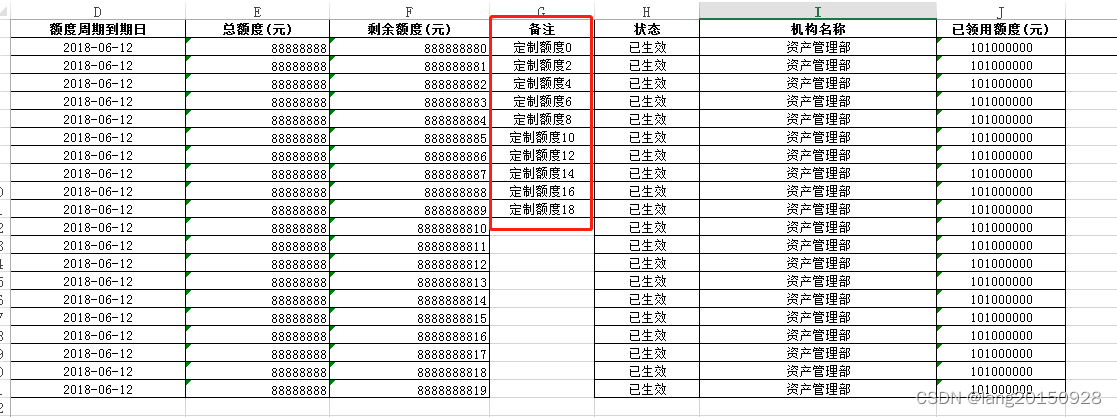
从上面的结果不难看出,备注栏的信息都错乱了。
通过测试发现,将Map转为对象即可。
pojo定义如下
package com.alibaba.easyexcel.test.demo.fill;

import lombok.EqualsAndHashCode;
import lombok.Getter;
import lombok.Setter;

@Getter
@Setter
@EqualsAndHashCode
public class FillData2 {


    private String CREATE_DATE;
    private String STATUS;
    private String LIMIT_CYCLE_START;
    private String LIMIT_CYCLE_MTR;
    private String BRANCH_INSTITUTION_NAME;
    private String SURPLUS_LIMIT;
    private String CREATOR;
    private String GET_LIMIT;
    private String PK;
    private String TOTAL_LIMIT;
    private String REMARK;
    private FillData3 fillData3;
}
package com.alibaba.easyexcel.test.demo.fill;

import lombok.EqualsAndHashCode;
import lombok.Getter;
import lombok.Setter;


@Getter
@Setter
@EqualsAndHashCode
public class FillData3 {


    private String REMARK3;

}
创建测试数据
  private static Map<String, List<FillData2>> data3(){

        Map<String, List<FillData2>> params = new HashMap<>();
        List<FillData2> result = new ArrayList<>();
        for (int i = 0; i < 20; i++) {

            FillData2 curMap = new FillData2();

            curMap.setCREATE_DATE("2018-06-12");
            curMap.setSTATUS("已生效");
            curMap.setLIMIT_CYCLE_START("2018-06-12");
            curMap.setLIMIT_CYCLE_MTR("2018-06-12");
            curMap.setBRANCH_INSTITUTION_NAME("资产管理部");
            curMap.setSURPLUS_LIMIT("88888888" + i);
            curMap.setCREATOR("系统管理员" + i);
            curMap.setGET_LIMIT("101000000");
            curMap.setPK("2417");
            curMap.setTOTAL_LIMIT("88888888");
            if (i % 2 == 0) {

                curMap.setREMARK("定制额度" + i);
            }else {

// curMap.put("REMARK","");
            }
            FillData3 fillData3 = new FillData3();
            fillData3.setREMARK3(curMap.getREMARK() +">>");
            curMap.setFillData3(fillData3);
            result.add(curMap);
        }
        params.put("bean", result);
        return params;
    }
创建测试类
    @Test
    public void compositeFillMapIssue3() {

        String templateFileName =
                TestFileUtil.getPath() + "demo" + File.separator + "fill" + File.separator + "limitManage2.xlsx";
        System.out.println(new File(templateFileName).getPath());
        String fileName = TestFileUtil.getPath() + "compositeFill" + System.currentTimeMillis() + ".xlsx";

        // 方案1
        try (ExcelWriter excelWriter = EasyExcel.write(fileName).withTemplate(templateFileName).build()) {

            WriteSheet writeSheet = EasyExcel.writerSheet().build();
            Map<String, List<FillData2>> data2 = data3();
            data2.forEach((key,value)->{

                excelWriter.fill(new FillWrapper(key, value), writeSheet);
            });
        }
        System.out.println(new File(fileName).getPath());
    }
测试结果如下所示
| 额度周期到期日 | 总额度(元) | 剩余额度(元) | 备注 | 状态 | 机构名称 | 已领用额度(元) | 备注2 |
|---|---|---|---|---|---|---|---|
| 2018-06-12 | 88888888 | 888888880 | 定制额度0 | 已生效 | 资产管理部 | 101000000 | |
| 2018-06-12 | 88888888 | 888888881 | 已生效 | 资产管理部 | 101000000 | ||
| 2018-06-12 | 88888888 | 888888882 | 定制额度2 | 已生效 | 资产管理部 | 101000000 | |
| 2018-06-12 | 88888888 | 888888883 | 已生效 | 资产管理部 | 101000000 | ||
| 2018-06-12 | 88888888 | 888888884 | 定制额度4 | 已生效 | 资产管理部 | 101000000 | |
| 2018-06-12 | 88888888 | 888888885 | 已生效 | 资产管理部 | 101000000 | ||
| 2018-06-12 | 88888888 | 888888886 | 定制额度6 | 已生效 | 资产管理部 | 101000000 | |
| 2018-06-12 | 88888888 | 888888887 | 已生效 | 资产管理部 | 101000000 | ||
| 2018-06-12 | 88888888 | 888888888 | 定制额度8 | 已生效 | 资产管理部 | 101000000 | |
| 2018-06-12 | 88888888 | 888888889 | 已生效 | 资产管理部 | 101000000 | ||
| 2018-06-12 | 88888888 | 8888888810 | 定制额度10 | 已生效 | 资产管理部 | 101000000 | |
| 2018-06-12 | 88888888 | 8888888811 | 已生效 | 资产管理部 | 101000000 | ||
| 2018-06-12 | 88888888 | 8888888812 | 定制额度12 | 已生效 | 资产管理部 | 101000000 | |
| 2018-06-12 | 88888888 | 8888888813 | 已生效 | 资产管理部 | 101000000 | ||
| 2018-06-12 | 88888888 | 8888888814 | 定制额度14 | 已生效 | 资产管理部 | 101000000 | |
| 2018-06-12 | 88888888 | 8888888815 | 已生效 | 资产管理部 | 101000000 | ||
| 2018-06-12 | 88888888 | 8888888816 | 定制额度16 | 已生效 | 资产管理部 | 101000000 | |
| 2018-06-12 | 88888888 | 8888888817 | 已生效 | 资产管理部 | 101000000 | ||
| 2018-06-12 | 88888888 | 8888888818 | 定制额度18 | 已生效 | 资产管理部 | 101000000 | |
| 2018-06-12 | 88888888 | 8888888819 | 已生效 | 资产管理部 | 101000000 |
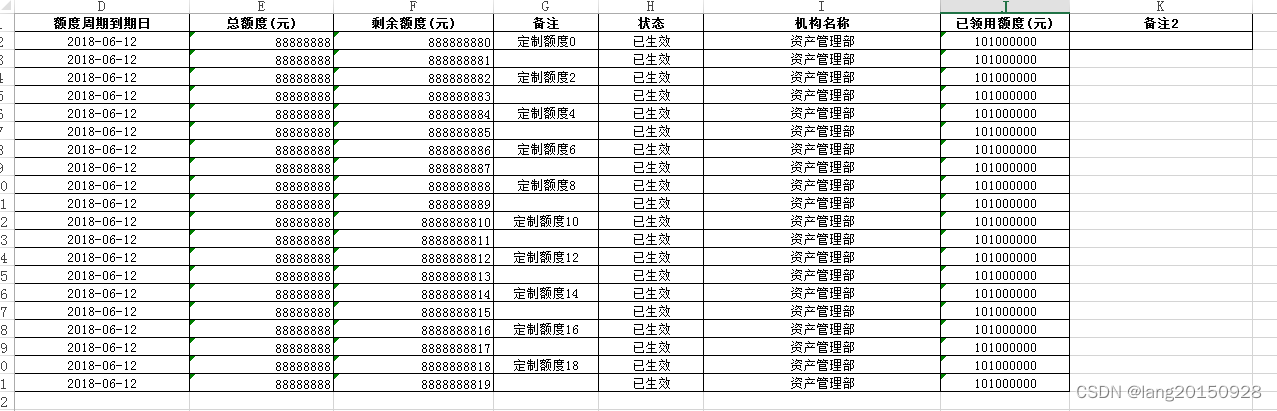
从测试结果可以看出,上面空数据错乱的问题解决了,但是最后一列没有任何数据。对应的模板为{bean.fillData3.REMARK},从这里看出easyexcel对于一个对象中包含复杂对象数据的模板导出不支持。
边栏推荐
- 如何在2022年更明智地应用智能合约?
- Redhat7.4 configure Yum software warehouse (rhel7.4)
- 国海证券在网上开户安全吗?
- Explain in detail the functions and underlying implementation logic of the groups sets statement in SQL
- vagrant2.2.6支持virtualbox6.1版本
- 从零实现深度学习框架——LSTM从理论到实战【实战】
- Vagrant2.2.6 supports virtualbox6.1
- 毫米波雷达人体感应器,智能感知静止存在,人体存在检测应用
- Golang through pointer for Range implements the change of the value of the element in the slice
- Windows Oracle open remote connection Windows Server Oracle open remote connection
猜你喜欢
5年经验Android程序员面试27天,2022程序员进阶宝典

Ultrasonic ranging based on FPGA

不愧是大佬,字节大牛耗时八个月又一力作
Decision tree and random forest
Millimeter wave radar human body sensor, intelligent perception of static presence, human presence detection application
Reinforcement learning - learning notes 4 | actor critical
MMO項目學習一:預熱
Windows Oracle open remote connection Windows Server Oracle open remote connection
毫米波雷达人体感应器,智能感知静止存在,人体存在检测应用
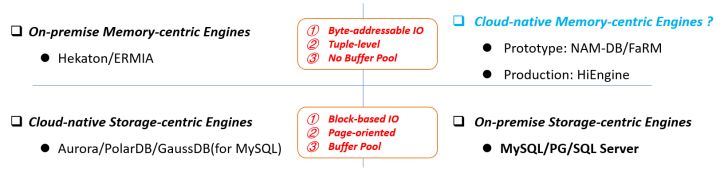
HiEngine:可媲美本地的云原生内存数据库引擎
随机推荐
Is the performance evaluation of suppliers in the fastener industry cumbersome? Choose the right tool to easily counter attack!
MySql中的longtext字段的返回问题及解决
MMO項目學習一:預熱
测试外包公司怎么样?
The basic grammatical structure of C language
IFD-x 微型红外成像仪(模块)关于温度测量和成像精度的关系
Is it safe for Guohai Securities to open an account online?
Oracle故障处理:Ora-10873:file * needs to be either taken out of backup or media recovered
Teach you to deal with JS reverse picture camouflage hand in hand
How to realize the Online timer and offline timer in the game
Cf:b. almost Terry matrix [symmetry + finding rules + structure + I am structural garbage]
软件测试工程师是做什么的?待遇前景怎么样?
Realizing deep learning framework from zero -- LSTM from theory to practice [practice]
Pandora IOT development board learning (HAL Library) - Experiment 8 timer interrupt experiment (learning notes)
The road of enterprise digital transformation starts from here
R语言可视化散点图(scatter plot)图、为图中的部分数据点添加标签、始终显示所有标签,即使它们有太多重叠、ggrepel包来帮忙
数据库 逻辑处理功能
Hiengine: comparable to the local cloud native memory database engine
司空见惯 - 英雄扫雷鼠
You can have both fish and bear's paw! Sky wing cloud elastic bare metal is attractive!