当前位置:网站首页>海思万能平台搭建:颜色空间转换YUV2RGB
海思万能平台搭建:颜色空间转换YUV2RGB
2022-07-06 20:23:00 【快跑bug来啦】
前言
颜色空间的转换,除了闹着玩的找找定位,画画框,更具代表性的就是yuv到rgb的转化
Makefile
主要用到了sdk中ive内的算子,由于默认的是不支持ive的静态库的,需要在Makefile中将其添加进来
SENSOR_LIBS += $(REL_LIB)/libive.a
代码
还是新建专门用于转换的线程
if(yuv2rgbEnable)
    {

        stv_process_yuv2rgb.VpssGrp = VpssGrp;
        stv_process_yuv2rgb.VpssChn = VpssChn[1];
        pthread_t video_process_yuv2rgb_id;
        s32Ret=pthread_create(&video_process_yuv2rgb_id, NULL, &video_process_yuv2rgb_task,(HI_VOID*)&stv_process_yuv2rgb);
        if(s32Ret != 0)
        {

            SAMPLE_PRT("pthread video_process_yuv2rgb create failed\n");
            return -HI_FAILURE;
        }
        pthread_detach(video_process_yuv2rgb_id);
        }
在原先处理线程的基础上进行修改
/* *描述 :用于处理yuv2rgb颜色空间转化的线程 *参数 :arg 为自定义结构video_process_s,VPSS_GRP和VPSS_CHN用于传参给HI_MPI_VPSS_GetChnFrame *返回值: *注意 :HI_MPI_VPSS_GetChnFrame完必须释放,否则再次获取VB会报错 */
HI_VOID *video_process_yuv2rgb_task(HI_VOID *arg)
{

    HI_S32 cnt = 0;
    HI_S32 s32Ret;

    VIDEO_FRAME_INFO_S stVideoFrame;
    video_process_s* pstPara;
    pstPara = (video_process_s*)arg;

    sleep(1);
    memset(&stVideoFrame,0,sizeof(VIDEO_FRAME_INFO_S));
    while(cnt <= 10)
    {

        s32Ret = HI_MPI_VPSS_GetChnFrame(pstPara->VpssGrp, pstPara->VpssChn, &stVideoFrame,1000);
        if(s32Ret != HI_SUCCESS)
        {

            SAMPLE_PRT("%dVPSS_GetChnFrame err for %#x!\n", cnt,s32Ret);
            cnt++;
        }
        else
        {

            HI_MPI_VPSS_ReleaseChnFrame(pstPara->VpssGrp, pstPara->VpssChn, &stVideoFrame);//不释放会导致后续vb崩溃
            goto DEAL;
        }

    }
    goto EXIT;
DEAL:
    // deal_myself_osd(arg);
    deal_myself_yuv2rgb(arg);
    // deal_myself(arg);

EXIT:
    pthread_exit(0);
}
HI_MPI_IVE_CSC
是核心的转换函数,位于SVP目录下HiIVE API 参考手册中,重点是对该函数参数的配置
/*****************************************************************************
*   Prototype    : HI_MPI_IVE_CSC
*   Description  : YUV2RGB\YUV2HSV\YUV2LAB\RGB2YUV color space conversion are supported.
*   Parameters   : IVE_HANDLE         *pIveHandle       Returned handle ID of a task
*                  IVE_SRC_IMAGE_S    *pstSrc           Input source data:
*                                                       1. SP420\SP422 type for YUV2RGB\YUV2HSV\YUV2LAB;
*                                                       2. U8C3_PACKAGE\U8C3_PLANAR type for RGB2YUV;
*                  IVE_DST_IMAGE_S    *pstDst           Output result:
*                                                       1. U8C3_PACKAGE\U8C3_PLANAR typed for YUV2RGB\YUV2HSV\YUV2LAB;
*                                                       2. SP420\SP422 type for RGB2YUV;
*                  IVE_CSC_CTRL_S     *pstCscCtrl       Control parameters for CSC
*                  HI_BOOL             bInstant         For details, see HI_MPI_IVE_DMA.
*   Return Value : HI_SUCCESS: Success;Error codes: Failure.
*   Spec         : The size of the input data ranges from 64x64 pixels to 1920x1080 pixels.
*                  The physical addresses of the input data and output data must be 16-byte-aligned.
*                  The stride must be 16-pixel-aligned.
*   History:
*
*       1.  Date         : 2011-05-16
*           Author       :
*           Modification : Created function
*       2.  Date         : 2013-08-09
*           Author       :
*           Modification : Modified function
*
*****************************************************************************/
HI_S32 HI_MPI_IVE_CSC(IVE_HANDLE *pIveHandle, IVE_SRC_IMAGE_S *pstSrc,IVE_DST_IMAGE_S *pstDst, IVE_CSC_CTRL_S *pstCscCtrl, HI_BOOL bInstant);
注意事项要看仔细,这里对分辨率有着明确的要求,没细看的我第一次天真的又跳进自己挖好的坑里,不过在上一期思维方式转变厚,不到五分钟就成功定位到了,毕竟这个日志功能确实强大
再然后关于函数使用的就顺利许多了,参考下面的代码配置即可
/* *描述 :线程里用于处理图像信息,完成yuv-rgb的颜色空间转换 *参数 :arg 为自定义结构video_process_s,VPSS_GRP和VPSS_CHN用于传参给HI_MPI_VPSS_GetChnFrame *返回值:无 *注意 :HI_MPI_VPSS_GetChnFrame完必须释放,否则再次获取VB会报错 HI_MPI_SYS_MmzAlloc_Cached需要搭配HI_MPI_SYS_MmzFlushCache刷新,最后需要HI_MPI_SYS_MmzFree释放 *Bug :未知原因卡顿,偶现退出后无法再次运行的问题(定位至保存问题) */
HI_S32 deal_myself_yuv2rgb(HI_VOID *arg)
{


    HI_S32 s32Ret;
    IVE_SRC_IMAGE_S stSrc ;
    IVE_DST_IMAGE_S stDst ;
    IVE_HANDLE IveHandle ;
    IVE_CSC_CTRL_S stCscControl ;
    HI_BOOL bInstant = HI_TRUE;
    VIDEO_FRAME_INFO_S stVideoFrame;
    // VIDEO_FRAME_INFO_S* pstVideoFrame = &stVideoFrame;
    video_process_s* pstPara;
    pstPara = (video_process_s*)arg;

    memset(&stSrc,0,sizeof(IVE_SRC_IMAGE_S));
    memset(&stDst,0,sizeof(IVE_DST_IMAGE_S));
    memset(&stCscControl,0,sizeof(IVE_CSC_CTRL_S));
    stCscControl.enMode = IVE_CSC_MODE_VIDEO_BT601_YUV2RGB;

    // #define RGB_SAVE
    #ifdef RGB_SAVE
    FILE *fOut;
    HI_CHAR *pchDstFileName = "./YUV/chn1_w1920_h1080_RGB.bgr";
    #endif

    // ftruncate(fOut,0);
    while(1)
    {

        // sleep(1);
        s32Ret = HI_MPI_VPSS_GetChnFrame(pstPara->VpssGrp, pstPara->VpssChn, &stVideoFrame,1000);
        // SAMPLE_PRT("deal_myself_yuv2rgb chn is %d!\n",pstPara->VpssChn);
        if(s32Ret != HI_SUCCESS)
        {

            // SAMPLE_PRT("VPSS_GetChnFrame err for %#x!\n",s32Ret);//while1打印太多
            continue;
        }
        else
        {

            // SAMPLE_PRT("VPSS_GetChnFrame success for %#x!\n",s32Ret);
            /*初始化YUV输入数据结构体stSrc*/
            stSrc.enType = IVE_IMAGE_TYPE_YUV420SP ;
            stSrc.au64PhyAddr[0] = stVideoFrame.stVFrame.u64PhyAddr[0] ;
            stSrc.au64PhyAddr[1] = stVideoFrame.stVFrame.u64PhyAddr[1] ;
            stSrc.au64PhyAddr[2] = stVideoFrame.stVFrame.u64PhyAddr[2] ;
            stSrc.au64VirAddr[0] = stVideoFrame.stVFrame.u64VirAddr[0] ;
            stSrc.au64VirAddr[1] = stVideoFrame.stVFrame.u64VirAddr[1] ;
            stSrc.au64VirAddr[2] = stVideoFrame.stVFrame.u64VirAddr[2] ;
            stSrc.au32Stride[0] = stVideoFrame.stVFrame.u32Stride[0] ;
            stSrc.au32Stride[1] = stVideoFrame.stVFrame.u32Stride[1] ;
            stSrc.au32Stride[2] = stVideoFrame.stVFrame.u32Stride[2] ;
            stSrc.u32Width = stVideoFrame.stVFrame.u32Width ;
            stSrc.u32Height = stVideoFrame.stVFrame.u32Height ;
            // printf("width is %d, height is %d\n", stSrc.au32Stride[0], stSrc.u32Height);
            /*初始化输出RPG数据结构体并在内存中为图像数据分配空间*/

            s32Ret = HI_MPI_SYS_MmzAlloc_Cached(&stDst.au64PhyAddr[0], (HI_VOID *)&stDst.au64VirAddr[0], "DstImg",
                                            HI_NULL, stSrc.au32Stride[0] * stSrc.u32Height * 3);
            if(HI_SUCCESS != s32Ret)
            {

                SAMPLE_PRT("Error(%#x),HI_MPI_SYS_MmzAlloc_Cached failed!\n",s32Ret) ;
                HI_MPI_SYS_MmzFree(stDst.au64PhyAddr[0],(HI_VOID*)stDst.au64VirAddr) ;
                return s32Ret;
            }

            // memset(stDst.au64VirAddr[0],0,stSrc.u32Height * stSrc.au32Stride[0] * 3) ;
            stDst.enType = IVE_IMAGE_TYPE_U8C3_PACKAGE ;
            stDst.u32Height = stSrc.u32Height ;
            stDst.u32Width = stSrc.u32Width ;
            stDst.au32Stride[0] = (((stVideoFrame.stVFrame.u32Width + 15) >> 4) << 4);


            // stDst.au32Stride[0] = stSrc.au32Stride[0] ;
            // stDst.au32Stride[1] = stDst.au32Stride[1] ;
            // stDst.au32Stride[2] = stDst.au32Stride[2] ;
            // stDst.au64VirAddr[1] = stDst.au64VirAddr[0] + stDst.u32Height * stDst.au32Stride[0] ;
            // stDst.au64VirAddr[2] = stDst.au64VirAddr[1] + stDst.u32Height * stDst.au32Stride[0] ;
            // stDst.au64PhyAddr[1] = stDst.au64PhyAddr[0] + stDst.u32Height * stDst.au32Stride[0] ;
            // stDst.au64PhyAddr[2] = stDst.au64PhyAddr[1] + stDst.u32Height * stDst.au32Stride[0] ;

            // memset(stDst.au64VirAddr,0, stSrc.au32Stride[0] * stSrc.u32Height * 3);
            /*将cache中的内容刷新到内存*/
            // s32Ret = HI_MPI_SYS_MmzFlushCache(stDst.au64PhyAddr[0],(HI_VOID*)stDst.au64VirAddr[0],stDst.u32Height * stDst.au32Stride[0] * 3) ;
            // // s32Ret = HI_MPI_SYS_MmzFlushCache(0, NULL, 0) ;
            // if(HI_SUCCESS != s32Ret){

            // SAMPLE_PRT("Error(%#x),HI_MPI_SYS_MmzFlushCache failed!\n",s32Ret) ;
            // // HI_MPI_SYS_MmzFree(stDst.au64PhyAddr[0],stDst.au64VirAddr) ;
            // // HI_MPI_SYS_MmzFree(stDst.au64PhyAddr[0],stDst.au64VirAddr) ;
            // // return ;
            // }

            /*将YUV数据转换到RGB planar存储,地址保存在stDst结构体中*/

            s32Ret = HI_MPI_IVE_CSC(&IveHandle,&stSrc,&stDst,&stCscControl,bInstant) ;
            if(HI_SUCCESS != s32Ret)
            {

                SAMPLE_PRT("Error(%#x),HI_MPI_IVE_CSC failed!\n",s32Ret) ;
                // return ;
            }
            #ifdef RGB_SAVE
            printf("yuv2bgr success\r\n");
            fflush(stdout);
            fOut = fopen(pchDstFileName,"wb");
            if(HI_NULL == fOut)
            {

                printf("Open out file %s fail\n",pchDstFileName);
                fclose(fOut);
                // return;
            }
            WriteBGRPackFile(&stDst, fOut);
            fclose(fOut);
            printf("file\r\n");
            #endif
            s32Ret = HI_MPI_SYS_MmzFree(stDst.au64PhyAddr[0],(HI_VOID*)stDst.au64VirAddr) ;
            if(HI_SUCCESS != s32Ret){

                SAMPLE_PRT("Error(%#x),HI_MPI_SYS_MmzFree failed!\n",s32Ret) ;
                HI_MPI_SYS_MmzFree(stDst.au64PhyAddr[0],(HI_VOID*)stDst.au64VirAddr) ;
                // return ;
            }
            s32Ret = HI_MPI_VENC_SendFrame(pstPara->VpssChn, &stVideoFrame,1000);
            HI_MPI_VPSS_ReleaseChnFrame(pstPara->VpssGrp, pstPara->VpssChn, &stVideoFrame);
        }
    }

}
将转化后的rgb文件保存下来(rgb888或者叫rgb24格式)
/* *描述 :用于保存rgb图像 *参数 :pstImg IVE_IMAGE_S 结构体,定义二维广义图像信息,用于ive_csc处理后rgb24图像的保存 pFp 文件指针,用于保存文件 *返回值:无 *注意 :无 *Bug :未知原因容易卡顿(更换打开文件的位置后解决) */
HI_VOID WriteBGRPackFile(IVE_IMAGE_S *pstImg, FILE *pFp)
{

    HI_U16 y;
    HI_U8 *pU8;
    HI_U16 height;
    HI_U16 width;

    width = pstImg->u32Width;
    height = pstImg->u32Height*3;
    pU8 = (HI_U8*)pstImg->au64VirAddr[0];
    for (y = 0; y < height; y++)
    {

        if ( 1 != fwrite(pU8,width,1,pFp))
        {

            printf("write file error, y = %d\n", y);
            return ;
        }

        pU8 += pstImg->au32Stride[0];
    }
}
结果
小意外还是发生了,除了注释中解决的小bug,图像感觉颜色怪怪的,像加了滤镜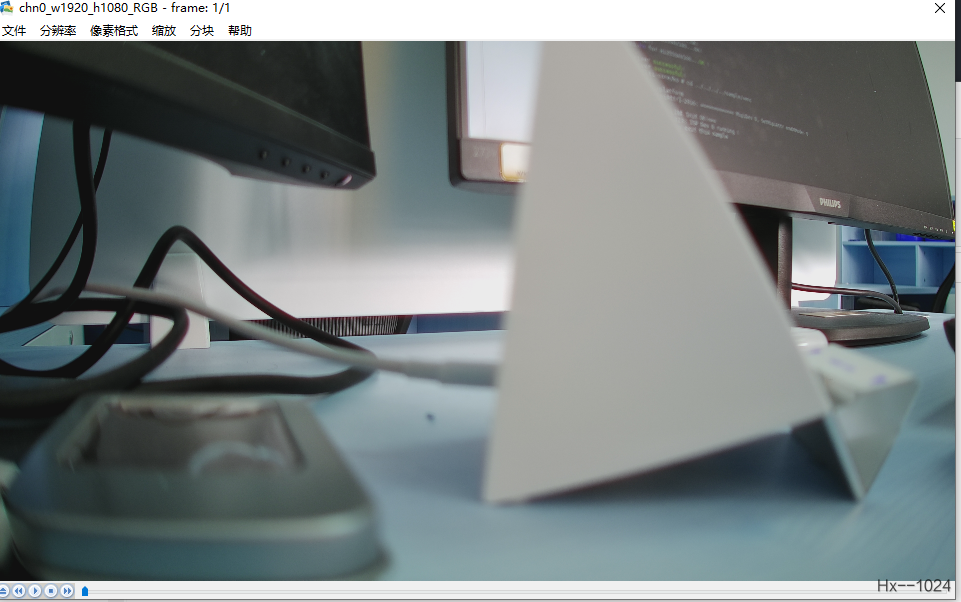
应该是这个算子支持的是yuv转rgb而我们默认的一直是yvu实际上,vpss处修改了图片格式后果然正常多了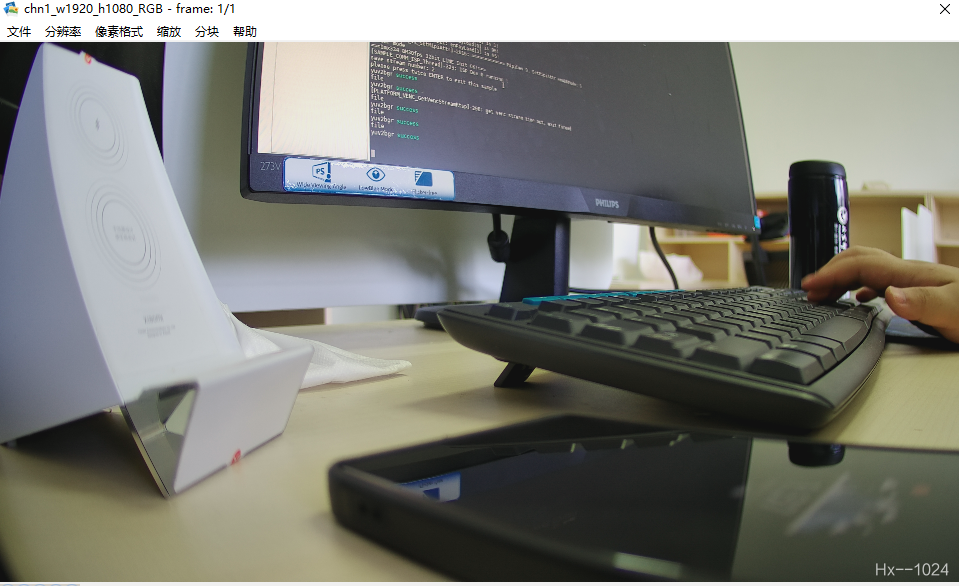
边栏推荐
- Ubuntu 20 installation des enregistrements redisjson
- Domcontentloaded and window onload
- 2022.6.28
- R数据分析:cox模型如何做预测,高分文章复现
- Laravel php artisan 自动生成Model+Migrate+Controller 命令大全
- 变量、流程控制与游标(MySQL)
- Variables, process control and cursors (MySQL)
- Mathematical induction and recursion
- SQL Tuning Advisor一个错误ORA-00600: internal error code, arguments: [kesqsMakeBindValue:obj]
- 海思3559万能平台搭建:RTSP实时播放的支持
猜你喜欢
ubuntu20安裝redisjson記錄
Stored procedures and functions (MySQL)
腾讯云原生数据库TDSQL-C入选信通院《云原生产品目录》
input_ delay
ubuntu20安装redisjson记录

22.(arcgis api for js篇)arcgis api for js圆采集(SketchViewModel)
Sub pixel corner detection opencv cornersubpix

19. (ArcGIS API for JS) ArcGIS API for JS line acquisition (sketchviewmodel)
枚举通用接口&枚举使用规范

23.(arcgis api for js篇)arcgis api for js椭圆采集(SketchViewModel)
随机推荐
迷失在MySQL的锁世界
[C language] question set of IX
input_ delay
Mathematical induction and recursion
Create applet from 0
Flutter3.0, the applet is not only run across mobile applications
About Tolerance Intervals
[colmap] 3D reconstruction with known camera pose
Codeforces round 264 (Div. 2) C gargari and Bishop [violence]
Tencent cloud native database tdsql-c was selected into the cloud native product catalog of the Academy of communications and communications
Matlab Error (Matrix dimensions must agree)
unrecognized selector sent to instance 0x10b34e810
Appx code signing Guide
【安全的办公和生产力应用程序】上海道宁为您提供ONLYOFFICE下载、试用、教程
Jericho is in non Bluetooth mode. Do not jump back to Bluetooth mode when connecting the mobile phone [chapter]
【基于 RT-Thread Studio的CPK-RA6M4 开发板环境搭建】
HDU 4337 King Arthur&#39; S Knights it outputs a Hamiltonian circuit
Jericho turns on the display icon of the classic Bluetooth hid mobile phone to set the keyboard [chapter]
24.(arcgis api for js篇)arcgis api for js点修改点编辑(SketchViewModel)
[cpk-ra6m4 development board environment construction based on RT thread studio]