当前位置:网站首页>Learn more about materialapp and common attribute parsing in fluent
Learn more about materialapp and common attribute parsing in fluent
2022-07-02 03:42:00 【Keke duck~】
One 、Flutter Middle structure diagram
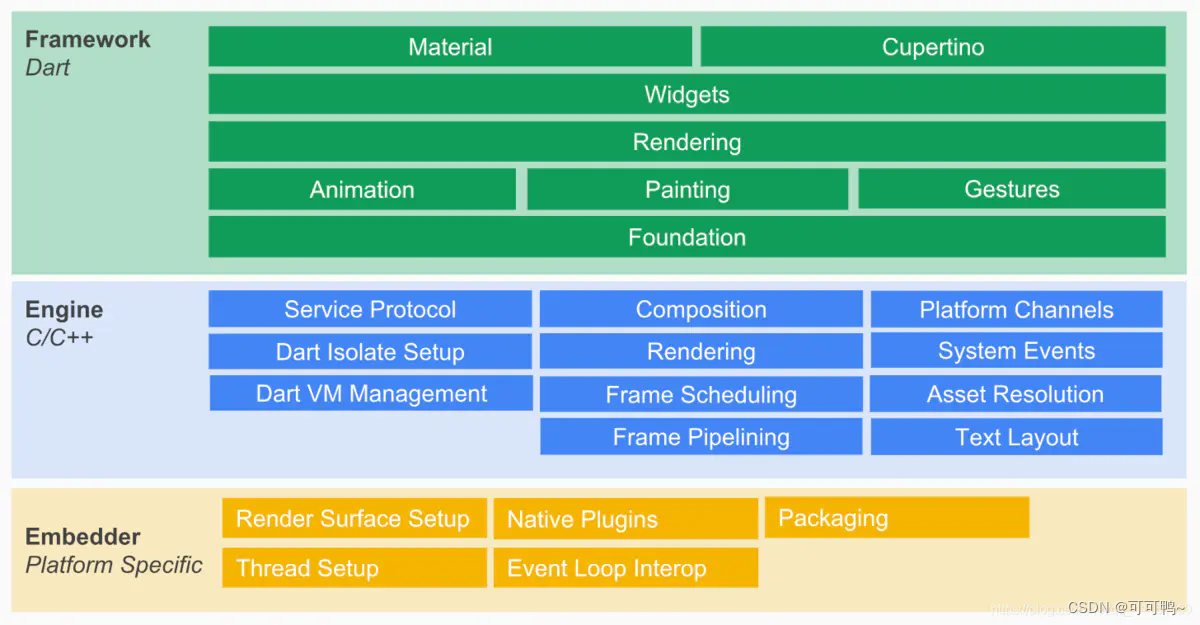
Flutter Framework
Foundation、Animation、Painting、Gestures Synthesized Dart UI layer , The corresponding is Flutter in dart:ui package , The corresponding meaning is animation 、 gesture 、 Drawing ability .
Rendering Layer is an abstract layout layer , Depend on Dart UI layer ,Rendering Layer will build a UI Trees 、 When UI When the trees change , The accountant worked out what had changed , And then update UI Trees , Finally, it's drawn on the screen
Widgets Layer is Flutter Provide a set of basic component libraries
Material、Cupertino yes Flutter Two visual style component libraries are provided (Android、iOS)
Flutter Engine
This is a pure C++ Realized SDK, It mainly performs related rendering 、 Thread management 、 Platform events and other operations . Which includes Skia engine 、Dart Runtime 、 Typesetting engine, etc . Calling dart:ui Kuo is , In fact, it will eventually come to Engine layer , Realize the real drawing logic
Flutter Embedder
Provide four Task Runner, Run the engine all the way to the rendering settings of the platform middle tier code 、 Native plug-ins 、 pack 、 Thread management 、 Time cycle 、 Interactive operation, etc .
Two 、Material Introduce
MaterialApp It contains a lot of Widget , these Widget It is usually to implement Material Design
Necessary for your application , Contains Widget Can be in Material Components widgets View all .
| Field | attribute | describe |
|---|---|---|
| navigatorKey | GlobalKey<NavigatorState> | Navigation key |
| scaffoldMessengerKey | GlobalKey<ScaffoldMessengerState> | Scaffold key |
| home | Widget | Home page , The page displayed when the application opens |
| routes | Map<String, WidgetBuilder> | Application top-level routing table |
| initialRoute | String | If the navigator is built , The name of the first route will be displayed |
| onGenerateRoute | RouteFactory | Route management interceptor |
| onGenerateInitialRoutes | InitialRouteListFactory | Generate initialization route |
| onUnknownRoute | RouteFactory | When onGenerateRoute Called when a route cannot be generated |
| navigatorObservers | List<NavigatorObserver> | Create an observer list for the navigator |
| builder | TransitionBuilder | Insert a widget on the navigator |
| title | String | Title displayed during program switching |
| onGenerateTitle | GenerateAppTitle | Generate title string when program switching |
| color | Color | Apply icon background color when program switching ( Only Android works ) |
| theme | ThemeData | Theme color |
| darkTheme | ThemeData | Dark mode theme color |
| highContrastTheme | ThemeData | System request “ High Contrast ” Theme used |
| highContrastDarkTheme | ThemeData | System request “ High Contrast ” Theme color used in dark mode |
| themeMode | ThemeMode | The theme of which mode to use ( Default follow system ) |
| locale | Locale | Initial locale |
| localizationsDelegates | Iterable<LocalizationsDelegate<dynamic>> | Localization agent |
| localeListResolutionCallback | LocaleListResolutionCallback | Failed or did not provide the locale of the device |
| localeResolutionCallback | LocaleResolutionCallback | Responsible for computing language environment |
| supportedLocales | Iterable<Locale> | List of localized regions |
| debugShowMaterialGrid | bool | Draw baseline mesh overlay ( only debug Pattern ) |
| showPerformanceOverlay | bool | Show performance overlay |
| checkerboardRasterCacheImages | bool | Open the checkerboard of the grid cache image . |
| checkerboardOffscreenLayers | bool | Open the checkerboard of layers rendered to off screen bitmaps . |
| showSemanticsDebugger | bool | Open the overlay that displays accessibility information |
| debugShowCheckedModeBanner | bool | Debug display check mode banner |
| shortcuts | Map<LogicalKeySet, Intent> | Default mapping of keyboard shortcuts intended by the application . |
| actions | Map<Type, Action<Intent>> | Contains and defines mappings for user actions |
| restorationScopeId | String | Identifier of the application state recovery |
| scrollBehavior | ScrollBehavior | How scrollable widgets behave |
3、 ... and 、 Attribute resolution
1.navigatorKey
navigatorKey amount to Navigator.of(context) , If the application wants to implement no context Jump , Then you can set the key, adopt navigatorKey.currentState.overlay.context Get the big picture context.
Usage mode
GlobalKey<NavigatorState> navigatorKey = new GlobalKey();
navigatorKey: navigatorKey ,
2.home
Pass in Widget Components , Show the first page
3.debugShowCheckedModeBanner
Debug display check mode banner , Generally set as false
debugShowCheckedModeBanner: false,
4.onGenerateRoute
When jumping a route , If in routes No corresponding key , The callback will be executed , Will call and return a RouteSettings , The object contains name Routing name 、 arguments Routing parameters .
// In the previous article, I talked about how to configure unified routing
onGenerateRoute: AppRouteManager.getInstance().onGenerateRoute,
5.initialRoute
Initial route , If this parameter is set and in routes Found the corresponding key, The corresponding Widget , Otherwise show home
 MaterialApp(
   routes: {

     "/home": (_) => Home(),
     "/my": (_) => My()
   },
   initialRoute: "/home",
 )
6.builder
In the build MaterialApp Of Widget tree when , That is, loading child Give to before child Add a parent node to the parameter . So some toast Libraries need to be global context Three party Library , Will use builder Add yourself to widget tree in .
builder: EasyLoading.init(),
7.theme
Specify the whole App Theme color
MaterialApp(
  theme: ThemeData(
    //  Main colors
    primaryColor: Colors.pink
  ),
)
8.scaffoldMessengerKey
scaffoldMessengerKey Mainly to manage future generations Scaffolds, Can be achieved without context call snack bars
GlobalKey<ScaffoldMessengerState> _Key = GlobalKey();
MaterialApp(
  scaffoldMessengerKey: _Key,
);
_scaffoldKey.currentState.showSnackBar(SnackBar(content: Text("show SnackBar")));
9.onGenerateInitialRoutes
If provided initialRoute , The route generator callback used to generate the initial route , If this property is not set , Then the bottom layer Navigator.onGenerateInitialRoutes Default to Navigator.defaultGenerateInitialRoutes.
10.onUnknownRoute
Effect and onGenerateRoute equally , Just go first onGenerateRoute , If the route cannot be generated, call onUnknownRoute
MaterialApp(
   routes: {

     "/home": (_) => Home(),
     },
   initialRoute: "/home",
   onGenerateRoute: (setting) {

     return null;
   },
   onUnknownRoute: (setting) {

     return MaterialPageRoute(builder: (_) => Home());
   },
)
11.navigatorObservers
Listen for routing stack changes
  static final RouteObserver<PageRoute> routeObserver =
      RouteObserver<PageRoute>();
      navigatorObservers: [MyApp.routeObserver],
12.title
Android: On top of the program snapshot of Task Manager
IOS: Program switch manager
 return MaterialApp(
      title: ' You Shangxing ',)
13.localizationsDelegates
Used to store customized multilingual resources
  localizationsDelegates: [
        RefreshLocalizations.delegate,
        GlobalMaterialLocalizations.delegate,
        GlobalWidgetsLocalizations.delegate,
        GlobalCupertinoLocalizations.delegate
      ],
14.supportedLocales
When the application supports different languages , You need to internationalize the application
MaterialApp(
  title: 'Flutter IntlApp',
  supportedLocales: [
    const Locale('zh'),
    const Locale('en'),
  ],
)
15.localeResolutionCallback
Listen for system language switching events , Some Android features , Multi language list can be set , By default, the first list is the default language
      localeResolutionCallback:
          (Locale locale, Iterable<Locale> supportedLocales) {

        //print("change language");
        return locale;
      },
appendix :
stay src in com File directory
1.Flutter Engine Use 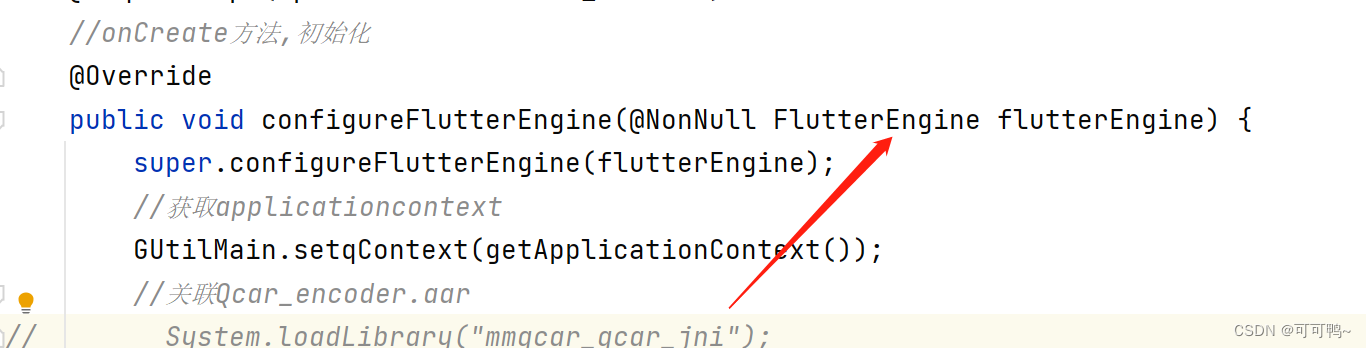
2.Flutter Embedder Use 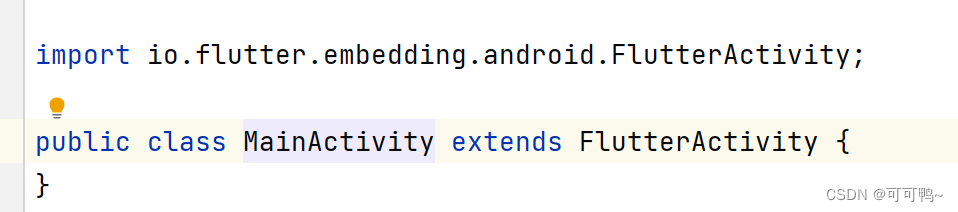
边栏推荐
- Large screen visualization from bronze to the advanced king, you only need a "component reuse"!
- regular expression
- 蓝桥杯单片机省赛第十二届第一场
- Blue Bridge Cup SCM digital tube skills
- Kotlin basic learning 16
- Kotlin基础学习 16
- [HCIA continuous update] working principle of OSPF Protocol
- Analyse de 43 cas de réseaux neuronaux MATLAB: Chapitre 42 opérations parallèles et réseaux neuronaux - - opérations parallèles de réseaux neuronaux basées sur CPU / GPU
- Basic syntax of unity script (6) - specific folder
- The 5th Blue Bridge Cup single chip microcomputer provincial competition
猜你喜欢
NLog使用

Eight steps of agile development process
【直播回顾】战码先锋首期8节直播完美落幕,下期敬请期待!
蓝桥杯单片机省赛第十届
蓝桥杯单片机省赛第十一届第二场

How should the team choose the feature branch development mode or trunk development mode?
How to establish its own NFT market platform in 2022
蓝桥杯单片机省赛第五届
Comment élaborer une stratégie nuageuse à l'ère des nuages mixtes
Visual slam Lecture 3 -- Lie groups and Lie Algebras
随机推荐
Set vscode. When double clicking, the selected string includes the $symbol - convenient for PHP operation
Basic syntax of unity script (6) - specific folder
Jetpack之LiveData扩展MediatorLiveData
近段时间天气暴热,所以采集北上广深去年天气数据,制作可视化图看下
滴滴开源DELTA:AI开发者可轻松训练自然语言模型
Blue Bridge Cup single chip microcomputer sixth temperature recorder
【直播回顾】战码先锋首期8节直播完美落幕,下期敬请期待!
In the era of programmers' introspection, five-year-old programmers are afraid to go out for interviews
Large screen visualization from bronze to the advanced king, you only need a "component reuse"!
L'avènement de l'ère 5G, une brève discussion sur la vie passée et présente des communications mobiles
Pointer array & array pointer
5G时代全面到来,浅谈移动通信的前世今生
MySQL advanced (Advanced) SQL statement (II)
NLog使用
蓝桥杯单片机省赛第十二届第一场
The page in H5 shows hidden execution events
Basic syntax of unity script (7) - member variables and instantiation
FFMpeg AVFrame 的概念.
h5中的页面显示隐藏执行事件
Analyse de 43 cas de réseaux neuronaux MATLAB: Chapitre 42 opérations parallèles et réseaux neuronaux - - opérations parallèles de réseaux neuronaux basées sur CPU / GPU