当前位置:网站首页>Oauth2.0 - using JWT to replace token and JWT content enhancement
Oauth2.0 - using JWT to replace token and JWT content enhancement
2022-07-03 06:02:00 【Xiao bichao】
One 、OAuth2.0
In the last article, we explained OAuth2.0 Several authentication modes , The previous explanation Token use OAuth2.0 Generated in its own way Token, But this way also has this drawback , Through the previous test, we found , When the resource service and authorization service are not together, the resource service uses RemoteTokenServices Remote request authorization service authentication token, If the number of visits is large, it will affect the performance of the system .
So we can use JWT To generate the token , User authentication will get a JWT token ,JWT The token already contains user related information , The client just needs to carry JWT Access resource services , The resource service completes the token verification by itself according to the agreed algorithm , There is no need to request the authentication service to complete authorization every time .
Here is the address of the last article :
Two 、OAuth2.0 Integrate JWT
This article continues to revise the content of the previous article .
Authentication service modification
First of all JWT Signature mode , Symmetric encryption is adopted here , Set key to bxc123, This is also modified in the resource server :
@Configuration
public class TokenConfig {

    private String SIGNING_KEY = "bxc123";

    @Bean

    public TokenStore tokenStore() {
        return new JwtTokenStore(accessTokenConverter());

    }

    @Bean
    public JwtAccessTokenConverter accessTokenConverter() {
        JwtAccessTokenConverter converter = new JwtAccessTokenConverter();
        converter.setSigningKey(SIGNING_KEY); // Symmetric key , The resource server uses the secret key to verify
        return converter;
    }
}
Next, we need to modify AuthorizationServer Preparation Class , The main AuthorizationServerTokenServices The preparation of , Add one more TokenEnhancerChain, Declare the above JwtAccessTokenConverter Prepare it .
@Configuration
@EnableAuthorizationServer
public class AuthorizationServer extends AuthorizationServerConfigurerAdapter {

    @Autowired
    private TokenStore tokenStore;

    @Autowired
    private ClientDetailsService clientDetailsService;

    @Autowired
    private AuthenticationManager authenticationManager;

    @Autowired
    private AuthorizationCodeServices authorizationCodeServices;

    @Autowired
    private JwtAccessTokenConverter accessTokenConverter;


    @Override
    public void configure(ClientDetailsServiceConfigurer clients) throws Exception {
        clients.inMemory()//  Use in‐memory Storage
                .withClient("c1")// client_id
                .secret(new BCryptPasswordEncoder().encode("secret"))
                .resourceIds("res1")
                .authorizedGrantTypes("authorization_code", "password", "client_credentials", "implicit", "refresh_token")//  The client Allowed authorization types  authorization_code,password,refresh_token,implicit,client_credentials
                .scopes("all")//  Permitted scope of Authorization
                .autoApprove(false) // Add the verification callback address
                .authorities("admin")
                .redirectUris("http://www.baidu.com");
    }

    // Set how the authorization code of the authorization code mode is accessed , Temporarily use memory mode
    @Bean
    public AuthorizationCodeServices authorizationCodeServices() {
        return new InMemoryAuthorizationCodeServices();
    }

    @Bean
    public AuthorizationServerTokenServices tokenService() {
        DefaultTokenServices service = new DefaultTokenServices();
        service.setClientDetailsService(clientDetailsService);
        service.setSupportRefreshToken(true);
        service.setTokenStore(tokenStore);
        // Token enhancement
        TokenEnhancerChain tokenEnhancerChain = new TokenEnhancerChain();
        List<TokenEnhancer> tokenEnhancers = new ArrayList<>();
        tokenEnhancers.add(accessTokenConverter);
        tokenEnhancerChain.setTokenEnhancers(tokenEnhancers);

        service.setTokenEnhancer(tokenEnhancerChain);
        service.setAccessTokenValiditySeconds(7200); //  Token default validity 2 Hours
        service.setRefreshTokenValiditySeconds(259200); //  Refresh token default validity 3 God
        return service;
    }

    @Override
    public void configure(AuthorizationServerEndpointsConfigurer endpoints) {
        endpoints
                .authenticationManager(authenticationManager)// Authentication manager
                .authorizationCodeServices(authorizationCodeServices)// Authorization code service
                .tokenServices(tokenService())// Token management service
                .allowedTokenEndpointRequestMethods(HttpMethod.POST);
    }

    @Override
    public void configure(AuthorizationServerSecurityConfigurer security) throws Exception {
        security
                .tokenKeyAccess("permitAll()")                    //oauth/token_key It's public
                .checkTokenAccess("permitAll()")                  //oauth/check_token Open
                .allowFormAuthenticationForClients();                // Forms authentication ( Claim Token )
    }
}
restart auth Certification services .
Resource service modification
Put what's written on it TokenConfig class , Cover resource services , And modify it ResouceServerConfig Preparation Class , The logic of verifying the token by the remote access authentication service written above , It can be removed :
@Configuration
@EnableResourceServer
public class ResouceServerConfig extends ResourceServerConfigurerAdapter {
    public static final String RESOURCE_ID = "res1";

    @Autowired
    TokenStore tokenStore;

    @Override
    public void configure(ResourceServerSecurityConfigurer resources) {
        resources.resourceId(RESOURCE_ID)// resources  id
                .tokenStore(tokenStore)
                .stateless(true);
    }

    @Override
    public void configure(HttpSecurity http) throws Exception {
        http
                .authorizeRequests()
                .antMatchers("/admin/**").hasAuthority("admin")
                .antMatchers("/common/**").hasAuthority("common")
                .and().csrf().disable()
                .sessionManagement().sessionCreationPolicy(SessionCreationPolicy.STATELESS);
    }
}
Restart the resource service .
3、 ... and 、 test
Log in to the system in password mode to get token, You can see what you get token It's already Jwt Format :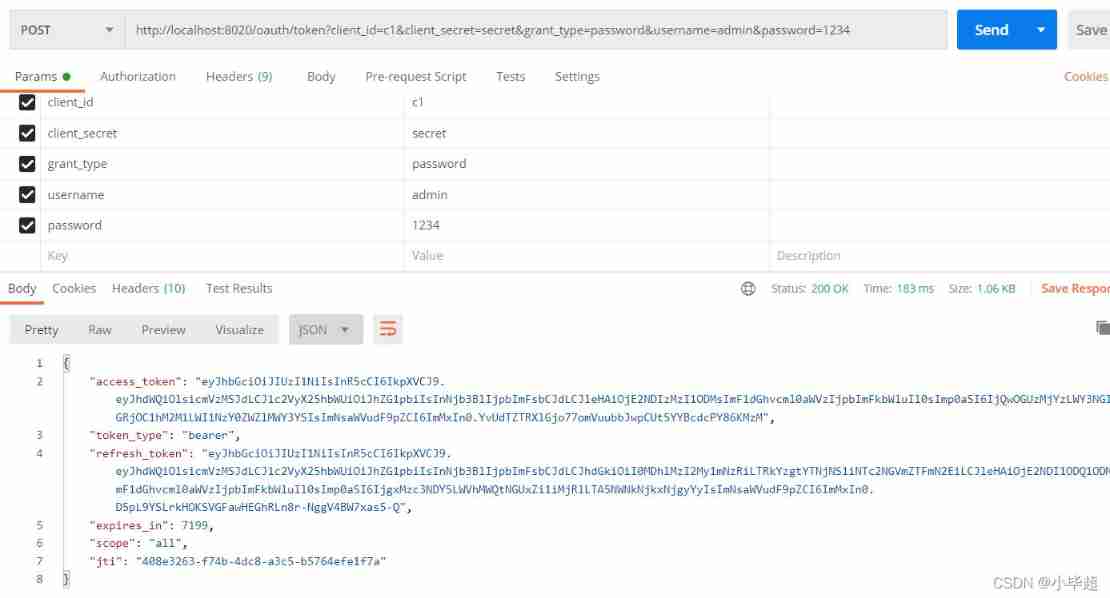
Can be in some Jwt Online parsing website , Parsing JWT: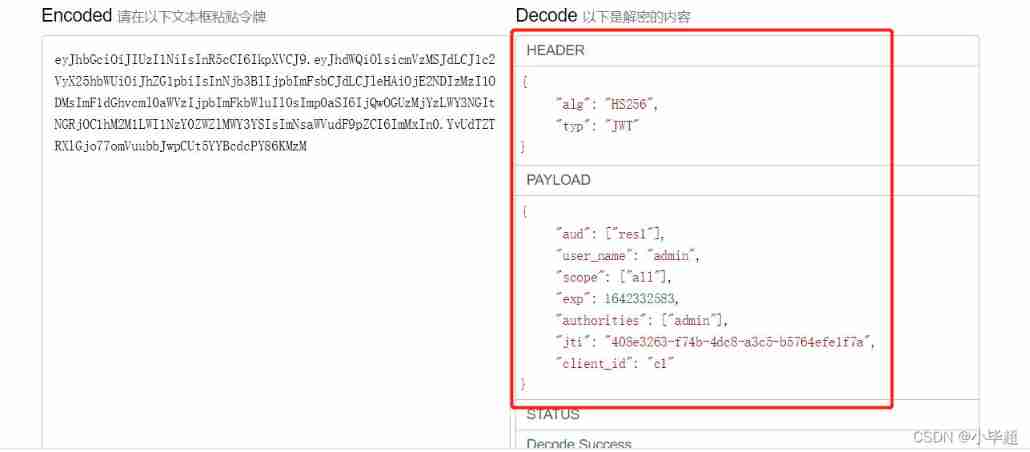
Use token Go to the resource service interface :
Four 、JWT Content enhancement
You can see up here JWT Some user information is placed by default , What if we want to store other things , Just use DefaultOAuth2AccessToken Of setAdditionalInformation Method , Pass a Map You can place customized data , You can get user information , You can also find other customized information placement , Next, modify the authentication service AuthorizationServer Preparation Class :
add to TokenEnhancer tokenEnhancer() Method :
 /**
  * JWT Content enhancement
  */
 @Bean
 public TokenEnhancer tokenEnhancer() {
     return (accessToken, authentication) -> {
         Map<String, Object> additionalInfo = new HashMap<>();
         User principal = (User)authentication.getUserAuthentication().getPrincipal();
         String username = principal.getUsername();
         additionalInfo.put("three"," Additional content !");
         ((DefaultOAuth2AccessToken) accessToken).setAdditionalInformation(additionalInfo);
         return accessToken;
     };
 }
In the build TokenEnhancerChain Object time , Put the settings configured above :
@Bean
public AuthorizationServerTokenServices tokenService() {
    DefaultTokenServices service = new DefaultTokenServices();
    service.setClientDetailsService(clientDetailsService);
    service.setSupportRefreshToken(true);
    service.setTokenStore(tokenStore);
    // Token enhancement
    TokenEnhancerChain tokenEnhancerChain = new TokenEnhancerChain();
    List<TokenEnhancer> tokenEnhancers = new ArrayList<>();
    // Content enhancement
    tokenEnhancers.add(tokenEnhancer());
    tokenEnhancers.add(accessTokenConverter);
    tokenEnhancerChain.setTokenEnhancers(tokenEnhancers);

    service.setTokenEnhancer(tokenEnhancerChain);
    service.setAccessTokenValiditySeconds(7200); //  Token default validity 2 Hours
    service.setRefreshTokenValiditySeconds(259200); //  Refresh token default validity 3 God
    return service;
}
Restart the authentication service , Log in again , You can see that the added information already exists :
If the parsing JWT, You can also see the content :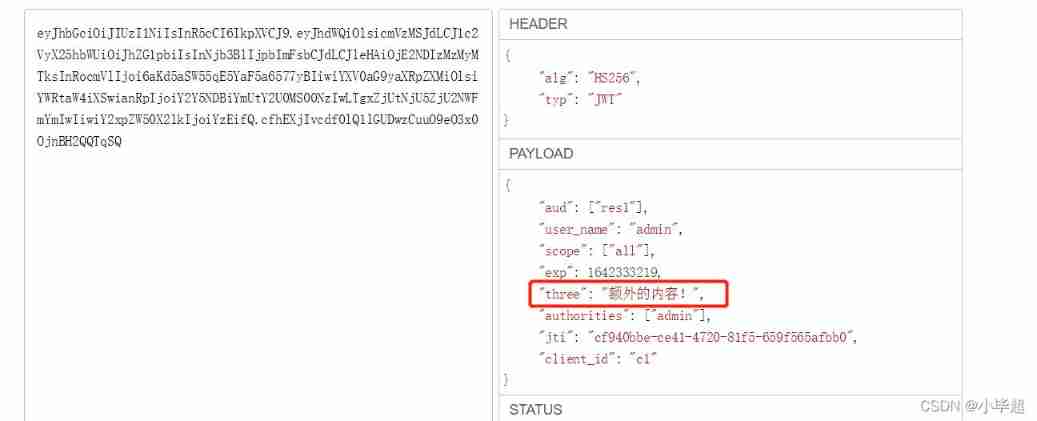

Love little buddy can pay attention to my personal WeChat official account. , Get more learning materials !
边栏推荐
- BeanDefinitionRegistryPostProcessor
- Yum is too slow to bear? That's because you didn't do it
- Understand one-way hash function
- Use telnet to check whether the port corresponding to the IP is open
- QT read write excel -- qxlsx insert chart 5
- Deep learning, thinking from one dimensional input to multi-dimensional feature input
- BeanDefinitionRegistryPostProcessor
- Redhat7 system root user password cracking
- Today, many CTOs were killed because they didn't achieve business
- Detailed explanation of findloadedclass
猜你喜欢
![[teacher Zhao Yuqiang] the most detailed introduction to PostgreSQL architecture in history](/img/18/f91d3d21a39743231d01f2e4015ef8.jpg)
[teacher Zhao Yuqiang] the most detailed introduction to PostgreSQL architecture in history

Understand the first prediction stage of yolov1

智牛股--03
![[Shangshui Shuo series together] day 10](/img/a3/e8b9df588bef67ead925813a75c8c0.png)
[Shangshui Shuo series together] day 10
Pytorch builds the simplest version of neural network
![[set theory] relational closure (reflexive closure | symmetric closure | transitive closure)](/img/c8/2995c503e9dabae4e2cc704449e04f.jpg)
[set theory] relational closure (reflexive closure | symmetric closure | transitive closure)
![[teacher Zhao Yuqiang] Cassandra foundation of NoSQL database](/img/cc/5509b62756dddc6e5d4facbc6a7c5f.jpg)
[teacher Zhao Yuqiang] Cassandra foundation of NoSQL database

Introduction to redis using Lua script
![[video of Teacher Zhao Yuqiang's speech on wot] redis high performance cache and persistence](/img/a7/2140744ebad9f1dc0a609254cc618e.jpg)
[video of Teacher Zhao Yuqiang's speech on wot] redis high performance cache and persistence
Kubernetes notes (IX) kubernetes application encapsulation and expansion
随机推荐
Sorry, this user does not exist!
Final review (Day6)
Exception when introducing redistemplate: noclassdeffounderror: com/fasterxml/jackson/core/jsonprocessingexception
JDBC connection database steps
Simple handwritten ORM framework
[teacher Zhao Yuqiang] use the catalog database of Oracle
多线程与高并发(7)——从ReentrantLock到AQS源码(两万字大章,一篇理解AQS)
Kubernetes notes (I) kubernetes cluster architecture
Redis cannot connect remotely.
Deep learning, thinking from one dimensional input to multi-dimensional feature input
MySQL 5.7.32-winx64 installation tutorial (support installing multiple MySQL services on one host)
最大似然估计,散度,交叉熵
[trivia of two-dimensional array application] | [simple version] [detailed steps + code]
[written examination question analysis] | | get [sizeof and strlen] [pointer and array] graphic explanation + code analysis
从 Amazon Aurora 迁移数据到 TiDB
[together Shangshui Shuo series] day 7 content +day8
[teacher Zhao Yuqiang] index in mongodb (Part 2)
Loss function in pytorch multi classification
BeanDefinitionRegistryPostProcessor
[escape character] [full of dry goods] super detailed explanation + code illustration!