当前位置:网站首页>使用 RepositoryProvider简化父子组件的传值
使用 RepositoryProvider简化父子组件的传值
2022-07-05 19:29:00 【InfoQ】
前言
- 构造函数传值:父组件将子组件需要的对象通过构造函数传递给子组件;
- 单例对象:构建单例对象,使得父子组件使用的是同一个对象;
- 容器:将对象存入容器中,父子组件使用的时候直接从容器中获取。
RepositoryProviderProviderRepositoryProvider定义
RepositoryProviderProviderBlocBlocRepositoryProvidercreatevaluecreatevalueRepositoryProviderclass RepositoryProvider<T> extends Provider<T>
with RepositoryProviderSingleChildWidget {
RepositoryProvider({
Key? key,
required Create<T> create,
Widget? child,
bool? lazy,
}) : super(
key: key,
create: create,
dispose: (_, __) {},
child: child,
lazy: lazy,
);
RepositoryProvider.value({
Key? key,
required T value,
Widget? child,
}) : super.value(
key: key,
value: value,
child: child,
);
static T of<T>(BuildContext context, {bool listen = false}) {
try {
return Provider.of<T>(context, listen: listen);
} on ProviderNotFoundException catch (e) {
if (e.valueType != T) rethrow;
throw FlutterError(
'''
RepositoryProvider.of() called with a context that does not contain a repository of type $T.
No ancestor could be found starting from the context that was passed to RepositoryProvider.of<$T>().
This can happen if the context you used comes from a widget above the RepositoryProvider.
The context used was: $context
''',
);
}
}
}
mixin RepositoryProviderSingleChildWidget on SingleChildWidget {}
MultiRepositoryProviderRepositoryProviderRepositoryProviderProvideroflistenfalse// 方式1
context.read<T>()
// 方式2
RepositoryProvider.of<T>(context)
MultiRepositoryProviderMultiRepositoryProvider(
providers: [
RepositoryProvider<RepositoryA>(
create: (context) => RepositoryA(),
),
RepositoryProvider<RepositoryB>(
create: (context) => RepositoryB(),
),
RepositoryProvider<RepositoryC>(
create: (context) => RepositoryC(),
),
],
child: ChildA(),
)
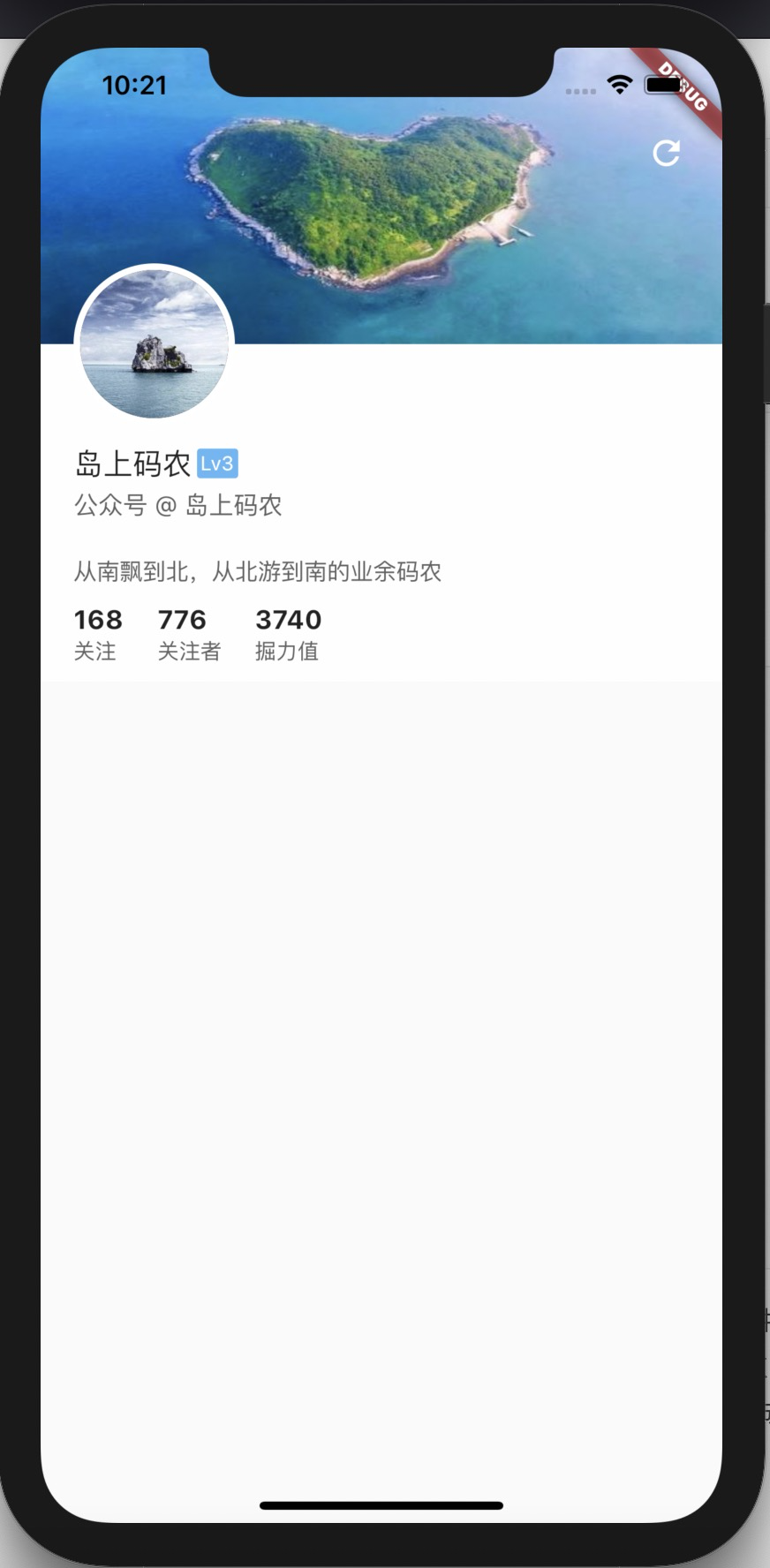
RepositoryProvider 应用
- 头像及背景图:
_getBannerWithAvatar;
- 个人资料:
_getPersonalProfile;
- 个人数据统计:
_getPersonalStatistic。
PersonalEntity personalProfile = personalResponse.personalProfile!;
 return Stack(
 children: [
 CustomScrollView(
 slivers: [
 _getBannerWithAvatar(context, personalProfile),
 _getPersonalProfile(personalProfile),
 _getPersonalStatistic(personalProfile),
 ],
 ),
 // ...
 ],
 );
 },
//...
personalProfile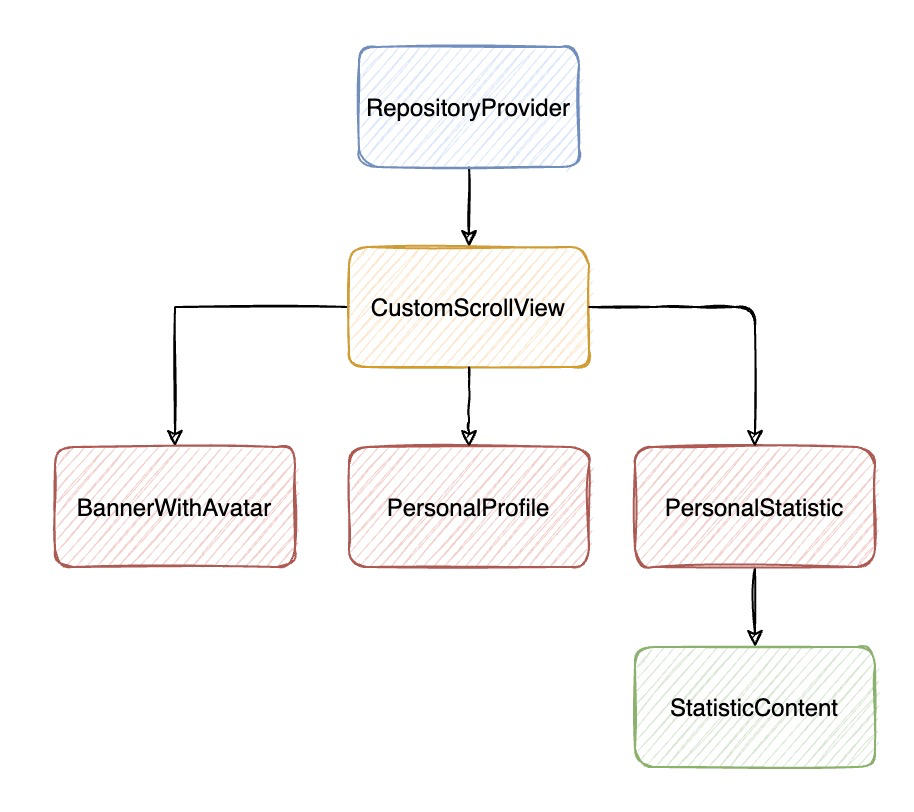
personalProfileRepositoryProvider.value(
child: CustomScrollView(
slivers: [
const BannerWithAvatar(),
const PersonalProfile(),
const PersonalStatistic(),
],
),
value: personalProfile,
),
// ...
valuepersonalProfilepersonalProfilecontext.read<PersonalEntity>()RepositoryProviderpersonalProfileclass BannerWithAvatar extends StatelessWidget {
final double bannerHeight = 230;
final double imageHeight = 180;
final double avatarRadius = 45;
final double avatarBorderSize = 4;
const BannerWithAvatar({Key? key}) : super(key: key);
@override
Widget build(BuildContext context) {
return SliverToBoxAdapter(
child: Container(
height: bannerHeight,
color: Colors.white70,
alignment: Alignment.topLeft,
child: Stack(
children: [
Container(
height: bannerHeight,
),
Positioned(
top: 0,
left: 0,
child: CachedNetworkImage(
imageUrl:
'https://ss1.bdstatic.com/70cFvXSh_Q1YnxGkpoWK1HF6hhy/it/u=688497718,308119011&fm=26&gp=0.jpg',
height: imageHeight,
width: MediaQuery.of(context).size.width,
fit: BoxFit.fill,
),
),
Positioned(
left: 20,
top: imageHeight - avatarRadius - avatarBorderSize,
child: _getAvatar(
context.read<PersonalEntity>().avatar,
avatarRadius * 2,
avatarBorderSize,
),
),
],
),
),
);
}
Widget _getAvatar(String avatarUrl, double size, double borderSize) {
return Stack(alignment: Alignment.center, children: [
Container(
width: size + borderSize * 2,
height: size + borderSize * 2,
clipBehavior: Clip.antiAlias,
decoration: BoxDecoration(
color: Colors.white,
borderRadius: BorderRadius.circular(size / 2 + borderSize),
),
),
Container(
width: size,
height: size,
clipBehavior: Clip.antiAlias,
decoration: BoxDecoration(
color: Colors.black,
borderRadius: BorderRadius.circular(size / 2),
),
child: CachedNetworkImage(
imageUrl: avatarUrl,
height: size,
width: size,
fit: BoxFit.fill,
),
),
]);
}
}
总结
RepositoryProviderRepositoryProviderProviderRepositoryProvidercontextRepositoryProvider.of
边栏推荐
- JMeter 常用的几种断言方法,你会了吗?
- How to realize the Online timer and offline timer in the game
- [Collection - industry solutions] how to build a high-performance data acceleration and data editing platform
- IFD-x 微型红外成像仪(模块)关于温度测量和成像精度的关系
- Get wechat avatar and nickname with uniapp
- Android interview, Android audio and video development
- Debezium系列之:解析默认值字符集
- C# 语言的基本语法结构
- 14、用户、组和权限(14)
- Shell编程基础(第8篇:分支语句-case in)
猜你喜欢

That's awesome. It's enough to read this article
How MySQL queries and modifies JSON data

C#应用程序界面开发基础——窗体控制(5)——分组类控件
IBM has laid off 40 + year-old employees in a large area. Mastering these ten search skills will improve your work efficiency ten times

测试外包公司怎么样?
IFD-x 微型红外成像仪(模块)关于温度测量和成像精度的关系

After the company went bankrupt, the blackstones came
5 years of experience, 27 days of Android programmer interview, 2022 programmer advanced classic
word如何转换成pdf?word转pdf简单的方法分享!

Debezium系列之:记录mariadb数据库删除多张临时表debezium解析到的消息以及解决方法

随机推荐
C#应用程序界面开发基础——窗体控制(5)——分组类控件
爬虫练习题(二)
C# 语言的基本语法结构
Bitcoinwin (BCW)受邀参加Hanoi Traders Fair 2022
建议收藏,我的腾讯Android面试经历分享
测试外包公司怎么样?
[Collection - industry solutions] how to build a high-performance data acceleration and data editing platform
Decision tree and random forest
aggregate
MMO项目学习一:预热
IBM has laid off 40 + year-old employees in a large area. Mastering these ten search skills will improve your work efficiency ten times
PG基础篇--逻辑结构管理(用户及权限管理)
【硬核干货】数据分析哪家强?选Pandas还是选SQL
How MySQL queries and modifies JSON data
acm入门day1
城链科技数字化创新战略峰会圆满召开
HAC cluster modifying administrator user password
开源 SPL 消灭数以万计的数据库中间表
国海证券在网上开户安全吗?
Pandora IOT development board learning (HAL Library) - Experiment 8 timer interrupt experiment (learning notes)