当前位置:网站首页>C# 对象存储
C# 对象存储
2022-07-05 12:55:00 【猿长大人】
C# 对象存储
文章目录
前言
开发时经常会遇到需要保存配置的情况,最常见的实现方式是将对象序列化成Json,再写入文件并保存到本地磁盘。
本文将使用开源库ApeFree.DataStore来替换原有的对象存储过程,实现一个可以随意切换存储方式的对象存储方法。
关于DataStore
ApeFree.DataStore是一款可配置的对象存储库,支持在不同平台/介质中对内存中的对象进行存储与还原(如本地存储、注册表存储)。支持配置序列化格式(如Json、Xml),支持配置压缩算法(如GZip、Defalte),支持配置加密算法(如AES、RSA)。
开源地址:https://github.com/landriesnidis/ApeFree.DataStore
示例代码
实体类
创建一个用于测试的实体类型,预设了初始值;
    /// <summary>
    /// 学生(测试实体类)
    /// </summary>
    public class Student
    {

        public long Id {
     get; set; } = 2022030511;
        public string Name {
     get; set; } = "张三";
        public DateTime DateOfBirth {
     get; set; } = new DateTime(2013, 6, 1);
        public string ClassName {
     get; set; } = "A班";
        public string Description {
     get; set; } = "平平无奇的学生";
        public bool IsYoungPioneer {
     get; set; } = true;
        public string Address {
     get; set; } = "二仙桥成华大道8号";
    }
创建对象存储器
示例一、Json格式的本地存储器
            // 本地存储配置(默认使用Json格式)
            var settings = new LoaclStoreAccessSettings("./config/student.conf");

            // 本地存储器
            IStore<Student> store = StoreFactory.Factory.CreateLoaclStore<Student>(settings);
示例二、Xml格式的本地存储器
            // 本地存储配置
            var settings = new LoaclStoreAccessSettings("./config/student.conf") {

                SerializationAdapter = new XmlSerializationAdapter()
            };

            // 本地存储器
            IStore<Student> store = StoreFactory.Factory.CreateLoaclStore<Student>(settings);
示例三、Xml格式(采用GZip压缩算法)的本地存储器
            // 本地存储配置
            var settings = new LoaclStoreAccessSettings("./config/student.conf") {

                SerializationAdapter = new XmlSerializationAdapter(),
                CompressionAdapter = new GZipCompressionAdapter(),
            };

            // 本地存储器
            IStore<Student> store = StoreFactory.Factory.CreateLoaclStore<Student>(settings);
示例四、Xml格式(采用AES加密)的本地存储器
ASE密钥:12345678901234567890123456789012
AES向量:0123456789abcdef
            // 本地存储配置
            var settings = new LoaclStoreAccessSettings("./config/student.conf") {

                SerializationAdapter = new XmlSerializationAdapter(),
                EncryptionAdapter = new AesEncryptionAdapter("12345678901234567890123456789012".GetBytes(), "0123456789abcdef".GetBytes()),
            };

            // 本地存储器
            IStore<Student> store = StoreFactory.Factory.CreateLoaclStore<Student>(settings);
示例五、Xml格式(Deflate+AES)的注册表存储器
注意Deflate+AES纯粹是为了演示配置的用法:
            // 注册表存储配置
            var settings = new RegistryStoreAccessSettings(RegistryHive.CurrentUser, @"ApeFree\DataStore\Demo","student") {

                SerializationAdapter = new XmlSerializationAdapter(),
                CompressionAdapter = new DeflateCompressionAdapter(),
                EncryptionAdapter = new AesEncryptionAdapter("12345678901234567890123456789012".GetBytes(), "0123456789abcdef".GetBytes()),
            };

            // 注册表存储器
            IStore<Student> store = StoreFactory.Factory.CreateRegistryStore<Student>(settings);
测试窗体
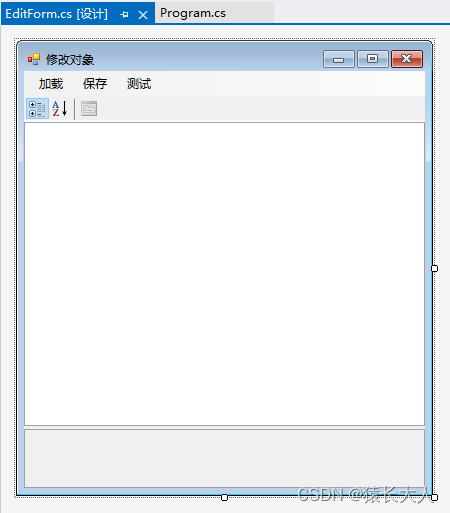
    public partial class EditForm : Form
    {

        private IStore<Student> store;

        public EditForm(IStore<Student> store) : this()
        {

            this.store = store;

            tsmiLoad.PerformClick();
        }

        private EditForm()
        {

            InitializeComponent();
        }

        private void tsmiLoad_Click(object sender, EventArgs e)
        {

            store.Load();
            propertyGrid.SelectedObject = store.Value;
        }

        private void tsmiSave_Click(object sender, EventArgs e)
        {

            store.Save();
            Close();
        }

        private void tsmiTestIO_Click(object sender, EventArgs e)
        {

            int times = 1000;

            Stopwatch watch = new Stopwatch();
            watch.Restart();
            for (int i = 0; i < times; i++)
            {

                store.Load();
                store.Save();
            }
            watch.Stop();

            // 计算耗时(毫秒)
            var elapsedTime = watch.ElapsedTicks * 1000.0 / Stopwatch.Frequency;

            MessageBox.Show($"存取{
      times}次测试完毕。\r\n" +
                $"总耗时:{
      elapsedTime}毫秒。\r\n" +
                $"平均单次读取+保存耗时:{
      elapsedTime / times}毫秒");
        }
    }
边栏推荐
- Default parameters of function & multiple methods of function parameters
- Rocky基础命令3
- How can non-technical departments participate in Devops?
- 【Nacos云原生】阅读源码第一步,本地启动Nacos
- Lb10s-asemi rectifier bridge lb10s
- ASEMI整流桥HD06参数,HD06图片,HD06应用
- Sorry, we can't open xxxxx Docx, because there is a problem with the content (repackaging problem)
- 潘多拉 IOT 开发板学习(HAL 库)—— 实验7 窗口看门狗实验(学习笔记)
- [cloud native] use of Nacos taskmanager task management
- [Nacos cloud native] the first step of reading the source code is to start Nacos locally
猜你喜欢
碎片化知识管理工具Memos
简单上手的页面请求和解析案例
Principle and configuration of RSTP protocol
Setting up sqli lab environment

RHCSA10
OpenHarmony应用开发之Navigation组件详解
Pycharm installation third party library diagram
![[Nacos cloud native] the first step of reading the source code is to start Nacos locally](/img/f8/d9b848593cf7380a6c99ee0a8158f8.png)
[Nacos cloud native] the first step of reading the source code is to start Nacos locally
A deep long article on the simplification and acceleration of join operation
量价虽降,商业银行结构性存款为何受上市公司所偏爱?
随机推荐
RHCSA3
Hiengine: comparable to the local cloud native memory database engine
初识Linkerd项目
About the single step debugging of whether SAP ui5 floating footer is displayed or not and the benefits of using SAP ui5
Talk about my drawing skills in my writing career
RHCSA10
【服务器数据恢复】某品牌服务器存储raid5数据恢复案例
Asemi rectifier bridge hd06 parameters, hd06 pictures, hd06 applications
There is no monitoring and no operation and maintenance. The following is the commonly used script monitoring in monitoring
Why is your next computer a computer? Explore different remote operations
实现 1~number 之间,所有数字的加和
程序员成长第八篇:做好测试工作
Natural language processing from Xiaobai to proficient (4): using machine learning to classify Chinese email content
SAP SEGW 事物码里的 ABAP 类型和 EDM 类型映射的一个具体例子
Didi open source Delta: AI developers can easily train natural language models
[cloud native] use of Nacos taskmanager task management
Sorry, we can't open xxxxx Docx, because there is a problem with the content (repackaging problem)
RHCSA7
Lb10s-asemi rectifier bridge lb10s
[cloud native] event publishing and subscription in Nacos -- observer mode