当前位置:网站首页>Docker advanced learning (container data volume, MySQL installation, dockerfile)
Docker advanced learning (container data volume, MySQL installation, dockerfile)
2022-07-03 06:14:00 【Muyu】
Docker Advanced learning
Container data volume
docker The idea is to package the application and environment into a mirror image .
If the data is all in the container , So let's delete the container , The data is lost ! demand : Data can be persistent
demand : The data in the container can be stored locally
There can be a data sharing technology between containers !Docker Data generated in the container , Sync to local !
This is volume technology ! Directory hanging , Put the directory in our container , Mount to Linux above !
Persistence and synchronization of containers ! Containers can also be shared
Working with data volumes
Mode one : Directly use the command to mount -v
docker run -it -v Host Directory : In-container directory
[[email protected] home]# docker run -it -v /home/test:/home centos /bin/bash
# In container
[[email protected] /]# cd home
[[email protected] home]# ls
[[email protected] home]# mkdir FANXU
# In the mainframe
[[email protected] home]# ls
lighthouse  MUYU  test
[[email protected] home]# cd test
[[email protected] test]# ls
FANXU
Whether from the host test Directory add file , Or from the container home Add file below , Both sides will automatically synchronize .
benefits : We only need to modify it locally in the future , The container will be synchronized automatically
install Mysql
# Get the container
[[email protected] test]# docker pull mysql:5.7
5.7: Pulling from library/mysql
e1acddbe380c: Already exists
bed879327370: Pull complete
03285f80bafd: Pull complete
......
Digest: sha256:7cf2e7d7ff876f93c8601406a5aa17484e6623875e64e7acc71432ad8e0a3d7e
Status: Downloaded newer image for mysql:5.7
docker.io/library/mysql:5.7

# Run container :-d Background operation  -p Set port  -v Set mount path  -e  Environment configuration ,MYSQL_ROOT_PASSWORD Set up mysql password ( Required )
[[email protected] test]# docker run -d -p 3306:3306 -v /home/mysql/conf:/etc/mysql/conf.d -v /home/mysql/data:/var/lib/mysql -e MYSQL_ROOT_PASSWORD=password --name mysql mysql:5.7
2da46ed95ba3e66612e25d4f77129e72d209bd1cdd26edd47d82816e07820a89
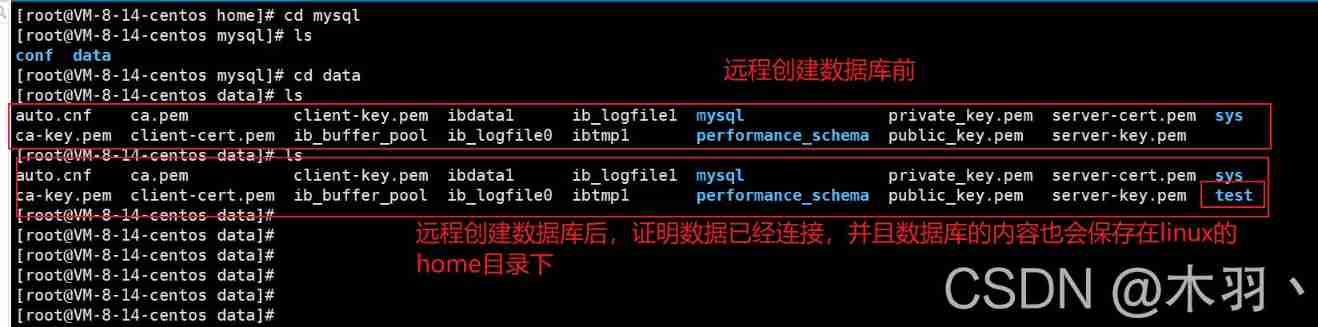
Named and anonymous mount
# Mount anonymously
-v  Container path ! -P  Random mapping port
docker run -d -P --name nginx02 -v juming-nginx:/etc/nginx nginx
# View all volume The situation of
[[email protected] data]# docker volume ls
DRIVER    VOLUME NAME
local     8613276e64c7d34e01b2366e80d6d2491dc2ae00f0c5ee6062dfc71a0bc897cb
# This is anonymous mount , stay -v Only the path in the container is written in , There is no write path outside the container

# Mount with a name
docker run -d -P --name nginx01 -v /etc/nginx nginx
[[email protected] data]# docker volume ls
DRIVER    VOLUME NAME
local     juming-nginx
#  adopt -v  Volume name : Container path   name

# View the details of this volume
docker volume inpsect juming-nginx
all docker The volume in the container , In the case of no specified directory, it exists /var/lib/docker/volumes/xxx/_data Next
Recommended Mount with a name
Expand
docker run -d -P --name nginx02 -v juming-nginx:/etc/nginx:ro nginx
docker run -d -P --name nginx02 -v juming-nginx:/etc/nginx:rw nginx
# This situation ,ro representative read only  read-only
#rw representative  read write  Reading and writing
# The default is read-write , If you use ro Words , Then you can only write from the inside of the container , Only read outside the container .
DockerFile mount
Dockerfile It's for structure docker The build file for the image ! Command script !
This script can generate images , The image is one layer at a time , The script commands one by one , Every command is a layer !
Use dockerfile Mount folder
# Create a dockerfile file , Names can be random , Suggest  Dockerfile
# Contents of the file   Instructions ( Capitalization )  Parameters
[[email protected] docker-test-volume]# pwd
/home/docker-test-volume
[[email protected] docker-test-volume]# vi dockerfile1
[[email protected] docker-test-volume]# cat dockerfile1
FROM centos

VOLUME ["volume01","volume02"]

CMD echo "----end----"
CMD /bin/bash
[[email protected] docker-test-volume]# docker build -f dockerfile1 -t fanxu/centos:1.0 .
Sending build context to Docker daemon  2.048kB
Step 1/4 : FROM centos
 ---> 300e315adb2f
Step 2/4 : VOLUME ["volume01","volume02"]
 ---> Running in 4bac924c41e9
Removing intermediate container 4bac924c41e9
 ---> 8df2881b227e
Step 3/4 : CMD echo "----end----"
 ---> Running in 26e85ef2daf0
Removing intermediate container 26e85ef2daf0
 ---> c066d8c93847
Step 4/4 : CMD /bin/bash
 ---> Running in 9da8dbb3ae17
Removing intermediate container 9da8dbb3ae17
 ---> a879d71f361b
Successfully built a879d71f361b
Successfully tagged fanxu/centos:1.0
Enter the image you created , Check the mount
[[email protected] docker-test-volume]# docker images
REPOSITORY            TAG       IMAGE ID       CREATED              SIZE
fanxu/centos          1.0       a879d71f361b   About a minute ago   209MB
[[email protected] docker-test-volume]# docker run -it a879d71f361b /bin/bash

Check which directory is attached to the host
[[email protected] /]# docker inspect 6a33393e604a
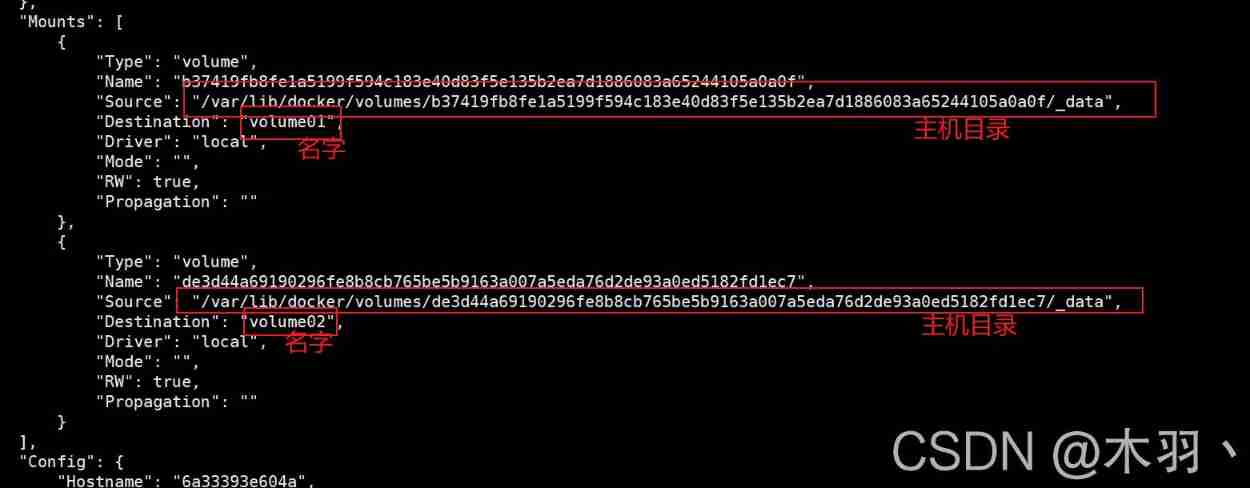
Test whether the documents are interconnected
# host
[[email protected] /]# cd /var/lib/docker/volumes/b37419fb8fe1a5199f594c183e40d83f5e135b2ea7d1886083a65244105a0a0f/_data
[[email protected] _data]# ls
[[email protected] _data]# vi helloDockerFile
[[email protected] _data]# cat helloDockerFile
hello dockerfile

# Mirror image
[[email protected] /]# cd volume01
[[email protected] volume01]# ls
helloDockerFile
[[email protected] volume01]# cat helloDockerFile
hello dockerfile
This way, , Usually used more , Because we usually build our own image ! Suppose there is no mounted volume when building the image , You need to mount the image manually -v Volume name Container path
Data volume container
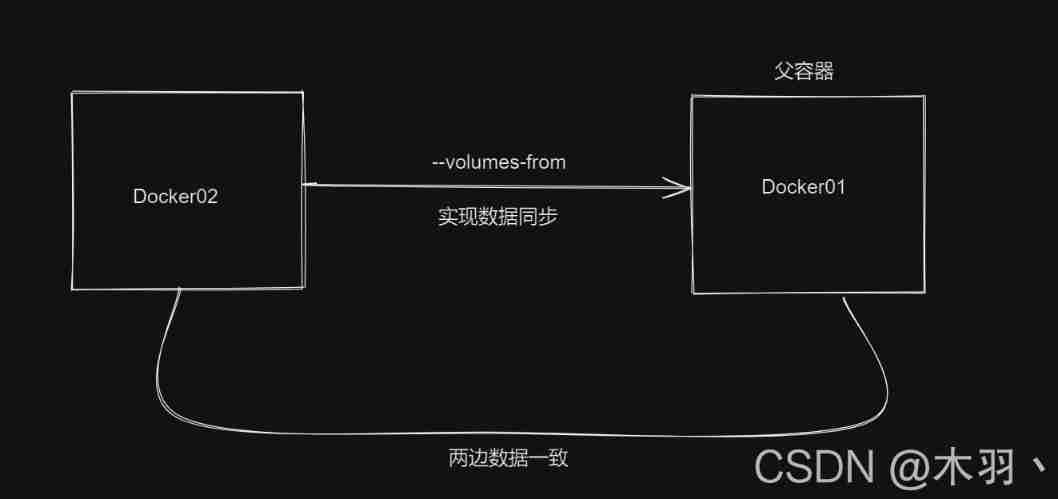
Multiple containers synchronize data , Like multiple mysql Synchronous data
#docker01
[[email protected] docker-test-volume]# docker run -it --name docker01 fanxu/centos:1.0
[[email protected] /]# ls
bin  dev  etc  home  lib  lib64  lost+found  media  mnt  opt  proc  root  run  sbin  srv  sys  tmp  usr  var  volume01	volume02
[[email protected] /]# cd volume01
[[email protected] volume01]# touch docker01
[[email protected] volume01]# ls
docker01

#docker02
#--volumes-from  Mount to docker01  Something like java One class in inherits another class
[[email protected] _data]# docker run -it --name docker02 --volumes-from docker01 fanxu/centos:1.0
[[email protected] /]# ls
bin  dev  etc  home  lib  lib64  lost+found  media  mnt  opt  proc  root  run  sbin  srv  sys  tmp  usr  var  volume01	volume02
[[email protected] /]# cd volume01
[[email protected] volume01]# ls
docker01


#docker03
[[email protected] ~]# docker run -it --name docker03 --volumes-from docker01 fanxu/centos:1.0
[[email protected] /]# ls
bin  dev  etc  home  lib  lib64  lost+found  media  mnt  opt  proc  root  run  sbin  srv  sys  tmp  usr  var  volume01	volume02
[[email protected] /]# cd volume0
bash: cd: volume0: No such file or directory
[[email protected] /]# cd volume01
[[email protected] volume01]# ls
docker01
# from docker3 Create a new file
[[email protected] volume01]# touch docker03
[[email protected]8350b8f730 volume01]# ls
docker01  docker03

#docker01
[[email protected] volume01]# ls
docker01  docker03
#docker02
[[email protected] volume01]# ls
docker01  docker03
# At this time, the three images are interconnected , If docker01 What will happen if it is deleted ?
[[email protected] docker-test-volume]# docker rm -f docker01
docker01
#docker02
[[email protected] volume01]# ls
docker01  docker03
#docker03
[[email protected] volume01]# ls
docker01  docker03
# so docker01 Even if you hang up, it won't affect docker02 and docker03, So the relationship between these images should be copy 、 Backup relationships , Instead of mapping , One died , It does not affect the use of the other two . however docker02 and docker03 They are all attached to docker01 Upper ,docker01 Hang up ,docker02 and docker03 Still communicating

#docker02  Create a file
[[email protected] volume01]# touch docker02
[[email protected] volume01]# ls
docker01  docker02  docker03
#docker03  You can look it up , So , although docker02 and docker03 They are all attached to docker01 Upper , But even if not docker01, The two of them are also interconnected
[[email protected] volume01]# ls
docker01  docker02  docker03
DockerFile
dockerfile It's used to build docker Mirrored files ! Command parameter script !
Build steps :
- Write a dockerfile file
- docker build Build into a mirror
- docker run Running the mirror
- docker push Release scene (DockerHub、 Alibaba cloud image library )
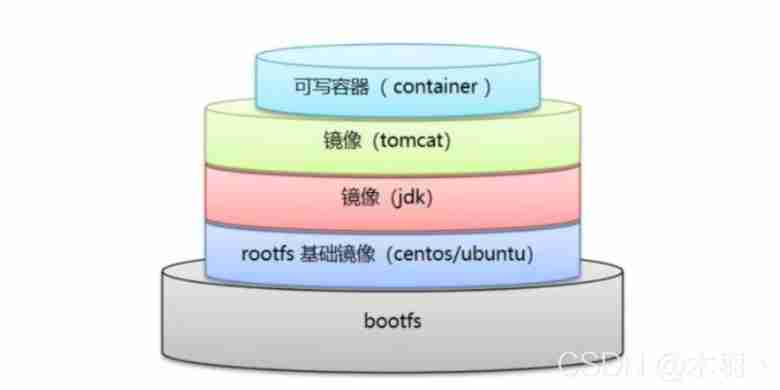
Many official images are basic packages , A lot of features don't have , We usually build our own image !
Dockerfile The build process
Basic knowledge of :
- Every reserved keyword ( Instructions ) All have to be capital letters
- Execute from top to bottom
- # Notation
- Each instruction creates and submits a new mirror layer , And submit
dockerfile It's development oriented , Publish the project , Make a mirror image , I'm going to write dockerfile file , This document is very simple !
docker The image primary key has become the standard of enterprise delivery
DockerFile: Build file , Defines all the steps , Source code
DockerImages: adopt DockerFIle Build the resulting image . The final product released and run
Docker Containers : A container is a service provided by an image
DockerFile Instructions
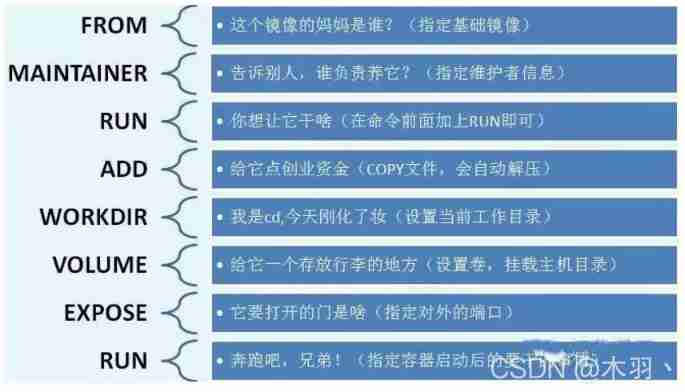
FROM 		#  base image , It's all built from here
MAINTAINER	#  Who wrote the mirror image   full name + mailbox
RUN			# The command that needs to be run when building the image
ADD			#  step :tomcat Mirror image , This tomcat Compressed package ! Add content
WORKDIR		#  The working directory of the mirror image
VOLUME 		#  Mounted Directory
EXPOST	 	#  Reserve port configuration
RUN			#  function
CMD			#  Specifies the command to run when the container starts , Only the last one will work , Can be replaced by
ENTRYPOINT	#  Specifies the command to run when the container starts , Can append command
ONBUILD	 	#  Build an integrated DockerFile  This time it will run ONBUILD Instructions .
COPY		# similar ADD, Copy our files into the image
ENV			# Set environment variables when building !
Actual test
DockerHub in 99% All of the images are from this basic image FROM scratch, Then configure the required software and configuration to build .
Create your own centos
# To write Dockerfile The file of
[[email protected] FANXU]# vi myDockerFile
[[email protected] FANXU]# cat myDockerFile
FROM centos
MAINTAINER fanxu<[email protected]>

ENV MYPATH /user/local
WORKDIR $MYPATH

RUN yum -y install vim
RUN yum -y install net-tools

EXPOSE 80

CMD echo $MYPATH
CMD echo "-----end----"
CMD /bin/bash

#2、 Build an image from this file
[[email protected] FANXU]# docker build -f myDockerFile-centos -t mycentos:1.0 .
......
Successfully built d3b9ff75ac9f
Successfully tagged mycentos:1.0

# test run
[[email protected] FANXU]# docker run -it --name mycentos01 mycentos:1.0
[[email protected] local]# ls
[[email protected] local]# pwd
/user/local
[[email protected] local]# vi helloDocker
[[email protected] local]# ls
helloDocker
[[email protected] local]# more helloDocker
hello docker
Can pass docker history See construction history 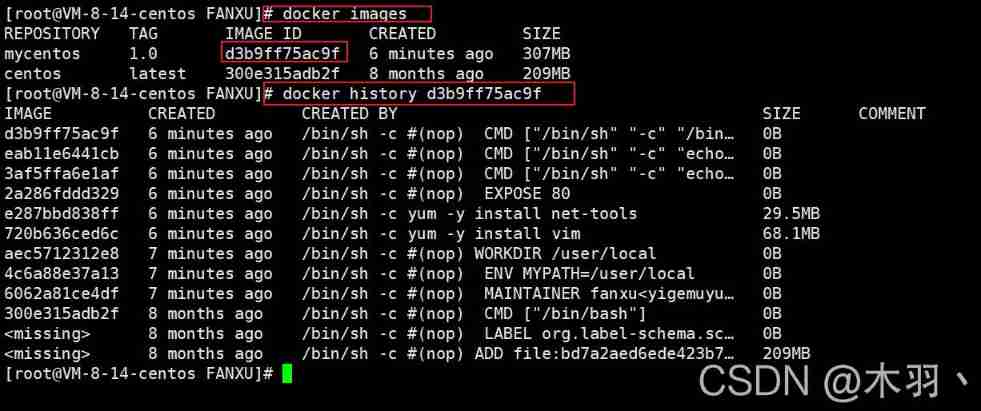
CMD and ENTRYPOINT The difference between
CMD 		# Specify the command to run when the container starts , Only the last one will work , Can be replaced by
ENTRYPOINT	# Specifies the command to run when the container starts , Can append command
test cmd
[[email protected] FANXU]# vim dockerfile-cmd-test
[[email protected] FANXU]# more dockerfile-cmd-test
FROM centos
CMD ["ls","-a"]

# create mirror
[[email protected] FANXU]# docker build -f dockerfile-cmd-test -t cmdtest .
Sending build context to Docker daemon  3.072kB
Step 1/2 : FROM centos
 ---> 300e315adb2f
Step 2/2 : CMD ["ls","-a"]
 ---> Running in 143a14f5839e
Removing intermediate container 143a14f5839e
 ---> 05d86eab4ac9
Successfully built 05d86eab4ac9
Successfully tagged cmdtest:latest
# Start the container
[[email protected] FANXU]# docker run 05d86eab4ac9
.
..
.dockerenv
bin
dev
etc
home
lib
lib64
lost+found
media
mnt
opt
......
var
# When you want to add a command
[[email protected] FANXU]# docker run 05d86eab4ac9 -l
docker: Error response from daemon: OCI runtime create failed: container_linux.go:380: starting container process caused: exec: "-l": executable file not found in $PATH: unknown.
#cmd Clean up  -l To replace the CMD ["ls","-a"] command ,-l  Not a command, so save !

[[email protected] FANXU]# docker run 05d86eab4ac9 ls -l
total 48
lrwxrwxrwx   1 root root    7 Nov  3  2020 bin -> usr/bin
drwxr-xr-x   5 root root  340 Aug 26 12:35 dev
drwxr-xr-x   1 root root 4096 Aug 26 12:35 etc
drwxr-xr-x   2 root root 4096 Nov  3  2020 home
# If you want to append commands , Then write the whole order , Replace ls -l
test entrypoint
[[email protected] FANXU]# vim dockerfile-cmd-entrypoint
[[email protected] FANXU]# cat dockerfile-cmd-entrypoint
FROM centos
ENTRYPOINT ["ls","-a"]
# create mirror
[[email protected] FANXU]# docker build -f dockerfile-cmd-entrypoint -t entrypoint-test .
Sending build context to Docker daemon  4.096kB
Step 1/2 : FROM centos
 ---> 300e315adb2f
Step 2/2 : ENTRYPOINT ["ls","-a"]
 ---> Running in a76b97795d71
Removing intermediate container a76b97795d71
 ---> b32cc7f739ea
Successfully built b32cc7f739ea
Successfully tagged entrypoint-test:latest
# Look at all the images
[[email protected] FANXU]# docker images
REPOSITORY        TAG       IMAGE ID       CREATED         SIZE
entrypoint-test   latest    b32cc7f739ea   6 seconds ago   209MB
cmdtest           latest    05d86eab4ac9   9 minutes ago   209MB
mycentos          1.0       d3b9ff75ac9f   23 hours ago    307MB
centos            latest    300e315adb2f   8 months ago    209MB
# Run the test
[[email protected] FANXU]# docker run b32cc7f739ea
.
..
.dockerenv
bin
dev
etc
home
lib
lib64
lost+found
media
mnt
opt
proc
root
run
sbin
srv
sys
tmp
usr
var
# Add command test at the end
[[email protected] FANXU]# docker run b32cc7f739ea -l
total 56
drwxr-xr-x   1 root root 4096 Aug 26 12:38 .
drwxr-xr-x   1 root root 4096 Aug 26 12:38 ..
-rwxr-xr-x   1 root root    0 Aug 26 12:38 .dockerenv
lrwxrwxrwx   1 root root    7 Nov  3  2020 bin -> usr/bin
drwxr-xr-x   5 root root  340 Aug 26 12:38 dev
drwxr-xr-x   1 root root 4096 Aug 26 12:38 etc
drwxr-xr-x   2 root root 4096 Nov  3  2020 home
lrwxrwxrwx   1 root root    7 Nov  3  2020 lib -> usr/lib
lrwxrwxrwx   1 root root    9 Nov  3  2020 lib64 -> usr/lib64
drwx------   2 root root 4096 Dec  4  2020 lost+found
drwxr-xr-x   2 root root 4096 Nov  3  2020 media
drwxr-xr-x   2 root root 4096 Nov  3  2020 mnt
drwxr-xr-x   2 root root 4096 Nov  3  2020 opt
dr-xr-xr-x 112 root root    0 Aug 26 12:38 proc
dr-xr-x---   2 root root 4096 Dec  4  2020 root
drwxr-xr-x  11 root root 4096 Dec  4  2020 run
lrwxrwxrwx   1 root root    8 Nov  3  2020 sbin -> usr/sbin
drwxr-xr-x   2 root root 4096 Nov  3  2020 srv
dr-xr-xr-x  13 root root    0 Aug 26 12:35 sys
drwxrwxrwt   7 root root 4096 Dec  4  2020 tmp
drwxr-xr-x  12 root root 4096 Dec  4  2020 usr
drwxr-xr-x  20 root root 4096 Dec  4  2020 var
DocekrFile Many of the commands in are very similar , We need to understand the difference between them , Our best learning is to compare them and then test the effect .
Make Tomcat Mirror image
Prepare the image file tomcat Compressed package ,jdk Compressed package
To write dockerfile file , Officially named
Dockerfile,build Will automatically find this file , There is no need to -f It specifiesFROM centos MAINTAINER kuangshen<[email protected]> COPY readme.txt /usr/local/readme.text ADD jdk /usr/local ADD apache /usr/local RUN yum -y install vim ENV MYPATH /usr/local WORK $MYPATH ENV JAVA_HOME /usr/local/jdk ENV CLASSPATH $JAVA_HOME/lib/dt.jar:$JAVA_HOME/lib/tools.jar ENV CATALINA_HOME /usr/local/apache ENV CATALINA_BASH /usr/local/apache ENV PATH $PATH:$JAVA_HOME/bin:$CATALINA_HOME/lib:$CATALINA_HOME/bin EXPOSE 8080 CMD /usr/local/apache/bin/startup.sh && tail -F /url/local/apache-tomcat/bin/logs/catalina.outbuild Mirror image
[[email protected] FANXU]# docker build -t diycentos .

#---------------------------------------------------------------------------------
#------------------------------------- Build start -------------------------------------
Sending build context to Docker daemon  156.7MB
Step 1/15 : FROM centos
 ---> 300e315adb2f
Step 2/15 : MAINTAINER fanxu<[email protected]>
 ---> Using cache
 ---> 6062a81ce4df
Step 3/15 : COPY readme.txt /usr/local/readme.text
 ---> b0a25b15918a
Step 4/15 : ADD jdk-8u301-linux-i586.tar.gz  /usr/local
 ---> 3e6245552fc9
Step 5/15 : ADD apache-tomcat-9.0.52.tar.gz  /usr/local
 ---> c2d0f3d546fd
Step 6/15 : RUN yum -y install vim
 ---> Running in b0f2fe6a815c
CentOS Linux 8 - AppStream                      7.1 MB/s | 8.8 MB     00:01
CentOS Linux 8 - BaseOS                         943 kB/s | 5.6 MB     00:06
CentOS Linux 8 - Extras                         4.7 kB/s |  10 kB     00:02
Dependencies resolved.
================================================================================
 Package             Arch        Version                   Repository      Size
================================================================================
Installing:
 vim-enhanced        x86_64      2:8.0.1763-15.el8         appstream      1.4 M
Installing dependencies:
 gpm-libs            x86_64      1.20.7-17.el8             appstream       39 k
 vim-common          x86_64      2:8.0.1763-15.el8         appstream      6.3 M
 vim-filesystem      noarch      2:8.0.1763-15.el8         appstream       48 k
 which               x86_64      2.21-12.el8               baseos          49 k

Transaction Summary
================================================================================
Install  5 Packages

Total download size: 7.8 M
Installed size: 30 M
Downloading Packages:
(1/5): gpm-libs-1.20.7-17.el8.x86_64.rpm        1.2 MB/s |  39 kB     00:00
(2/5): vim-filesystem-8.0.1763-15.el8.noarch.rp 4.3 MB/s |  48 kB     00:00
(3/5): vim-enhanced-8.0.1763-15.el8.x86_64.rpm   13 MB/s | 1.4 MB     00:00
(4/5): vim-common-8.0.1763-15.el8.x86_64.rpm     32 MB/s | 6.3 MB     00:00
(5/5): which-2.21-12.el8.x86_64.rpm             316 kB/s |  49 kB     00:00
--------------------------------------------------------------------------------
Total                                           7.0 MB/s | 7.8 MB     00:01
warning: /var/cache/dnf/appstream-02e86d1c976ab532/packages/gpm-libs-1.20.7-17.el8.x86_64.rpm: Header V3 RSA/SHA256 Signature, key ID 8483c65d: NOKEY
CentOS Linux 8 - AppStream                      1.6 MB/s | 1.6 kB     00:00
Importing GPG key 0x8483C65D:
 Userid     : "CentOS (CentOS Official Signing Key) <[email protected]>"
 Fingerprint: 99DB 70FA E1D7 CE22 7FB6 4882 05B5 55B3 8483 C65D
 From       : /etc/pki/rpm-gpg/RPM-GPG-KEY-centosofficial
Key imported successfully
Running transaction check
Transaction check succeeded.
Running transaction test
Transaction test succeeded.
Running transaction
  Preparing        :                                                        1/1
  Installing       : which-2.21-12.el8.x86_64                               1/5
  Installing       : vim-filesystem-2:8.0.1763-15.el8.noarch                2/5
  Installing       : vim-common-2:8.0.1763-15.el8.x86_64                    3/5
  Installing       : gpm-libs-1.20.7-17.el8.x86_64                          4/5
  Running scriptlet: gpm-libs-1.20.7-17.el8.x86_64                          4/5
  Installing       : vim-enhanced-2:8.0.1763-15.el8.x86_64                  5/5
  Running scriptlet: vim-enhanced-2:8.0.1763-15.el8.x86_64                  5/5
  Running scriptlet: vim-common-2:8.0.1763-15.el8.x86_64                    5/5
  Verifying        : gpm-libs-1.20.7-17.el8.x86_64                          1/5
  Verifying        : vim-common-2:8.0.1763-15.el8.x86_64                    2/5
  Verifying        : vim-enhanced-2:8.0.1763-15.el8.x86_64                  3/5
  Verifying        : vim-filesystem-2:8.0.1763-15.el8.noarch                4/5
  Verifying        : which-2.21-12.el8.x86_64                               5/5

Installed:
  gpm-libs-1.20.7-17.el8.x86_64         vim-common-2:8.0.1763-15.el8.x86_64
  vim-enhanced-2:8.0.1763-15.el8.x86_64 vim-filesystem-2:8.0.1763-15.el8.noarch
  which-2.21-12.el8.x86_64

Complete!
Removing intermediate container b0f2fe6a815c
 ---> 3d1a5ef54d79
Step 7/15 : ENV MYPATH /usr/local
 ---> Running in 7cbecb42b6c1
Removing intermediate container 7cbecb42b6c1
 ---> 77e94a84490f
Step 8/15 : WORKDIR $MYPATH
 ---> Running in 3c33cbac7cfd
Removing intermediate container 3c33cbac7cfd
 ---> a3f8c5bac7ac
Step 9/15 : ENV JAVA_HOME /usr/local/jdk1.8.0_301
 ---> Running in 90b21630b6bb
Removing intermediate container 90b21630b6bb
 ---> b39222cbe52d
Step 10/15 : ENV CLASSPATH $JAVA_HOME/lib/dt.jar:$JAVA_HOME/lib/tools.jar
 ---> Running in 5f2ce6a55156
Removing intermediate container 5f2ce6a55156
 ---> b30335948859
Step 11/15 : ENV CATALINA_HOME /usr/local/apache-tomcat-9.0.52
 ---> Running in 9b42156c8eac
Removing intermediate container 9b42156c8eac
 ---> 0eed8ebf580d
Step 12/15 : ENV CATALINA_BASH /usr/local/apache-tomcat-9.0.52
 ---> Running in c1ba72c469e4
Removing intermediate container c1ba72c469e4
 ---> 301ab465f2a1
Step 13/15 : ENV PATH $PATH:$JAVA_HOME/bin:$CATALINA_HOME/lib:$CATALINA_HOME/bin
 ---> Running in 48f0b57c3fc1
Removing intermediate container 48f0b57c3fc1
 ---> fc986905ef5c
Step 14/15 : EXPOSE 8080
 ---> Running in 1ca1a08d5aa6
Removing intermediate container 1ca1a08d5aa6
 ---> 46082ba771b8
Step 15/15 : CMD /usr/local/apache-tomcat-9.0.52/bin/startup.sh && tail -F /url/local/apache-tomcat-9.0.52/bin/logs/catalina.out
 ---> Running in 31c08120952d
Removing intermediate container 31c08120952d
 ---> 72b78ce3f86d
Successfully built 72b78ce3f86d
Successfully tagged diycentos:latest
#------------------------------------- End of build -------------------------------------
#---------------------------------------------------------------------------------
[[email protected] FANXU]# clear
# Look at the mirror image
[[email protected] FANXU]# docker images
REPOSITORY        TAG       IMAGE ID       CREATED              SIZE
diycentos         latest    72b78ce3f86d   About a minute ago   645MB

# The author here because of jdk If there is a problem with the version, don't continue to test , Under normal circumstances, it can curl localhost:8080 Access to the , Internet can also
bash: /usr/local/jdk1.8.0_301/bin/javac: No such file or directory
Summary
边栏推荐
- Disruptor learning notes: basic use, core concepts and principles
- 技术管理进阶——你了解成长的全貌吗?
- There is no one of the necessary magic skills PXE for old drivers to install!!!
- Core principles and source code analysis of disruptor
- Skywalking8.7 source code analysis (I): agent startup process, agent configuration loading process, custom class loader agentclassloader, plug-in definition system, plug-in loading
- Kubernetes notes (III) controller
- Interesting research on mouse pointer interaction
- Clickhouse learning notes (2): execution plan, table creation optimization, syntax optimization rules, query optimization, data consistency
- Oauth2.0 - using JWT to replace token and JWT content enhancement
- Leetcode solution - 02 Add Two Numbers
猜你喜欢
![[system design] proximity service](/img/4a/2e68536cbe385af1d1a591e674fbf0.png)
[system design] proximity service
Kubernetes notes (VII) kuberetes scheduling
Pytorch builds the simplest version of neural network
JDBC connection database steps
Cesium 点击获取模型表面经纬度高程坐标(三维坐标)

Bernoulli distribution, binomial distribution and Poisson distribution, and the relationship between maximum likelihood (incomplete)
Kubernetes notes (IX) kubernetes application encapsulation and expansion
Skywalking8.7 source code analysis (II): Custom agent, service loading, witness component version identification, transform workflow

Kubernetes cluster environment construction & Deployment dashboard

Interesting research on mouse pointer interaction
随机推荐
Zhiniu stock -- 03
Virtual memory technology sharing
ThreadLocal的简单理解
Naive Bayes in machine learning
Oauth2.0 - using JWT to replace token and JWT content enhancement
Oauth2.0 - Introduction and use and explanation of authorization code mode
YOLOV3学习笔记
輕松上手Fluentd,結合 Rainbond 插件市場,日志收集更快捷
phpstudy设置项目可以由局域网的其他电脑可以访问
Kubernetes notes (IX) kubernetes application encapsulation and expansion
Bernoulli distribution, binomial distribution and Poisson distribution, and the relationship between maximum likelihood (incomplete)
BeanDefinitionRegistryPostProcessor
PHP用ENV获取文件参数的时候拿到的是字符串
Detailed explanation of contextclassloader
Difference between shortest path and minimum spanning tree
深入解析kubernetes controller-runtime
智牛股--03
Svn branch management
SVN分支管理
Es remote cluster configuration and cross cluster search