当前位置:网站首页>【数据挖掘】任务4:20Newsgroups聚类
【数据挖掘】任务4:20Newsgroups聚类
2022-07-03 01:09:00 【zstar-_】
要求
根据20Newsgroups数据集进行聚类,将聚类结果显示给用户,用户可以选择其中的一个类,标为关注,类的关键词作为主题,用户就可以跟踪这主题、了解主题的文章内容。
导入相关库
from sklearn.feature_extraction.text import TfidfVectorizer
from sklearn.cluster import KMeans
import numpy as np
import re
import string
import matplotlib.pyplot as plt
import seaborn as sns
import pandas as pd
from sklearn.datasets import fetch_20newsgroups
from wordcloud import WordCloud
%matplotlib inline
数据获取
使用sklearn的fetch_20newsgroups下载数据
dataset = fetch_20newsgroups(
    download_if_missing=True, remove=('headers', 'footers', 'quotes'))
数据预览
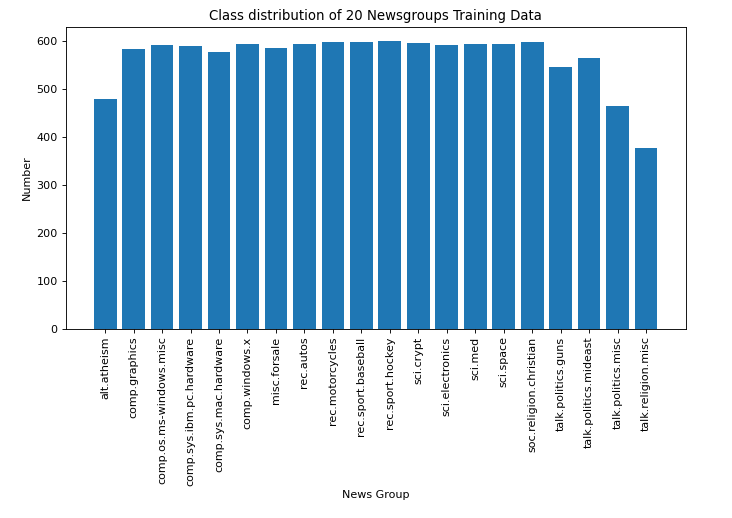
可以看到,新闻数据共有20个分类
对各类别的数量进行可视化处理
dataset.target_names
['alt.atheism',
 'comp.graphics',
 'comp.os.ms-windows.misc',
 'comp.sys.ibm.pc.hardware',
 'comp.sys.mac.hardware',
 'comp.windows.x',
 'misc.forsale',
 'rec.autos',
 'rec.motorcycles',
 'rec.sport.baseball',
 'rec.sport.hockey',
 'sci.crypt',
 'sci.electronics',
 'sci.med',
 'sci.space',
 'soc.religion.christian',
 'talk.politics.guns',
 'talk.politics.mideast',
 'talk.politics.misc',
 'talk.religion.misc']
# 对各类别的数量进行可视化
targets, frequency = np.unique(dataset.target, return_counts=True)
targets_str = np.array(dataset.target_names)
fig = plt.figure(figsize=(10, 5), dpi=80, facecolor='w', edgecolor='k')
plt.bar(targets_str, frequency)
plt.xticks(rotation=90)
plt.title('Class distribution of 20 Newsgroups Training Data')
plt.xlabel('News Group')
plt.ylabel('Number')
plt.show()
数据预处理
为了提升聚类的准确性,在聚类之前先对数据进行预处理,剔除数据中的数字和标点,并将大写字母转换成小写
dataset_df = pd.DataFrame({
    'data': dataset.data, 'target': dataset.target})
# 使用正则表达式进行数据处理
def alphanumeric(x):
    return re.sub(r"""\w*\d\w*""", ' ', x)
def punc_lower(x):
    return re.sub('[%s]' % re.escape(string.punctuation), ' ', x.lower())
dataset_df['data'] = dataset_df.data.map(alphanumeric).map(punc_lower)
处理后的数据部分展示
dataset_df.data
0        i was wondering if anyone out there could enli...
1        a fair number of brave souls who upgraded thei...
2        well folks  my mac plus finally gave up the gh...
3        \ndo you have weitek s address phone number   ...
4        from article      world std com   by tombaker ...
                               ...
11309    dn  from  nyeda cnsvax uwec edu  david nye \nd...
11310    i have a  very old  mac   and a mac plus  both...
11311    i just installed a     cpu in a clone motherbo...
11312    \nwouldn t this require a hyper sphere   in   ...
11313    stolen from pasadena between     and     pm on...
Name: data, Length: 11314, dtype: object
K-means聚类
使用K-means聚类方法,将数据聚成20类
texts = dataset.data
target = dataset.target
vectorizer = TfidfVectorizer(stop_words='english')
X = vectorizer.fit_transform(texts)
number_of_clusters = 20
model = KMeans(n_clusters=number_of_clusters,
               init='k-means++',
               max_iter=100,
               n_init=1)
model.fit(X)
KMeans(max_iter=100, n_clusters=20, n_init=1)
查看聚类后每个类别中的关键词,每个类别展示20个
dict_list = []
order_centroids = model.cluster_centers_.argsort()[:, ::-1]
terms = vectorizer.get_feature_names()
for i in range(number_of_clusters):
    dict = {
    }
    print("Cluster %d:" % i),
    for ind in order_centroids[i, :20]:
        print(' %s' % terms[ind])
        dict[terms[ind]] = model.cluster_centers_[i][ind]
    dict_list.append(dict)
类别预测
根据模型来划分测试集的类别
# 对单个词进行类别划分
X = vectorizer.transform([texts[400]])
cluster = model.predict(X)[0]
# print("这个词属于第{0}类".format(cluster))
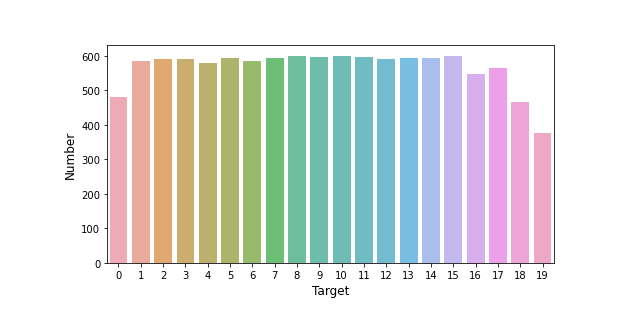
# 测试集预测结果可视化
count_target = dataset_df['target'].value_counts()
plt.figure(figsize=(8, 4))
sns.barplot(count_target.index, count_target.values, alpha=0.8)
plt.ylabel('Number', fontsize=12)
plt.xlabel('Target', fontsize=12)
词云图展示
对每个类别进行词云图展示
for i in range(20):
    wordcloud = WordCloud(background_color="white", relative_scaling=0.5,
                          normalize_plurals=False).generate_from_frequencies(dict_list[i])
    fig = plt.figure(figsize=(8, 6))
    plt.axis('off')
    plt.title('Cluster %d:' % i, fontsize='15')
    plt.imshow(wordcloud)
    plt.show()
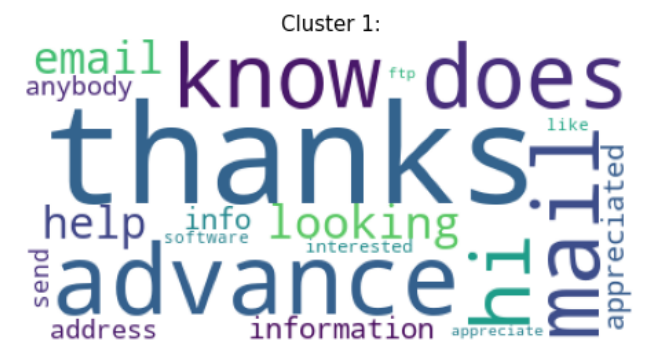
这里仅放两个类别图片以展示。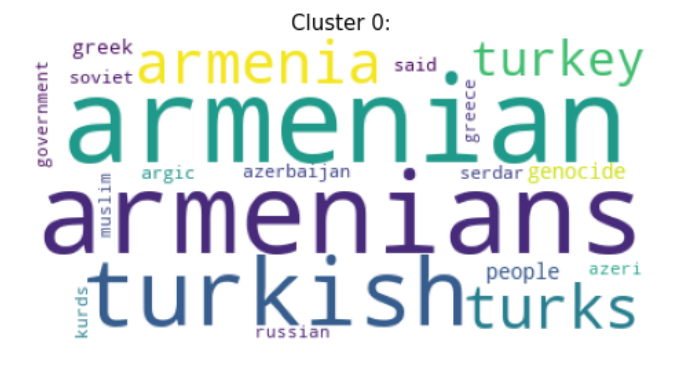
边栏推荐
- Basic remote connection tool xshell
- 串口抓包/截断工具的安装及使用详解
- C#应用程序界面开发基础——窗体控制(4)——选择类控件
- 看完这篇 教你玩转渗透测试靶机Vulnhub——DriftingBlues-9
- MySQL --- 数据库查询 - 基本查询
- C#应用程序界面开发基础——窗体控制(2)——MDI窗体
- 数学知识:能被整除的数—容斥原理
- kivy教程之在 Kivy App 中使用 matplotlib 的示例
- MySQL --- 数据库查询 - 条件查询
- [C language] detailed explanation of pointer and array written test questions
猜你喜欢

C#应用程序界面开发基础——窗体控制(2)——MDI窗体

Dotconnect for PostgreSQL data provider
MySQL foundation 05 DML language

MySQL foundation 04 MySQL architecture

Detailed explanation of Q-learning examples of reinforcement learning
CF1617B Madoka and the Elegant Gift、CF1654C Alice and the Cake、 CF1696C Fishingprince Plays With Arr
Give you an array numbers that may have duplicate element values. It was originally an array arranged in ascending order, and it was rotated once according to the above situation. Please return the sm

Steps to obtain SSL certificate private key private key file
![[Arduino experiment 17 L298N motor drive module]](/img/e2/4511eaa942e4a64c8ca2ee70162785.jpg)
[Arduino experiment 17 L298N motor drive module]
Database SQL language 02 connection query
随机推荐
Main features of transport layer TCP and TCP connection
C application interface development foundation - form control (3) - file control
[Cao gongzatan] after working in goose factory for a year in 2021, some of my insights
Work experience of a hard pressed programmer
并发编程的三大核心问题 -《深入理解高并发编程》
Type expansion of non ts/js file modules
测试右移:线上质量监控 ELK 实战
不登陆或者登录解决oracle数据库账号被锁定。
传输层 TCP主要特点和TCP连接
Test shift right: Elk practice of online quality monitoring
Mathematical knowledge: step Nim game game game theory
数学知识:能被整除的数—容斥原理
对非ts/js文件模块进行类型扩充
Mathematical knowledge: Nim game game theory
dotConnect for PostgreSQL数据提供程序
kivy教程之在 Kivy App 中使用 matplotlib 的示例
Vim 9.0正式发布!新版脚本执行速度最高提升100倍
MySQL
按键精灵打怪学习-多线程后台坐标识别
如今少年已归来,人间烟火气最抚凡人心 复工了~