当前位置:网站首页>JDBC详解
JDBC详解
2022-07-06 11:22:00 【斯文~】
推荐阅读:Druid 数据库连接池详解
文章目录
快速入门
Java操作数据库的流程
1.编写Java代码;
2.Java代码将SQL发送到MySQL服务端;
3.MySQL服务端接收到SQL语句并执行该SQL语句;
4.将SQL语句执行的结果返回给Java代码;
JDBC具体实现流程
1.创建工程,导入驱动jar包;
2.注册驱动:Class.forName("com.mysql.jdbc.Driver");
3.获取连接: Connection conn = DriverManager.getConnection(url, username, password);Java代码需要发送SQL给MySQL服务端,就需要先建立连接;
4.定义SQL语句:String sql = “update…” ;;
5.获取执行SQL对象:执行SQL语句需要SQL执行对象,而这个执行对象就是Statement对象,Statement stmt = conn.createStatement();
6.执行SQL:stmt.executeUpdate(sql);
7.处理返回结果;
8.释放资源;
API详解
DriverManager 获取连接
注册驱动
DriverManager(驱动管理类)作用:注册驱动;
在Java文档中static void registerDriver(Driver driver)方法是用来注册驱动的。
查询MySQL提供的Driver类,可以看到该方法是在静态代码块中实现的。代码如下: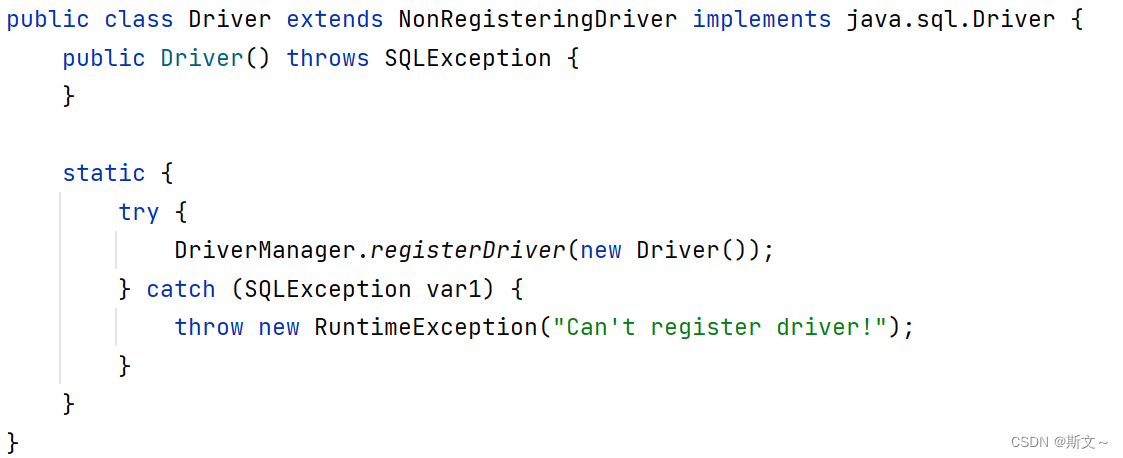
在该类中的静态代码块中已经执行了 DriverManager 对象的registerDriver() 方法进行驱动的注册了,那么我们只需要加载 Driver 类,该静态代码块就会执行。而Class.forName("com.mysql.jdbc.Driver"); 就可以加载Driver 类。
因此连接数据库前,我们只需执行以下代码即可。
Class.forName("com.mysql.jdbc.Driver");
注意
MySQL 5之后的驱动包,可以省略注册驱动的步骤,其会自动加载jar包中META-INF/services/java.sql.Driver文件中的驱动类。
获取数据库连接
static Connection getConnection(String url, String user, String password)
参数说明
url:连接路径
语法:jdbc:mysql://ip地址(域名):端口号/数据库名称?参数键值对1&参数键值对2…
示例:jdbc:mysql://127.0.0.1:3306/db1

* 如果连接的是本机mysql服务器,并且mysql服务默认端口是3306,则url可以简写为:jdbc:mysql:///数据库名称?参数键值对
* 配置 useSSL=false 参数,禁用安全连接方式,解决警告提示
user:用户名
poassword :密码
代码示例
public class connect {

    public static void main(String[] args) throws Exception {

// MySQL 5之后的驱动包,可以省略注册驱动的步骤
// Class.forName("com.mysql.jdbc.Driver");

        String url="jdbc:mysql://127.0.0.1:3306/sd?useSSL=false";
        String user="root";
        String password="root";

        try {

            Connection conn= DriverManager.getConnection(url,user,password);
            System.out.println("连接成功!");
        } catch (SQLException e) {

            throw new RuntimeException(e);
        }
    }
}
Connection 获取对象
获取执行 SQL 的对象
1.普通执行SQL对象
Statement createStatement()
2.预编译SQL的执行SQL对象:防止SQL注入
PreparedStatement prepareStatement(sql)
该方法是常用方法,可以防止SQL注入,会在本文后面详细讲解 。
3.执行存储过程的对象
CallableStatement prepareCall(sql)
通过这种方式获取的 CallableStatement 执行对象是用来执行存储过程的,但存储过程在MySQL中不常用。
代码示例
public class connect {

    public static void main(String[] args) throws Exception {

// MySQL 5之后的驱动包,可以省略注册驱动的步骤
// Class.forName("com.mysql.jdbc.Driver");

        String url = "jdbc:mysql://127.0.0.1:3306/sd?useSSL=false";
        String user = "root";
        String password = "root";

        Connection conn = DriverManager.getConnection(url, user, password);

        String sql="update course set cname='C++' where cno=1";

        Statement stmt=conn.createStatement();

        int count=stmt.executeUpdate(sql);
        System.out.println(count);
    }
}
事务管理
开启事务: BEGIN; 或者 START TRANSACTION;
提交事务: COMMIT;
回滚事务:ROLLBACK;
MySQL默认是自动提交事务
开启事务
void setAutoCommit(boolean autoCommit)
参与autoCommit 表示是否自动提交事务,true表示自动提交事务,false表示手动提交事务。而开启事务需要将该参数设为false。
提交事务
void commit()
回滚事务
void rollback()
代码示例
public class connect {

    public static void main(String[] args) throws Exception {

// MySQL 5之后的驱动包,可以省略注册驱动的步骤
// Class.forName("com.mysql.jdbc.Driver");

        String url = "jdbc:mysql://127.0.0.1:3306/sd?useSSL=false";
        String user = "root";
        String password = "root";

        Connection conn = DriverManager.getConnection(url, user, password);

        String sql1="update course set cname='Java' where cno=1";
        String sql2="update course set cname='Java' where cno=2";

        Statement stmt=conn.createStatement();

        try {

            int count1=stmt.executeUpdate(sql1);
            System.out.println(count1);

            int i=1/0; // 人为制造异常,以观察归滚操作

            int count2=stmt.executeUpdate(sql2);
            System.out.println(count2);

            //若没有异常 ,则提交所有改动,数据库更新
            conn.commit();
        } catch (SQLException e) {

            //若存在异常,则撤销此前的所有操作(sql1的更新操作)
            conn.rollback();
        }

    }
}
Statement 执行语句
Statement对象的作用就是用来执行SQL语句。而针对不同类型的
SQL语句使用的方法也不一样。
执行DDL、DML语句:executeUpdate
int executeUpdate(String sql)
执行DQL语句:executeQuery
ResultSet executeQuery(String sql)
该方法涉及到了 ResultSet 对象,会在本文后面详细讲解。
代码示例
public class connect {

    public static void main(String[] args) throws Exception {

// MySQL 5之后的驱动包,可以省略注册驱动的步骤
// Class.forName("com.mysql.jdbc.Driver");

        String url = "jdbc:mysql://127.0.0.1:3306/sd?useSSL=false";
        String user = "root";
        String password = "root";

        Connection conn = DriverManager.getConnection(url, user, password);

        String sql1 = "update st set age=15 where name='Tom'";
        String sql2 = "select * from st";

        Statement stmt = conn.createStatement();

        //执行DDL、DML语句
        int c = stmt.executeUpdate(sql1);
        System.out.println(c);

        System.out.println("------------------");

        //执行DQL语句:查询
        ResultSet rs = stmt.executeQuery(sql2);
        while (rs.next()) {

            int id = rs.getInt("id");
            String name = rs.getString("name");
            int age = rs.getInt("age");
            System.out.println(id + " " + name + " " + age);
        }

    }
}
运行结果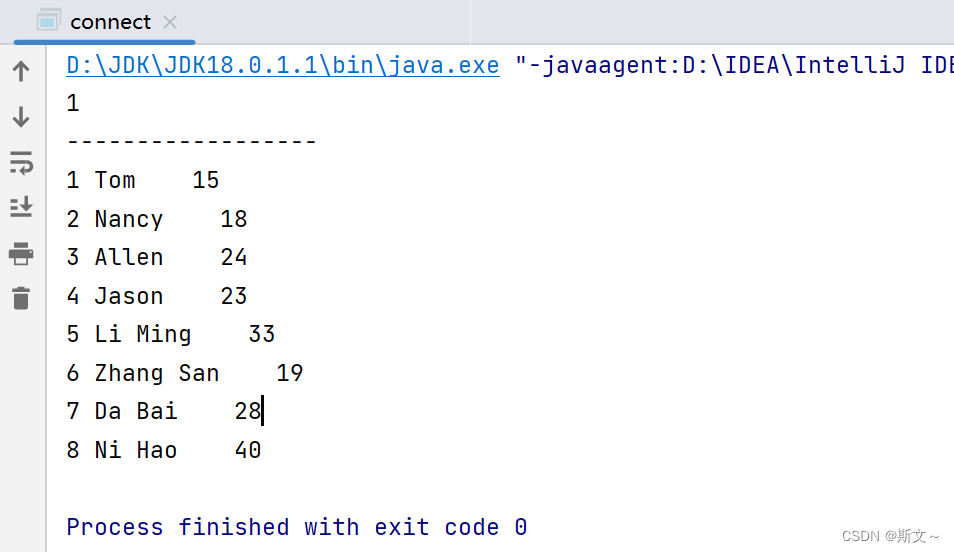
ResultSet 处理返回结果
概述
ResultSet封装了SQL查询语句的结果,执行了DQL语句后就会返回该对象。
ResultSet executeQuery(String sql)
ResultSet对象提供了操作查询结果数据的方法,如下:
| 方法 | 说明 |
|---|---|
| boolean next() | 将光标下移一行后并判断新的行是否有效,true有效、false无效 |
获取数据Xxx getXxx(参数);Xxx:要查询的数据类型,如getInt(参数);参数:
用列的名称查询的话是传String类型,如getString("name");
用列的索引查询的话,传int类型,表的第一列索引为1,如getString(1);
代码示例
public class connect {

    public static void main(String[] args) throws Exception {

// MySQL 5之后的驱动包,可以省略注册驱动的步骤
// Class.forName("com.mysql.jdbc.Driver");

        String url = "jdbc:mysql://127.0.0.1:3306/sd?useSSL=false";
        String user = "root";
        String password = "root";

        Connection conn = DriverManager.getConnection(url, user, password);

        String sql = "select * from st";

        Statement stmt = conn.createStatement();

        System.out.println("---------用列的名称查询----------");
        ResultSet rs = stmt.executeQuery(sql);
        while (rs.next()) {

            int id = rs.getInt("id");
            String name = rs.getString("name");
            int age = rs.getInt("age");
            System.out.println(id + " " + name + " " + age);
        }

        System.out.println("---------用列的索引查询----------");

        ResultSet rs1 = stmt.executeQuery(sql);
        while (rs1.next()) {

            int id = rs1.getInt(1);
            String name = rs1.getString(2);
            int age = rs1.getInt(3);
            System.out.println(id + " " + name + " " + age);
        }

    }
}
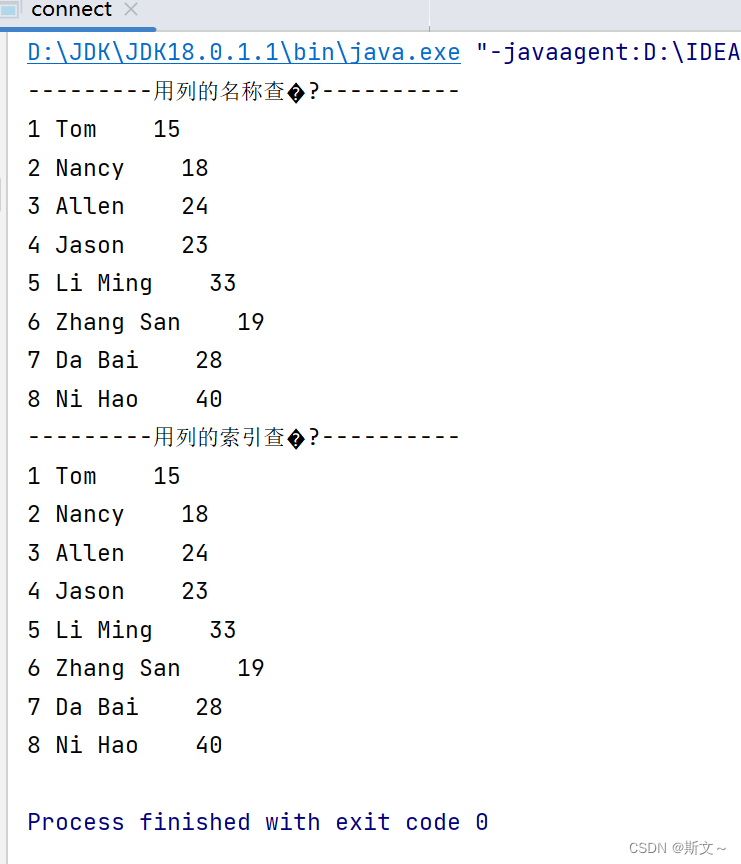
PreparedStatement 防注入
PreparedStatement作用:预编译SQL语句并执行,预防SQL注入问题。它是通过将特殊字符进行转义实现的。
获取 PreparedStatement 对象
PreparedStatement prepareStatement(String sql)
// SQL语句中的参数值,使用?占位符替代
String sql = "select * from user where username = ? and password = ?";
// 通过Connection对象获取,并传入对应的sql语句
PreparedStatement pstmt = conn.prepareStatement(sql);

pstmt.setString(1,"user");
pstmt.setInt(2,123456);
设置参数值
PreparedStatement对象:setXxx(参数,值):给 ? 赋值
Xxx:数据类型 ; 如 setInt(1,10);
参数:?的位置编号,从1开始;
**值:**给参数所赋的值
执行SQL语句
调用executeUpdate() 和 executeQuery()这两个方法时不需要再传递SQL语句,因为获取SQL语句执行对象时已经对SQL语句进行预编译了。
public void testPreparedStatement() throws  Exception {

    //2. 获取连接:如果连接的是本机mysql并且端口是默认的 3306 可以简化书写
    String url = "jdbc:mysql:///db1?useSSL=false";
    String username = "root";
    String password = "1234";
    Connection conn = DriverManager.getConnection(url, username, password);

    // 接收用户输入 用户名和密码
    String name = "zhangsan";
    String pwd = "' or '1' = '1";

    // 定义sql
    String sql = "select * from tb_user where username = ? and password = ?";
    // 获取pstmt对象
    PreparedStatement pstmt = conn.prepareStatement(sql);
    // 设置?的值
    pstmt.setString(1,name);
    pstmt.setString(2,pwd);
    // 执行sql
    ResultSet rs = pstmt.executeQuery();
    // 判断登录是否成功
    if(rs.next()){

        System.out.println("登录成功~");
    }else{

        System.out.println("登录失败~");
    }
    //7. 释放资源
    rs.close();
    pstmt.close();
    conn.close();
}
边栏推荐
- Describe the process of key exchange
- Installation and management procedures
- 应用使用Druid连接池经常性断链问题分析
- R语言使用rchisq函数生成符合卡方分布的随机数、使用plot函数可视化符合卡方分布的随机数(Chi Square Distribution)
- 一种用于夜间和无袖测量血压手臂可穿戴设备【翻译】
- QLabel 跑马灯文字显示
- QPushButton绑定快捷键的注意事项
- 星诺奇科技IPO被终止:曾拟募资3.5亿元 年营收3.67亿
- [depth first search] Ji suanke: a joke of replacement
- From 2022 to 2024, the list of cifar azrieli global scholars was announced, and 18 young scholars joined 6 research projects
猜你喜欢
Benefit a lot, Android interview questions
CCNP Part 11 BGP (III) (essence)

第五期个人能力认证考核通过名单公布
中缀表达式转后缀表达式详细思路及代码实现
![[matlab] Simulink the input and output variables of the same module cannot have the same name](/img/99/adfe50075010916439cd053b8f04c7.png)
[matlab] Simulink the input and output variables of the same module cannot have the same name
![[translation] a GPU approach to particle physics](/img/07/57036c925155cab36678c696e89440.jpg)
[translation] a GPU approach to particle physics

Describe the process of key exchange
Summary of performance knowledge points

Solve DoS attack production cases
Master Xuan joined hands with sunflower to remotely control enabling cloud rendering and GPU computing services
随机推荐
青龙面板最近的库
Camel case with Hungarian notation
使用map函数、split函数一行键入多个元素
Yutai micro rushes to the scientific innovation board: Huawei and Xiaomi fund are shareholders to raise 1.3 billion
Understanding disentangling in β- VAE paper reading notes
R语言dplyr包进行数据分组聚合统计变换(Aggregating transforms)、计算dataframe数据的分组均值(mean)
AIRIOT物联网平台赋能集装箱行业构建【焊接工位信息监控系统】
Computer network: sorting out common network interview questions (I)
一种用于夜间和无袖测量血压手臂可穿戴设备【翻译】
R语言ggplot2可视化时间序列柱形图:通过双色渐变配色颜色主题可视化时间序列柱形图
Nuc11 cheetah Canyon setting U disk startup
业务与应用同步发展:应用现代化的策略建议
How to type multiple spaces when editing CSDN articles
朗坤智慧冲刺科创板:年营收4亿 拟募资7亿
Synchronous development of business and application: strategic suggestions for application modernization
倒计时2天|腾讯云消息队列数据接入平台(Data Import Platform)直播预告
Three years of Android development, Android interview experience and real questions sorting of eight major manufacturers during the 2022 epidemic
基于蝴蝶种类识别
如何提高网站权重
Digital "new" operation and maintenance of energy industry