当前位置:网站首页>Matlab读取GNSS 观测值o文件代码示例
Matlab读取GNSS 观测值o文件代码示例
2022-07-06 09:18:00 【Proletarians】
一、准备工作
观测值数据读取是进行数据处理的前提,通常,观测值的数据格式有rtcm、ubx、rinex,各家厂商还有自定义的格式。数据读取是最简单的工作,掌握了数据组织格式即掌握了数据读取策略,简言之,我们是对字符串进行一系列操作。我认为对o文件读取要做以下准备工作,分别是:
(1)安装Matlab的PC;
(2) 学习rinex.pdf资料;
(3)o文件准备;
(4)伪代码编写,理清数据流;
(5)代码测试
我们在使用定位方法SPP/PPP/RTK时,是按照历元来读取卫星的观测值(PR/CP),Doppler,SNR等信息,后续的处理是对所有卫星数进行循环遍历,进行不同的操作。
二、需解决的问题
问题是:要实现使用Matlab绘制不同卫星系统的卫星在观测弧段的伪距观测值时序图。
在上述问题分析中,易知卫星PRN号是唯一的,可作为key;而卫星对应着观测值(PC/CP/Doppler),可作为value。换言之,key和value可以使用map的映射来作为数据结构,其中,value可以使用结构体保存。最重要的一环已经确定了,即使用map和struct。
接下来,我们拿一颗卫星的观测弧段内的伪距值来说,可能的情况有以下几种:
(1) 在观测弧段内,卫星一直被捕获,即100%存在伪距值;
(2) 在观测弧段内,卫星在开始历元没有被捕获,而后才被捕获;
(3)在(2)中还存在未捕获,捕获,未捕获,捕获等情况;
在未捕获的历元时观测值为0,同时,我们还要注意,有伪距不一定有载波,没有载波肯定没有伪距。我们的伪代码主要是对上述三种情况进行判断即可。
三、代码实现
具体问题具体分析,解决上述提到的问题,具体代码如下:
% function: read the body of rinex obs file
clear all
close all
clc

fid=fopen(' example.obs');
if fid==-1
    disp('fail to open obs file!');
end

% 创建结构体obs,使用Map进行映射,prn为键(char),sv为值(table)
obs=containers.Map;
record_counter=0;

% 读取body记录
while feof(fid)==0
    line=fgets(fid);
    if strcmp(line(1),'>')
        sv_sum=str2double(line(34:35));
        time=line(3:29);
        if sv_sum>0
            for i=1:sv_sum
                line=fgets(fid);
                % 键 -> prn
                key=line(1:3);
                % 值 -> sv(pr cp dop)
                sv.pr=str2double(line(6:17));
                cp=line(21:33);
                if isnan(cp)
                    sv.cp=0;
                else
                    sv.cp=str2double(line(21:33));
                end
                sv.dop=str2double(line(41:49));
                % 值逻辑判断
                if isKey(obs,key)
                    jump_sec=record_counter-length(obs(key));
                    if jump_sec~=0 % 解决掉星后重新锁定的问题
                        temp.pr=0;
                        temp.cp=0;
                        temp.dop=0;
                        tmp_strcut=repmat(temp,1,jump_sec);
                        value=[obs(key) tmp_strcut sv];
                    else % 卫星一直锁定,直接追加
                        if strcmp(key,'C18')==1
                            if length(obs(key))>5713
                                disp(time);
                            end
                        end
                        value=[repmat(obs(key),1) repmat(sv,1)]; % mark
                    end
                else % 卫星首次锁定
                    if record_counter~=0 % 第一秒未锁定
                        temp.pr=0;
                        temp.cp=0;
                        temp.dop=0;
                        tmp_strcut=repmat(temp,1,record_counter);
                        value=[tmp_strcut sv];
                    else % 第一秒锁定
                        value=sv;
                    end
                end
                obs(key)=value;
            end
        end
        record_counter=record_counter+1;
    end
end
disp('create struct obs(body) successfully!');

% 绘图
sv_sum=obs.Count; % 可视卫星数量
keySet=keys(obs); % 可视卫星名称
disp(keySet);

v=299792458.0;
bf1=1.561098E9; % bds L1 频率
gf1=1.57542E9; % gps L1 频率
gps_sum=0;bds_sum=0;

for i=1:sv_sum
    prn=char(keySet(i));
    if strcmp(prn(1),'G')==1 % GPS
        gps_sum=gps_sum+1;
    else if strcmp(prn(1),'C')==1 % BDS
            bds_sum=bds_sum+1;
        end
    end
end
subfig1=ceil(sqrt(bds_sum));
subfig2=ceil(sqrt(gps_sum));

x=1:record_counter;
for i=1:sv_sum
    prn=char(keySet(i));
    info=obs(prn);
    pr=zeros(1,record_counter);cp=pr;
    for j=1:length(info)
        pr(j)=info(j).pr;
        cp(j)=info(j).cp;
    end
    if i==1 || i==bds_sum+1
        figure;
    end
    subplot(n,n,pos);
    plot(x,pr,'r',x,cp*f,'g');
    title(char(prn));
end
四、示例结果
我只针对工作中遇到的rinex版本数据进行处理,gps/bds双系统,单频数据,结果图如下: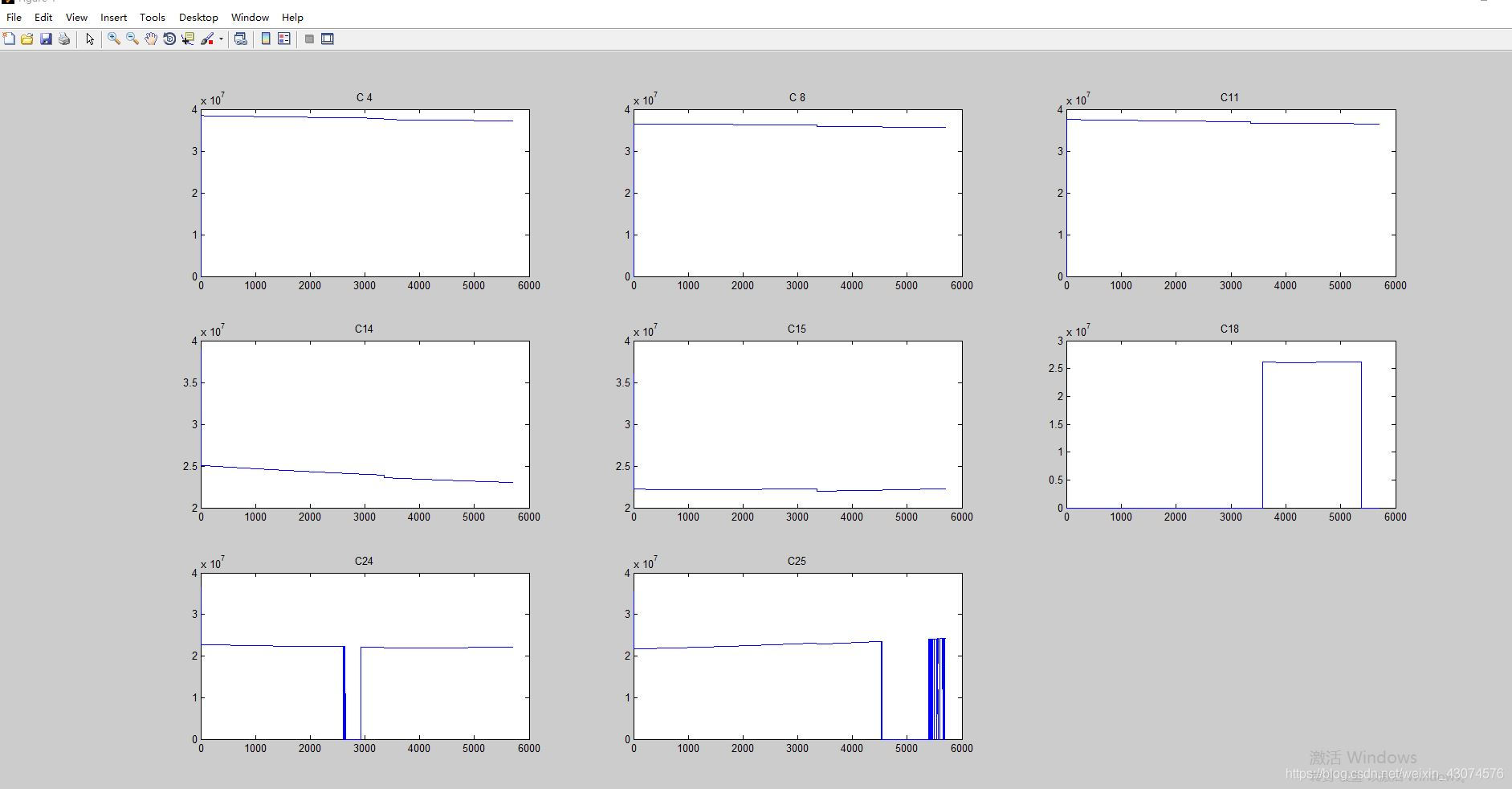
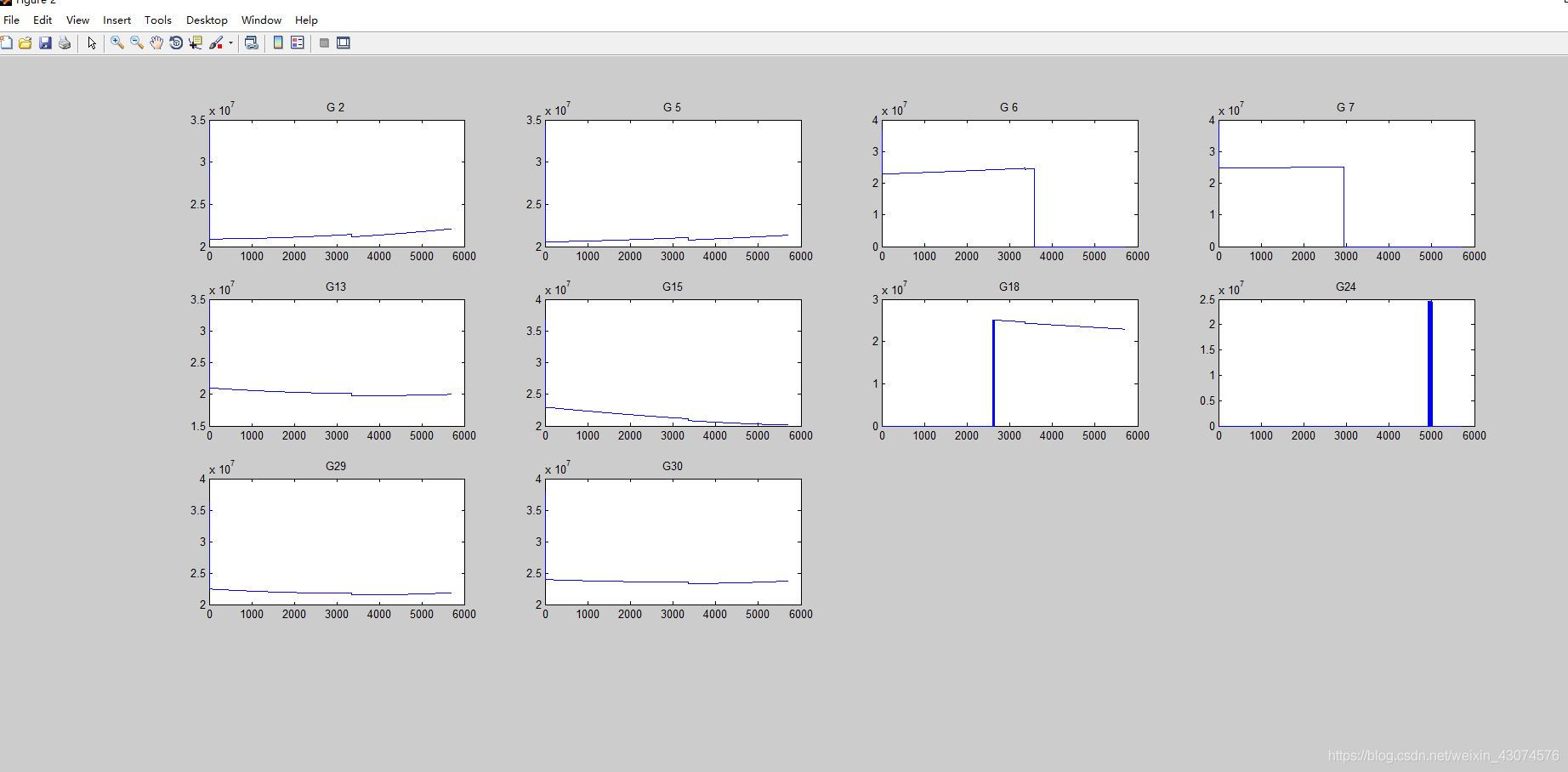
示例代码比较简单,也有相应的注释。
边栏推荐
- Gateway fails to route according to the service name, and reports an error service unavailable, status=503
- Theoretical derivation of support vector machine
- Fairygui character status Popup
- Knowledge summary of request
- (4) Data visualization of R language -- matrix chart, histogram, pie chart, scatter chart, linear regression and strip chart
- MySQL时间、时区、自动填充0的问题
- Servlet
- HCIP Day 12
- [offer18] delete the node of the linked list
- 燕山大学校园网自动登录问题解决方案
猜你喜欢

The master of double non planning left the real estate company and became a programmer with an annual salary of 25W. There are too many life choices at the age of 25
341. Flatten nested list iterator
FGUI工程打包发布&导入Unity&将UI显示出来的方式
编译原理:源程序的预处理及词法分析程序的设计与实现(含代码)
Redis 缓存更新策略,缓存穿透、雪崩、击穿问题
Unity3d makes the registration login interface and realizes the scene jump

PR 2021 quick start tutorial, first understanding the Premiere Pro working interface
MySQL时间、时区、自动填充0的问题
Unity场景跳转及退出
Esp8266 connect onenet (old mqtt mode)
随机推荐
FairyGUI复选框与进度条的组合使用
Postman 中级使用教程【环境变量、测试脚本、断言、接口文档等】
Office提示您的许可证不是正版弹框解决
[Leetcode15]三数之和
Unity场景跳转及退出
idea中好用的快捷键
2021.11.10汇编考试
Unity3D摄像机,键盘控制前后左右上下移动,鼠标控制旋转、放缩
(课设第一套)1-4 消息传递接口 (100 分)(模拟:线程)
JS function promotion and declaration promotion of VaR variable
关于Gateway中使用@Controller的问题
Unity scene jump and exit
Unity3D,阿里云服务器,平台配置
idea中导包方法
First use of dosbox
程序设计大作业:教务管理系统(C语言)
@Autowired 和 @Resource 的区别
Particle system for introduction to unity3d Foundation (attribute introduction + case production of flame particle system)
Affichage du changement de valeur du Buff de gain de l'interface graphique de défaillance
How to add music playback function to Arduino project