当前位置:网站首页>Shell_ 02_ Text three swordsman
Shell_ 02_ Text three swordsman
2022-07-06 16:50:00 【Coke loving w】
Shell_02_ Text three swordsman
cut
cut command : Operate on data in fields
Command format :cut Options File path
| Options | meaning |
|---|---|
| -d | Specify the delimiter of the data |
| -f | Specify the field display |
| -c N | Appoint N The characters are 1 Display units |
1)-d and -f Options together make sense ( Only the delimiter of the specified data , Data can be segmented )
2)-c The value followed by the option “-” There are different meanings in different places
Such as : Show PATH The fifth path in the variable path 
Such as : Display in different character units test1.txt The contents of the document 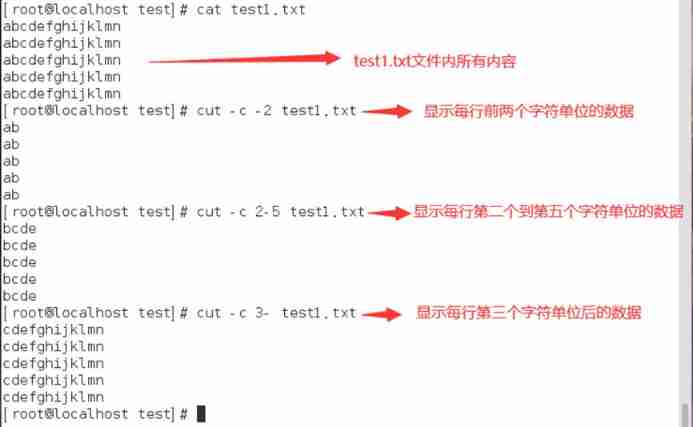
sed
sed command : Replace data in behavioral units 、 Delete 、 newly added 、 Selection and other functions
Command format :sed Options ‘ operation ’ File path
1) Options are optional , But the operation must have ;
2)sed Command more than two operations , Need to add -e Options ;
3) The operation must be enclosed in two single quotation marks , And between multiple operations “;” Separate ;
| Options | meaning |
|---|---|
| -n | Only output is sed Processed lines |
| -e | In the command prompt interface sed operation |
| -f | take sed Write to a file |
| -r | Use extended regular expression syntax ( The default is the basic regular expression syntax ) |
| -i | Directly modify the contents of the document ( The default is to only read the file and output it to the terminal ) |
| operation | meaning |
|---|---|
| s | Replace / Delete string ( Usually used with regular expressions ) |
| y | Replace character |
| i | ( Last line ) Insert |
| a | ( The next line ) Insert |
| c | Replacement row |
| d | Delete row |
| p | Print ( Usually cooperate -n Options together make sense ) |
Replace string
s operation : Replace the string specified in the data flow
1) Format :s/ Original string / New string / identification
2) Signs are divided into (p and w It can be used for other operations ):
| identification | explain |
|---|---|
| g | All occurrences of the original string in the data stream are replaced |
| p | Print out the line where the string is operated |
| w File path | Write the result of the operation to the specified file |
| The number N | Specify the number of... That the string successfully matches in this line N Time , To replace |
3) By default, only the first string that is successfully matched is replaced ;
4) If the new string is empty , Then you can delete the original string ;
Such as : Replace the specified string 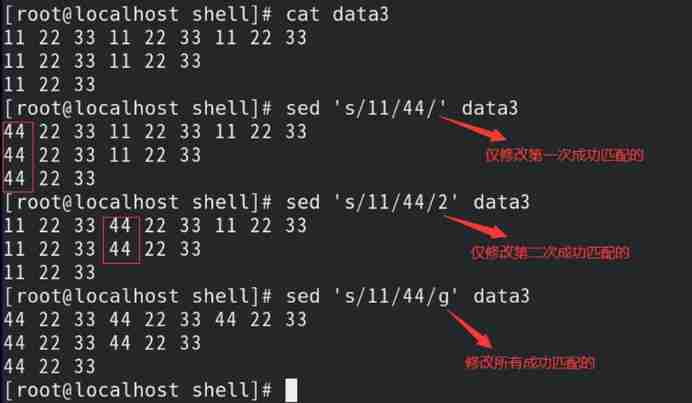
Such as : Only print out by sed Command replacement line 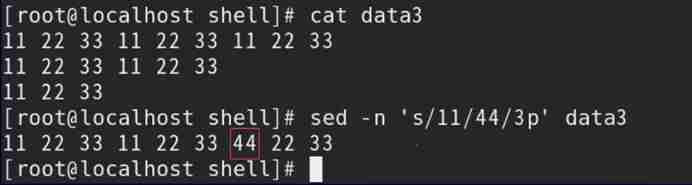
Such as : adopt s Operation deletes the specified string 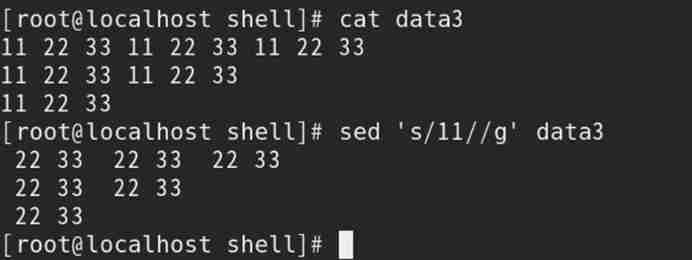
y operation : Replace a single character in the data stream
1) Format :y/ Original character / New character /
2) The number of original characters should be consistent with the number of new characters ;
3) By default, it works on all strings in the data flow ( The range cannot be specified by addressing )
Such as : Replace specified characters 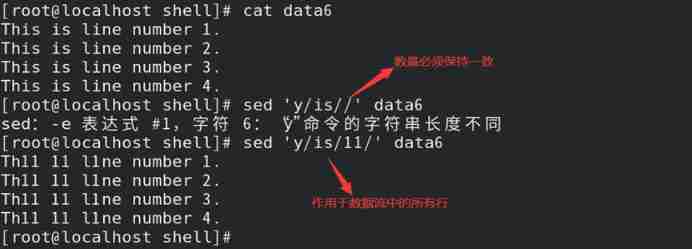
Addressing
Row addressing (Line Addressing): Appoint sed The scope of the operation of the command line
1)sed The operation of the command works on all data lines by default ;
2) Row addressing is divided into : Digital addressing 、 Text addressing
(1) Digital addressing
1)sed By default, the row number is assigned from the first row of data 1( Including the empty line );
2) Digital addressing is divided into : That's ok 、 Row interval
3) Digital addressing format :‘ Values and operations ’
// When specifying a row interval , Use between multiple values “,” Separate ( The interval contains the value itself )
Such as : Through digital addressing , Replace specified data 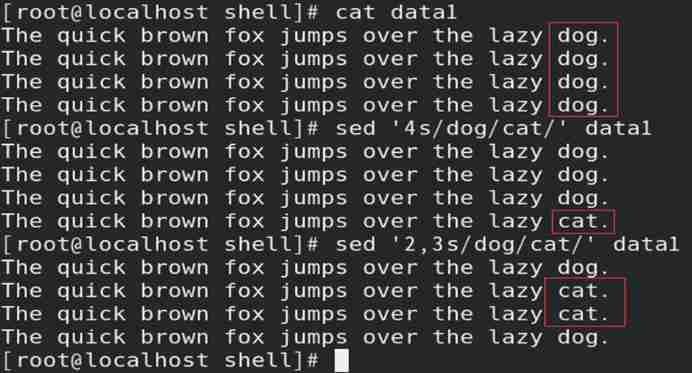
(2) Text addressing
1) Select the line containing the specified string ;
2) Text addressing format :‘/ character string / operation ’
Such as : Through text addressing , Replace specified data 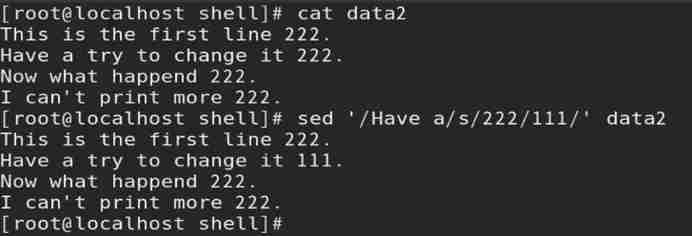
(3) When multiple operations are performed under the same address , Operations need to be specified by branches
// It can also be written on the same line , However, you need to specify addressing multiple times and use “;” Separation operation
Such as : In the specified row , Replace multiple data at the same time 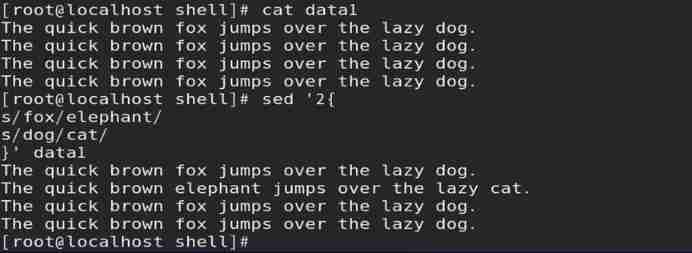
Delete
d operation : Delete the specified row in the data flow
1) Format : Match format d
2) If no string is specified , Then the string of all lines is deleted by default ;
3) Use two text addressing , It can realize the opening and closing of the deletion function ;
// Enable the deletion function when matching to the first text addressing , Close when the second one is matched
Such as : Delete specified row 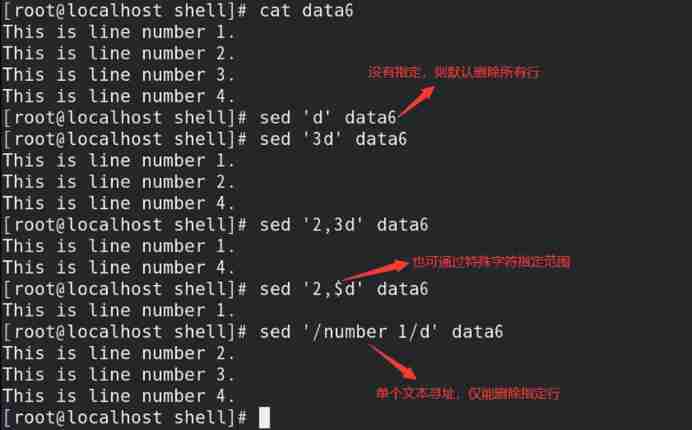
Such as : Addressing through two texts , Realize the opening and closing of the deletion function 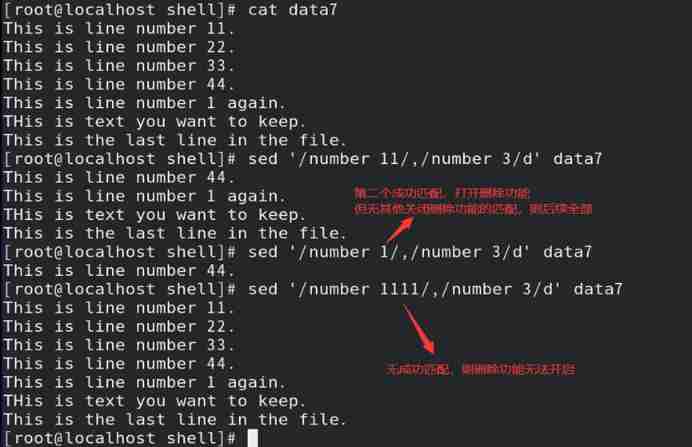
Insert
i operation : Insert a row of data into the previous row of the specified row in the data flow
1) Format : Addressing i\ insert data
2)i Operation must be coordinated with addressing , And row interval addressing cannot be used ;
// If addressing is not specified , By default, the specified data is inserted in the previous row of all rows
3)a Operation and i Same operation ( The difference lies in : Insert );
Such as : Read data6 In the file data stream , The first 3 Insert the specified data in the previous row of the row 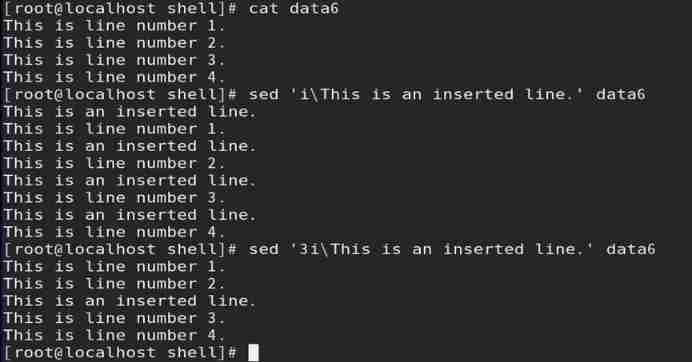
Replacement row
c operation : The new row replaces the specified row in the data flow
1) Format : Addressing c\ New line
2)c Operation must be coordinated with addressing ( If row interval addressing , Then the interval is replaced by a new line );
// If addressing is not specified , Replace all rows in the data flow by default
Such as : The new line replaces the specified line 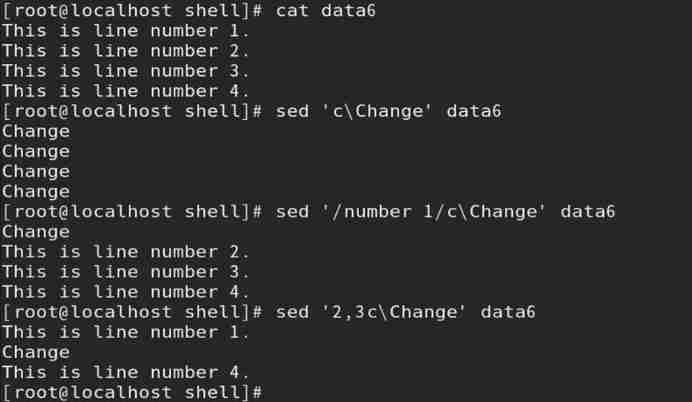
gawk
gawk Program :Unix in awk programmatic GNU edition , It has the following functions
1) Variables can be defined to store data ;
2) Use arithmetic and string operators to process data ;
3) Use structured programming concepts to add processing logic to data processing ;
4) By extracting the data elements in the data file , Format it and output ;
gawk command : The fields in each row are used to replace the data 、 Delete 、 newly added 、 Selection and other functions
Command format :gawk Options ‘ key word 1{ operation 1} key word 2{ operation 2}’ File path
| Options | meaning |
|---|---|
| -F character | Specifies the separator for the field |
| -f File path | Specify storage gwak Files for operation |
| -v Variable name = value | Define variables and variable values |
| -mf | Specify the maximum number of processing fields in the data flow |
1)gawk Unit by behavior , Take the field as the processing unit ;
2)gwak The built-in variables for each field in are :
| Variable name | explain |
|---|---|
| $0 | Represents the whole row of data |
| $1 | On behalf of the 1 A field |
| $2 | On behalf of the 2 A field |
| $N | On behalf of the N A field |
3)gawk Other built-in variables
| Variable name | meaning |
|---|---|
| NF | The total number of fields per row |
| NR | gawk What line of data is being processed |
| FS | Input field separator ( Default is space ) |
| RS | Enter the delimiter of the data row |
| OFS | Separator for output field |
| ORS | Separator of output data row |
// Built in variables in gawk When used inside , There is no need to add variable symbols before “$”
4)gawk in 3 Key words :BEGIN( The first to perform )、pattern、END( Finally, execute )
// When specifying split characters , Need to use BEGIN key word , otherwise gawk When the split character has not been replaced , Other operations have already been processed
// The default is omitted pattern key word ( Use less )
Such as : Format output 
// When there are multiple commands in an operation , Need to use “;” Separate
Such as : Store by calling gwak Files for operation , Output /etc/passwd The user name of the file and UID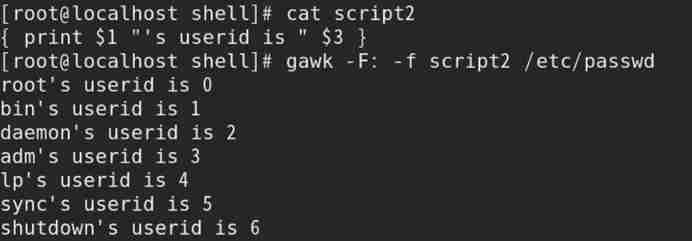
Such as : Inquire about /etc/passwd In the file UID Less than 10 Users of , And pass awk Format output 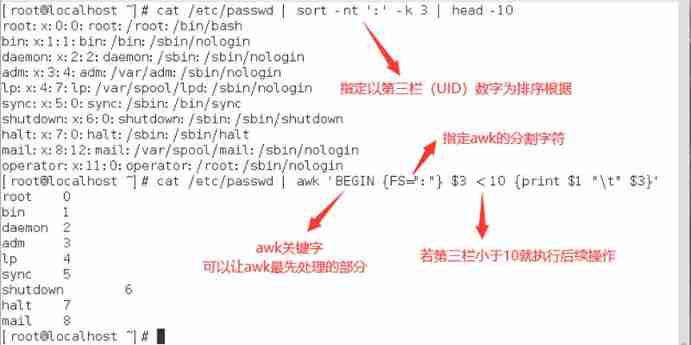
//gawk Operation selection can be realized by logical operation , And awk and gawk Universal
Such as : adopt gawk Format output
1) To write 3.sh Script files 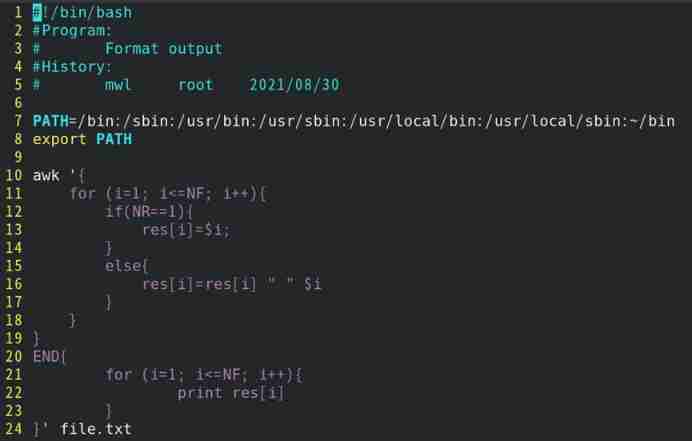
2) call 3.sh Script files 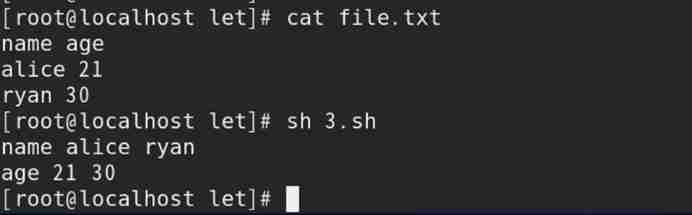
边栏推荐
- Business system compatible database oracle/postgresql (opengauss) /mysql Trivia
- 谢邀,人在工区,刚交代码,在下字节跳动实习生
- Educational Codeforces Round 122 (Rated for Div. 2)
- LeetCode 1551. Minimum operand to make all elements in the array equal
- Ffmpeg command line use
- 第6章 Rebalance详解
- ~86m rabbit practice
- 第一章 MapReduce概述
- Eureka high availability
- 力扣leetcode第 280 场周赛
猜你喜欢

字节跳动新程序员成长秘诀:那些闪闪发光的宝藏mentor们

Two weeks' experience of intermediate software designer in the crash soft exam

简单尝试DeepFaceLab(DeepFake)的新AMP模型

J'ai traversé le chemin le plus fou, le circuit cérébral d'un programmeur de saut d'octets
![Story of [Kun Jintong]: talk about Chinese character coding and common character sets](/img/d5/9a9e3a0ba57328749d80ec71cb9467.png)
Story of [Kun Jintong]: talk about Chinese character coding and common character sets
Solr new core
Spark独立集群Worker和Executor的概念
~86m rabbit practice
SQL quick start

ByteDance 2022 school recruitment R & D advance approval publicity meeting, students' top 10 issues
随机推荐
Business system compatible database oracle/postgresql (opengauss) /mysql Trivia
How to insert mathematical formulas in CSDN blog
Mp4 format details
LeetCode1556. Thousand separated number
~74 JD top navigation bar exercise
7-12 inventory code base
Market trend report, technical innovation and market forecast of tabletop dishwashers in China
这116名学生,用3天时间复刻了字节跳动内部真实技术项目
LeetCode 1561. The maximum number of coins you can get
Cartesian tree (modified)
LeetCode 1550. There are three consecutive arrays of odd numbers
Market trend report, technological innovation and market forecast of double door and multi door refrigerators in China
Simply try the new amp model of deepfacelab (deepfake)
第7章 __consumer_offsets topic
我走過最迷的路,是字節跳動程序員的腦回路
Investigation report of bench type Brinell hardness tester industry - market status analysis and development prospect prediction
Audio and video development interview questions
MP4格式详解
~69 other ways to use icon fonts
Chapter 6 datanode