当前位置:网站首页>Taro advanced
Taro advanced
2022-07-05 10:43:00 【Code Bruce Lee】
Taro Advanced
1、 Introduce
Taro It's a set of rules React Grammatically correct Multi terminal development Solutions for
2、 function
Use Taro, We can write only one set of code , Re pass Taro The compiler of , The source code can be compiled on different ends ( WeChat / Baidu / Alipay / Bytedance applet 、H5、React-Native etc. ) Running code
3、 Install scaffolding
$ npm i -g [email protected]
$ yarn add [email protected]
4、 Create project
$ taro init myApp
5、 Order to start the project in the development period
$ npm run dev:h5 // web
$ npm run dev:webapp // Wechat applet
$ npm run dev:alipay // Alipay applet
$ npm run dev:swan // Baidu applet
$ npm run dev:rn // ReactNative
6、 Project directory Introduction
|— dist // Compile results directory
|— config // The configuration directory
|-- dev.js // Configuration at development time
|-- index.js // The default configuration
|-- prod.js // Configure when packaging
|— src // Source directory
|-- pages // Page file directory
|-- index // index Page directory
|-- index.js // index Page logic
|-- index.css // index Page style
|-- app.css // Project general style
|-- app.js // Project entry documents
|— package.json // Rely on package management files
|— project.config.json // Configuration file for configuring applet
7、 Life cycle
state = {
name: ‘Jerry’,
age: 24
}
// -> 1.
componentWillMount () {
console.log(‘ Execute... Before the first rendering , Only execute 1 Time ’)
}
// -> 2.render
// -> 3.
componentDidMount () {
console.log(‘ Execute... After the first rendering , Only execute 1 Time ’)
this.setState({
name: ‘Tom’
}, () => {
// -> The value obtained through callback is the latest value
console.log(this.state.name + ‘,’ + this.state.age) // Tom,24
});
}
// -> 4.
componentWillUnmount () {
console.log(‘ Execute on uninstall , Only execute 1 Time ’)
}
componentWillUpdate () {
console.log(‘state The data will be updated ’)
}
componentDidUpdate () {
console.log(‘state After the data is updated ’)
}
// -> The following two life cycles are required by applets , But compatible h5 And small program
componentDidShow () {
console.log(‘ Trigger when the page is displayed ’)
}
componentDidHide () {
console.log(‘ Triggered when the page is hidden ’)
}
componentWillReceiveProps () {
console.log(‘ It will be triggered when the parameters passed from the parent component to the child component change ’)
}
// -> Every call setState This life cycle will be called once
// -> What scenarios are used in this life cycle ? - for example : By judging if name yes Jerry Only when it is updated state, Otherwise, it will not be updated
shouldComponentUpdate (nextProps, nextState) {
console.log(‘ Check this setState Is it necessary to render call ’)
// -> This life cycle will return a boolean value , If you return false, Then it will not carry out render; return true, Then it will be executed render
// -> The default is to return true
if (nextState.name === ‘Tom’) { // -> Usually used for many times setState Invocation time , To promote render Performance of
return true
} else {
return false
}
}
render () {
console.log(‘ Rendering render’)
return (
)
}
8、 Status update
Taro Status updates must be asynchronous
React Status updates in are not necessarily asynchronous , Update must call setState Method
9、Props
// -> index
test() {
console.log(‘ Parent component -> Child components , The transmission of methods ’)
}
// Be sure to be compatible with applets and h5, stay Taro Use in props The transmission event must be in on perhaps dispatch start , And it is in the form of hump
// -> Child
class Child extends Component {
componentWillReceiveProps (nextProps) {
// stay props When updating data
// props Too many will be updated frequently , So in this function, we usually make some judgments
console.log(‘props The properties have changed ’)
console.log(nextProps)
}
cl() {
this.props.onTest()
}
render() {
let { name, obj } = this.props
return (
)
}
}
// -> The default value is
Child.defaultProps = {
obj: {key: [{name:“aaaa”}]}
}
10、 Routing functions
10.1 Routing functions
stay Taro in , The routing function is built-in by default , No additional routing configuration is required for developers
This is equivalent to adapting the applet and h5 The routing problem of
Taro By default, it is generated according to the configuration path Route
We just need to enter the file in the config The configuration specifies pages, And then you can go through it in the code Taro Provided API To jump to the destination page
handleClick = () => {
Taro.navigateTo({
url:‘/pages/index/index’
})
}
render () {
return (
Jump
)
}
10.2 Route parameters
We can jump through all url Add the query string parameter later to jump and transfer parameters , for example :id=2&type=test
In this case , Jump to the life cycle of the successful target page (componentWillMount) The method can pass this.$router.params Get the passed in parameter
11、 Static resource references
stay Taro It can be used like webpack So free to reference static resources , And there is no need to install any loader
You can use it directly ES6 Of import Syntax to reference style files /Js file / Local pictures
12、 Conditions apply colours to a drawing
Short circuit expression
It is worth noting that the applet renders short-circuit expressions , There will be true perhaps false The brief appearance of , So if you want to adapt the applet , It is best to use ternary expressions to judge
Ternary expression
A more general way ,Jsx Grammar is not supported if Operator , So we can only use ternary expression or short-circuit expression
{/* Short circuit expression /}
{
!true ||
}
{/ Ternary expression /}
{
true ?
}
13、 The list of rendering
{/ The list of rendering /}
{
this.state.list.map((item) => {
return (
// Remind you that when looping through an array, you should provide keys.
// Keys Can be in DOM Help when some elements in are added or deleted Nerv/ Applet Identify which elements have changed .
// So you should give each element in the array a definite identity
)
})
}
14、Children
export default class TestDialog extends Component {
render () {
return (
<Dialog header={
header
}
>I am dialog1
I am dialog2
)
}
}
export default class Dialog extends Component {
render () {
return (
{/ Don't take this.props.children Do anything */}
{this.props.children}
{/* When multiple displays are needed , You can customize the name , It's equivalent to a small program slot */}
{this.props.header}
)
}
}
15、 Event handling
Named after the hump
stay Taro Prevent the event from bubbling , Must be clearly used stopPropagation
Pass parameters... To the event handler
The event transmission of any component should be in on start 【 As long as JSX The parameters passed in by the component are functions , The parameter name must start with on start 】
All of the above are for adapting applets , If you only do h5 End , You don't need to pay attention to
export default class Event extends Component {
state = {
username: ‘Jerry’
}
// -> What we need to pay attention to here is to be compatible with applets , You cannot use arrow functions to write in events , It's better to use bind To change this Point to
// test = () => {
// console.log(‘test log’)
// console.log(this.state.username)
// }
test(e) {
console.log(e);
console.log(‘test log’);
// -> this Point to
// console.log(this.state.username);
// -> It should be noted that to prevent event bubbling, you can only use stopPropagation
// e.stopPropagation();
// -> Clear text parameters are event In front of the object Arguments(2) [“Jerry”, MouseEvent, callee: (…), Symbol(Symbol.iterator): ƒ]
console.log(arguments);
}
render () {
return (
<Button onClick={this.test.bind(this, this.state.username)}>testEvent
)
}
}
16、 Style sheets
Out of commission #id Selectors | div span tag chooser | span[class=‘name’] Attribute selector | .a > .b
You usually use . Class selectors , Must define className, Only valid for the current component
It is recommended to use flex Layout
Taro actual combat
Install the stable version taro && Initialize project
$ cnpm i @tarojs/[email protected] -g
$ taro init cnode
Use taro-ui Component library
$ cnpm i taro-ui --save
边栏推荐
- [paper reading] kgat: knowledge graph attention network for recommendation
- 双向RNN与堆叠的双向RNN
- Customize the left sliding button in the line in the applet, which is similar to the QQ and Wx message interface
- 脚手架开发基础
- 风控模型启用前的最后一道工序,80%的童鞋在这都踩坑
- web安全
- C语言实现QQ聊天室小项目 [完整源码]
- SQL Server monitoring statistics blocking script information
- How can non-technical departments participate in Devops?
- beego跨域问题解决方案-亲试成功
猜你喜欢
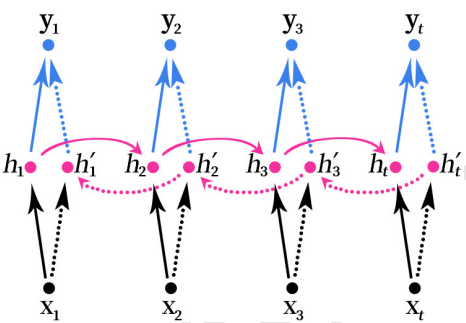
双向RNN与堆叠的双向RNN

Who is the "conscience" domestic brand?
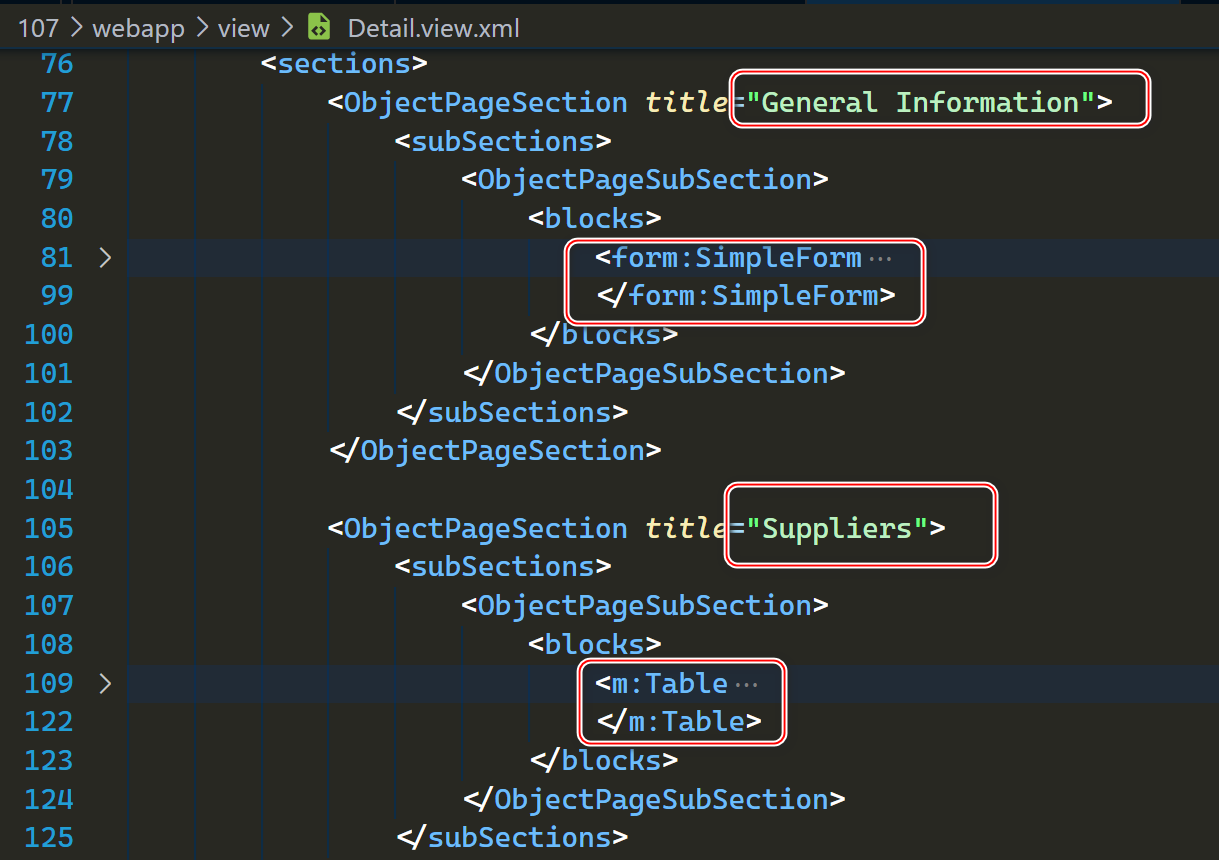
SAP ui5 objectpagelayout control usage sharing
![[vite] 1371 - develop vite plug-ins by hand](/img/7f/84bba39965b4116f20b1cf8211f70a.png)
[vite] 1371 - develop vite plug-ins by hand
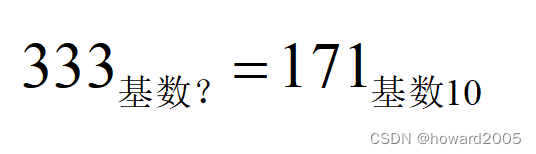
"Everyday Mathematics" serial 58: February 27
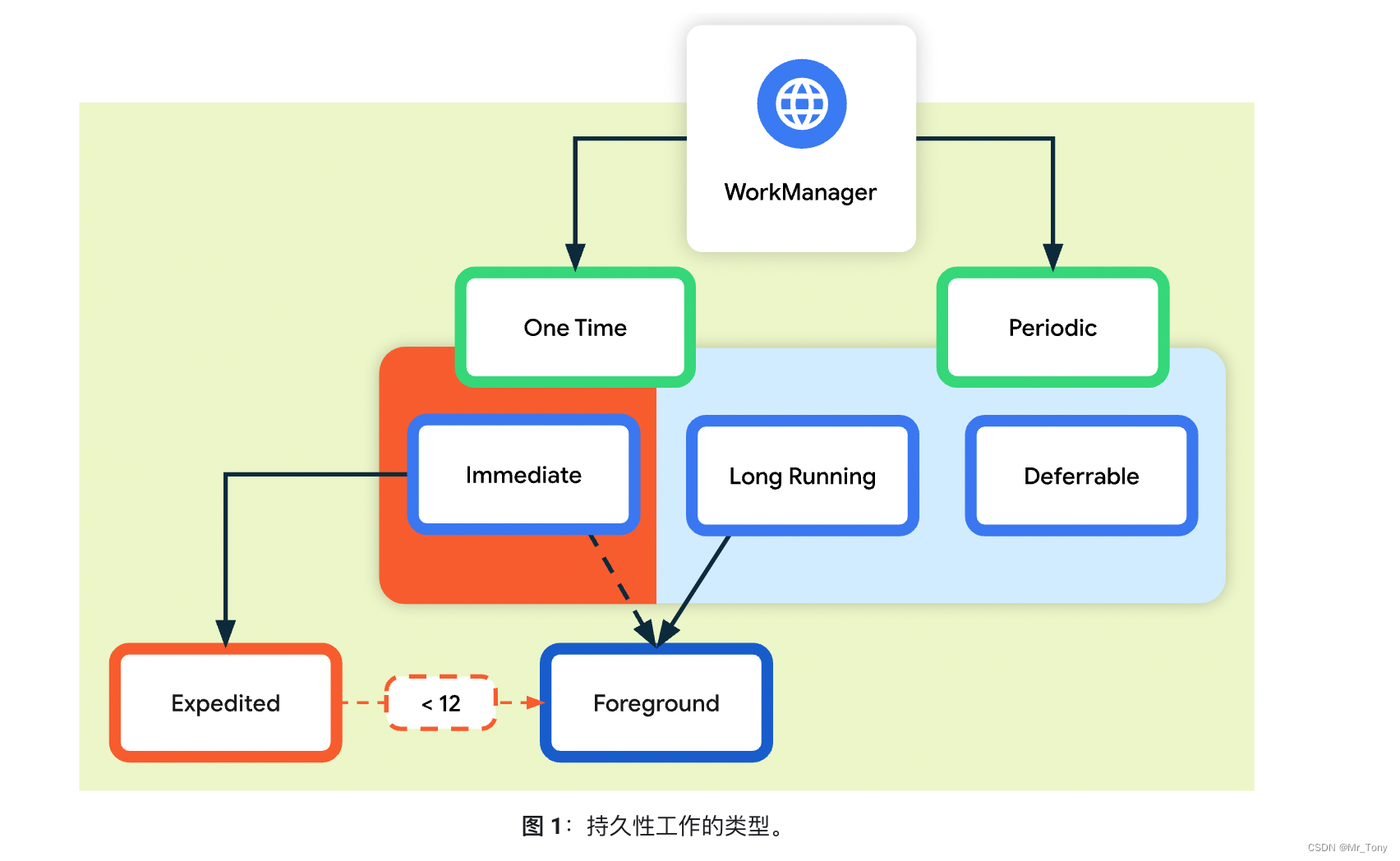
Workmanager Learning one
微信核酸检测预约小程序系统毕业设计毕设(8)毕业设计论文模板

Crawler (9) - scrape framework (1) | scrape asynchronous web crawler framework

第五届 Polkadot Hackathon 创业大赛全程回顾,获胜项目揭秘!
谈谈对Flink框架中容错机制及状态的一致性的理解
随机推荐
[可能没有默认的字体]Warning: imagettfbbox() [function.imagettfbbox]: Invalid font filename……
Go project practice - Gorm format time field
Web3 Foundation grant program empowers developers to review four successful projects
PHP solves the problems of cache avalanche, cache penetration and cache breakdown of redis
正则表达式
flink cdc不能监听mysql日志,大家遇到过这个问题吧?
变量///
Who is the "conscience" domestic brand?
双向RNN与堆叠的双向RNN
vite//
埋点111
Should the dependency given by the official website be Flink SQL connector MySQL CDC, with dependency added
Go-3-第一个Go程序
Golang应用专题 - channel
What are the top ten securities companies? Is it safe to open an account online?
DGL中异构图的一些理解以及异构图卷积HeteroGraphConv的用法
Learning II of workmanager
C function returns multiple value methods
SqlServer定时备份数据库和定时杀死数据库死锁解决
C language QQ chat room small project [complete source code]