当前位置:网站首页>Zabbix5 client installation and configuration
Zabbix5 client installation and configuration
2022-07-02 19:35:00 【gsls200808】
Connected to a docker install zabbix5 Server side , This is to configure the client
centos7 To configure
install
wget http://repo.zabbix.com/zabbix/5.4/rhel/7/x86_64/zabbix-agent2-5.4.12-1.el7.x86_64.rpm
rpm -ivh zabbix-agent2-5.4.12-1.el7.x86_64.rpm
Edit settings zabbix agent2 The configuration file
Modify the following
Server=192.168.3.54
ServerActive=192.168.3.54
HostMetadataItem=system.uname
among Server and ServerActive Change to your own server IP,HostMetadataItem Remove the previous comments and modify the content
start-up Check the status Boot from boot
systemctl start zabbix-agent2
systemctl status zabbix-agent2
systemctl enable zabbix-agent2
close selinux( This step may not be necessary )
command vi /etc/selinux/config, take SELINUX=enforcing Change it to SELINUX=disabled
Let go of the firewall
firewall-cmd --permanent --add-port=10050/tcp
firewall-cmd --reload
ubuntu18.04 To configure
install
wget http://repo.zabbix.com/zabbix/5.4/ubuntu/pool/main/z/zabbix/zabbix-agent2_5.4.12-1%2Bubuntu18.04_amd64.deb
sudo dpkg -i zabbix-agent2_5.4.12-1+ubuntu18.04_amd64.deb
Edit settings zabbix agent2 The configuration file
Modify the following
Server=192.168.3.54
ServerActive=192.168.3.54
HostMetadataItem=system.uname
among Server and ServerActive Change to your own server IP,HostMetadataItem Remove the previous comments and modify the content
start-up Check the status Boot from boot
systemctl start zabbix-agent2
systemctl status zabbix-agent2
systemctl enable zabbix-agent2
Use iptables Release port
iptables -A INPUT -p tcp --dport 10050 -j ACCEPT
iptables -A OUTPUT -p tcp --sport 10050 -j ACCEPT
Save release port
#  install iptables-persistent Tools , Persistent port configuration
sudo apt-get install iptables-persistent
# The pop-up box returns all the way

#  The port configuration takes effect permanently
sudo netfilter-persistent save
sudo netfilter-persistent reload
After the release port is configured, it needs to be restarted zabbix-agent2
systemctl restart zabbix-agent2windows To configure
windows agent2 download
Download selection page
https://www.zabbix.com/cn/download_agents?version=5.4&release=5.4.12&os=Windows&os_version=Any&hardware=amd64&encryption=OpenSSL&packaging=MSI&show_legacy=0
Through
https://cdn.zabbix.com/zabbix/binaries/stable/5.4/5.4.12/zabbix_agent2-5.4.12-windows-amd64-openssl.msi
Double click installation , Configure in the interface after installation Server and ServerActive For your own server IP, Pictured

Server host add
First add a custom group name To configure -- Host group - Create groups
Host add To configure - host - Create a host
windows Add the host as shown in the figure
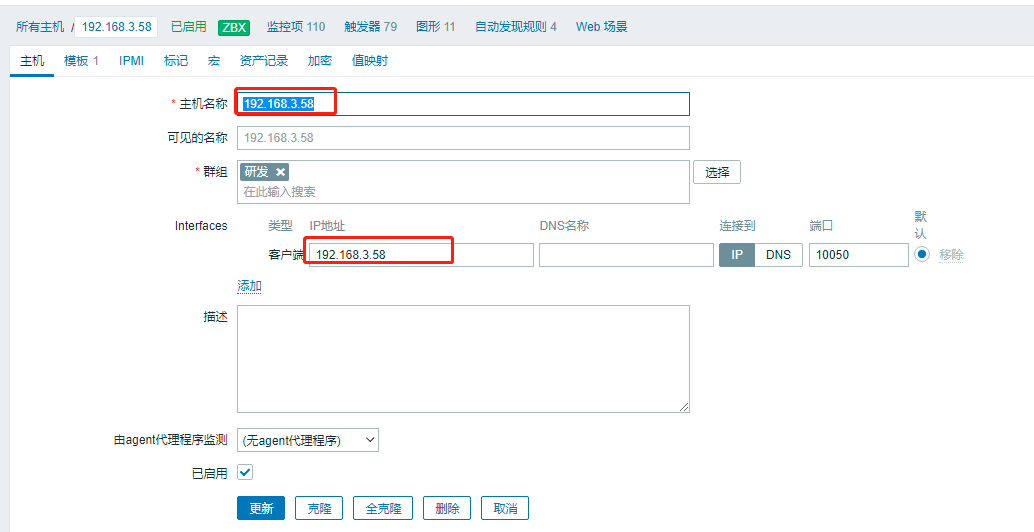
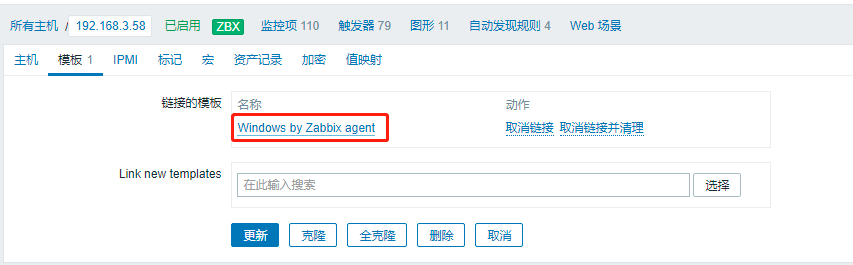
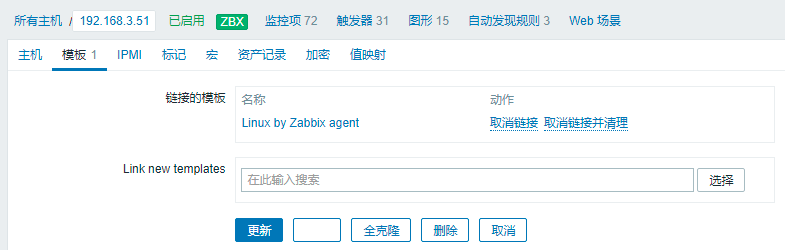
linux The host configuration is shown in the figure , The main reason is that the template is different

After a while zabbix The icon turns green
边栏推荐
- Golang并发编程——goroutine、channel、sync
- Gamefi chain game system development (NFT chain game development function) NFT chain game system development (gamefi chain game development source code)
- Quanzhi A33 uses mainline u-boot
- 《重构:改善既有代码的设计》读书笔记(上)
- Windows2008r2 installing php7.4.30 requires localsystem to start the application pool, otherwise 500 error fastcgi process exits unexpectedly
- Preprocessing and preprocessing macros
- AcWing 383. Sightseeing problem solution (shortest circuit)
- 机器学习笔记 - 时间序列预测研究:法国香槟的月销量
- 教程篇(5.0) 10. 故障排除 * FortiEDR * Fortinet 网络安全专家 NSE 5
- codeforces每日5题(均1700)-第四天
猜你喜欢
搭建主从模式集群redis

Registration opportunity of autowiredannotationbeanpostprocessor under annotation development mode

云呐|为什么要用固定资产管理系统,怎么启用固定资产管理系统
教程篇(5.0) 10. 故障排除 * FortiEDR * Fortinet 网络安全专家 NSE 5
Advanced performance test series "24. Execute SQL script through JDBC"

《重构:改善既有代码的设计》读书笔记(上)
Yunna | why use the fixed asset management system and how to enable it

定了,就是它!

为什么要做企业固定资产管理系统,企业如何加强固定资产管理

Codeworks 5 questions per day (1700 average) - day 4
随机推荐
Markdown basic grammar
c语言里怎么设立优先级,细说C语言优先级
数据湖(十二):Spark3.1.2与Iceberg0.12.1整合
守望先锋世界观架构 ——(一款好的游戏是怎么来的)
数据降维——因子分析
AcWing 903. 昂贵的聘礼 题解(最短路—建图、dijkstra)
Qpropertyanimation use and toast case list in QT
AcWing 1131. Saving Private Ryan (the shortest way)
Develop fixed asset management system, what voice is used to develop fixed asset management system
2022 software engineering final exam recall Edition
Pytorch版本、CUDA版本与显卡驱动版本的对应关系
Registration opportunity of autowiredannotationbeanpostprocessor under annotation development mode
The mybatieshelperpro tool can be generated to the corresponding project folder if necessary
Npoi export Excel2007
450-深信服面经1
LeetCode 0871.最低加油次数 - 类似于POJ2431丛林探险
Web2.0 giants have deployed VC, and tiger Dao VC may become a shortcut to Web3
Gmapping code analysis [easy to understand]
Py之interpret:interpret的简介、安装、案例应用之详细攻略
2022.7.1-----leetcode.241