当前位置:网站首页>Semantic segmentation experiment: UNET network /msrc2 dataset
Semantic segmentation experiment: UNET network /msrc2 dataset
2022-07-05 12:11:00 【Hua Weiyun】
This experiment uses Unet Network pair MSRC2 Data sets are segmented
Source code files and MSRC2 See the end of the text for the data set acquisition method
1. Data partitioning
Organize the picture data from the folder into csv file , Each line represents its path
class image2csv(object): # Split training set Verification set Test set # Make corresponding txt def __init__(self, data_root, image_dir, label_dir, slice_data, width_input, height_input): self.data_root = data_root self.image_dir = image_dir self.label_dir = label_dir self.slice_train = slice_data[0] self.slice_val = slice_data[1] self.width = width_input self.height = height_input def read_path(self): images = [] labels = [] for i, im in enumerate(os.listdir(self.image_dir)): label_name = im.split('.')[0] + '_GT' + '.bmp' # Because the size of each picture is different , Here is a simple screening , Only the length and width are greater than 200px Was selected if os.path.exists(os.path.join(self.label_dir, label_name)): size_w, size_h = Image.open( os.path.join(self.image_dir, im)).size size_lw, size_lh = Image.open( os.path.join(self.label_dir, label_name)).size if min(size_w, size_lw) > self.width and min(size_h, size_lh) > self.height: images.append(os.path.join(self.image_dir, im)) labels.append(os.path.join(self.label_dir, label_name)) else: continue self.data_length = len(images) # The length of the pictures in both folders data_path = { 'image': images, 'label': labels, } return data_path def generate_csv(self): data_path = self.read_path() # Stored path data_path_pd = pd.DataFrame(data_path) train_slice_point = int(self.slice_train*self.data_length) # 0.7*len validation_slice_point = int( (self.slice_train+self.slice_val)*self.data_length) # 0.8*len train_csv = data_path_pd.iloc[:train_slice_point, :] validation_csv = data_path_pd.iloc[train_slice_point:validation_slice_point, :] test_csv = data_path_pd.iloc[validation_slice_point:, :] train_csv.to_csv(os.path.join( self.data_root, 'train.csv'), header=None, index=None) validation_csv.to_csv(os.path.join( self.data_root, 'val.csv'), header=None, index=None) test_csv.to_csv(os.path.join(self.data_root, 'test.csv'), header=False, index=False)2. Data preprocessing
Color and classification label conversion
Semantic segmentation is mainly to build a color map (colormap), Give different color labels to each class of segmented objects .
def colormap(n): cmap = np.zeros([n, 3]).astype(np.uint8) for i in np.arange(n): r, g, b = np.zeros(3) for j in np.arange(8): r = r + (1 << (7 - j)) * ((i & (1 << (3 * j))) >> (3 * j)) g = g + (1 << (7 - j)) * ((i & (1 << (3 * j + 1))) >> (3 * j + 1)) b = b + (1 << (7 - j)) * ((i & (1 << (3 * j + 2))) >> (3 * j + 2)) cmap[i, :] = np.array([r, g, b]) return cmap class label2image(): def __init__(self, num_classes=22): self.colormap = colormap(256)[:num_classes].astype('uint8') def __call__(self, label_pred, label_true): pred = self.colormap[label_pred] true = self.colormap[label_true] return pred, trueclass image2label(): def __init__(self, num_classes=22): # Give each category a color colormap = [[0, 0, 0], [128, 0, 0], [0, 128, 0], [128, 128, 0], [0, 0, 128], [0, 128, 128], [128, 128, 128], [192, 0, 0], [64, 128, 0], [192, 128, 0], [64, 0, 128], [192, 0, 128], [64, 128, 128], [192, 128, 128], [0, 64, 0], [128, 64, 0], [0, 192, 0], [128, 64, 128], [ 0, 192, 128], [128, 192, 128], [64, 64, 0], [192, 64, 0]] self.colormap = colormap[:num_classes] # establish 256^3 Power empty array , All combinations of colors cm2lb = np.zeros(256 ** 3) for i, cm in enumerate(self.colormap): cm2lb[(cm[0] * 256 + cm[1]) * 256 + cm[2]] = i # Mark this kind of combination self.cm2lb = cm2lb def __call__(self, image): image = np.array(image, dtype=np.int64) idx = (image[:, :, 0] * 256 + image[:, :, 1]) * 256 + image[:, :, 2] label = np.array(self.cm2lb[idx], dtype=np.int64) # Find this according to the color bar label Label of return labelImage clipping
class RandomCrop(object): """ Customize the implementation image and label Randomly crop the same position """ def __init__(self, size): self.size = size @staticmethod def get_params(img, output_size): w, h = img.size th, tw = output_size if w == tw and h == th: return 0, 0, h, w i = random.randint(0, h - th) j = random.randint(0, w - tw) return i, j, th, tw def __call__(self, img, label): i, j, h, w = self.get_params(img, self.size) return img.crop((j, i, j + w, i + h)), label.crop((j, i, j + w, i + h))3. Data loading
class CustomDataset(Dataset): def __init__(self, data_root_csv, input_width, input_height, test=False): # When subclasses are initialized , Also want to inherit the parent class __init__() Just through super() Realization super(CustomDataset, self).__init__() self.data_root_csv = data_root_csv self.data_all = pd.read_csv(self.data_root_csv) self.image_list = list(self.data_all.iloc[:, 0]) self.label_list = list(self.data_all.iloc[:, 1]) self.width = input_width self.height = input_height def __len__(self): return len(self.image_list) def __getitem__(self, index): img = Image.open(self.image_list[index]).convert('RGB') label = Image.open(self.label_list[index]).convert('RGB') img, label = self.train_transform( img, label, crop_size=(self.width, self.height)) # assert(img.size == label.size)s return img, label def train_transform(self, image, label, crop_size=(256, 256)): image, label = RandomCrop(crop_size)( image, label) # The first bracket is the instance conversation object , The second is __call__ Method tfs = transforms.Compose([ transforms.ToTensor(), transforms.Normalize([.485, .456, .406], [.229, .224, .225]) ]) image = tfs(image) label = image2label()(label) label = torch.from_numpy(label).long() return image, label4.Unet Network structure
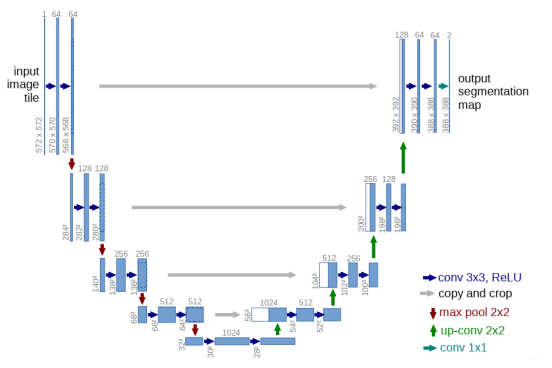
Double convolution structure
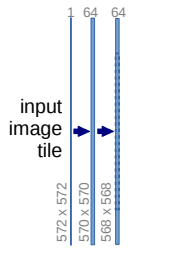
class DoubleConv(nn.Module): def __init__(self, in_channels, out_channels, mid_channels=None): super().__init__() if not mid_channels: mid_channels = out_channels self.double_conv = nn.Sequential( nn.Conv2d(in_channels, mid_channels, kernel_size=3, padding=1), nn.BatchNorm2d(mid_channels), nn.ReLU(inplace=True), nn.Conv2d(mid_channels, out_channels, kernel_size=3, padding=1), nn.BatchNorm2d(out_channels), nn.ReLU(inplace=True) ) def forward(self, x): return self.double_conv(x)Down sampling
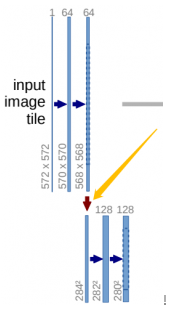
class Down(nn.Module): def __init__(self, in_channels, out_channels): super().__init__() self.maxpool_conv = nn.Sequential( nn.MaxPool2d(2), DoubleConv(in_channels, out_channels) ) def forward(self, x): return self.maxpool_conv(x)On the sampling
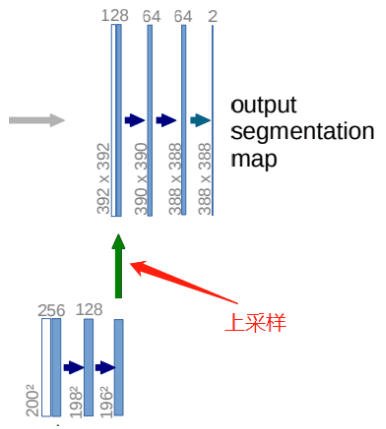
class Up(nn.Module): def __init__(self, in_channels, out_channels, bilinear=True): super().__init__() if bilinear: self.up = nn.Upsample( scale_factor=2, mode='bilinear', align_corners=True) self.conv = DoubleConv(in_channels, out_channels, in_channels // 2) else: self.up = nn.ConvTranspose2d( in_channels, in_channels // 2, kernel_size=2, stride=2) self.conv = DoubleConv(in_channels, out_channels) def forward(self, x1, x2): x1 = self.up(x1) # input is CHW diffY = x2.size()[2] - x1.size()[2] diffX = x2.size()[3] - x1.size()[3] x1 = F.pad(x1, [diffX // 2, diffX - diffX // 2, diffY // 2, diffY - diffY // 2]) x = torch.cat([x2, x1], dim=1) return self.conv(x)Output
class OutConv(nn.Module): def __init__(self, in_channels, out_channels): super(OutConv, self).__init__() self.conv = nn.Conv2d(in_channels, out_channels, kernel_size=1) def forward(self, x): return self.conv(x)The overall structure
class UNet(nn.Module): def __init__(self, n_channels, n_classes, bilinear=True): super(UNet, self).__init__() self.n_channels = n_channels self.n_classes = n_classes self.bilinear = bilinear self.inc = DoubleConv(n_channels, 64) self.down1 = Down(64, 128) self.down2 = Down(128, 256) self.down3 = Down(256, 512) factor = 2 if bilinear else 1 self.down4 = Down(512, 1024 // factor) self.up1 = Up(1024, 512 // factor, bilinear) self.up2 = Up(512, 256 // factor, bilinear) self.up3 = Up(256, 128 // factor, bilinear) self.up4 = Up(128, 64, bilinear) self.outc = OutConv(64, n_classes) def forward(self, x): x1 = self.inc(x) x2 = self.down1(x1) x3 = self.down2(x2) x4 = self.down3(x3) x5 = self.down4(x4) x = self.up1(x5, x4) x = self.up2(x, x3) x = self.up3(x, x2) x = self.up4(x, x1) logits = self.outc(x) return logits5. Evaluation indicators :MIoU
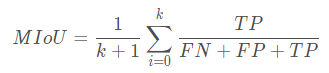
# Get the confusion matrix def _fast_hist(label_true, label_pred, n_class): mask = (label_true >= 0) & (label_true < n_class) hist = np.bincount( n_class * label_true[mask].astype(int) + label_pred[mask], minlength=n_class ** 2).reshape(n_class, n_class) return hist# Calculation MIOUdef miou_score(label_trues, label_preds, n_class): hist = np.zeros((n_class, n_class)) for lt, lp in zip(label_trues, label_preds): hist += _fast_hist(lt.flatten(), lp.flatten(), n_class) iou = np.diag(hist) / (hist.sum(axis=1) + hist.sum(axis=0) - np.diag(hist)) miou = np.nanmean(iou) return miou6. Training
GPU_ID = 0INPUT_WIDTH = 200INPUT_HEIGHT = 200BATCH_SIZE = 2NUM_CLASSES = 22LEARNING_RATE = 1e-3epoch = 300net = UNet(3, NUM_CLASSES)# -------------------- Generate csv ------------------DATA_ROOT = './MSRC2/'image = os.path.join(DATA_ROOT, 'Images')label = os.path.join(DATA_ROOT, 'GroundTruth')slice_data = [0.7, 0.1, 0.2] # Training verification Percentage of tests tocsv = image2csv(DATA_ROOT, image, label, slice_data, INPUT_WIDTH, INPUT_HEIGHT)tocsv.generate_csv()# -------------------------------------------model_path = './model_result/best_model_UNet.mdl'train_csv_dir = 'MSRC2/train.csv'val_csv_dir = 'MSRC2/val.csv'train_data = CustomDataset(train_csv_dir, INPUT_WIDTH, INPUT_HEIGHT)train_dataloader = DataLoader( train_data, batch_size=BATCH_SIZE, shuffle=True, num_workers=0)val_data = CustomDataset(val_csv_dir, INPUT_WIDTH, INPUT_HEIGHT)val_dataloader = DataLoader( val_data, batch_size=BATCH_SIZE, shuffle=True, num_workers=0)net = UNet(3, NUM_CLASSES)use_gpu = torch.cuda.is_available()# To build the network optimizer = optim.Adam(net.parameters(), lr=LEARNING_RATE, weight_decay=1e-4)criterion = nn.CrossEntropyLoss()if use_gpu: torch.cuda.set_device(GPU_ID) net.cuda() criterion = criterion.cuda()if os.path.exists(model_path): net.load_state_dict(torch.load(model_path)) print('successful load weight!')else: print('not successful load weight')# Training validation # def train():best_score = 0.0for e in range(epoch): net.train() train_loss = 0.0 label_true = torch.LongTensor() label_pred = torch.LongTensor() for i, (batchdata, batchlabel) in enumerate(train_dataloader): if use_gpu: batchdata, batchlabel = batchdata.cuda(), batchlabel.cuda() output = net(batchdata) output = F.log_softmax(output, dim=1) loss = criterion(output, batchlabel) pred = output.argmax(dim=1).squeeze().data.cpu() real = batchlabel.data.cpu() optimizer.zero_grad() loss.backward() optimizer.step() train_loss += loss.cpu().item() * batchlabel.size(0) label_true = torch.cat((label_true, real), dim=0) label_pred = torch.cat((label_pred, pred), dim=0) train_loss /= len(train_data) miou = miou_score( label_true.numpy(), label_pred.numpy(), NUM_CLASSES) print('\nepoch:{}, train_loss:{:.4f},miou:{:.4f}'.format( e + 1, train_loss, miou)) net.eval() val_loss = 0.0 val_label_true = torch.LongTensor() val_label_pred = torch.LongTensor() with torch.no_grad(): for i, (batchdata, batchlabel) in enumerate(val_dataloader): if use_gpu: batchdata, batchlabel = batchdata.cuda(), batchlabel.cuda() output = net(batchdata) output = F.log_softmax(output, dim=1) loss = criterion(output, batchlabel) pred = output.argmax(dim=1).data.cpu() real = batchlabel.data.cpu() val_loss += loss.cpu().item() * batchlabel.size(0) val_label_true = torch.cat((val_label_true, real), dim=0) val_label_pred = torch.cat((val_label_pred, pred), dim=0) val_loss /= len(val_data) val_miou = miou_score(val_label_true.numpy(), val_label_pred.numpy(), NUM_CLASSES) print('epoch:{}, val_loss:{:.4f}, miou:{:.4f}'.format( e + 1, val_loss, val_miou)) # Pass the val_miou To judge the effect of the model , Save the best model weights score = val_miou if score > best_score: best_score = score torch.save(net.state_dict(), model_path)7. test
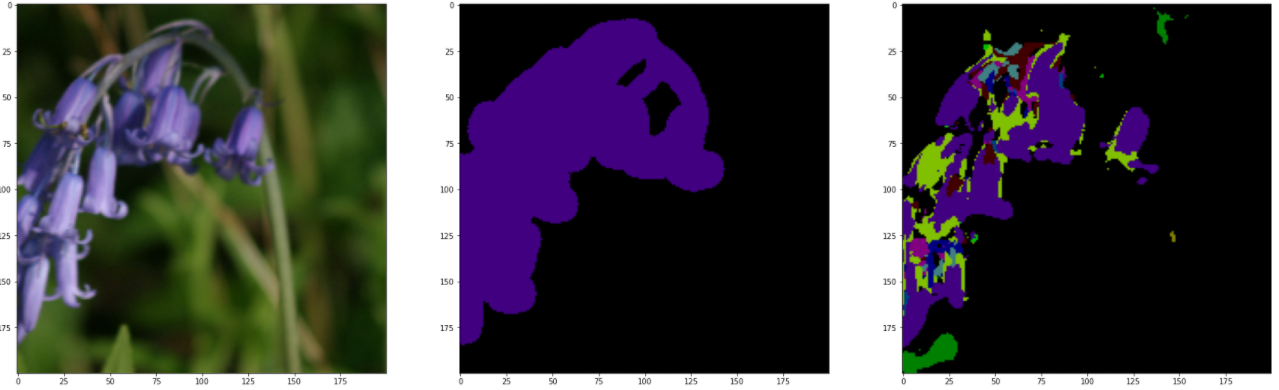
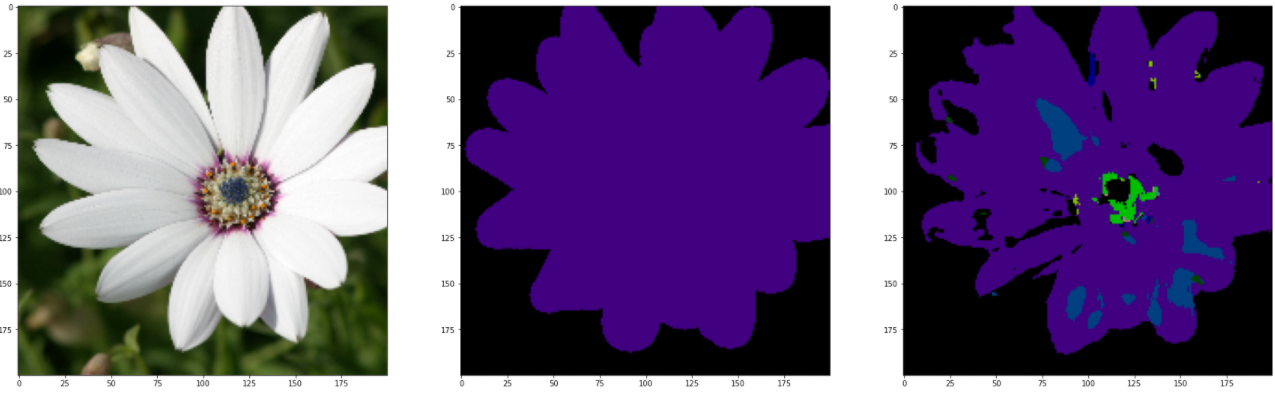
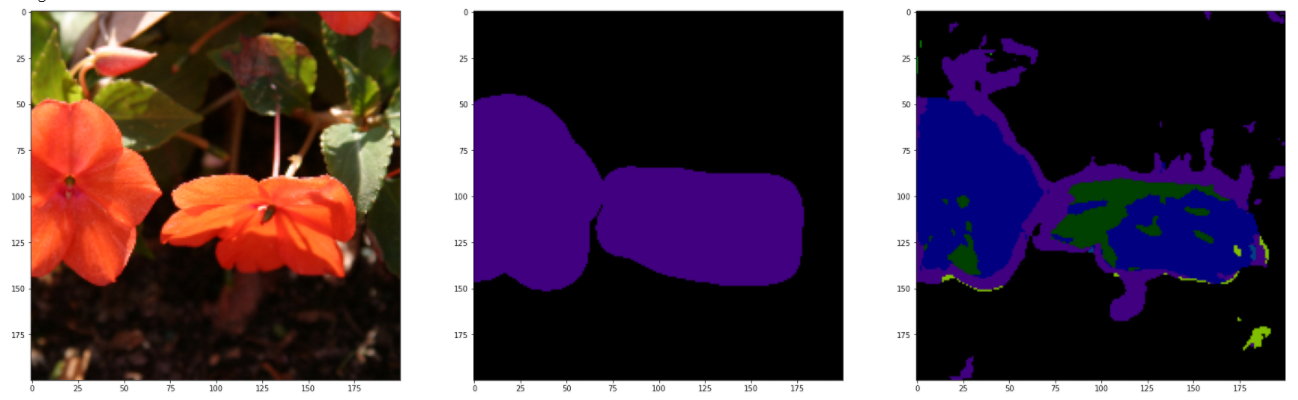
GPU_ID = 0INPUT_WIDTH = 200INPUT_HEIGHT = 200BATCH_SIZE = 2NUM_CLASSES = 22LEARNING_RATE = 1e-3model_path = './model_result/best_model_UNet.mdl'torch.cuda.set_device(0)net = UNet(3, NUM_CLASSES)# Load the network for testing test_csv_dir = './MSRC2/train.csv'testset = CustomDataset(test_csv_dir, INPUT_WIDTH, INPUT_HEIGHT)test_dataloader = DataLoader(testset, batch_size=15, shuffle=False)net.load_state_dict(torch.load(model_path, map_location='cuda:0'))test_label_true = torch.LongTensor()test_label_pred = torch.LongTensor()# Only one is extracted here batch To test , namely 15 A picture for (val_image, val_label) in test_dataloader: net.cuda() out = net(val_image.cuda()) pred = out.argmax(dim=1).squeeze().data.cpu().numpy() label = val_label.data.numpy() output = F.log_softmax(out, dim=1) pred = output.argmax(dim=1).data.cpu() real = val_label.data.cpu() test_label_true = torch.cat((test_label_true, real), dim=0) test_label_pred = torch.cat((test_label_pred, pred), dim=0) test_miou = miou_score(test_label_true.numpy(), test_label_pred.numpy(), NUM_CLASSES) print(" On test set miou by :" + str(test_miou)) val_pred, val_label = label2image(NUM_CLASSES)(pred, label) for i in range(15): val_imag = val_image[i] val_pre = val_pred[i] val_labe = val_label[i] # Anti normalization mean = [.485, .456, .406] std = [.229, .224, .225] x = val_imag for j in range(3): x[j] = x[j].mul(std[j])+mean[j] img = x.mul(255).byte() img = img.numpy().transpose((1, 2, 0)) # Original picture fig, ax = plt.subplots(1, 3, figsize=(30, 30)) ax[0].imshow(img) ax[1].imshow(val_labe) ax[2].imshow(val_pre) plt.show() plt.savefig('./pic_results/pic_UNet_{}.png'.format(i)) breakTheoretically , You should test with a test set , But the results of the test are unbearable . It may be caused by insufficient training times , In the above code , Directly import the training set to view , Here are and GroundTruth Compare with the reference figure .
Complete source code
Experiment source code +MSRC2 Data sets
https://download.csdn.net/download/qq1198768105/85907409
边栏推荐
- Matlab superpixels function (2D super pixel over segmentation of image)
- mysql拆分字符串做条件查询
- 15 methods in "understand series after reading" teach you to play with strings
- codeforces每日5题(均1700)-第五天
- How to clear floating?
- 报错ModuleNotFoundError: No module named ‘cv2.aruco‘
- What is digital existence? Digital transformation starts with digital existence
- Course design of compilation principle --- formula calculator (a simple calculator with interface developed based on QT)
- Mongodb replica set
- 【 YOLOv3中Loss部分计算】
猜你喜欢
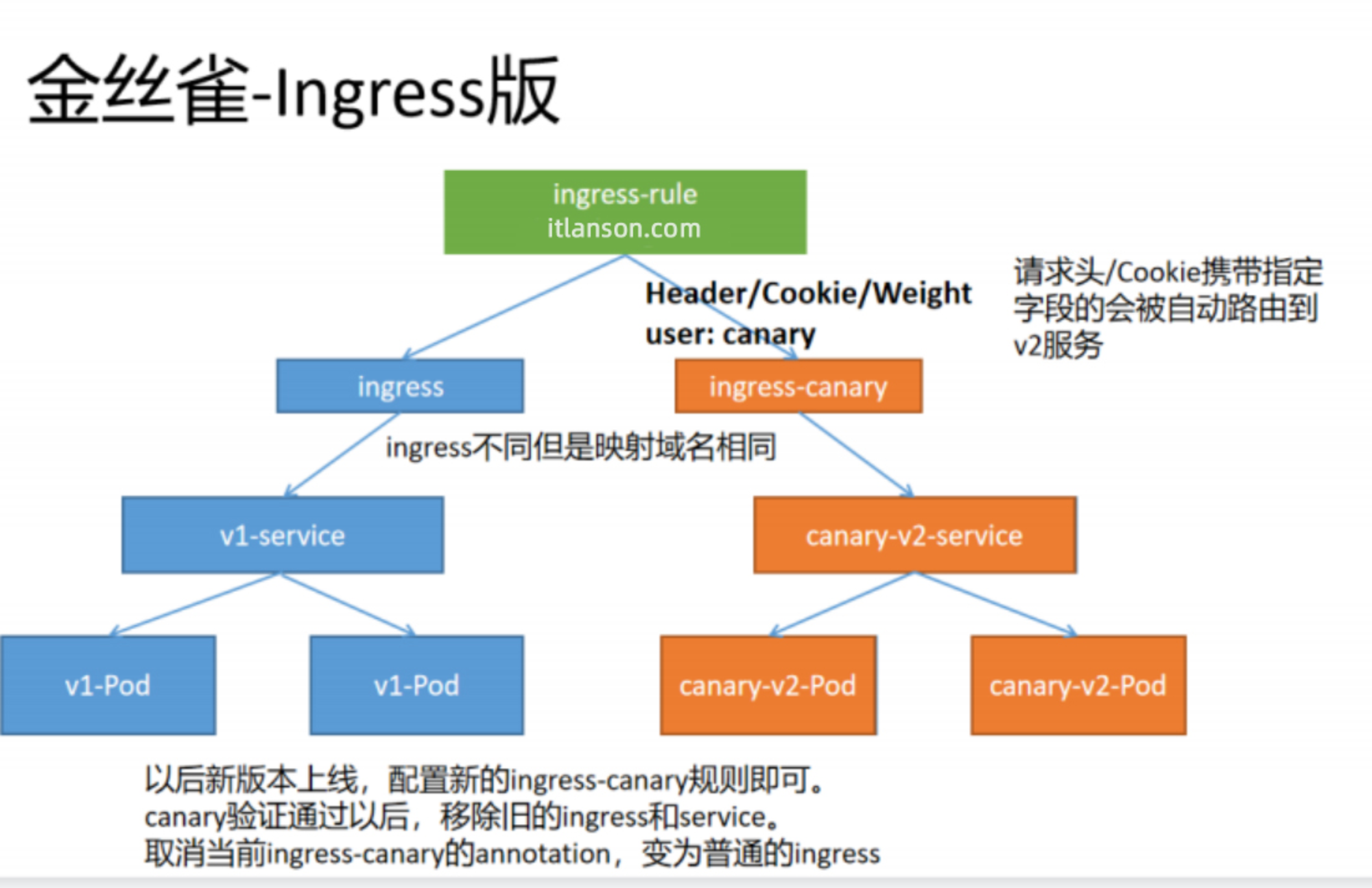
【云原生 | Kubernetes篇】Ingress案例实战(十三)
Use and install RkNN toolkit Lite2 on itop-3568 development board NPU

《增长黑客》阅读笔记
![[pytorch modifies the pre training model: there is little difference between the measured loading pre training model and the random initialization of the model]](/img/ad/b96e9319212cf2724e0a640109665d.png)
[pytorch modifies the pre training model: there is little difference between the measured loading pre training model and the random initialization of the model]
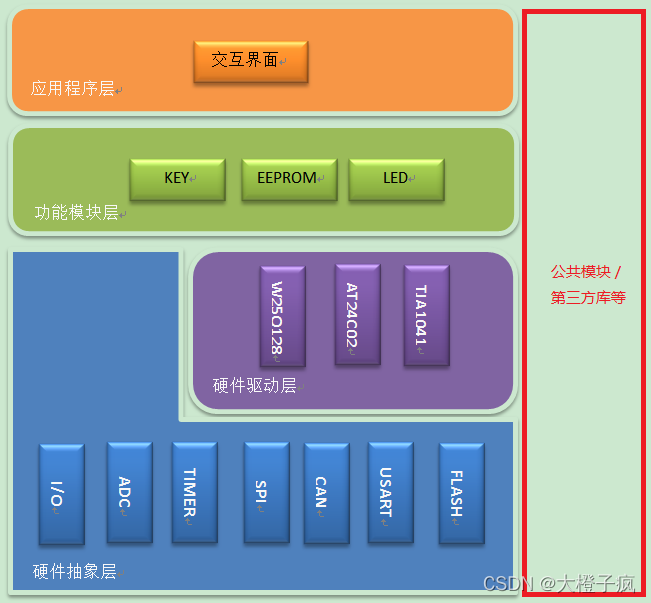
Embedded software architecture design - message interaction
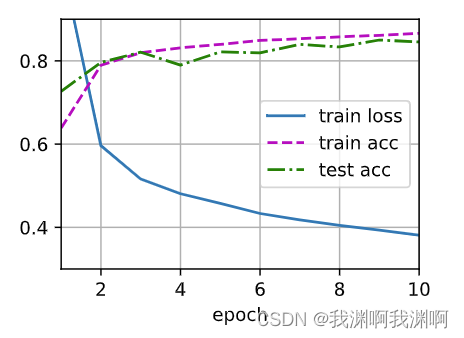
Pytorch MLP
Redis master-slave mode
liunx禁ping 详解traceroute的不同用法
【SingleShotMultiBoxDetector(SSD,单步多框目标检测)】
How to protect user privacy without password authentication?
随机推荐
【ijkplayer】when i compile file “compile-ffmpeg.sh“ ,it show error “No such file or directory“.
abap查表程序
嵌入式软件架构设计-消息交互
Acid transaction theory
The solution of outputting 64 bits from printf format%lld of cross platform (32bit and 64bit)
Redis master-slave mode
Intern position selection and simplified career development planning in Internet companies
Principle of redis cluster mode
Want to ask, how to choose a securities firm? Is it safe to open an account online?
yolov5目标检测神经网络——损失函数计算原理
多表操作-子查询
[cloud native | kubernetes] actual battle of ingress case (13)
Linux Installation and deployment lamp (apache+mysql+php)
Network five whip
【SingleShotMultiBoxDetector(SSD,单步多框目标检测)】
pytorch-多层感知机MLP
Course design of compilation principle --- formula calculator (a simple calculator with interface developed based on QT)
XML parsing
Recyclerview paging slide
【Win11 多用户同时登录远程桌面配置方法】