当前位置:网站首页>爬虫学习5---反反爬之识别图片验证码(ddddocr和pytesseract实测效果)
爬虫学习5---反反爬之识别图片验证码(ddddocr和pytesseract实测效果)
2022-06-27 05:48:00 【lufei0920】
爬虫学习5—反反爬之识别图片验证码
| 名称 | 环境版本 | 说明 |
|---|---|---|
| ddddocr | linux系统安装;python3版本:3.6.8;命令:python3 -m pip install ddddocr;安装的版本:ddddocr-1.4.3 | /usr/local/lib/python3.6/site-packages/ddddocr-1.4.3-py3.6.egg/ddddocr/init.py中需要注释调项目说明,识别效果较好;见下图:  |
| pytesseract | linux系统安装;python3版本:3.6.8;需要安装tesseract | 识别效果一般不推荐 |
一、利用ddddocr识别图片验证码示例
首先安装ddddocr模块:python3 -m pip install ddddocr
	安装过程较为曲折,总是报错,后来按照报错的连带模块进行单独安装后,才安装完成。
1、示例代码
from selenium import webdriver
import time
from PIL import Image,ImageEnhance

import ddddocr

ocr = ddddocr.DdddOcr()

url = "要访问的页面"
options = webdriver.ChromeOptions()
options.add_argument("--headless")  # 开启无界面模式
options.add_argument('--no-sandbox')
options.add_argument("--disable-gpu")
options.add_argument('--disable-dev-shm-usage')  # linux上需要设置上面四项内容。
driver = webdriver.Chrome(chrome_options=options,executable_path='/usr/bin/chromedriver')

driver.get(url)  # 请求Url
driver.maximize_window()    # 全屏显示
driver.save_screenshot('m3.png')    # 截屏整个页面,并保存为图片
location = driver.find_element_by_xpath('//*[@id="login"]/div[5]/span')   # 获取验证码区域的坐标
# print(location.location)
size = location.size   # 坐标大小
# print(size)
rangle = (int(location.location['x']),int(location.location['y']),int(location.location['x'] + size['width']),int(location.location['y'] + size['height']))   # 获取验证码图片的坐标大小
i = Image.open('m3.png')   # 通过图像的方式打开保存的图片
imgry=i.crop(rangle)    # 截取验证码区域
imgry.save('getVerifyCode1.png')   # 保存验证码图片
im=Image.open('getVerifyCode1.png')   # 再次打开新截取的验证码图片
sharpness =ImageEnhance.Contrast(im)     #对比度增强,是图片中验证码更容易识别
#
sharp_img = sharpness.enhance(2.0)
#
sharp_img.save("newVerifyCode1.png")    # 保存优化过的验证码图片


with open('newVerifyCode1.png', 'rb') as f:
    img_bytes = f.read()   # 读取图片
res = ocr.classification(img_bytes)   # 获取图片中的字符
print(res)
2、代码演示结果
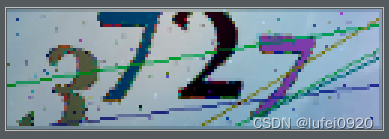

证明获取的验证码信息和图片中相同。
二、pytesseract方式实现验证码
1、安装pytesseract
python3 -m pip install pytesseract
2、安装tesseract
安装详情见:https://blog.csdn.net/weixin_44575268/article/details/117258508
3、代码示例
from selenium import webdriver
import time
from PIL import Image,ImageEnhance

import pytesseract

tesseract_cmd = r'/usr/local/bin/tesseract'
pytesseract.pytesseract.tesseract_cmd =tesseract_cmd
url = "要访问的页面"
options = webdriver.ChromeOptions()
options.add_argument("--headless")  # 开启无界面模式
options.add_argument('--no-sandbox')
options.add_argument("--disable-gpu")
options.add_argument('--disable-dev-shm-usage')  # linux上需要设置上面四项内容。
driver = webdriver.Chrome(chrome_options=options,executable_path='/usr/bin/chromedriver')

driver.get(url)  # 请求Url
driver.maximize_window()    # 全屏显示
driver.save_screenshot('m3.png')    # 截屏整个页面,并保存为图片
location = driver.find_element_by_xpath('//*[@id="login"]/div[5]/span')   # 获取验证码区域的坐标
# print(location.location)
size = location.size   # 坐标大小
# print(size)
rangle = (int(location.location['x']),int(location.location['y']),int(location.location['x'] + size['width']),int(location.location['y'] + size['height']))   # 获取验证码图片的坐标大小
i = Image.open('m3.png')   # 通过图像的方式打开保存的图片
imgry=i.crop(rangle)    # 截取验证码区域
imgry.save('getVerifyCode1.png')   # 保存验证码图片
im=Image.open('getVerifyCode1.png')   # 再次打开新截取的验证码图片
sharpness =ImageEnhance.Contrast(im)     #对比度增强,是图片中验证码更容易识别
#
sharp_img = sharpness.enhance(2.0)
#
sharp_img.save("newVerifyCode1.png")    # 保存优化过的验证码图片
#
 newVerify = Image.open('newVerifyCode1.png')
#
 mm = pytesseract.image_to_string(newVerify,'eng')
 print(mm)
4、示例结果
图片: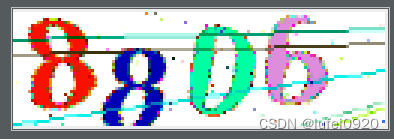
结果: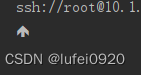
未识别出来。
边栏推荐
- Spark 之 Projection
- Unity中跨平臺獲取系統音量
- WebRTC系列-網絡傳輸之7-ICE補充之提名(nomination)與ICE_Model
- Some articles about component packaging and my experience
- 代码即数据
- 双位置继电器RXMVB2 R251 204 110DC
- js实现双向数据绑定
- [collection] Introduction to basic knowledge of point cloud and functions of point cloud catalyst software
- Avoid asteroids
- Spark 之 built-in functions
猜你喜欢

Double position relay jdp-1440/dc110v

资深【软件测试工程师】学习线路和必备知识点
思维的技术:如何破解工作生活中的两难冲突?

RTP sending PS stream tool (open source)
Free SSH and telnet client putty
![[FPGA] realize the data output of checkerboard horizontal and vertical gray scale diagram based on bt1120 timing design](/img/80/c258817abd35887c0872a3286a821f.png)
[FPGA] realize the data output of checkerboard horizontal and vertical gray scale diagram based on bt1120 timing design
Two position relay hjws-9440

Nlp-d62-nlp competition d31 & question brushing D15

汇编语言-王爽 第9章 转移指令的原理-笔记

STM32 reads IO high and low level status
随机推荐
Implementation of easyexcel's function of merging cells with the same content and dynamic title
Neo4j community conflicts with neo4j desktop
Niuke practice 101-c reasoning clown - bit operation + thinking
Wechat applet refreshes the current page
使用域名转发mqtt协议,避坑指南
Unity point light disappears
Ad22 Gerber files Click to open the Gerber step interface. Official solutions to problems
Wechat applet websocket use case
How JQ gets the ID name of an element
QListWidgetItem上附加widget
C语言练手小项目(巩固加深知识点理解)
Neon optimization 1: how to optimize software performance and reduce power consumption?
Comprehensive application of OpenCV in contour detection and threshold processing
Junda technology - centralized monitoring scheme for multi brand precision air conditioners
开门小例子学习十种用例图
[nips 2017] pointnet++: deep feature learning of point set in metric space
The form verifies the variables bound to the V-model, and the solution to invalid verification
Senior [Software Test Engineer] learning route and necessary knowledge points
树莓派4B上运行opcua协议DEMO接入kubeedge
Wholestagecodegen of spark