当前位置:网站首页>Detailed introduction to the usage of Nacos configuration center
Detailed introduction to the usage of Nacos configuration center
2022-07-03 02:06:00 【Zhang weipeng】
The last article introduced Nacos Usage as a registry , besides ,Nacos It can also be used as a configuration center , Then this article will introduce Nacos As the basic usage of configuration center , First, let's understand why we need to use the configuration center .
One 、 Why configure the center :
Before there is no configuration center , The traditional application configuration has the following pain points :
(1) Adopt local static configuration , There's no guarantee of real-time : Modifying the configuration is not flexible and requires a long test release cycle , Unable to notify the client as soon as possible , Some configurations require high real-time performance , For example, the configuration of active / standby switchover or the configuration needs to be modified in case of failure , At this time, configure through traditional static configuration or republishing , Then the response speed is very slow , Business risks are very high
(2) Easy to cause production accidents : For example, when publishing , It is easy to bring the configuration of the test environment to production , Cause production accidents .
(3) The configuration is messy and the format is not standard : Some use properties Format , Some use xml Format , There are still deposits DB, Teams tend to make their own wheels , There are various methods .
(4) The configuration lacks security audit 、 version control 、 Configure permission control function : who ? At what time ? What configuration has been modified ? There is no way to trace , If something goes wrong, you can't rollback to the previous version in time ; Unable to authenticate and authorize the release of configuration changes , Everyone can modify and publish the configuration .
The configuration center is different from the traditional way that the configuration information is distributed to all corners of the system , Centralized and unified management of configuration files in the system , There is no need to manage individual servers one by one . So what's the advantage of doing this ?
(1) Through the configuration center , It can standardize the configuration 、 Unified format
(2) When the configuration information changes , Changes take effect in real time , There is no need to restart the server , Can automatically perceive the corresponding changes , And send the new changes to the corresponding procedures , Respond quickly to change . For example, a function is only for users in a certain region , There is also a function that is only available during the promotion period , After using the configuration center, only relevant personnel need to dynamically adjust parameters in the configuration center , Basically, you can adjust the corresponding business in real time or quasi real time .
(3) The audit function can also trace the problem
Two 、Nacos Use of configuration center :
There are three main solutions for configuration center in microservices :Nacos、Apollo、Config+Bus, However, this article mainly introduces Nacos Usage as configuration center , Readers who are interested in the other two ways should check online by themselves
1、Springboot Integrate Nacos Configuration center :
(1) First, we declare the version information of the project :
<properties>
    <spring-boot.version>2.3.2.RELEASE</spring-boot.version>
    <spring-cloud.version>Hoxton.SR9</spring-cloud.version>
    <spring-cloud-alibaba.version>2.2.6.RELEASE</spring-cloud-alibaba.version>
</properties>

<!--   Only declare dependencies , Do not introduce dependencies  -->
<dependencyManagement>
    <dependencies>
        <!--  Statement springBoot edition  -->
        <dependency>
            <groupId>org.springframework.boot</groupId>
            <artifactId>spring-boot-dependencies</artifactId>
            <version>${spring-boot.version}</version>
            <type>pom</type>
            <scope>import</scope>
        </dependency>
        <!--  Statement springCloud edition  -->
        <dependency>
            <groupId>org.springframework.cloud</groupId>
            <artifactId>spring-cloud-dependencies</artifactId>
            <version>${spring-cloud.version}</version>
            <type>pom</type>
            <scope>import</scope>
        </dependency>
        <!--  Statement  springCloud Alibaba  edition  -->
        <dependency>
            <groupId>com.alibaba.cloud</groupId>
            <artifactId>spring-cloud-alibaba-dependencies</artifactId>
            <version>${spring-cloud-alibaba.version}</version>
            <type>pom</type>
            <scope>import</scope>
        </dependency>
    </dependencies>
</dependencyManagement>
(2) add to nacos Configuration center maven rely on :
<!-- SpringCloud Ailibaba Nacos Config -->
<dependency>
    <groupId>com.alibaba.cloud</groupId>
    <artifactId>spring-cloud-starter-alibaba-nacos-config</artifactId>
</dependency>
(3) stay application.properties Add... To the file nacos Configuration center related configuration :
spring.profiles.active=dev
spring.application.name=cloud-producer-server
server.port=8080

# nacos  Configure center address
spring.cloud.nacos.config.server-addr=localhost:8848
#  The type of configuration file
spring.cloud.nacos.config.file-extension=yaml
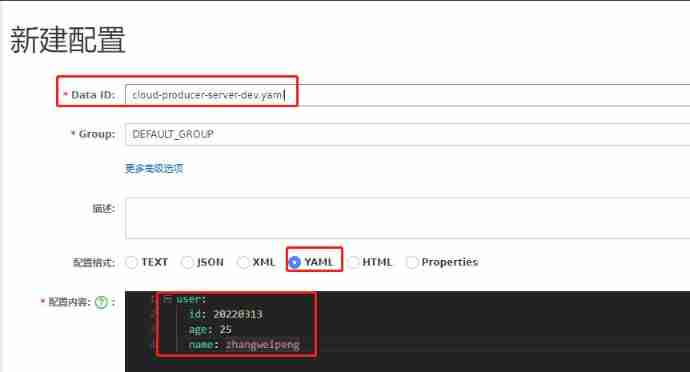
(4) stay nacos Create a new console DataID by cloud-producer-server-dev.yaml Configuration set of :
Why? DataID The named cloud-producer-server-dev.yaml We'll talk about

(5) Writing test classes :
// After configuration Publishing , Dynamic refresh configuration
@RefreshScope
@RestController
@RequestMapping("provider")
public class ProviderController
{
    //  Use native annotations @Value() Import configuration
    @Value("${user.id}")
    private String id;
    @Value("${user.name}")
    private String name;
    @Value("${user.age}")
    private String age;

    @GetMapping("getNacosConfig")
    public String providerTest()
    {
        return " I am a provider, Successfully obtained nacos Configure the data of the center :(id:" + id + ",name:" + name + ",age:" + age +")";
    }
}
(6) Start service validation :
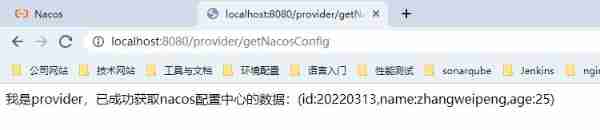
Start project , visit http://localhost:8080/provider/getNacosConfig Interface , You can see nacos The configuration information of the configuration center has been effective and successfully obtained
(7) Verify the dynamic refresh configuration :
Dynamic refresh of configuration is one of the core functions of the configuration center , Suppose I need to modify it now user.name Value , Then I'll just change Nacos Will the configuration in take effect ? Let's try to directly Nacos Change the configuration in to “zhangsan”, Here's the picture :

At this time, do not restart the project and re access the interface , give the result as follows :

We found that the configuration has been refreshed dynamically , Why is that ? In fact, it's because we added @RefreshScope The effect of annotation .
// After configuration Publishing , Dynamic refresh configuration
@RefreshScope
@RestController
@RequestMapping("provider")
public class ProviderController
2、Nacos Core concept of :
2.1、Data ID:
(1)Data ID Naming format for :
Previously we demonstrated in nacos Create a new console DataID by cloud-producer-server-dev.yaml Data set of , So this Data ID What is it? ?Data ID Is the unique identification of the configuration set , An application can contain multiple configuration sets , Each configuration set needs to be identified by a meaningful name . that Data ID How to get the value ? The popular format is “ Prefix - Environmental Science - Extension ”, As shown below :
${spring.cloud.nacos.config.prefix}-${spring.profiles.active}.${spring.cloud.nacos.config.file-extension}
① prefix: Prefix , The default is spring.application.name Value , You can also configure items through spring.cloud.nacos.config.prefix To configure the .
#  If not specified , The default scheme is the application name
spring.application.name=cloud-producer-server

#  Manually specify the configuration dataID Prefix identification
# spring.cloud.nacos.config.prefix=cloud-producer-server-config
② active: Configure the operating environment , That is, the current environment corresponds to profile.
Be careful : When spring.profiles.active It's empty time , Corresponding connector ”-“ There will be no ,dataId The splicing format of becomes ${prefix}.${file-extension}
# dev Represents the development environment
spring.profiles.active=dev
③ file-exetension: The type of configuration file , The default is properties, You can also configure items through spring.cloud.nacos.config.file-extension To configure the , At present, the supported types are TEXT、JSON、XML、YAML、HTML、Properties
#  Specify the configuration file type as yaml file
spring.cloud.nacos.config.file-extension=yaml
④ Final configuration :
Go through the first three steps , We ended up with nacos The new configuration file on the console of the configuration center is :cloud-producer-server.yaml
2.2、 Environmental isolation - Namespace Namespace:
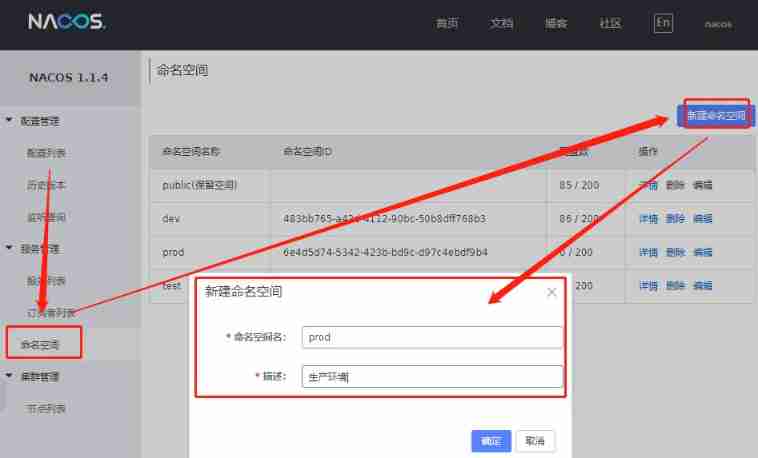
Nacos Introduce namespace Namespace To manage and isolate multiple environment configurations and services . for example , You may have a local development environment dev、 Test environment test、 Production environment prod Three different environments , Then you can create three different Namespace Distinguish between different environments . Create it as follows :
After creation , You can go to Nacos You can see different namespaces on the configuration list of the console , Here's the picture :
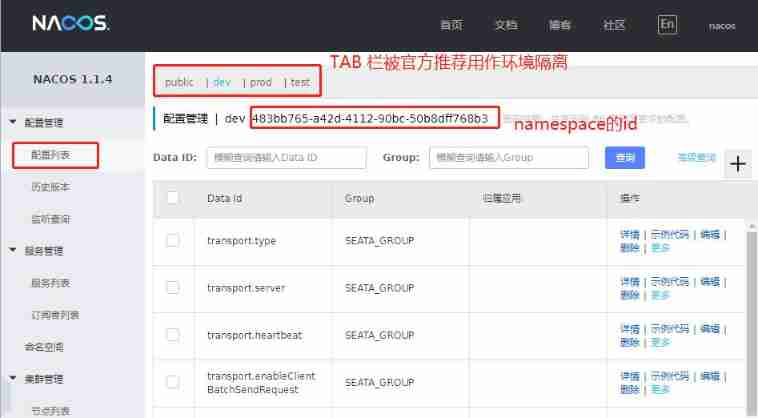

After successfully creating the new namespace , You can go to springboot Configuration file configuration namespace id Switch to the corresponding namespace , And get the configuration file under the corresponding space , But without specifying the namespace configuration , The default configuration is public In the space , The way to specify the namespace is as follows :
#  Corresponding to the created namespace ID, Here it corresponds to dev Namespace
cloud.nacos.config.namespace=483bb765-a42d-4112-90bc-50b8dff768b3
2.3、 Business isolation -Group grouping :
Group It can also realize the function of environmental isolation , but Group The main purpose of the design is to group different services in the same environment , Divide the configuration files of different microservices into the same group ,Nacos If you don't specify Group, The default grouping is DEFAULT_GROUP.
without Group, Just imagine this scene : There are two microservices , One is the order system , One is the user system , But they have the same configuration , such as datasource-url, So how to distinguish ? Now Group That comes in handy . The order system in the above scenario 、 The user system can be divided into a separate group , such as ORDER_GROUP、USER_GROUP, Of course, this is a fine-grained grouping , According to the business of the enterprise, multiple micro services can also be divided into a group .
Next, we will demonstrate how to specify grouping when creating configuration sets and when integrating , Or the previous example , The new configuration set is specified in the following location Group grouping :
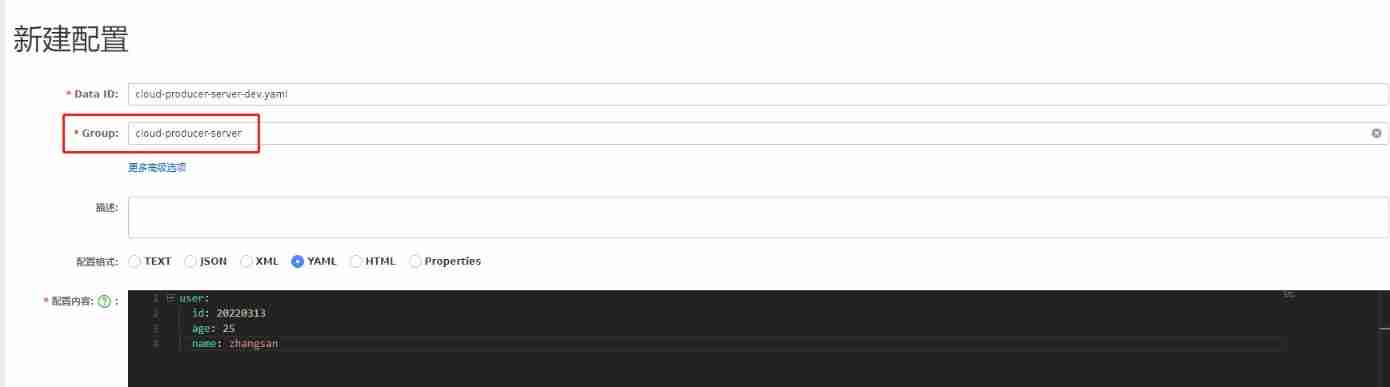
The next in application.properties File grouping :
spring.cloud.nacos.config.namespace=483bb765-a42d-4112-90bc-50b8dff768b33、 Summary :
Nacos Implementing configuration management and dynamic configuration refresh is very simple , Summarize the following steps :
- ① Add corresponding spring-cloud-starter-alibaba-nacos-config rely on
- ② Use native annotations @Value() Import configuration
- ③ Use native annotations @RefreshScope Refresh configuration
- ④ Do a lot of environment configuration isolation according to your business scenario (Namespace)、 Different business configurations are isolated (Group)
4、 Shared configuration :
When we have more and more micro Services , There must be the same configuration , At this time, we can extract the same configuration as the common configuration of the project , For example, the data source information in the cluster 、 Log configuration information ,nacos It also supports the writing of multiple configuration sets in one configuration center .
(1) We are nacos New two in Data ID Namely db.yaml and log.yaml The file of .
(2) Add some configuration contents to the configuration file respectively
(3) stay Springboot Add the following nacos To configure :
spring:
  cloud:
    nacos:
      config:
        extension-configs[0]:
          data-id: db.yaml
          #  The default is DEFAULT_GROUP
          group: DEFAULT_GROUP
          #  Whether to refresh dynamically , The default is false
          refresh: true
        extension-configs[1]:
          data-id: log.yaml
          group: DEFAULT_GROUP
          refresh: true
In order to more clearly configure shared Data Id, Official recommendation shared-configs, The configuration is as follows :
spring:
  cloud:
    nacos:
      config:
        shared-configs[0]:
          data-id: db.yaml
          #  The default is DEFAULT_GROUP
          group: DEFAULT_GROUP
          #  Whether to refresh dynamically , The default is false
          refresh: true
        shared-configs[1]:
          data-id: log.yaml
          group: DEFAULT_GROUP
          refresh: true
(4) reflection : Here 2 The same configuration appears in files ,nacos How to choose ?
When more than one Data Id When the same configuration appears at the same time , Its priority relationship is spring.cloud.nacos.config.extension-configs[n].data-id among n The greater the value of , The higher the priority .
Be careful :spring.cloud.nacos.config.extension-configs[n].data-id The value of must have a file extension , The file extension can support properties, You can support yaml/yml. here spring.cloud.nacos.config.file-extension The configuration of the user-defined extension configuration Data Id File extensions have no effect .
(5) Configure load priority in different ways :
Nacos The configuration center currently provides the following three configuration capabilities from Nacos Pull the relevant configuration , When the three methods are used together , One of their priorities is :A < B < C:
- A: adopt spring.cloud.nacos.config.shared-configs[n].data-id Support multiple shares Data Id Configuration of
- B: adopt spring.cloud.nacos.config.extension-configs[n].data-id The way to support multiple extensions Data Id Configuration of
- C: Through internal rules (spring.cloud.nacos.config.prefix、spring.cloud.nacos.config.file-extension、spring.cloud.nacos.config.group) Automatically generate related Data Id To configure
Reference article :
SpringBoot2.X Integrate Nacos Do configuration center
Fifty five pictures show you the soul ferry of micro service Nacos How strong ?
边栏推荐
- Redis: simple use of redis
- Reprint some Qt development experience written by great Xia 6.5
- Function definition and call, this, strict mode, higher-order function, closure, recursion
- 函数的定义和调用、this、严格模式、高阶函数、闭包、递归
- Solution for processing overtime orders (Overtime unpaid)
- [shutter] bottom navigation bar implementation (bottomnavigationbar bottom navigation bar | bottomnavigationbaritem navigation bar entry | pageview)
- CFdiv2-Fixed Point Guessing-(区间答案二分)
- Return the only different value (de duplication)
- Analyzing several common string library functions in C language
- Introduction to kotlin collaboration
猜你喜欢
![[Appendix 6 Application of reflection] Application of reflection: dynamic agent](/img/e7/0ee42902b178b13e9a41385267e7b6.jpg)
[Appendix 6 Application of reflection] Application of reflection: dynamic agent
![[fluent] hero animation (hero animation use process | create hero animation core components | create source page | create destination page | page Jump)](/img/68/65b8c0530cfdc92ba4f583b0162544.gif)
[fluent] hero animation (hero animation use process | create hero animation core components | create source page | create destination page | page Jump)

Custom components, using NPM packages, global data sharing, subcontracting

Trial setup and use of idea GoLand development tool

Huakaiyun (Zhiyin) | virtual host: what is a virtual host

Everything file search tool

Hard core observation 547 large neural network may be beginning to become aware?
![[error record] an error is reported in the fluent interface (no mediaquery widget ancestor found. | scaffold widgets require a mediaquery)](/img/fd/d862412db43a641537fd67f7910741.jpg)
[error record] an error is reported in the fluent interface (no mediaquery widget ancestor found. | scaffold widgets require a mediaquery)

树形结构数据的处理

What are the key points often asked in the redis interview
随机推荐
Modify table structure
Answers to ten questions about automated testing software testers must see
单词单词单词
stm32F407-------ADC
How to refresh the opening amount of Oracle ERP
Network security - cracking system passwords
stm32F407-------DMA
[error record] navigator operation requested with a context that does not include a naviga
Network security - Trojan horse
DDL basic operation
Solution for processing overtime orders (Overtime unpaid)
Method of removing webpage scroll bar and inner and outer margins
Visualisation de l'ensemble de données au format yolov5 (fichier labelme json)
What are MySQL locks and classifications
File class (add / delete)
Return the only different value (de duplication)
The testing process that software testers should know
深度(穿透)选择器 ::v-deep/deep/及 > > >
[shutter] bottom navigation bar implementation (bottomnavigationbar bottom navigation bar | bottomnavigationbaritem navigation bar entry | pageview)
Network security - the simplest virus