当前位置:网站首页>OpenHarmony资源管理详解
OpenHarmony资源管理详解
2022-07-05 00:01:00 【InfoQ】
资源分类
resourcesresouresbaserawfile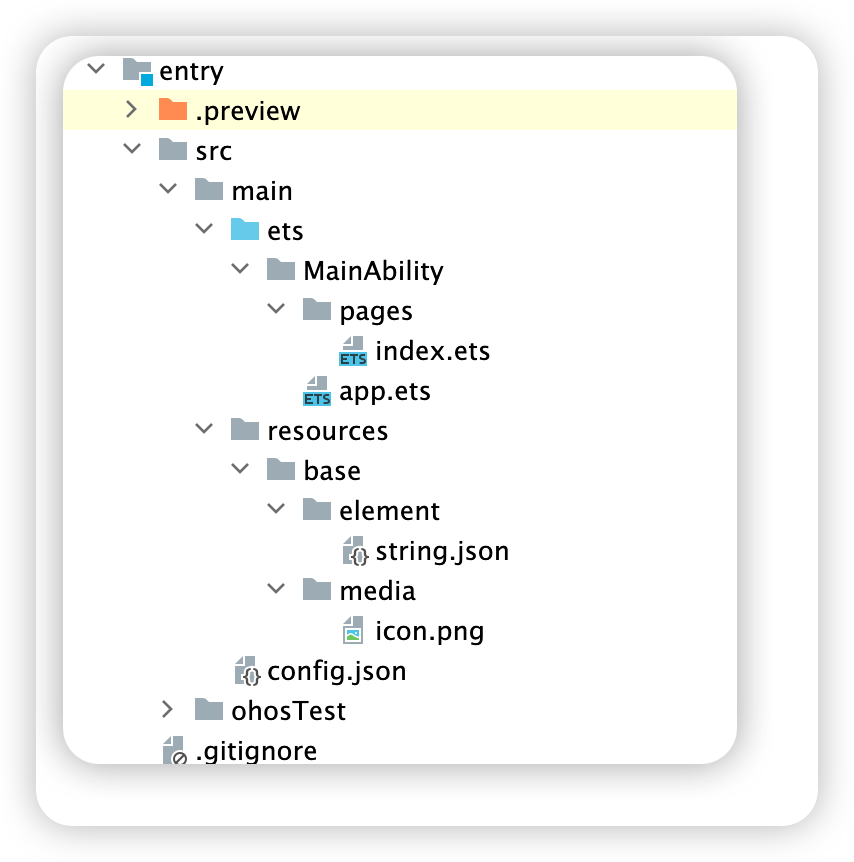
baseelementmediaanimationlayoutgraphicprofile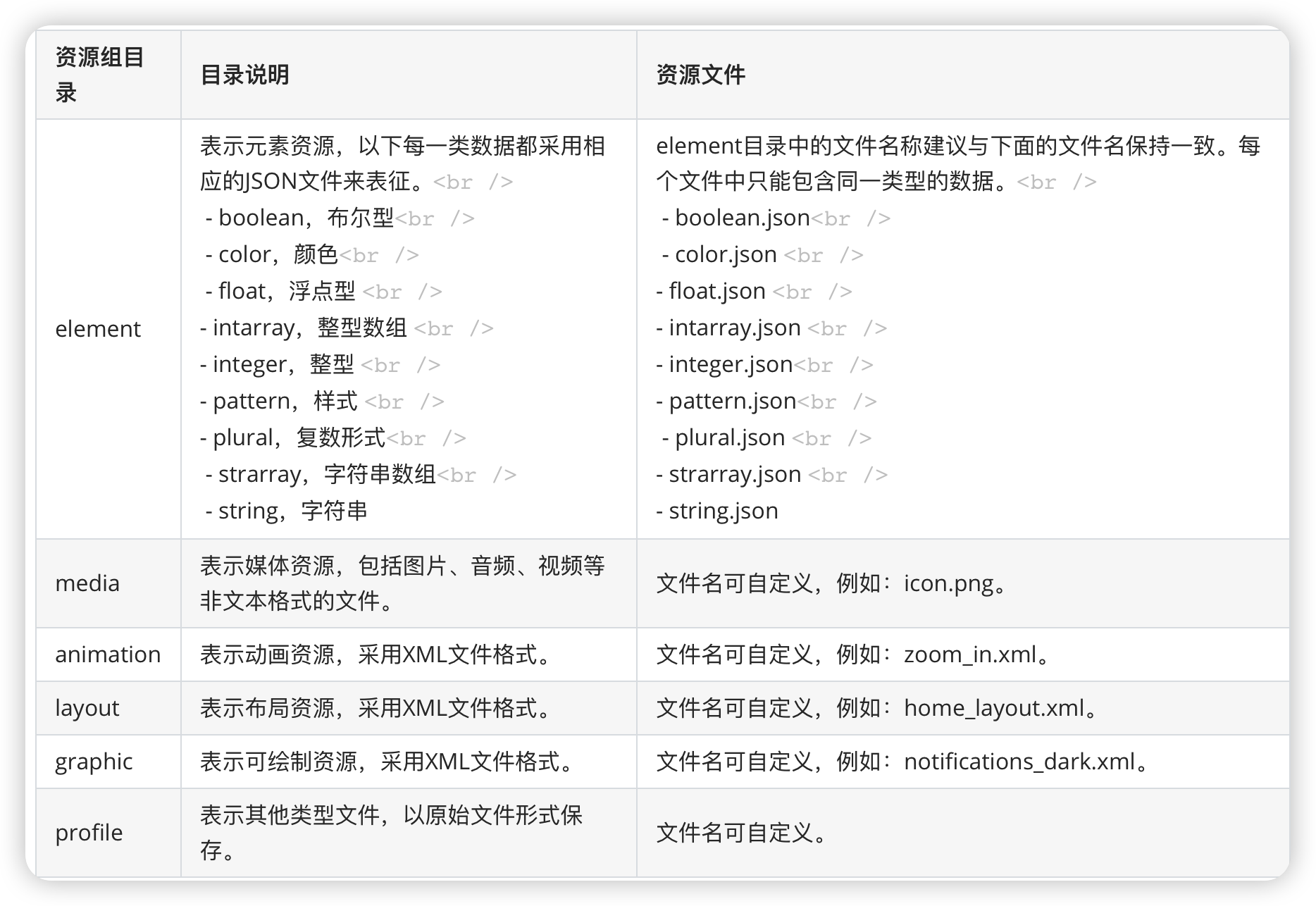
资源组目录
限定词目录
- 在为设备匹配对应的资源文件时,限定词目录匹配的优先级从高到低依次为:移动国家码和移动网络码 > 区域(可选组合:语言、语言_文字、语言_国家或地区、语言_文字_国家或地区)> 横竖屏 > 设备类型 > 颜色模式 > 屏幕密度。
- 如果限定词目录中包含移动国家码和移动网络码、语言、文字、横竖屏、设备类型、颜色模式限定词,则对应限定词的取值必须与当前的设备状态完全一致,该目录才能够参与设备的资源匹配。例如,限定词目录“zh_CN-car-ldpi”不能参与“en_US”设备的资源匹配。
资源访问
- 访问应用资源目录
base目录下的资源文件会被编译成二进制文件并且给这些资源赋予唯一的 ID ,使用相应资源的时候通过资源访问符$('app.type.name')的形式,app代表是应用内resources目录中定义的资源;type表示资源类型,可取值有color、float、string、string、media等;name表示资源的文件名字。例如media中新加name为 Car.svg的图片,则访问该字符串资源为$r('app.media.Car')。
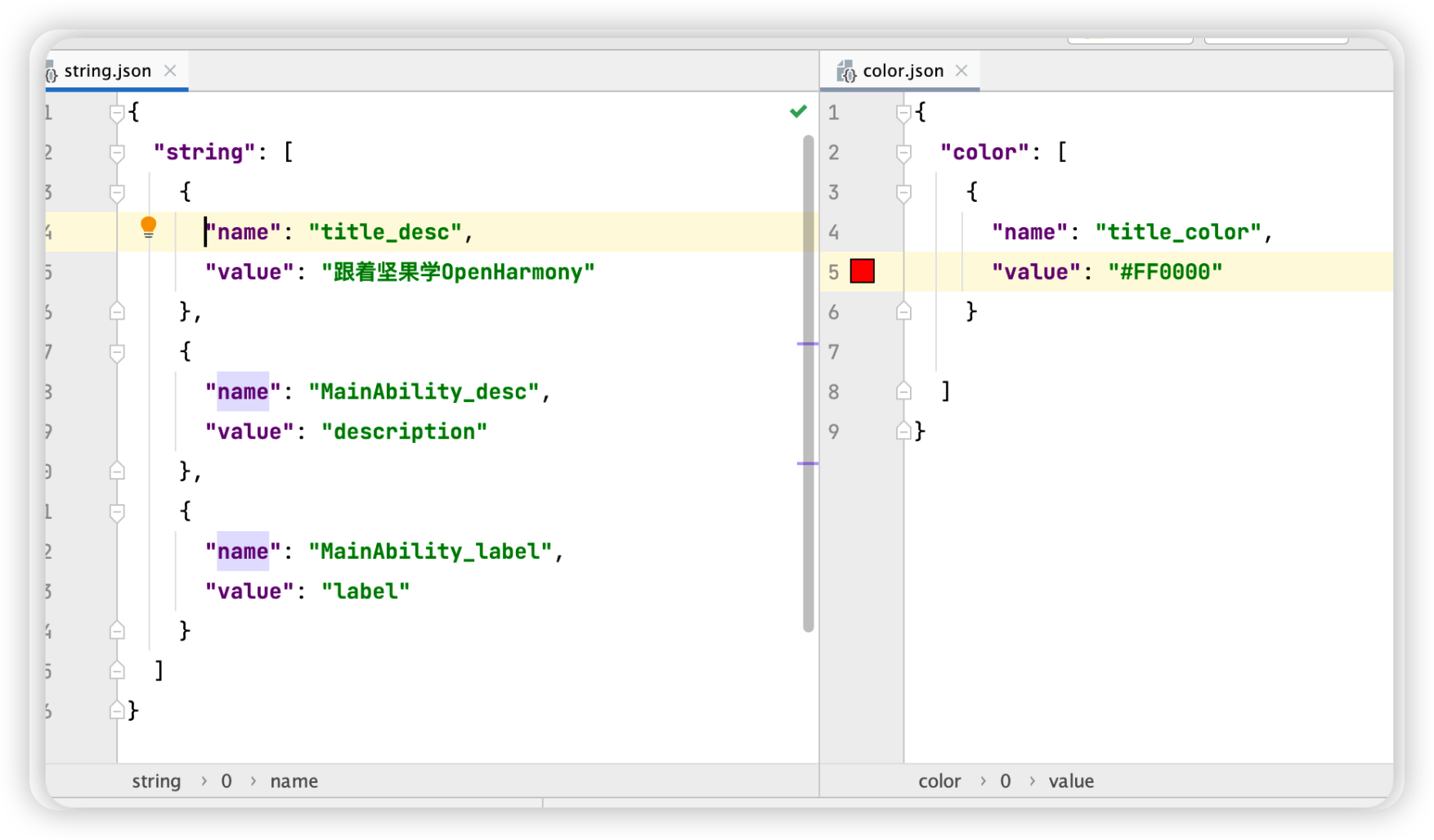
- 笔者在
base目录下新建string.json和color.json文件,分别存放字符串和颜色,资源内容如下图所示:
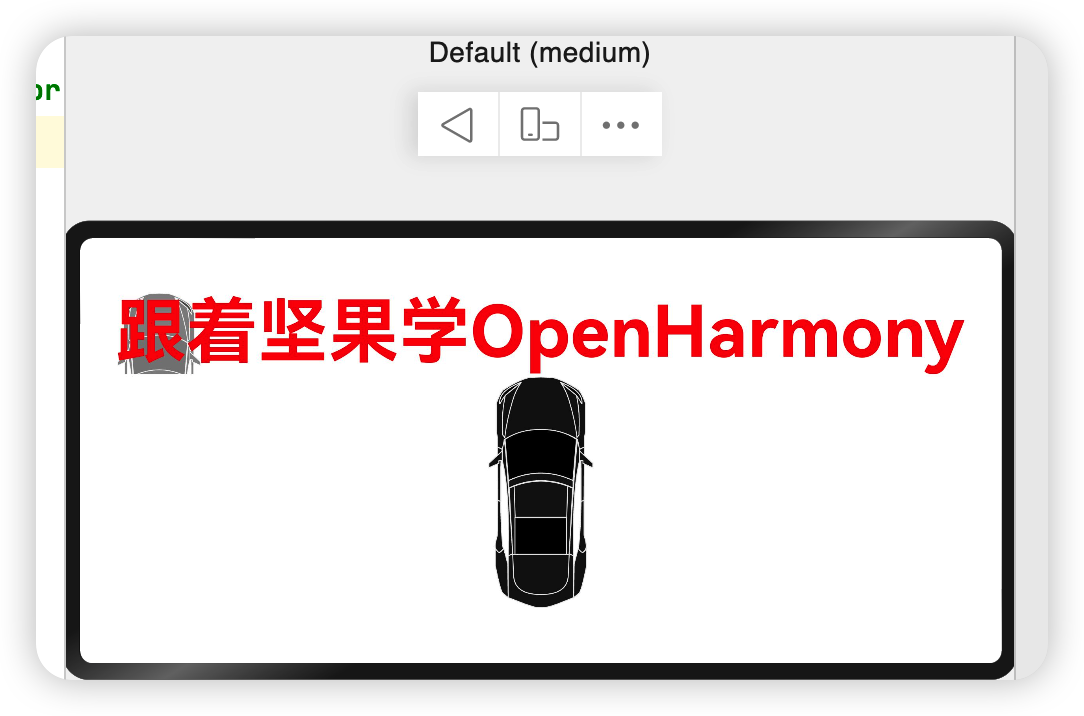
- 通过$('app.type.name')访问资源的简单样例如下所示:
 @Entry
 @Component
 struct Index {

 build() {
 Row() {
 Column() {
 Text($r('app.string.title_desc')) // 访问字符串资源
 .fontSize(60).fontWeight(FontWeight.Bold)

 .fontColor($r('app.color.title_color')) // 访问字体颜色
 .backgroundImage($r('app.media.Car')) // 设备背景图片
 Image("common/images/Car.svg").objectFit(ImageFit.Contain).height(200)
 }
 .width('100%')
 }
 .height('100%')
 }
 }
- 访问系统资源
- 系统资源包含
颜色、圆角、字体、间距、字符串及图片等,通过使用系统资源,不同的开发者可以开发出具有相同视觉风格的应用,开发者可以通过$r('sys.type.name')的形式引用系统资源,和访问应用资源不同的是使用sys代表系统资源,其它和访问应用资源规则一致。
- 访问系统资源简单样例如下所示:
 @Entry
 @Component
 struct ResourceTest {
 build() {
 Column() {
 Text($r('app.string.title_desc')) //**访问应用资源目录**
 .fontColor($r('sys.color.ohos_fa_alert')) //**访问系统资源目录**
 .fontSize($r('sys.float.ohos_id_text_size_headline3'))
 .backgroundColor($r('sys.color.ohos_id_color_palette_aux1'))
 Image("/common/images/Car.svg") //**自己创建的目录**
 .objectFit(ImageFit.None)
 .border({
 color: Color.Orange,
 radius: 20,
 width: 12
 })
 .margin({
 top: 50,

 })
 .width(200)
 .height(200)

 }
 .padding(20)
 .width("100%")
 .height("100%")
 }
 }
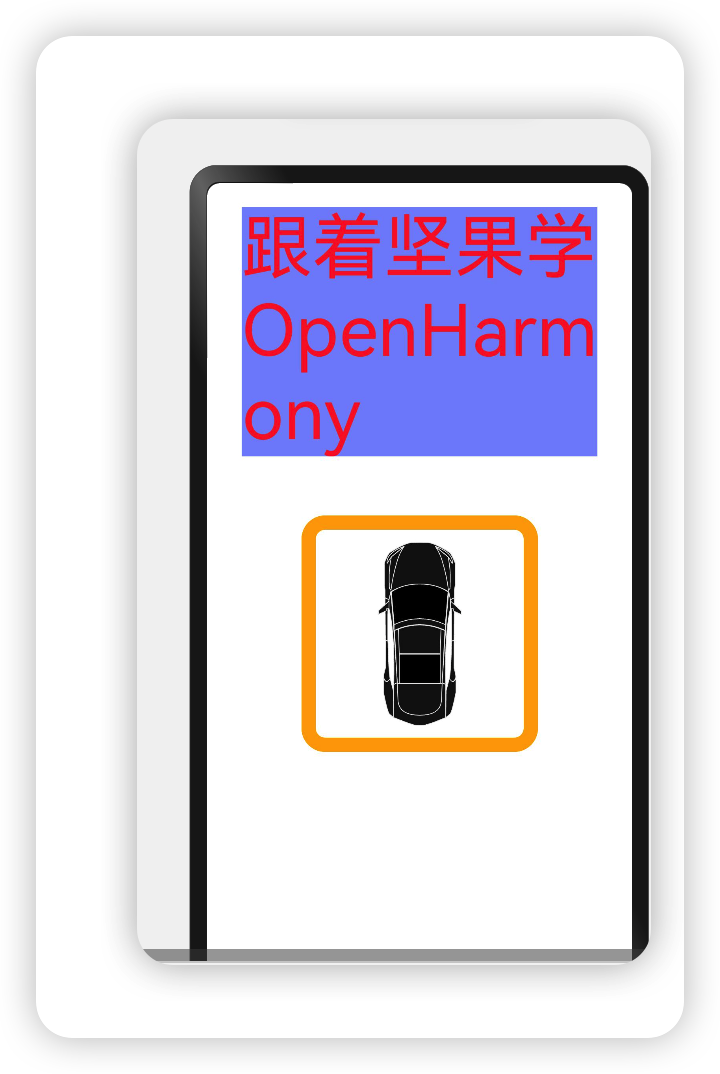
Image("/common/images/Car.svg") //**自己创建的目录**
 .objectFit(ImageFit.None)
 .border({
 color: Color.Orange,
 radius: 20,
 width: 12
 })
 .margin({
 top: 50,

 })
 .width(200)
 .height(200)

资源管理器
@ohos.resourceManagerResourceManagerresourceManagerdeclare namespace resourceManager {
// 获取ResourceManager
export function getResourceManager(callback: AsyncCallback<ResourceManager>): void;
// 获取指定bundleName的ResourceManager
export function getResourceManager(bundleName: string, callback: AsyncCallback<ResourceManager>): void;
export interface ResourceManager {
// 获取字符串资源
getString(resId: number, callback: AsyncCallback<string>): void;
// 获取字符串数组资源
getStringArray(resId: number, callback: AsyncCallback<Array<string>>): void;
// 获取媒体资源
getMedia(resId: number, callback: AsyncCallback<Uint8Array>): void;
// 获取设备信息,比如当前屏幕密度,设备类型是手机还是平板等
getDeviceCapability(callback: AsyncCallback<DeviceCapability>): void;
// 获取配置信息,比如当前屏幕方向密度,当前设备语言
getConfiguration(callback: AsyncCallback<Configuration>): void;
// 释放ResourceManager资源
release();
}
}
export default resourceManager;
ResourceManagergetResourceManager()ResourceManagergetXXX()ResourceManager- 引入 resourceManager
import resourceManager from '@ohos.resourceManager';
- 获取 ResourceManager
 aboutToAppear() {
 resourceManager.getResourceManager((error, manager) => {
 // 获取manager
 })
 }
- 使用 ResourceManager
 manager.getString(0x1000001, (innerError, data) => {
 if(data) {
 // 获取资源成功
 } else {
 console.log("error: " + JSON.stringify(innerError))
 }
 })
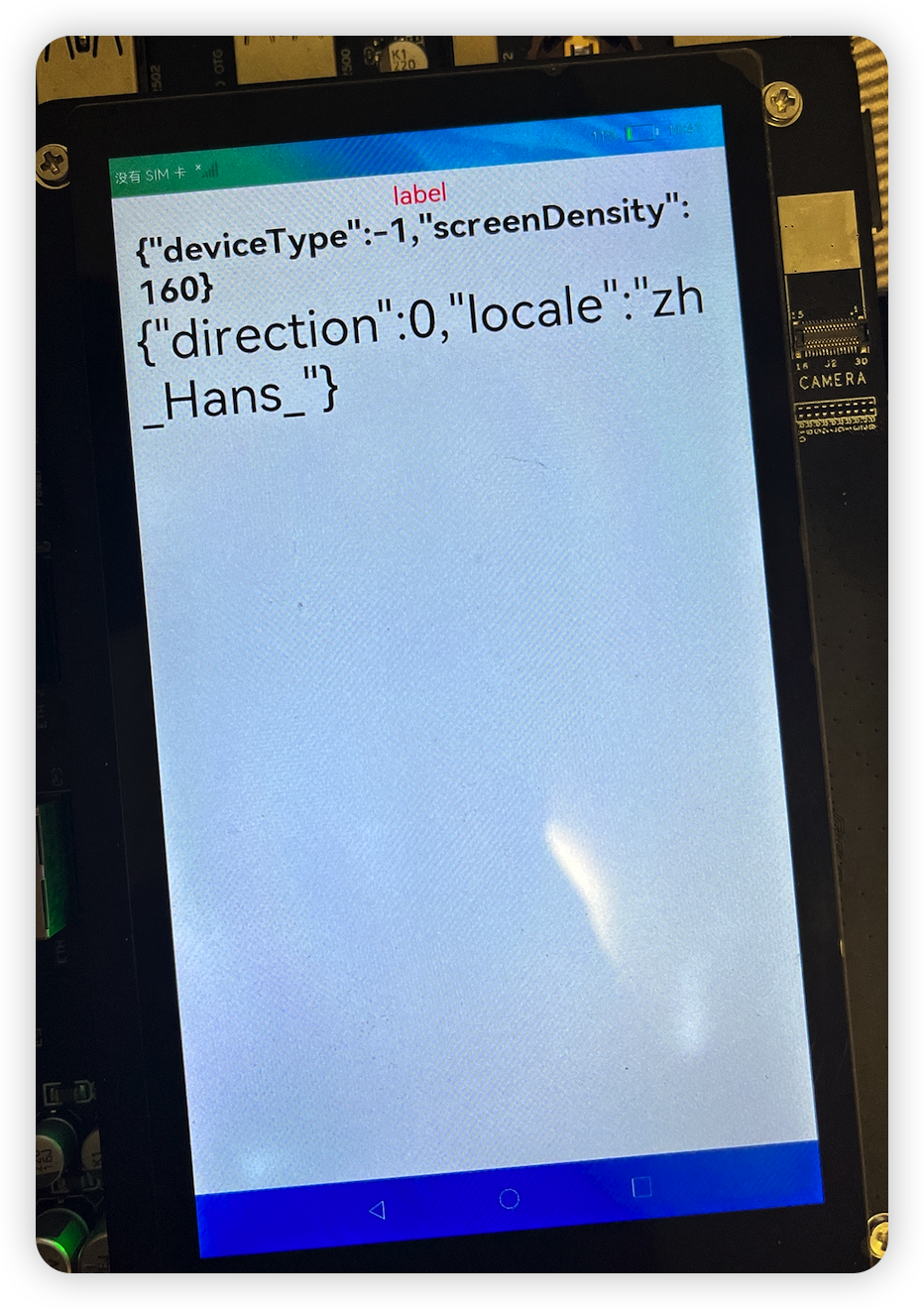
import resourceManager from '@ohos.resourceManager';

@Entry @Component struct ResourceTest {

 @State text_string: string = "跟着坚果学习";
 @State capability: string = "OpenHarmony";
 @State configuration: string = "应用开发";

 aboutToAppear() {
 resourceManager.getResourceManager((error, manager) => {
 manager.getString(0x1000001, (innerError, data) => {
 if(data) {
 this.text_string = data;
 } else {
 console.log("error: " + JSON.stringify(innerError));
 }
 })

 manager.getDeviceCapability((innerError, deviceCapability) => {
 if(deviceCapability) {
 this.capability = JSON.stringify(deviceCapability);
 }
 })

 manager.getConfiguration((innerError, configuration) => {
 if(configuration) {
 this.configuration = JSON.stringify(configuration);
 }
 })
 })
 }

 build() {
 Column({ }) {
 Text(this.text_string) // 访问字符串资源
 // 设置尺寸
 .fontSize(29)
 .fontColor($r('app.color.title_color')) // 访问字体颜色


 Text(this.capability) // capability信息
 .fontSize(40).fontWeight(FontWeight.Bold)

 Text(this.configuration) // configuration信息
 .fontSize(60)
 }
 .width('100%')
 .height('100%')
 .padding(10)
 }
}
边栏推荐
- [binary tree] the maximum difference between a node and its ancestor
- Advanced template
- Robot reinforcement learning synergies between pushing and grassing with self supervised DRL (2018)
- 如何避免电弧产生?—— AAFD故障电弧探测器为您解决
- How to do the project of computer remote company in foreign Internet?
- After Microsoft disables the IE browser, open the IE browser to flash back the solution
- Face recognition 5- insight face padding code practice notes
- Why does infographic help your SEO
- [IELTS reading] Wang Xiwei reads P4 (matching2 paragraph information matching question [difficult])
- Jar批量管理小工具
猜你喜欢
如何在外地外网电脑远程公司项目?

Data on the number of functional divisions of national wetland parks in Qinghai Province, data on the distribution of wetlands and marshes across the country, and natural reserves in provinces, cities
Blue sky nh55 series notebook memory reading and writing speed is extremely slow, solution process record
![[IELTS reading] Wang Xiwei reading P4 (matching1)](/img/91/1b3f85410035f65acb0c205185f698.png)
[IELTS reading] Wang Xiwei reading P4 (matching1)
"Xiaodeng" domain password policy enhancer in operation and maintenance
Acrel-EMS综合能效平台在校园建设的意义
Microservice
ICML 2022 | 3dlinker: e (3) equal variation self encoder for molecular link design
ECCV 2022 | 腾讯优图提出DisCo:拯救小模型在自监督学习中的效果
![[path planning] RRT adds dynamic model for trajectory planning](/img/98/dd9b106fd9dc64e676d9c943c03ab3.jpg)
[path planning] RRT adds dynamic model for trajectory planning
随机推荐
[IELTS reading] Wang Xiwei reading P3 (heading)
Etcd database source code analysis - brief process of processing entry records
用快解析内网穿透实现零成本自建网站
圖解網絡:什麼是網關負載均衡協議GLBP?
What is the difference between port mapping and port forwarding
Face recognition 5- insight face padding code practice notes
[JS] - [sort related] - Notes
取得PMP證書需要多長時間?
Nine Qi single chip microcomputer ny8b062d single key control four LED States
多回路仪表在基站“转改直”方面的应用
Netcore3.1 JSON web token Middleware
In the enterprise, win10 turns on BitLocker to lock the disk, how to back up the system, how to recover when the system has problems, and how to recover quickly while taking into account system securi
Skills in analyzing the trend chart of London Silver
If you open an account of Huatai Securities by stock speculation, is it safe to open an account online?
C language to quickly solve the reverse linked list
Solve the problem that the virtual machine cannot be remotely connected through SSH service
机器人强化学习——Learning Synergies between Pushing and Grasping with Self-supervised DRL (2018)
go踩坑——no required module provides package : go.mod file not found in current directory or any parent
[kotlin] the third day
IELTS examination process, what to pay attention to and how to review?