当前位置:网站首页>Troubleshooting of high memory usage of redis in a production environment
Troubleshooting of high memory usage of redis in a production environment
2022-07-05 11:44:00 【We've been on the road】
The server goes online after a regular release , It is found that the cache expiration speed is much lower than the configured 10min Be overdue .
The phenomenon : Just logged into the system background , After that 1 The cache expires in minutes , Unable to log in to the background , Enter Alibaba cloud redis The server , Found logged in key period , During this period, I also encountered various strange problems , Inexplicably log in to the system, but later drop the line , Later, I went to Alibaba cloud and found redis Memory Take up as much as 100%. I guessed that there might be threads in a large number of write caches , And then put redis The space is full , because redis The server configuration is volatile-lru Strategy : When the memory is full , There are a lot of cache writes , Just delete Set expiration time Of key Medium It hasn't been used for the longest time recently Of key.

Then I ran to redis The server puts the current rdb( memory dump ) Download a copy locally to analyze what it is key Writing data crazily , Found this key, I can find and use this in the program key Code for , And then do the corresponding processing .
Log in to Alibaba cloud , Go to the latest backup
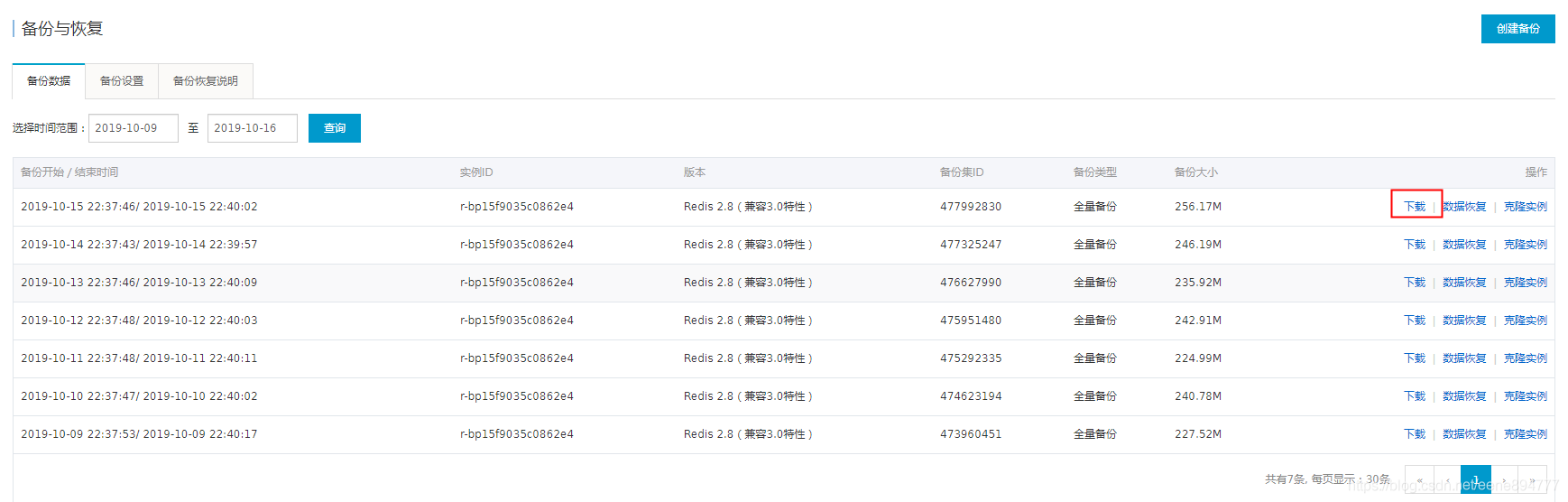
1、 Download to a full volume key Of rdb file

Then execute the following command to install python2.7 And load rdb plug-in unit , Generate csv file .
2、 Put this rdb Files use rdbTools Turn it into csv file .
-
pip install rdb
# install rdb
-
rdb -c memory hins8714399_data_20191015223705.rdb > memory.csv
# take redis Memory snapshot file , Store in csv In the document

3、 Will change csv Documents can be imported directly into mysql In the database , And then use mysql Query for , You can find out the one with the largest memory consumption key

Be careful A little bit is adopt csv Import mysql The default generated field types are varchar, We need to change the type here to int type , Used for sorting queries .
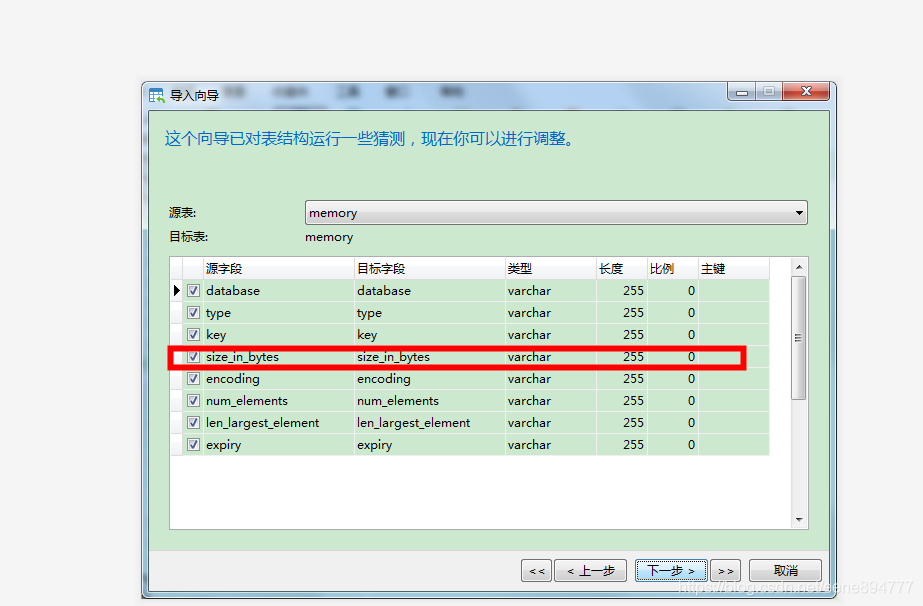
4、mysql There's a memory library , And then execute
SELECT * from memory ORDER BY size_in_bytes desc LIMIT 0, 10
According to the use of memory from large to small , Before the memory is occupied 10 Of key
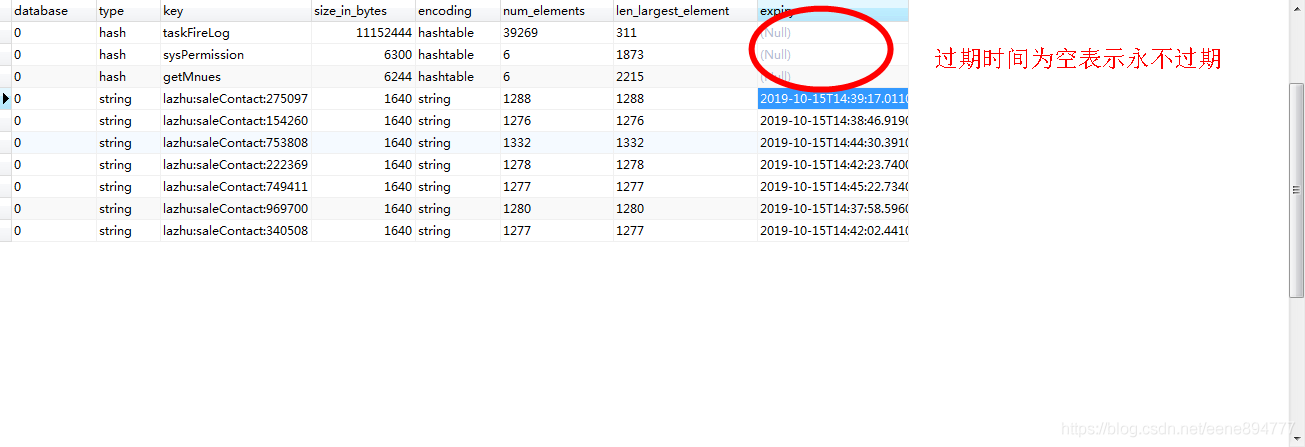
Found these expired on null Of key, Find out The code does not address these key Set expiration time , It's permanent key, Some more redis Set the queue for consumption , Write a lot of data to the queue that never expires , Then the consumption thread only 2 individual , It's faster to add to the queue , Queue consumption is slow , Backstage I put consumption redis The thread of the queue is set to 20、10、5 Find an optimal number of threads ,CPU The occupation is not too high , The queue is not stacked 、 Make full use of the performance of the machine , Solve the actual needs .
summary : Through a toss , Learned how to parse redis Of rdb Snapshot file , analysis redis Distribution of memory , Memory footprint , that key Take up a lot of , that key Account for less , There is also a memory elimination strategy , Why this key Expire first , The other one will expire later .
Expand 1: Interested students can check more redis Memory retirement strategy
- volatile-lru: Pick the least recently used data from the memory data set with expiration time Eliminate ;
- volatile-ttl: Select the data about to expire from the memory data set with the expiration time Eliminate ;
- volatile-random: Pick any data from the memory data set with the expiration time set Eliminate ;
- allkeys-lru: Pick the least recently used data from the memory data set Eliminate ;
- allkeys-random: Pick any data from the data set Eliminate ;
- no-enviction( deportation ): Exclusion data .( Default elimination strategy . When redis Memory data reaches maxmemory, Under this strategy , Go straight back to OOM error );
About maxmemory Set up , By means of redis.conf in maxmemory Parameter setting , Or by order CONFIG SET Dynamic modification
About the setting of data elimination strategy , By means of redis.conf Medium maxmemory-policy Parameter setting , Or by order CONFIG SET Dynamic modification
</article>
边栏推荐
- 【yolov5.yaml解析】
- Yolov 5 Target Detection Neural Network - Loss Function Calculation Principle
- pytorch-线性回归
- Ncp1342 chip substitute pn8213 65W gallium nitride charger scheme
- Yolov5 target detection neural network -- calculation principle of loss function
- 11. (map data section) how to download and use OSM data
- 13.(地图数据篇)百度坐标(BD09)、国测局坐标(火星坐标,GCJ02)、和WGS84坐标系之间的转换
- Pytorch linear regression
- Acid transaction theory
- Riddle 1
猜你喜欢
COMSOL -- establishment of geometric model -- establishment of two-dimensional graphics
【无标题】
分类TAB商品流多目标排序模型的演进

紫光展锐全球首个5G R17 IoT NTN卫星物联网上星实测完成

中非 钻石副石怎么镶嵌,才能既安全又好看?

石油化工企业安全生产智能化管控系统平台建设思考和建议

技术管理进阶——什么是管理者之体力、脑力、心力
MySQL 巨坑:update 更新慎用影响行数做判断!!!
Advanced technology management - what is the physical, mental and mental strength of managers

CDGA|数据治理不得不坚持的六个原则
随机推荐
COMSOL -- establishment of 3D graphics
Technology sharing | common interface protocol analysis
871. Minimum Number of Refueling Stops
【TFLite, ONNX, CoreML, TensorRT Export】
Splunk configuration 163 mailbox alarm
How to make your products as expensive as possible
Ffmpeg calls avformat_ open_ Error -22 returned during input (invalid argument)
7.2 daily study 4
2048游戏逻辑
谜语1
SET XACT_ABORT ON
以交互方式安装ESXi 6.0
2048 game logic
[loss functions of L1, L2 and smooth L1]
yolov5目標檢測神經網絡——損失函數計算原理
阻止浏览器后退操作
[calculation of loss in yolov3]
How to protect user privacy without password authentication?
【yolov5.yaml解析】
Prevent browser backward operation