当前位置:网站首页>Seven Ways to Center a Box Horizontally and Vertically
Seven Ways to Center a Box Horizontally and Vertically
2022-08-05 06:22:00 【MoXinXueWEB】
方法一:定位+ 平移
<!DOCTYPE html>
<html lang="en">
<head>
    <meta charset="UTF-8">
    <meta name="viewport" content="width=device-width, initial-scale=1.0">
    <title>Document</title>
    <style> .parent {
       width: 500px; height: 500px; border: 1px solid #000; position: relative; } .child {
       width: 100px; height: 100px; border: 1px solid #999; position: absolute; top: 50%; left: 50%; transform: translate(-50%, -50%); } </style>
</head>
<body>
    <div class="parent">
    	<div class="child">我是子元素</div>
    </div>
</body>
</html>
方法二:弹性布局
<!DOCTYPE html>
<html lang="en">
<head>
    <meta charset="UTF-8">
    <meta name="viewport" content="width=device-width, initial-scale=1.0">
    <title>Document</title>
    <style> .parent {
       width: 500px; height: 500px; border: 1px solid #000; display: flex; justify-content: center; align-items: center; } .child {
       width: 100px; height: 100px; border: 1px solid #999; } </style>
</head>
<body>
    <div class="parent">
    	<div class="child">我是子元素</div>
    </div>
</body>
</html>
方法三:网格 Grid
<!DOCTYPE html>
<html lang="en">
<head>
    <meta charset="UTF-8">
    <meta name="viewport" content="width=device-width, initial-scale=1.0">
    <title>Document</title>
    <style> .parent {
       width: 500px; height: 500px; border: 1px solid #000; display: grid; place-items: center; } .child {
       width: 100px; height: 100px; border: 1px solid #999; } </style>
</head>
<body>
    <div class="parent">
    	<div class="child">我是子元素</div>
    </div>
</body>
</html>
方法四:margin:auto;
<!DOCTYPE html>
<html lang="en">
<head>
    <meta charset="UTF-8">
    <meta name="viewport" content="width=device-width, initial-scale=1.0">
    <title>Document</title>
    <style> .parent {
       width: 500px; height: 500px; border: 1px solid #000; position: relative; } .child {
       width: 100px; height: 100px; border: 1px solid #999; position: absolute; margin: auto; top: 0; left: 0; right: 0; bottom: 0; } </style>
</head>
<body>
    <div class="parent">
    	<div class="child">我是子元素</div>
    </div>
</body>
</html>
方法五:表格布局
<!DOCTYPE html>
<html lang="en">
<head>
    <meta charset="UTF-8">
    <meta name="viewport" content="width=device-width, initial-scale=1.0">
    <title>Document</title>
    <style> .parent {
       width: 500px; height: 500px; border: 1px solid #000; display: table-cell; vertical-align: middle; text-align: center; } .child {
       width: 100px; height: 100px; border: 1px solid #999; display: inline-block; } </style>
</head>
<body>
    <div class="parent">
    	<div class="child">我是子元素</div>
    </div>
</body>
</html>
方法六:计算父盒子与子盒子的空间距离
<!DOCTYPE html>
<html lang="en">
<head>
    <meta charset="UTF-8">
    <meta name="viewport" content="width=device-width, initial-scale=1.0">
    <title>Document</title>
    <style> .parent {
       width: 500px; height: 500px; border: 1px solid #000; } .child {
       width: 100px; height: 100px; border: 1px solid #999; margin-top: 200px; margin-left: 200px; } </style>
</head>
<body>
    <div class="parent">
    	<div class="child">我是子元素</div>
    </div>
</body>
</html>
方法七:定位+负边距
<!DOCTYPE html>
<html lang="en">
<head>
    <meta charset="UTF-8">
    <meta name="viewport" content="width=device-width, initial-scale=1.0">
    <title>Document</title>
    <style> .parent {
       width: 500px; height: 500px; border: 1px solid #000; position: relative; } .child {
       width: 100px; height: 100px; border: 1px solid #999; position: absolute; top: 50%; left: 50%; margin-top: -50px; margin-left: -50px; } </style>
</head>
<body>
    <div class="parent">
    	<div class="child">我是子元素</div>
    </div>
</body>
</html>
边栏推荐
猜你喜欢
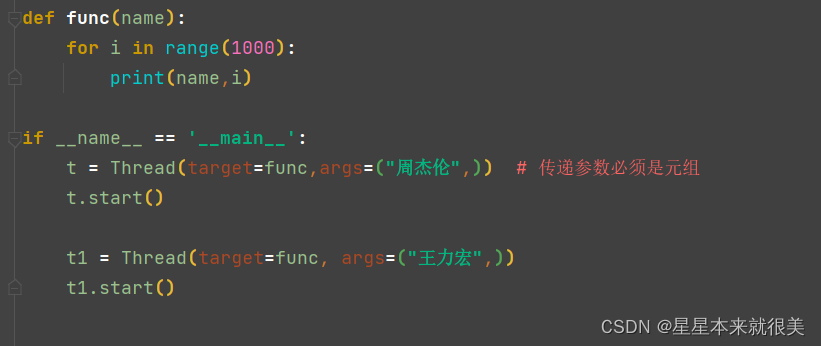
Passing parameters in multiple threads

Complete mysql offline installation in 5 minutes
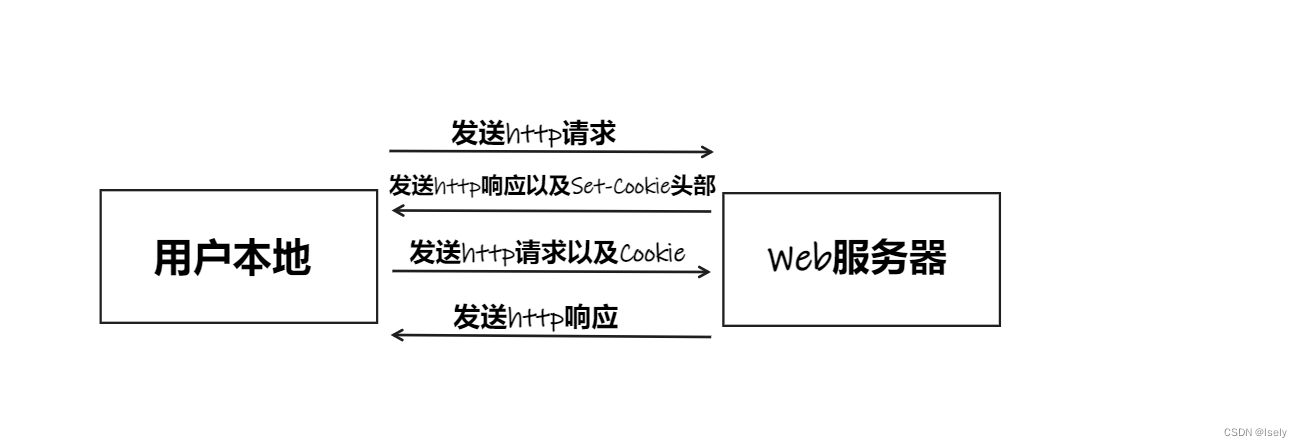
Take you in-depth understanding of cookies
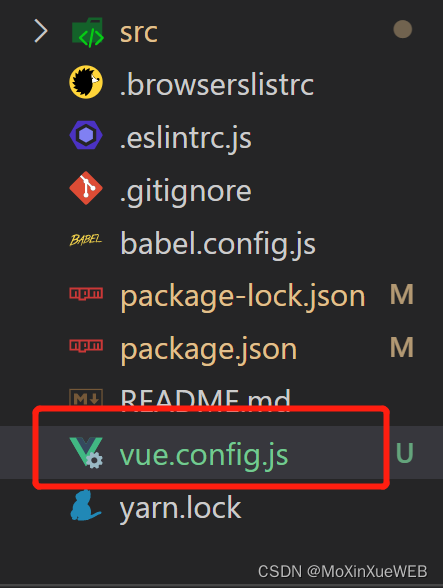
config.js相关配置汇总
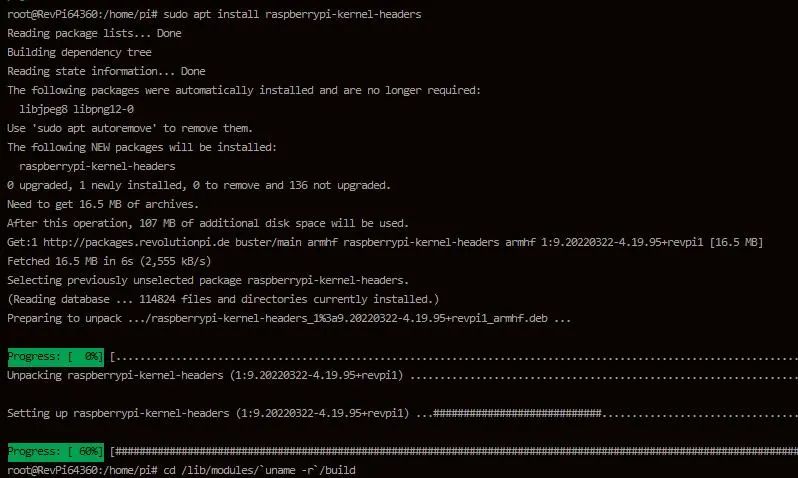
Teach you simple steps to achieve industrial raspberries pie properly installed RS232 USB drive
网络层协议介绍
Unity realizes first-person roaming (nanny-level tutorial)
![[问题已处理]-jenkins流水线checkout超时](/img/3d/c14276d2b5ce18fc3d1288abb059c0.png)
[问题已处理]-jenkins流水线checkout超时
el-autocomplete使用
Mina的长连接和短连接
随机推荐
DisabledDate date picker datePicker
技术分享杂七杂八技术
disabledDate 日期选择器 datePicker
Switch principle
逻辑卷创建
What are some things that you only know when you do operation and maintenance?
TCP/IP four-layer model
IP address and subnet division
Browser Storage for H5
The problem come from line screening process
通过反射获取Class对象的四种方式
VLAN介绍与实验
VLAN is introduced with the experiment
入职前,没想到他们玩的这么花
time complexity and space complexity
大小屏适配
多线程之传递参数
Met with the browser page
5分钟完成mysql离线安装
深度 Zabbix 使用指南——来自惨绿少年