当前位置:网站首页>[fluent] JSON model conversion (JSON serialization tool | JSON manual serialization | writing dart model classes according to JSON | online automatic conversion of dart classes according to JSON)
[fluent] JSON model conversion (JSON serialization tool | JSON manual serialization | writing dart model classes according to JSON | online automatic conversion of dart classes according to JSON)
2022-07-03 02:28:00 【Programmer community】
List of articles
- One 、JSON Serialization tool
- Two 、JSON Manual serialization
- 3、 ... and 、 according to JSON To write Dart Model class
- Four 、 Online automatic conversion
- 5、 ... and 、 Related resources
One 、JSON Serialization tool
JSON If the format is relatively simple , Use native dart:convert package , Manually JSON Serialization and deserialization of ;
/// json serialize , Deserialization package import 'dart:convert';If JSON The format is complex , You need to use JSON The serialization plug-in for ;
- json_serializable : https://pub.dev/packages/json_serializable
- built_value : https://pub.dev/packages/built_value
Two 、JSON Manual serialization
Given as follows JSON character string :
{ "icon": "icon.png", "title": " title ", "url": "https://www.baidu.com/", "statusBarColor": "FFFFFF", "hideAppBar": true}Write in a line :
{ "icon": "icon.png", "title": " title ", "url": "https://www.baidu.com/", "statusBarColor": "FFFFFF", "hideAppBar": true }Put the above JSON String serialized to Map<String, dynamic> Formatted data ;
Code example :
import 'dart:convert';void main() {
      String jsonString = '{ "icon": "icon.png", "title": " title ", "url": "https://www.baidu.com/", "statusBarColor": "FFFFFF", "hideAppBar": true }';  ///  Deal with Chinese code   Utf8Codec utf8codec = Utf8Codec();  Utf8Decoder utf8decoder = Utf8Decoder();  Utf8Encoder utf8encoder = Utf8Encoder();  ///  Binary  Byte  The data to  UTF-8  Format encoding  ,  Get the encoded string   String responseString = utf8decoder.convert(utf8codec.encode(jsonString));  //  take  json  The string information is converted to  Map<String, dynamic>  Key value pair information of type   Map<String, dynamic> jsonMap = json.decode(responseString);  //  Use the factory method to construct  Dart  object   CommonModel commonModel = CommonModel.fromJson(jsonMap);  print('icon : ${commonModel.icon}\ntittle : ${commonModel.title}\nurl : ${commonModel.url}');}// Dart  Model class class CommonModel {
      final String? icon;  final String? title;  final String? url;  final String? statusBarColor;  final bool? hideAppBar;  CommonModel({
    this.icon, this.title, this.url, this.statusBarColor, this.hideAppBar});  factory CommonModel.fromJson(Map<String, dynamic> json) {
        return CommonModel(      icon: json['icon'],      title: json['title'],      url: json['url'],      statusBarColor: json['statusBarColor'],      hideAppBar: json['hideAppBar'],    );  }}
Execution results :
icon : icon.pngtittle : title url : https://www.baidu.com/
3、 ... and 、 according to JSON To write Dart Model class
Given a specified format JSON class , Turn it into Dart , In case of manual conversion ,
{
      "school": " The first primary school ",  "students": [    {
          "name": " Xiao Wang ",      "age": "12"    },    {
          "name": " The small white ",      "age": "13"    }  ]}
Member variables are ordinary variables : Not used final modification ;
class School {
      /// json  In a string  school  Field   String? school;  /// json  In the string  students  Array   List<Student>? students;  School({
    this.school, this.students});  ///  There are two ways to construct   ///  The parameter is not  final  Type of  ,  Write in this way   ///  There is no need to add  factory  ///  If the member is  final  Type of  ,  Then the method needs to be added  factory  School.fromJson(Map<String, dynamic> json) {
        school = json['school'];    ///  First the  json  Array to  List    ///  And then call  map  Method  ,  Assign a value to each specific element     (json['students'] as List).map((i) => Student.fromJson(i));  }}class Student {
      String? name;  String? age;  Student({
    this.name, this.age});  Student.fromJson(Map<String, dynamic> json) {
        name = json['name'];    age = json['age'];  }}
Member variables use final The condition of embellishment :
class School {
      /// json  In a string  school  Field   final String? school;  /// json  In the string  students  Array   final List<Student>? students;  School({
    this.school, this.students});  ///  There are two ways to construct   ///  The parameter is not  final  Type of  ,  Write in this way   ///  There is no need to add  factory  ///  If the member is  final  Type of  ,  Then the method needs to be added  factory  factory School.fromJson(Map<String, dynamic> json) {
        String school = json['school'];    ///  First the  json  Array to  List    ///  And then call  map  Method   Get each value     List<Student> students = (json['students'] as List).map((i) => Student.fromJson(i)).toList();    return School(school: school, students: students);  }}class Student {
      final String? name;  final String? age;  Student({
    this.name, this.age});  factory Student.fromJson(Map<String, dynamic> json) {
        String name = json['name'];    String age = json['age'];    return Student(name: name, age: age);  }}
Four 、 Online automatic conversion
In addition to turning into Dart Out of type , Other Language type You can also convert , https://www.bejson.com/json2javapojo/new/ Website can JSON turn JavaBean ;
Recommend a JSON turn Dart The tools website : https://jsontodart.com/
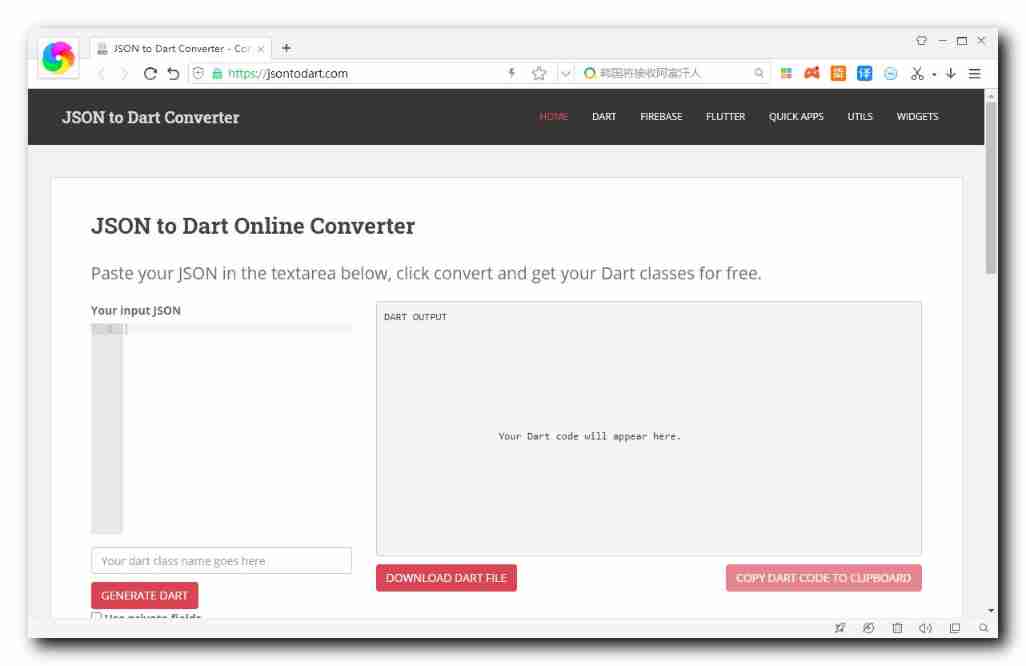
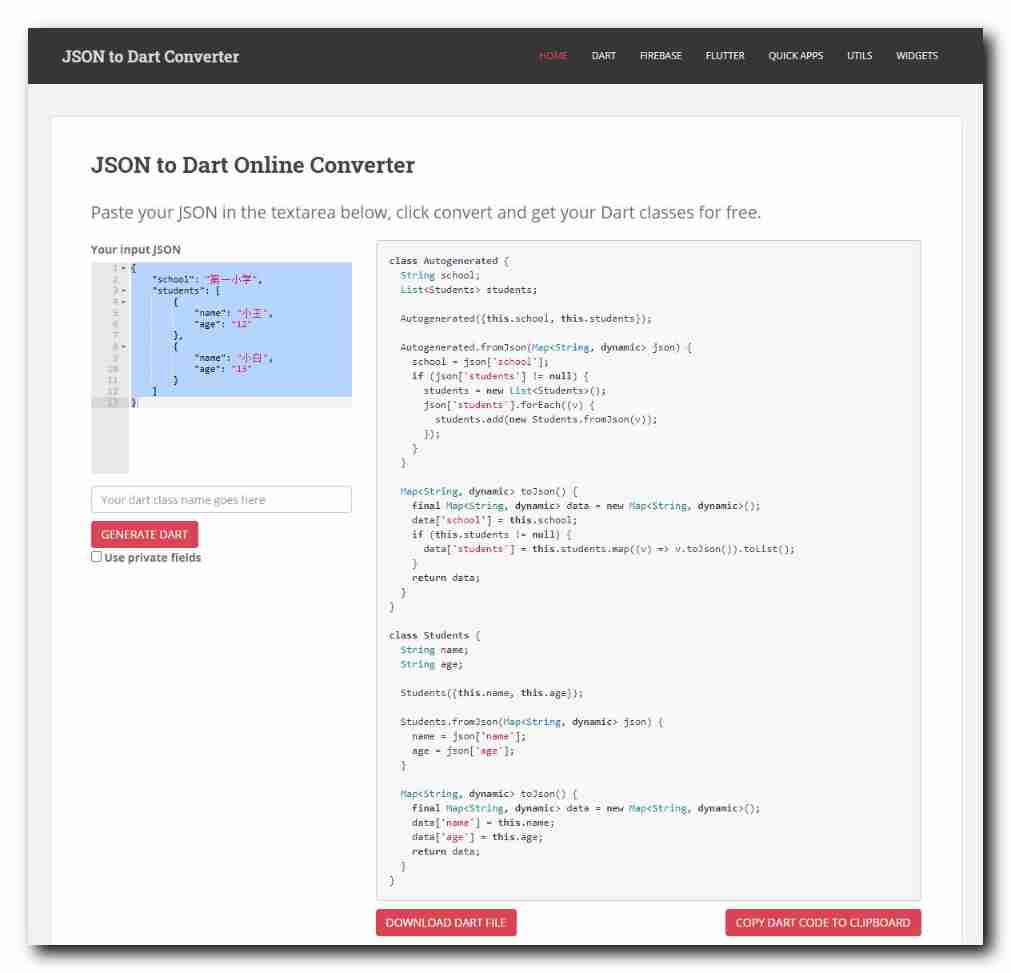
This is the basis of the system JSON String is automatically generated Dart class ;
class Autogenerated {
      String school;  List<Students> students;  Autogenerated({
    this.school, this.students});  Autogenerated.fromJson(Map<String, dynamic> json) {
        school = json['school'];    if (json['students'] != null) {
          students = new List<Students>();      json['students'].forEach((v) {
            students.add(new Students.fromJson(v));      });    }  }  Map<String, dynamic> toJson() {
        final Map<String, dynamic> data = new Map<String, dynamic>();    data['school'] = this.school;    if (this.students != null) {
          data['students'] = this.students.map((v) => v.toJson()).toList();    }    return data;  }}class Students {
      String name;  String age;  Students({
    this.name, this.age});  Students.fromJson(Map<String, dynamic> json) {
        name = json['name'];    age = json['age'];  }  Map<String, dynamic> toJson() {
        final Map<String, dynamic> data = new Map<String, dynamic>();    data['name'] = this.name;    data['age'] = this.age;    return data;  }}
5、 ... and 、 Related resources
Reference material :
- Flutter Official website : https://flutter.dev/
- Flutter Plug in download address : https://pub.dev/packages
- Flutter Developing documents : https://flutter.cn/docs ( Strongly recommend )
- official GitHub Address : https://github.com/flutter
- Flutter The Chinese community : https://flutter.cn/
- Flutter Practical tutorial : https://flutter.cn/docs/cookbook
- Flutter CodeLab : https://codelabs.flutter-io.cn/
- Dart Chinese document : https://dart.cn/
- Dart Developer website : https://api.dart.dev/
- Flutter Chinese net : https://flutterchina.club/ , http://flutter.axuer.com/docs/
- Flutter Related issues : https://flutterchina.club/faq/ ( It is recommended to watch it at the introductory stage )
- GitHub Upper Flutter Open source examples : https://download.csdn.net/download/han1202012/15989510
- Flutter Practical e-books : https://book.flutterchina.club/chapter1/
- Dart Language practice website : https://dartpad.dartlang.org/
Important topics :
- Flutter Animation reference documentation : https://flutterchina.club/animations/
Blog source download :
GitHub Address : https://github.com/han1202012/flutter_http( Keep updating with the progress of the blog , There may not be the source code of this blog )
Blog source snapshot : ( The source code snapshot of this blog , You can find the source code of this blog )
边栏推荐
- Qt之QComboBox添加QCheckBox(下拉列表框插入复选框,含源码+注释)
- Gbase 8C system table PG_ authid
- Tongda OA V12 process center
- 【翻译】Flux安全。通过模糊处理获得更多信心
- The Sandbox阐释对元宇宙平台的愿景
- My creation anniversary
- How to change the panet layer in yolov5 to bifpn
- Flink CDC mongoDB 使用及Flink sql解析monggo中复杂嵌套JSON数据实现
- Unrecognized SSL message, plaintext connection?
- Detailed introduction to the deployment and usage of the Nacos registry
猜你喜欢
Create + register sub apps_ Define routes, global routes and sub routes
![[Hcia]No.15 Vlan间通信](/img/59/a467c5920cbccb72040f39f719d701.jpg)
[Hcia]No.15 Vlan间通信
![[Flutter] dart: class;abstract class;factory;类、抽象类、工厂构造函数](/img/06/ab333a4752de27eae2dd937cf579e2.png)
[Flutter] dart: class;abstract class;factory;类、抽象类、工厂构造函数

Distributed transaction solution
![[shutter] bottom navigation bar implementation (bottomnavigationbar bottom navigation bar | bottomnavigationbaritem navigation bar entry | pageview)](/img/41/2413af283e8f1db5d20ea845527175.gif)
[shutter] bottom navigation bar implementation (bottomnavigationbar bottom navigation bar | bottomnavigationbaritem navigation bar entry | pageview)

《MATLAB 神经网络43个案例分析》:第43章 神经网络高效编程技巧——基于MATLAB R2012b新版本特性的探讨
Detailed introduction to the deployment and usage of the Nacos registry

stm32F407-------ADC
【ROS进阶篇】第六讲 ROS中的录制与回放(rosbag)

怎么将yolov5中的PANet层改为BiFPN
随机推荐
[Yu Yue education] reference materials of love psychology of China University of mining and technology
Iptables layer 4 forwarding
【翻译】Flux安全。通过模糊处理获得更多信心
Producer consumer model based on thread pool (including blocking queue)
单词单词单词
为什么会选择框架?选择什么样的框架
Hcip137-147 title + analysis
5. File operation
错误Invalid bound statement (not found): com.ruoyi.stock.mapper.StockDetailMapper.xxxx解决
4. 类和对象
MUX VLAN Foundation
[hcia]no.15 communication between VLANs
Return a tree structure data
GBase 8c 触发器(一)
The sandbox explains its vision for the meta universe platform
Tongda OA homepage portal workbench
【翻译】具有集中控制平面的现代应用负载平衡
Memory pool (understand the process of new developing space from the perspective of kernel)
GBase 8c系统表-pg_amop
面试八股文整理版