当前位置:网站首页>Selenium source code read through · 9 | desiredcapabilities class analysis
Selenium source code read through · 9 | desiredcapabilities class analysis
2022-07-06 06:16:00 【The elegance of testing】
1 Source directory
selenium/webdriver/common/desired_capabilities.py
2 Function description
According to the DesiredCapabilities Parameters , To decide which machine to distribute the test code to node Test on ;
Supplementary knowledge : We need to understand selenium grid;
3 Selenium Grid Introduce
3.1 What is it? ?
Selenium Part of the kit , It is designed to run multiple test cases in parallel in different browsers 、 Operating system and machine ;
Selenium Grid The main use of master-slaves (or hub-nodes) idea , It's a master/hub And multiple based on master/hub Registered child nodes slaves/nodes;
stay master Based on different browsers / When the system runs test cases ,master Will be distributed to the appropriate node function ;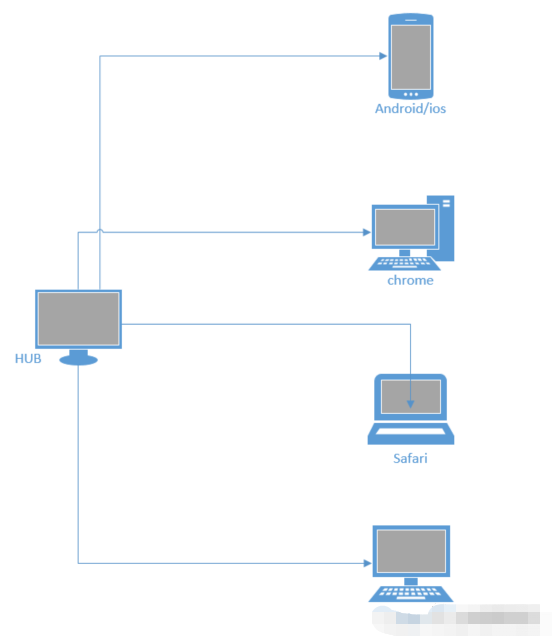
3.2 When to use ?
At the same time in different browsers 、 Run tests on the operating system and the machine ;
For compatibility testing ;
Reduce running time .
3.3 How to use it? ?
start-up Selenium Grid In three ways , A direct command line , Another way to use JSON The configuration file , The last one docker start-up .
3.3.1 Command line start
Simply put the next step , Please refer to other materials for details , function hub The machine is A, function node The machine is B.
To configure Java Environmental Science ;
browser ;
Browser corresponding driver;
download selenium server, take selenium-server-standalone-3.141.59.jar, machine A And machines B On ;
machine A Open the command line on the , Get into selenium server Under the table of contents , function :
ava -jar selenium-server-standalone-3.141.59.jar -role hub -port 5566
Browser input http://localhost:5566/grid/console ;
machine B Open the command line on the , Get into selenium server Under the table of contents , function :
java -jar selenium-server-standalone-3.141.59.jar -role node -hub http://192.168.1.100:5566/grid/register/ -port 5577
Refresh http://localhost:5566/grid/console ;
Run the test script , Will see in the machine B It's on Chrome browser , And will run test cases .
3.3.2 Json Profile startup
establish hub Of Json The configuration file ;
{
  "port": 4444,
  "newSessionWaitTimeout": -1,
  "servlets" : [],
  "withoutServlets": [],
  "custom": {},
  "capabilityMatcher": "org.openqa.grid.internal.utils.DefaultCapabilityMatcher",
  "registry": "org.openqa.grid.internal.DefaultGridRegistry",
  "throwOnCapabilityNotPresent": true,
  "cleanUpCycle": 5000,
  "role": "hub",
  "debug": false,
  "browserTimeout": 0,
  "timeout": 1800
}
The above code is saved as hub_config.json file , Put it in machine A Shanghe selenium server In the same way ;
establish nodes Of Json The configuration file ;
{
  "capabilities":
  [
    {
      "browserName": "firefox",
      "marionette": true,
      "maxInstances": 5,
      "seleniumProtocol": "WebDriver"
    },
    {
      "browserName": "chrome",
      "maxInstances": 5,
      "seleniumProtocol": "WebDriver"
    },
    {
      "browserName": "internet explorer",
      "platform": "WINDOWS",
      "maxInstances": 1,
      "seleniumProtocol": "WebDriver"
    },
    {
      "browserName": "safari",
      "technologyPreview": false,
      "platform": "MAC",
      "maxInstances": 1,
      "seleniumProtocol": "WebDriver"
    }
  ],
  "proxy": "org.openqa.grid.selenium.proxy.DefaultRemoteProxy",
  "maxSession": 5,
  "port": -1,
  "register": true,
  "registerCycle": 5000,
  "hub": "http:// This is the machine A Of ip:4444",
  "nodeStatusCheckTimeout": 5000,
  "nodePolling": 5000,
  "role": "node",
  "unregisterIfStillDownAfter": 60000,
  "downPollingLimit": 2,
  "debug": false,
  "servlets" : [],
  "withoutServlets": [],
  "custom": {}
}
Save as node_config.json file , Put it on the machine B Shanghe selenium server In the same way ;
machine A, function :
java -jar selenium-server-standalone-3.141.59.jar -role hub -hubConfig hub_config.json
machine B, function :
java -jar selenium-server-standalone-3.141.59.jar -role node -nodeConfig node_config.json
3.3.3 docker start-up
install docker;
start-up hub:
docker run -d -p 4444:4444 --name selenium-hub selenium/hub
start-up node, such as chrome browser ;
docker run -d --link selenium-hub:hub selenium/node-chrome
visit :http://localhost:4444/grid/console;
Run multiple node:
docker run -d --link selenium-hub:hub selenium/node-chrome
close docker-grid The order of :
docker stop $(docker ps -a -q), docker rm $(docker ps -a -q)
Be careful , In particular : About Selenium Grid Content reference and https://blog.csdn.net/lb245557472/article/details/91966770
4 Part of the source code description
class DesiredCapabilities(object):
    """
    Set of default supported desired capabilities.

    Use this as a starting point for creating a desired capabilities object for
    requesting remote webdrivers for connecting to selenium server or selenium grid.

    Usage Example::

        from selenium import webdriver

        selenium_grid_url = "http://198.0.0.1:4444/wd/hub"

        # Create a desired capabilities object as a starting point.
        capabilities = DesiredCapabilities.FIREFOX.copy()
        capabilities['platform'] = "WINDOWS"
        capabilities['version'] = "10"

        # Instantiate an instance of Remote WebDriver with the desired capabilities.
        driver = webdriver.Remote(desired_capabilities=capabilities,
                                  command_executor=selenium_grid_url)

    Note: Always use '.copy()' on the DesiredCapabilities object to avoid the side
    effects of altering the Global class instance.

    """

    FIREFOX = {
        "browserName": "firefox",
        "marionette": True,
        "acceptInsecureCerts": True,
    }

    INTERNETEXPLORER = {
        "browserName": "internet explorer",
        "version": "",
        "platform": "WINDOWS",
    }

    EDGE = {
        "browserName": "MicrosoftEdge",
        "version": "",
        "platform": "WINDOWS"
    }
#  The rest of the source code is omitted
From source code , The following describes the browser system :
browserName: browser
version: Operating system version
platform: operating system
I recommend one 【Python Automated test communication group :746506216】, We can discuss communication software testing together , Learn software testing together 、 Interview and other aspects of software testing , Help you advance quickly Python automated testing / Test Development , On the road to high pay .
Friends who like software testing , If my blog helps you 、 If you like my blog content , please “ give the thumbs-up ” “ Comment on ” “ Collection ” One Key triple connection !
边栏推荐
- Caused by:org.gradle.api.internal.plugins . PluginApplicationException: Failed to apply plugin
- 浅谈专项测试之弱网络测试
- [postman] the monitors monitoring API can run periodically
- Caused by:org. gradle. api. internal. plugins . PluginApplicationException: Failed to apply plugin
- 在uni-app中使用腾讯视频插件播放视频
- Digital triangle model acwing 1015 Picking flowers
- Commodity price visualization
- Left matching principle of joint index
- 进程和线程的理解
- G - Supermarket
猜你喜欢

Properties file

ICLR 2022 spotlight | analog transformer: time series anomaly detection method based on correlation difference
【Postman】Collections配置运行过程
Coordinatorlayout+nestedscrollview+recyclerview pull up the bottom display is incomplete
isam2运行流程
Customize the gateway filter factory on the specified route
【API接口工具】postman-界面使用介绍
在uni-app中使用腾讯视频插件播放视频
【Postman】Collections-运行配置之导入数据文件
【eolink】PC客户端安装
随机推荐
多线程应用的测试与调试
[wechat applet] build a development tool environment
[ram IP] introduction and experiment of ram IP core
一文揭开,测试外包公司的真 相
[eolink] PC client installation
Nodejs realizes the third-party login of Weibo
Caused by:org.gradle.api.internal.plugins . PluginApplicationException: Failed to apply plugin
Customize the gateway filter factory on the specified route
IDEA 新UI使用
G - Supermarket
ESP32 ESP-IDF看门狗TWDT
Function of contenttype
把el-tree选中的数组转换为数组对象
Manage configuration using Nacos
JWT-JSON WEB TOKEN
Redis 核心技术与实战之 基本架构:一个键值数据库包含什么?
[postman] collections - run the imported data file of the configuration
Buuctf-[[gwctf 2019] I have a database (xiaoyute detailed explanation)
Software test interview questions - Test Type
Thoughts on data security (Reprint)