当前位置:网站首页>QT implementation window gradually disappears qpropertyanimation+ progress bar
QT implementation window gradually disappears qpropertyanimation+ progress bar
2022-07-06 16:17:00 【Larry_ Yanan】
Meet a need , of FTP Upload , I plan to make a progress bar display , Finally, the gradient disappears such an effect . The first is to verify the possibility of gradual disappearance , So I found out QPropertyAnimation This thing .
One 、QPropertyAnimation Animation gradient disappears
The specific code is as follows :
QPropertyAnimation *animation = new QPropertyAnimation(this,"windowOpacity");
animation->setDuration(1000);
animation->setStartValue(1);
animation->setEndValue(0);
animation->start();
connect(animation,SIGNAL(finished()),this,SLOT(animation_close()));// Close after the effect is displayed
You can see , The code is very clean , In a few words, you can finish the effect of gradual disappearance .
1.new when ,windowOpacity That's the window / Opacity of components , It means that the next animation effect corresponds to the attribute of opacity
2.setDuration, Set duration ,1000 That's one second
3.setStartValue and setEndValue, The start value and end value are set respectively
4.connect, After the animation, jump to the custom slot function animation_close(), Exit procedure .
It should be noted that , in the light of windowOpacity Come on ,1 It's completely opaque , and 0 It's completely transparent , You can set it from 0.5 To 0, You can also set 0.3 To 0, But if it's set to 10 To 0, So in the next 1 In seconds , front 900 Milliseconds are unchanged , final 100 Will quickly walk from 1 To 0 The gradual disappearance process of .
For other types of attribute settings , for example geometry, His setValue It's not 1 and 0 了 , It is QRect Rectangle class , For example, the following paragraph , stay 10 In seconds from (0,0) To (250,250), By the way, I enlarged the size .
QPropertyAnimation *animation = new QPropertyAnimation(this, "geometry");
animation->setDuration(10000);
animation->setStartValue(QRect(0, 0, 30, 30));
animation->setEndValue(QRect(250, 250, 100, 100));
As for why setStartValue You can pass different parameters , Then you have to know QVariant This class .
also this, It means the object of transmission , The object of this animation .
In this case , You can treat an object , Set the corresponding position 、 Size 、 transparency , And the animation with specified frame rate .
It can be expected that , If you design a round or spherical widget , Trigger through a series of customized animations , You can even make a pretty good scroll animation ( Guessing )
Reference resources :
QT Animation frame
QT Attribute animation simulation QPropertyAnimation Use
Two 、QProgressBar Progress bar
This part QT Designer It's in there , Just use it directly 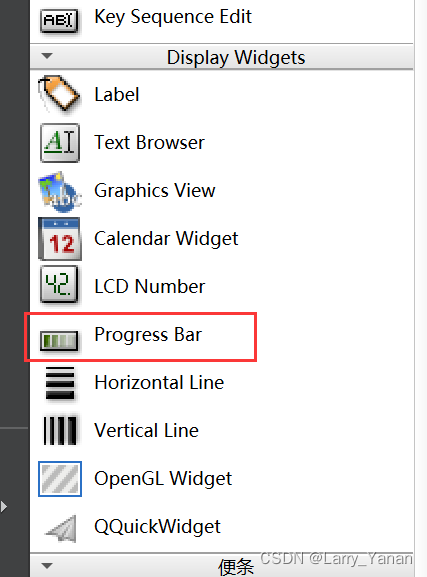
I think its default style is already very good-looking , Green , There is also a little flowing gradient effect .
If you are interested, you can search its style settings , There should be many kinds .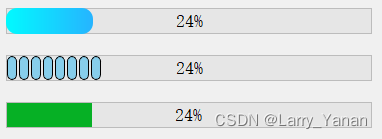
About the middle number , My side is on the right side by default , But the style sheet can be set as internal and intermediate
// Style sheets
QProgressBar#progressBar
{

text-align:center;
}
and 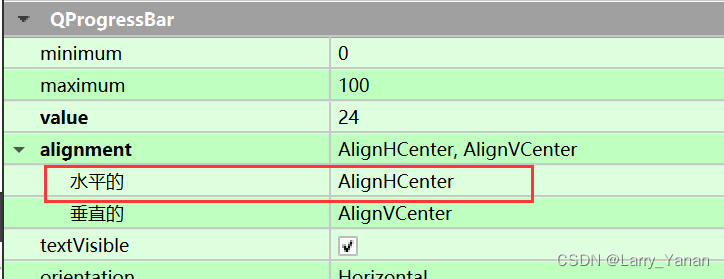
How to achieve the animation display of the progress bar , It's simple , Direct code
	timer = new QTimer;
	connect(timer,&QTimer::timeout, this, &MainWidget::timer_timeout);
	ui->progressBar->setRange(0,100);
	i= 0;
	ui->progressBar->setValue(i);
	timer->start(1000);

......
void MainWidget::timer_timeout()
{

    i+=10;
    ui->progressBar->setValue(i);
    if(i==100)
    {

        timer->stop();
        i=0;
        on_closeButton_clicked();

    }

}
ui->progressBar->setRange(0,100); Is the setting range ,ui->progressBar->setValue(i); Is to set the current value
Made a timer , Simulate the animation display of the progress bar , The effect is OK. .
边栏推荐
- 7-1 understand everything (20 points)
- 1605. Sum the feasible matrix for a given row and column
- (POJ - 3579) median (two points)
- Browser print margin, default / borderless, full 1 page A4
- [exercise-8] (UVA 246) 10-20-30== simulation
- Classic application of stack -- bracket matching problem
- AcWing:第56场周赛
- Suffix expression (greed + thinking)
- 628. Maximum product of three numbers
- b站 实时弹幕和历史弹幕 Protobuf 格式解析
猜你喜欢

628. Maximum product of three numbers

Openwrt build Hello ipk
“鬼鬼祟祟的”新小行星将在本周安全掠过地球:如何观看
Li Kou: the 81st biweekly match

Flask框架配置loguru日志庫

Vs2019 initial use

C language must memorize code Encyclopedia
Pytorch extract skeleton (differentiable)
1903. Maximum odd number in string
1689. Ten - the minimum number of binary numbers
随机推荐
window11 conda安装pytorch过程中遇到的一些问题
New to redis
Openwrt source code generation image
Alice and Bob (2021 Niuke summer multi school training camp 1)
Interesting drink
QNetworkAccessManager实现ftp功能总结
Penetration test (4) -- detailed explanation of meterpreter command
Differential (one-dimensional, two-dimensional, three-dimensional) Blue Bridge Cup three body attack
Determine the Photo Position
Configuration du cadre flask loguru log Library
Hdu-6025-prime sequence (girls' competition)
QT实现窗口渐变消失QPropertyAnimation+进度条
Codeforces Round #802(Div. 2)A~D
Nodejs crawler
读取和保存zarr文件
Codeforces Round #797 (Div. 3)无F
[exercise-7] (UVA 10976) fractions again?! (fraction split)
E. Breaking the Wall
PySide6 信号、槽
input 只能输入数字,限定输入