当前位置:网站首页>Mendeley -- a free document management tool that automatically inserts references into papers
Mendeley -- a free document management tool that automatically inserts references into papers
2022-07-07 10:37:00 【Sister Tina】
Are you still entering references manually like this ?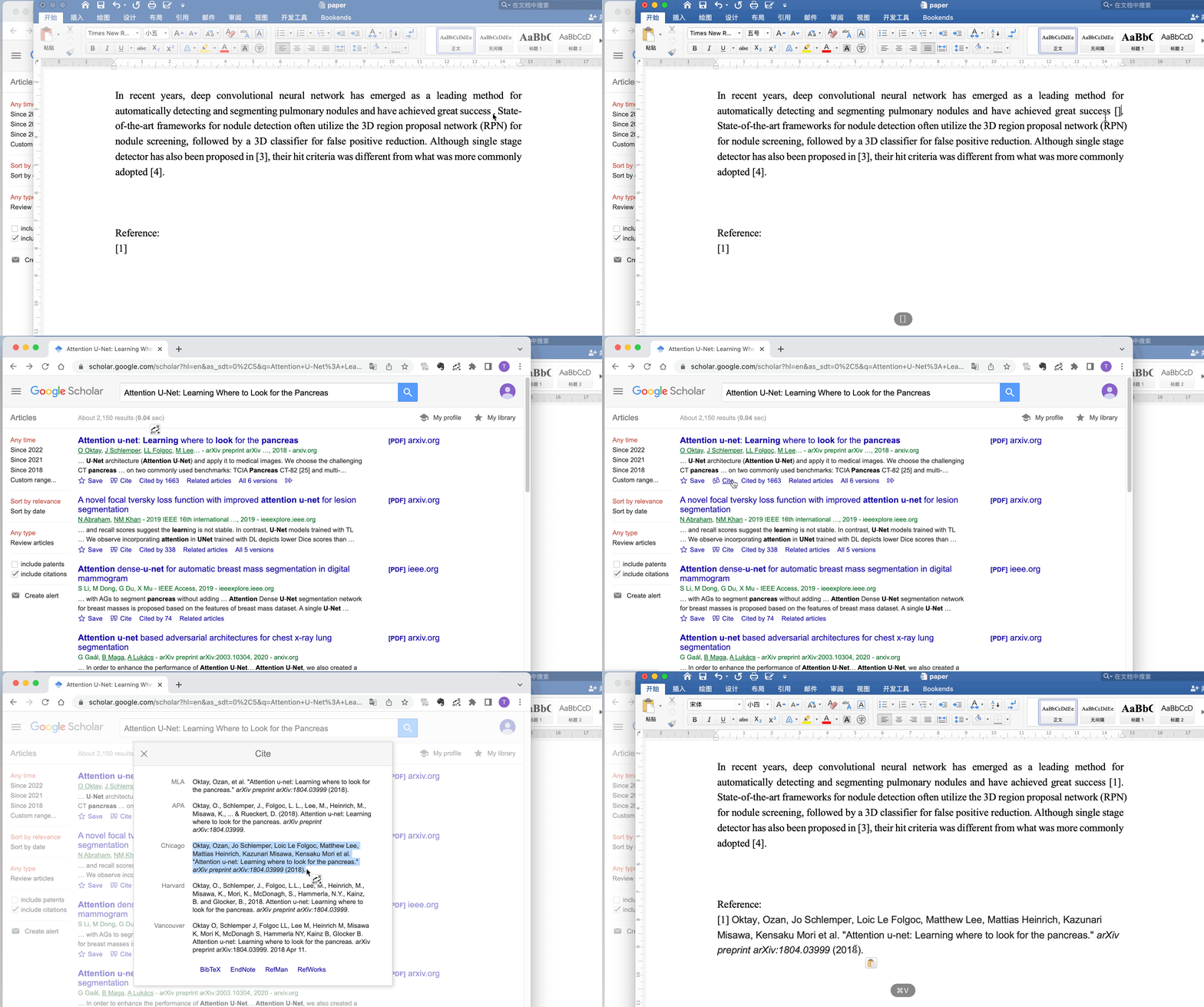
I used to feel that I was writing my thesis for the last time , I don't want to study literature management , I don't want to learn to automatically insert references . When I was writing my graduation thesis , Just like this. , Manually add documents one by one . It's not easy to add , It is found that the order of references is wrong , And then one by one . reference 50 Multiple , Leng is finished one by one .
Until I found this useful tool , Only then discovered , Inserting references can be like this Easy!
[ File size up , Can be found in gzh See... In the corresponding article ]
Pictured , Adding and modifying references becomes simple , You just need to select the references to quote .
Of course , There are many tools for document management . Well known EndNote. But it is a paid software , You have to work hard to find the cracked version , And it is relatively difficult to use .
therefore , I recommend Mendeley. Easy to get started , Interface simple .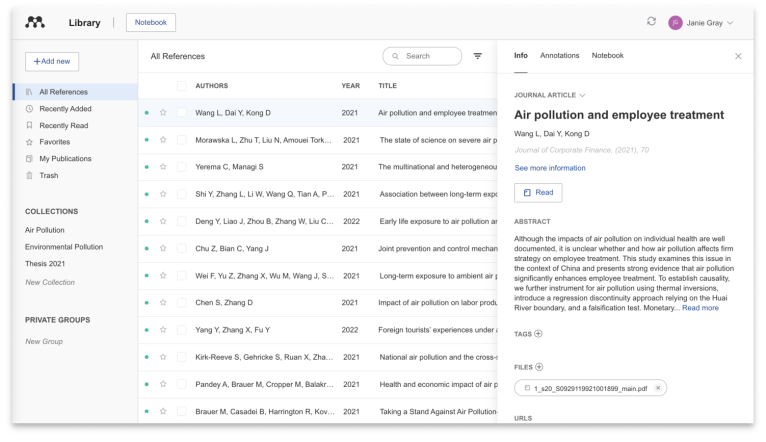
About Mendeley
Mendeley Is a free Reference management tools , Collection of documents , management , Search for , read , Annotations and references, etc . also Mendeley It also has the functions of multi platform synchronization and cloud backup . Its functions include :
- Automatically generate references
- Facilitate online collaboration with other researchers
- It is convenient to import papers from other research software
- Find relevant papers based on what you read
- Access your thesis online anytime, anywhere
Mendeley There are two versions 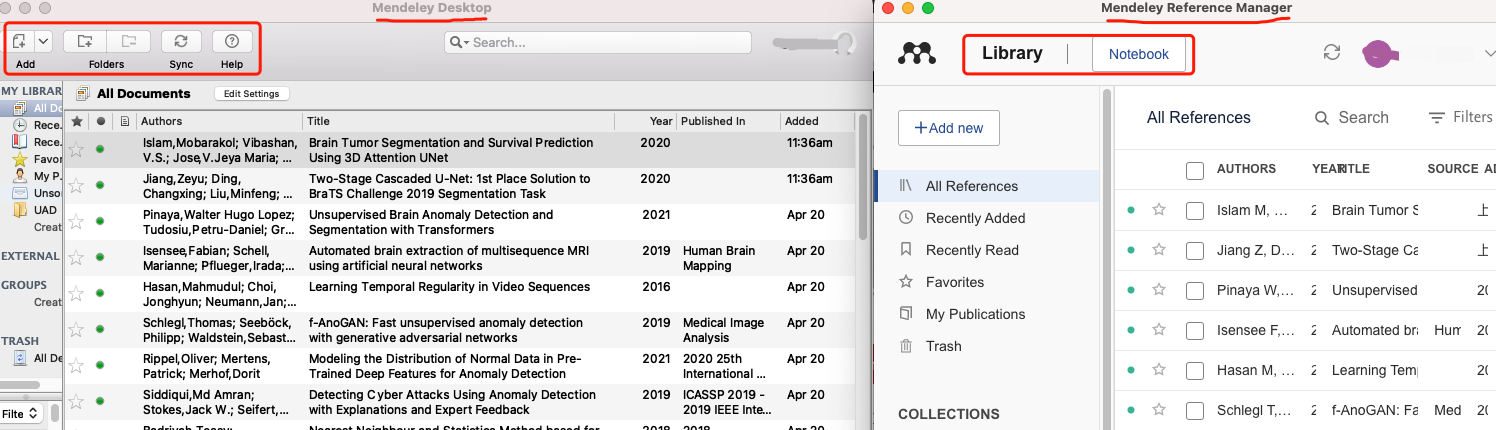
- Mendeley Desktop
- Mendeley Reference Manager
There are differences between these two editions in citing references . I will compare later .
The description of these two versions on the official website blog 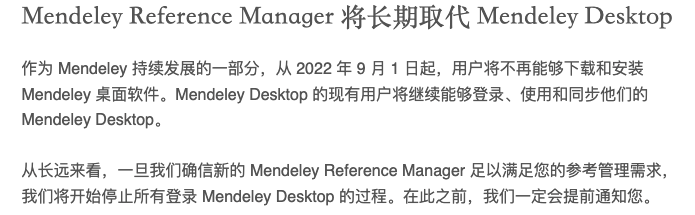
so , The official website is more recommended Mendeley Reference Manager( hereinafter referred to as MRM), I used to use Mendeley Desktop ( hereinafter referred to as MD), Personally, I think Mendeley Desktop The interface of is simpler and more beautiful , But this year 9 Download stopped in January , So I recommend you to download Mendeley Reference Manager.
however , At present, both versions can be downloaded , Used together .
How to download

Go to the official website to download the corresponding version and install it .
Be careful because MRM Relatively new ,B The tutorials on the website and other websites are all about MD Of . Don't confuse .
Today's tutorial only talks about how to add references to the paper , For these two tools Document management Part omitted . This part , I Baidu for a while , There are many articles and videos (B standing ), No, go search and have a look ~
Use Mendeley Desktop Insert references
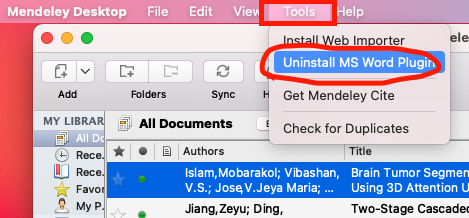
Click... Above the software tool, Check to see if it is installed MS word Plugin, When installed, it will display ’Uninstall xxxx’, If it shows ‘Install xxx’, Click Install .
After installed , Will be in Word > The contents in the box are displayed in the quotation column .
Come here , Even if it can be used normally
Functions of these functions :
- insert or edit citation: Insert and edit references , Used to insert references in the text . But you have inserted , But when you want to modify , Click on the inserted literature , This function will become
edit citations, Click on it , You can modify . - merge citations: Merge multiple literatures . Here, for example. [1][2][3] Several documents have been inserted , Want to merge into [1-3] When using this function .
- insert Bibliography: Insert references .

- style: Reference style . For example, it is used in the text [1], still (1), Or write the author's name directly , also reference What is the format of . All need to be submitted according to the requirements of journals . Here, the format requirements of most journals are included , What journal to vote for , Just change it into the style of periodicals .
Demo sample
【 Video available on gzh See... In the corresponding article 】
Use Mendeley Reference Manager Insert references
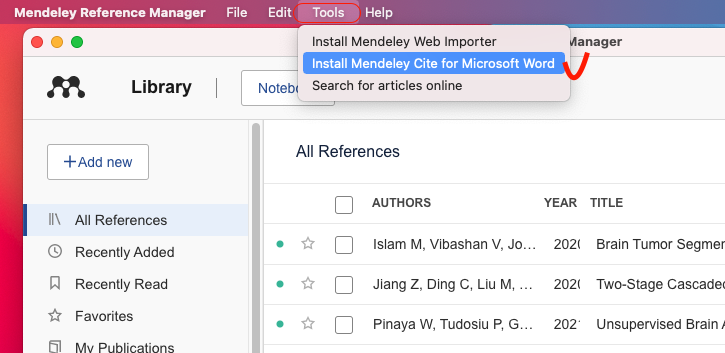
Click... Above the software tool, Check to see if it is installed Mendeley Cite,MD It also has this function , It can also be in MD Installation on Mendeley Cite.
Mendeley Cite yes microsoft word A plug-in for , Click the installation in the above figure to jump to the following interface , Follow the instructions to install .
Check that it is installed , Can open word, Appear in the quotation Mendeley Cite logo That means the installation is successful .
Click on Mendeley Cite The following interface will appear 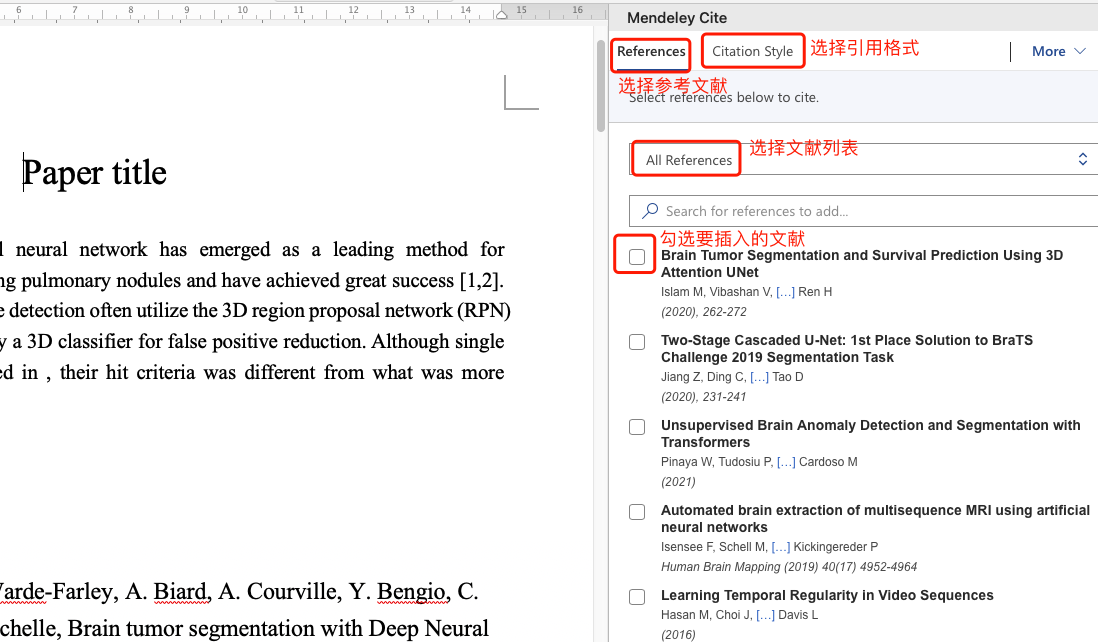
- References: Select the literature to insert
- Citation style: Select document format
- more: Click on more You can choose insert Bibliography( Insert references ).
Demo sample
【 Video available on gzh See... In the corresponding article 】
Articles are constantly updated , You can pay attention to the official account of WeChat 【 Medical image AI combat camp 】 Get the latest , The official account of the frontier technology in the field of medical image processing . Stick to the practice , Take you hand in hand to do the project , Play the game , Write a paper . All original articles provide theoretical explanation , Experimental code , experimental data . Only practice can grow faster , Pay attention to our , Learn together ~
I am a Tina, I'll see you on our next blog ~
Working during the day and writing at night , cough
If you think it's well written, finally , Please thumb up , Comment on , Collection . Or three times with one click 
边栏推荐
- Gym installation pit records
- [homework] 2022.7.6 write your own cal function
- Schnuka: machine vision positioning technology machine vision positioning principle
- [recommendation system 02] deepfm, youtubednn, DSSM, MMOE
- OpenGL glLightfv 函数的应用以及光源的相关知识
- 无法打开内核设备“\\.\VMCIDev\VMX”: 操作成功完成。是否在安装 VMware Workstation 后重新引导? 模块“DevicePowerOn”启动失败。 未能启动虚拟机。
- P1223 queuing for water /1319: [example 6.1] queuing for water
- 原型与原型链
- 对word2vec的一些浅层理解
- MONAI版本更新到 0.9 啦,看看有什么新功能
猜你喜欢
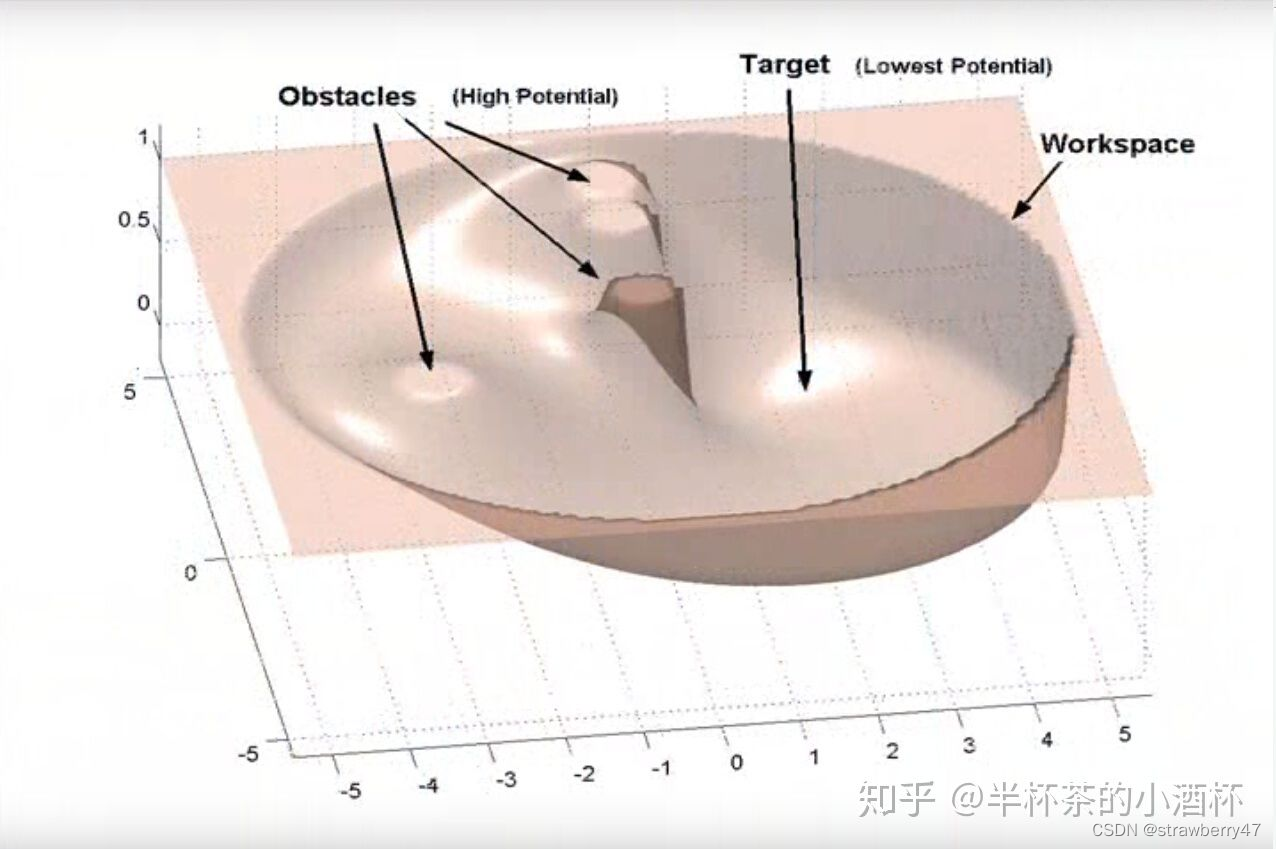
Trajectory planning for multi robot systems: methods and Applications Overview reading notes
【实战】霸榜各大医学分割挑战赛的Transformer架构--nnFormer

How much review time does it usually take to take the intermediate soft exam?

Basic introduction of yarn and job submission process
![P1031 [noip2002 improvement group] average Solitaire](/img/ba/6303f54d652fa7aa89440e314f8718.png)
P1031 [noip2002 improvement group] average Solitaire
2022年上半年5月网络工程师试题及答案
![[STM32] solution to the problem that SWD cannot recognize devices after STM32 burning program](/img/03/41bb3870b9a6c2ee66099abac08eb3.png)
[STM32] solution to the problem that SWD cannot recognize devices after STM32 burning program

枪出惊龙,众“锁”周之
Some superficial understanding of word2vec

成为优秀的TS体操高手 之 TS 类型体操前置知识储备
随机推荐
中级软件评测师考什么
BigDecimal value comparison
求最大公约数与最小公倍数(C语言)
长列表性能优化方案 memo
路由器开发知识汇总
那些易混淆的概念(三):function和class
2022年上半年5月网络工程师试题及答案
Common shortcut keys in IDA
P1031 [noip2002 improvement group] average Solitaire
CAS mechanism
软考信息处理技术员有哪些备考资料与方法?
[système recommandé 01] rechub
【推薦系統 01】Rechub
Cluster task scheduling system lsf/sge/slurm/pbs based on HPC scenario
[recommendation system 01] rechub
P1031 [NOIP2002 提高组] 均分纸牌
[detailed explanation of Huawei machine test] tall and short people queue up
BigDecimal数值比较
How to successfully pass the senior system architecture designer in the second half of the year?
[email protected] can help us get the log object quickly