当前位置:网站首页>Shape template matching based on Halcon learning [v] find_ cocoa_ packages_ max_ deformation. Hdev routine
Shape template matching based on Halcon learning [v] find_ cocoa_ packages_ max_ deformation. Hdev routine
2022-07-05 07:55:00 【BoomBiuBiu】
* This sample program demonstrates how to use shape based matching to find slightly deformed objects , Using parameter “ Maximum deformation ”;
* Please note that , To find deformed objects , Shape based matching can be applied using parameters “ Maximum deformation ” or - Apply locally deformable matching ;
* In this case , The task is to use shape based matching and parameters “ Maximum deformation ”. You can compare it with the example “ Find a deformable cocoa bag ”, Which uses local deformation matching to solve the same task . Shape based matching is significantly faster , But local deformable matching is more robust to different types of images
dev_update_off ()
* Read images
read_image (ModelImage, 'food/cocoa_package_model')
* close window
dev_close_window ()
* Open window adaptive image
dev_open_window_fit_image (ModelImage, 0, 0, -1, -1, WindowHandle)
* Set display font
set_display_font (WindowHandle, 16, 'mono', 'true', 'false')
First step : Create a template
* Create and display shape models
create_shape_model (ModelImage, 'auto', rad(-20), rad(40), 'auto', 'auto', 'use_polarity', [40,60,'auto_min_size'], 10, ModelID)

* Get the outline of the template
* notes : The position of the template will return to the origin
get_shape_model_contours (ModelContours, ModelID, 1)

* Get the row and column coordinates of the region
area_center (ModelImage, Area, Row, Column)

* Affine transformation
hom_mat2d_identity (HomMat2DIdentity)
hom_mat2d_translate (HomMat2DIdentity, Row, Column, HomMat2DTranslate)
affine_trans_contour_xld (ModelContours, ContoursAffineTrans, HomMat2DTranslate)

* Set a series of parameters
dev_set_line_width (2)
dev_set_color ('yellow')
dev_display (ModelImage)
dev_display (ContoursAffineTrans)
disp_message (WindowHandle, 'Model image and contours', 'window', 12, 12, 'black', 'true')
disp_continue_message (WindowHandle, 'black', 'true')
stop ()
2、 Start template matching
* The picture has 13 Zhang
NumImages := 13
* To begin for loop
for Index := 1 to NumImages by 1
    * Read the picture
    read_image (Image, 'food/cocoa_packages_' + Index$'02')

    * Reduce image resolution to improve speed
    dev_resize_window_fit_image (Image, 0, 0, -1, -1)
    * display picture
    dev_display (Image)

    disp_message (WindowHandle, 'Search...', 'window', 12, 12, 'black', 'true')
    * Time before looking for template
    count_seconds (S1)

    * Find the deformation model in the search image
    * And display the results

    * Start looking for templates
    find_shape_model (Image, ModelID, rad(-20), rad(40), 0.6, 0, 0.5, ['least_squares','max_deformation 16'], 0, 0.4, Row, Column, Angle, Score)
    * Time after finding the template
    count_seconds (S2)
    Time := (S2 - S1) * 1000

    * Set the color
    dev_set_color ('green')
    * Display the matching results
    dev_display_shape_matching_results (ModelID, 'green', Row, Column, Angle, 1, 1, ModelID)
    disp_message (WindowHandle, |Score| + ' matches found in ' + Time$'3.1f' + ' ms', 'window', 12, 12, 'black', 'true')

    * Show the results below the picture
    disp_message (WindowHandle, 'Score: ' + Score$'.2f', 'image', 350, Column - 80, 'black', 'true')

    * If the index is smaller than the number of pictures , Continued to
    if (Index < NumImages)
        disp_continue_message (WindowHandle, 'black', 'true')
        stop ()
    endif
endfor

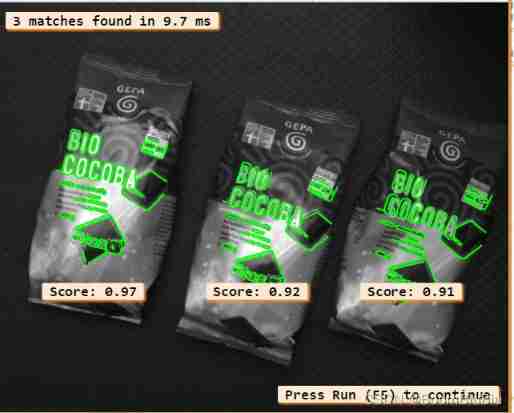
3、 Clear template
clear_shape_model (ModelID)notes : Here's how to find template parameters
* Start looking for templates
    find_shape_model (Image, ModelID, rad(-20), rad(40), 0.6, 0, 0.5, ['least_squares','max_deformation 16'], 0, 0.4, Row, Column, Angle, Score)
1、 In some applications , The accuracy requirement is very high . In these cases , The attitude of the model can be determined by least square adjustment . And “interpolation” contrary , This mode requires additional computation time . Different least squares methods can be used to adjust the mode ('least_squares','least_squares_high' and 'least_squares_very_high') To determine the accuracy of the minimum distance being searched . However , The higher the selection accuracy , The longer the sub-pixel extraction will take . Usually ,SubPixel Should be set to “interpolation”. If the least square adjustment is needed , You should choose “least_squares”, Because of this Will result in the best trade-off between runtime and accuracy .
2、 An object that is slightly deformed relative to the model , In some cases , Cannot be found or even if found , Accuracy is also very low . For such objects , It can be in the parameter SubPixel Maximum allowable object deformation for medium and extra frontal delivery . Deformation must be specified in pixels . This can be done by passing optional parameter values “max_deformation”, Followed by a 0 To 32 The integer value between ( In the same string ), This value specifies the maximum deformation . for example , If the shape of the object can deform as much as... Relative to the shape stored in the model 2 Pixel , Must be in SubPixel Pass values in “max_deformation 2”. Transfer value “max_deformation 0” when , When searching, the object must not be deformed , And not set “max_deformation” It does the same thing .
3、 Please note that , When the maximum deformation value is set high, it usually leads to an increase in running time . Besides , Select the higher the deformation value , The higher the risk of discovering instances of the wrong model . These two problems mainly appear when searching for small objects or objects with fine structures . This is because this kind of object will lose its characteristic shape when it is highly deformed , And feature shape is very important for powerful search . Also pay attention to , For higher deformations , If there is clutter near the object , The accuracy of partially occluded objects may be reduced . therefore , The maximum deformation should be as small as possible , Set it higher only when necessary .
边栏推荐
- [professional literacy] core conferences and periodicals in the field of integrated circuits
- Acwing-宠物小精灵之收服-(多维01背包+正序倒序+两种形式dp求答案)
- MySQL blind note common functions
- Could NOT find XXX (missing: XXX_LIBRARY XXX_DIR)
- STM32 knowledge points
- Global and Chinese market for blood typing 2022-2028: Research Report on technology, participants, trends, market size and share
- Network communication process
- 找不到实时聊天软件?给你推荐电商企业都在用的!
- About yolov3, conduct map test directly
- Development tools -- gcc compiler usage
猜你喜欢
A complete set of indicators for the 10000 class clean room of electronic semiconductors
UEFI development learning 6 - creation of protocol
Cadence simulation encountered "input.scs": can not open input file change path problem
Markdown tips

研究发现,跨境电商客服系统都有这五点功能!
Network communication process
Numpy——1. Creation of array
Numpy——1.數組的創建

Significance and requirements of semiconductor particle control
Opendrive arc drawing script
随机推荐
Process communication mode between different hosts -- socket
Batch modify the txt file code to UTF-8 (notepad++)
·Practical website·
Baiwen 7-day smart home learning experience of Internet of things
Record the opening ceremony of Beijing Winter Olympics with display equipment
Could NOT find XXX (missing: XXX_LIBRARY XXX_DIR)
Record the visual shock of the Winter Olympics and the introduction of the screen 2
[popular science] some interesting things that I don't know whether they are useful or not
P3D gauge size problem
Esmini longspeedaction modification
Use stm32cubemx tool to write the demo program of FreeRTOS
PIL's image tool image reduction and splicing.
Global and Chinese market of digital shore durometer 2022-2028: Research Report on technology, participants, trends, market size and share
软件设计师:03-数据库系统
Linked list (establishment, deletion, insertion and printing of one-way linked list)
Oracle triggers and packages
How to define guid in AMI code
Define in and define out
Altium Designer 19.1.18 - 隐藏某一个网络的飞线
Ads usage skills