当前位置:网站首页>lua 如何 实现一个unity协程的工具
lua 如何 实现一个unity协程的工具
2022-08-04 23:59:00 【接啊是哦ida】
Mcourtinue 是基于 延时回调 和 lua 协同程序 制作的类似unity协程的工具
- 支持异步将函数挂起 支持函数中添加等待时间 支持等待一个异步函数
- 在控制界面一些播放顺序的时候非常好用
首先 有做一个功能 就能 在unity中 做一个能能够延时回调的 工具
--暂且这个能够计时器回调的工具 就 叫 Delay(delayTime,callBack)
Delay(1,function()
print(“ok”)
end )
--意思就是1 秒钟之后 打印ok
好,现在假设 我们已经有了一个这样的函数
然后上代码
local Mcourtinue ={
    }
--重置
function Mcourtinue:Rest()
    self.ForcePass = false
end
--检查是否强制跳过
function Mcourtinue:CheckForcePass()
    if self.ForcePass or self.Destoryed then
        return true
    end
    return false
end

--开启一个协同程序
function Mcourtinue:Start(view, func)
    self.view = view
    self.m_start = func
    self:Rest()
    self.co =
        coroutine.create(
        function()
            self.m_start(view, self)
        end
    )
    self:Resume()
end

--唤醒
function Mcourtinue:Resume()
    self:Next()
end

--下一步
function Mcourtinue:Next()
    local result, params = coroutine.resume(self.co)
    if not result then
        error("协同运行过程中出错拉" .. coroutine.status(self.co))
    end
    return result, params
end

--delay= nil : 挂起等待
--delay= 数字 : 等待时间
--delay= 函数 : 等待一个
function Mcourtinue:Wait(delay, param)
    if not self.co then
        error("co 是 null")
    end

    if self:CheckForcePass() then --如果跳过就强制把携程走完 - 销毁的时候用
        return
    end
    if not delay then
        coroutine.yield(self.co)
        return
    end

    if type(delay) == "function" then
        return delay(self.view, self, param)
    end

    if type(delay) ~= "number" then
        error("不支持的类型")
    end

    self.WatiTimeId =
        LuaTimerManager:Delay(
        delay,
        function()

            self:Next()
        end
    )
    coroutine.yield(self.co)
end
-- 销毁界面的时候 记得调用destory
function Mcourtinue:OnDestory()
    self.Destoryed = true
    while self.co and coroutine.status(self.co) ~= "dead" do
        local result = self:Next()
        if not result then
            break
        end
    end
    for k, v in pairs(self) do
        self[k] = nil
    end
end

return Mcourtinue
下面展示一下使用范例
--Mcourtinue 是基于 延迟函数 和 lua 协同程序 制作的类似unity协程的工具

--支持异步将函数挂起 支持函数中添加等待时间 支持等待一个异步函数

--例子 创建一个协同程序 先播放A特效 然后等待3s 再每隔0.1s播放B特效10次 等待按钮点击确认之后 播放C特效

local TempView={
    }   --模拟窗口

function TempView:ctor()
    --创建一个携程控制器
    self.co = require("......./Mcourtinue")  --获取那个控制器

    --self.TmpPlay为要启动的协同函数
    self.co:Start(self, self.TempPlay)

    self.continueBtn:addOnClick(
        function ()
            self.McourtinueCtrl:Next()   --点击 btn就可以从上次挂起的地方往下继续了
        end
    )
end

--co:Wait() 不加参数 就是挂起函数 , 填数字是等待时间, 填函数 是等待这个函数执行完再走下面

--协同函数 默认第一个参数为co
function TempView:TempPlay(co)  --这里的co就是那个协同程序

    self:play_A_Effect_1()   --播放A特效
    co:Wait(3)
    -- local M= co:Wait(self:play_A_Effect_2) --与上面两行等效 ,可以接收等待函数的返回值
    -- print(M) ->1111
    for i=1,10 do
        self:play_B_Effect()   --播放B特效
        co:Wait(0.1)
    end
    co:Wait()              --这里会一直等待 直到 有地方执行co:Next()
    self:play_C_Effect()
end

function TempView:play_B_Effect()
    print("播放了特效B")
end

function TempView:play_A_Effect_1()
    print("播放了特效A")
end
--Wait接受的函数 第一个参数为co
function TempView:play_A_Effect_2(co)
    print("播放了特效A")
    co:Wait(3)
    return 1111
end

function TempView:Destory()
    self.co:Destory() --销毁的时候 也要执行一下
end
欢迎大家指出问题
边栏推荐
- jenkins send mail system configuration
- 统计单词(DAY 101)华中科技大学考研机试题
- 中日颜色风格
- 头脑风暴:完全背包
- 对写作的一些感悟
- The master teaches you the 3D real-time character production process, the game modeling process sharing
- Security software Avast and Symantec NortonLifeLock merge with UK approval, market value soars 43%
- 注解@EnableAutoConfiguration的作用以及如何使用
- Uniapp dynamic sliding navigation effect demo (finishing)
- [LeetCode] Summary of Matrix Simulation Related Topics
猜你喜欢
KT148A语音芯片怎么烧录语音进入芯片里面通过串口和电脑端的工具

VMware NSX 4.0 -- 网络安全虚拟化平台
【论文笔记】—低照度图像增强—Unsupervised—EnlightenGAN—2019-TIP
uniapp横向选项卡(水平滚动导航栏)效果demo(整理)

Essential knowledge for entry-level 3D game modelers
2022 Niu Ke Summer Multi-School Training Camp 5 (BCDFGHK)

Modelers experience sharing: model study method

在线中文姓名生成工具推荐
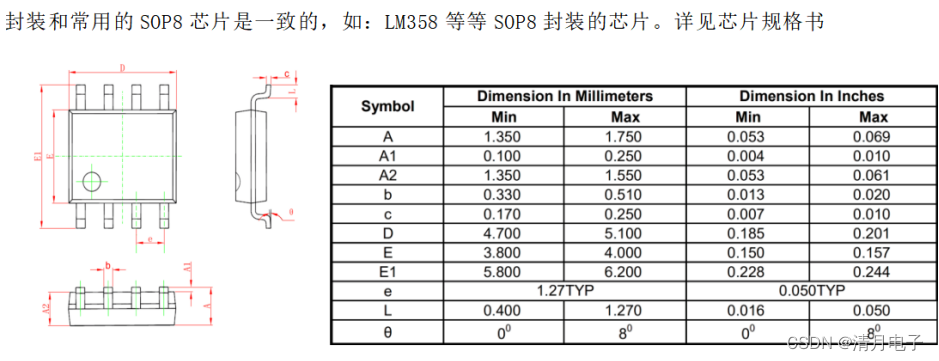
KT148A语音芯片ic工作原理以及芯片的内部架构描述
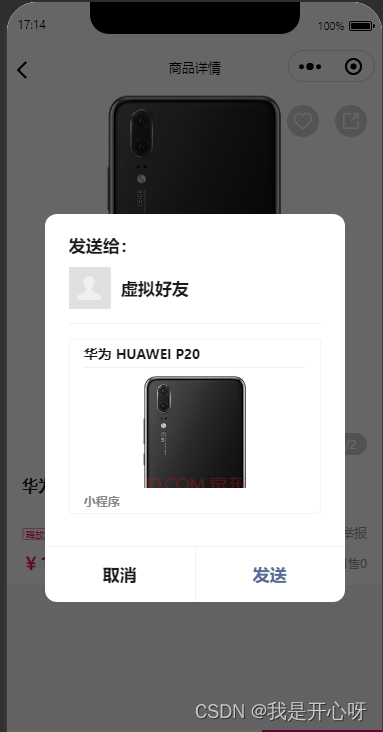
uniapp 分享功能-分享给朋友群聊朋友圈效果(整理)
随机推荐
网站最终产品页使用单一入口还是多入口?
The role of @Async annotation and how to implement asynchronous listening mechanism
Three tips for you to successfully get started with 3D modeling
node中package解析、npm 命令行npm详解,node中的common模块化,npm、nrm两种方式查看源和切换镜像
The market value of 360 has evaporated by 390 billion in four years. Can government and enterprise security save lives?
NebulaGraph v3.2.0 Release Note, many optimizations such as the performance of querying the shortest path
what is MVCC
#yyds dry goods inventory #Switching equipment serious packet loss troubleshooting
吐槽 | 参加IT培训的正确姿势
子连接中的参数传递
npm基本操作及命令详解
Day118.尚医通:订单列表、详情、支付
SQL关联表更新
10 个关于 Promise 和 setTimeout 知识的面试题,通过图解一次说透彻
Literature reading ten - Detect Rumors on Twitter by Promoting Information Campaigns with Generative Adversarial Learn
【CVA估值训练营】财务建模指南——第一讲
uniapp横向选项卡(水平滚动导航栏)效果demo(整理)
《MySQL入门很轻松》第2章:MySQL管理工具介绍
话题 | 雾计算和边缘计算有什么区别?
NebulaGraph v3.2.0 Release Note,对查询最短路径的性能等多处优化