当前位置:网站首页>Unity3d camera, the keyboard controls the front and rear left and right up and down movement, and the mouse controls the rotation, zoom in and out
Unity3d camera, the keyboard controls the front and rear left and right up and down movement, and the mouse controls the rotation, zoom in and out
2022-07-06 12:33:00 【SQ Liu】
Unity3D When running scenarios in , Realize the front of the camera 、 after 、 Left 、 Right 、 On 、 Next , And the zoom of the mouse wheel , Rotate the right mouse button . Close test effectively , For reference .
Introduction to key functions :W—— front ;S—— after ;A—— Left ;D—— Right ;Q—— falling ;E—— rising ; Right mouse button —— rotate ; Mouse wheel —— Shrinkage .
Tourcamera The script needs to be hung on the camera component .
You also need to add “Physics Raycaster” Components .
using System.Collections;
using System.Collections.Generic;
using UnityEngine;

public class Tourcamera : MonoBehaviour
{

    public Transform tourCamera;
    #region  Camera movement parameters
    public float moveSpeed = 1.0f;
    public float rotateSpeed = 90.0f;
    public float shiftRate = 2.0f;//  Hold down Shift Speed up
    public float minDistance = 0.5f;//  The minimum distance of the camera from an impenetrable surface ( Less than or equal to 0 Can penetrate any surface )
    #endregion

    #region  The velocity of motion and its velocity component in each direction
    private Vector3 direction = Vector3.zero;
    private Vector3 speedForward;
    private Vector3 speedBack;
    private Vector3 speedLeft;
    private Vector3 speedRight;
    private Vector3 speedUp;
    private Vector3 speedDown;
    #endregion
    void Start()
    {

        if (tourCamera == null) tourCamera = gameObject.transform;
        //  Prevent camera edges from penetrating
        //if (tourCamera.GetComponent<Camera>().nearClipPlane > minDistance / 3)
        //{

        // tourCamera.GetComponent<Camera>().nearClipPlane /= 3;
        //}
    }
    void Update()
    {

        GetDirection();
        //  Check whether it is too close to the impenetrable surface
        RaycastHit hit;
        while (Physics.Raycast(tourCamera.position, direction, out hit, minDistance))
        {

            //  Eliminate the velocity component perpendicular to the impenetrable surface
            float angel = Vector3.Angle(direction, hit.normal);
            float magnitude = Vector3.Magnitude(direction) * Mathf.Cos(Mathf.Deg2Rad * (180 - angel));
            direction += hit.normal * magnitude;
        }
        tourCamera.Translate(direction * moveSpeed * Time.deltaTime, Space.World);
    }
    private void GetDirection()
    {

        #region  Move faster
        if (Input.GetKeyDown(KeyCode.LeftShift)) moveSpeed *= shiftRate;
        if (Input.GetKeyUp(KeyCode.LeftShift)) moveSpeed /= shiftRate;
        #endregion

        #region  The keyboard moves
        //  Reset
        speedForward = Vector3.zero;
        speedBack = Vector3.zero;
        speedLeft = Vector3.zero;
        speedRight = Vector3.zero;
        speedUp = Vector3.zero;
        speedDown = Vector3.zero;
        //  Get key input
        if (Input.GetKey(KeyCode.UpArrow) || Input.GetKey(KeyCode.W)) speedForward = tourCamera.forward;
        if (Input.GetKey(KeyCode.DownArrow) || Input.GetKey(KeyCode.S)) speedBack = -tourCamera.forward;
        if (Input.GetKey(KeyCode.LeftArrow) || Input.GetKey(KeyCode.A)) speedLeft = -tourCamera.right;
        if (Input.GetKey(KeyCode.RightArrow) || Input.GetKey(KeyCode.D)) speedRight = tourCamera.right;
        if (Input.GetKey(KeyCode.E)) speedUp = Vector3.up;
        if (Input.GetKey(KeyCode.Q)) speedDown = Vector3.down;
        direction = speedForward + speedBack + speedLeft + speedRight + speedUp + speedDown;
        #endregion

        #region  Mouse rotation
        if (Input.GetMouseButton(1))
        {

            //  Turn the camera towards
            tourCamera.RotateAround(tourCamera.position, Vector3.up, Input.GetAxis("Mouse X") * rotateSpeed * Time.deltaTime);
            tourCamera.RotateAround(tourCamera.position, tourCamera.right, -Input.GetAxis("Mouse Y") * rotateSpeed * Time.deltaTime);
            //  Turn the speed direction
            direction = V3RotateAround(direction, Vector3.up, Input.GetAxis("Mouse X") * rotateSpeed * Time.deltaTime);
            direction = V3RotateAround(direction, tourCamera.right, -Input.GetAxis("Mouse Y") * rotateSpeed * Time.deltaTime);
        }
        #endregion

        #region  Mouse wheel effect
        if (Input.GetAxis("Mouse ScrollWheel") < 0)
        {

            if (Camera.main.fieldOfView <= 100)
                Camera.main.fieldOfView += 2;
            if (Camera.main.orthographicSize <= 20)
                Camera.main.orthographicSize += 0.5F;
        }
        //Zoom in
        if (Input.GetAxis("Mouse ScrollWheel") > 0)
        {

            if (Camera.main.fieldOfView > 2)
                Camera.main.fieldOfView -= 2;
            if (Camera.main.orthographicSize >= 1)
                Camera.main.orthographicSize -= 0.5F;
        }
        #endregion
    }

    public Vector3 V3RotateAround(Vector3 source, Vector3 axis, float angle)
    {

        Quaternion q = Quaternion.AngleAxis(angle, axis);//  Rotation coefficient
        return q * source;//  Return to target point
    }
}
边栏推荐
猜你喜欢
Unity3D制作注册登录界面,并实现场景跳转

History object
The dolphin scheduler remotely executes shell scripts through the expect command
基于Redis的分布式锁 以及 超详细的改进思路
Single chip Bluetooth wireless burning
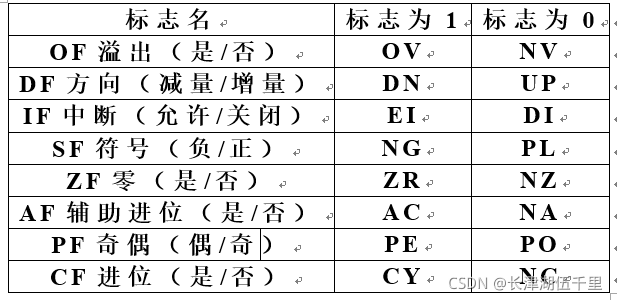
2021.11.10 compilation examination
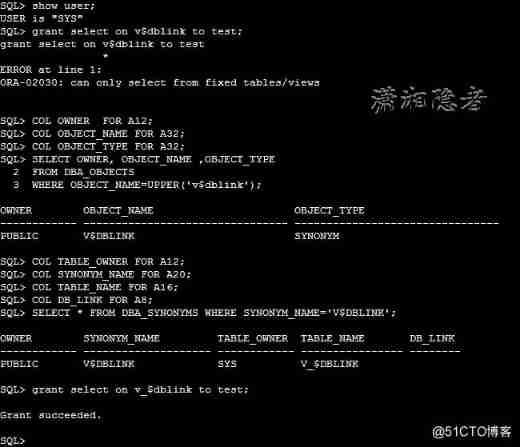
ORA-02030: can only select from fixed tables/views
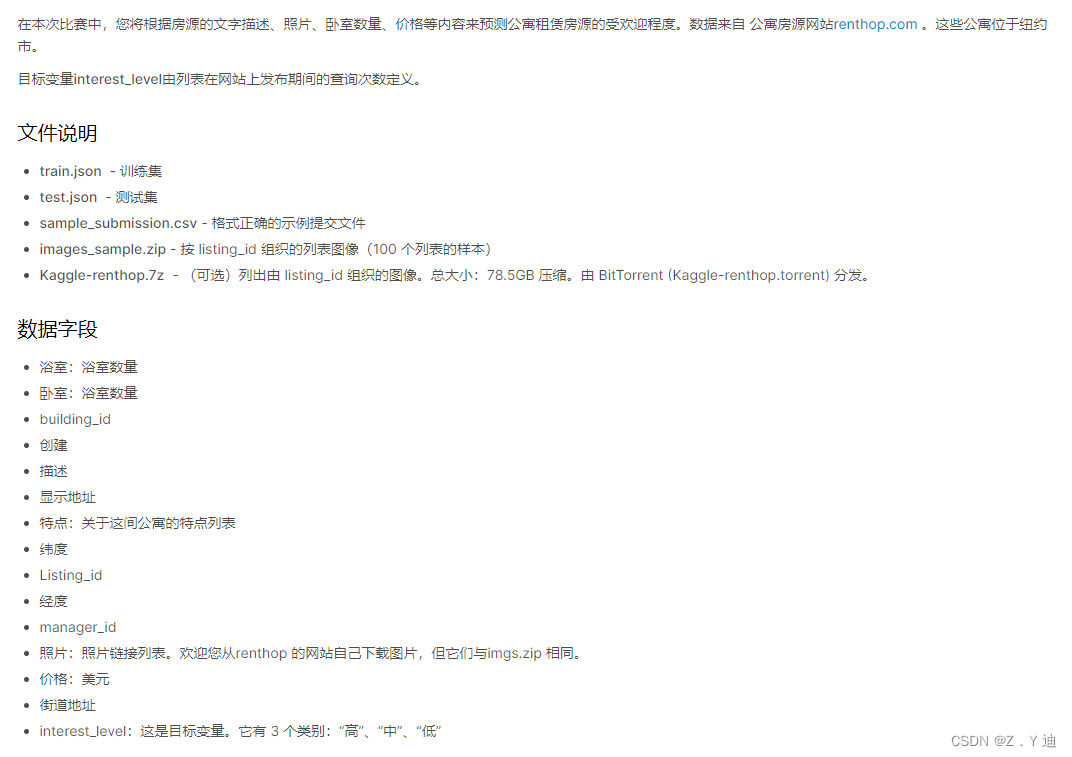
Kaggle competition two Sigma connect: rental listing inquiries (xgboost)
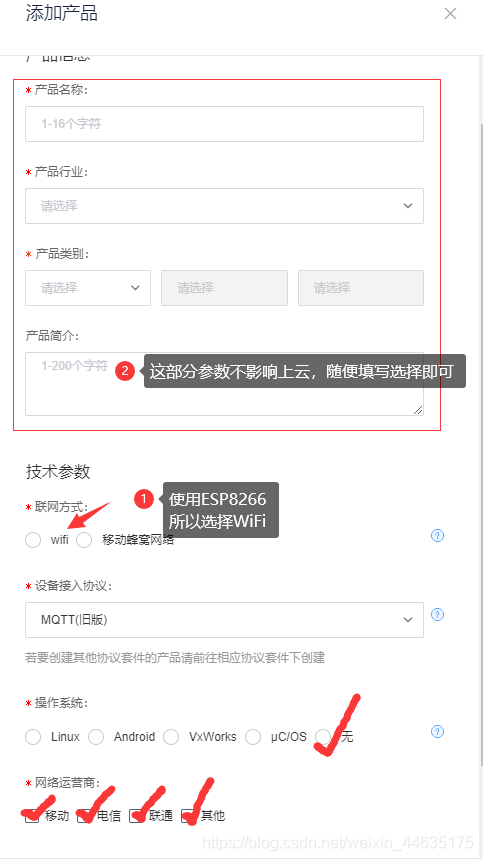
Esp8266 connect onenet (old mqtt mode)
Redis cache update strategy, cache penetration, avalanche, breakdown problems
随机推荐
gcc 编译选项
js 变量作用域和函数的学习笔记
First use of dosbox
Walk into WPF's drawing Bing Dwen Dwen
Programming homework: educational administration management system (C language)
[leetcode622] design circular queue
Fashion Gen: the general fashion dataset and challenge paper interpretation & dataset introduction
[esp32 learning-1] construction of Arduino esp32 development environment
[leetcode622]设计循环队列
JS regular expression basic knowledge learning
Gravure sans fil Bluetooth sur micro - ordinateur à puce unique
JS变量类型以及常用类型转换
open-mmlab labelImg mmdetection
Detailed explanation of truncate usage
ES6语法总结--上篇(基础篇)
(五)R语言入门生物信息学——ORF和序列分析
E-commerce data analysis -- salary prediction (linear regression)
Basic operations of databases and tables ----- classification of data
2021.11.10 compilation examination
What is the maximum length of MySQL varchar field