当前位置:网站首页>Detailed explanation of multi-mode input event distribution mechanism
Detailed explanation of multi-mode input event distribution mechanism
2022-07-05 00:47:00 【Openharmony developer community】
Detailed explanation of multi-mode input event distribution mechanism
One 、 Overview of multimode input
Multimode input service is designed to support developers to provide users with a variety of human-computer interaction methods , On the basis of continuous improvement and support for traditional input , Multimode input will also play OpenAtom OpenHarmony( hereinafter referred to as “OpenHarmony”) The distributed advantage of , Improve the cross device interaction experience , Facing new scenes 、 New businesses provide system level support .
Multimode input Input The components are OpenHarmony System level input event management framework ; Connect a variety of input devices to the South , Gather multiple input events ( Key 、 touch ), Through unification / After standardized treatment , Distribute to consumers ( system service 、 application ).
The docking of southbound input devices includes many types of input devices , Such as : A touch screen 、 mouse 、 keyboard 、 Touch Pad 、 The remote control .
Two 、 Input event and device status data flow introduction
First , Let's look at the key data flow under the multi-mode input architecture , It is convenient for users to have an in-depth understanding from initiating an interactive request , To the system 、 The whole process of application giving an interactive response .
As shown in the figure below , There are two types of key data flows :
● Input device status data flow :
The input device status data describes the status changes of the input device and its device attribute information , Include : Device insertion 、 Remove state 、 Unique identification of equipment 、 Equipment name 、 Input mode supported by the device .
Enter device status data , Through the kernel device driver, it is reported to the input device status management module of the multi-mode input server . In the input device management module, the global input device status is managed and maintained , At the same time, the device status will be encapsulated as a listening interface and provided to the upper business module to monitor the status of the system input peripherals .
● Interactive input event data flow :
Interactive input event data is used to describe the keyboard 、 mouse 、 Touch screen input events ; Keyboard events include : Key code 、 Key timestamp 、 Information such as the device to which the key belongs ; Mouse events include : mouse X/Y coordinate 、 Mouse button ( Such as : Mouse left | in | Right ) Events, etc. ; Touch events include : Time stamp 、 Touch the location X/Y Coordinates, etc .
The input event data is reported by the device driver to the input event receiving module to complete the forwarding of input events from kernel space to user space , Then the input event preprocessing module is given to complete the standardized processing of input events ( Key KeyCode Mapping standardization, etc ), Finally, the input event distribution module completes the event distribution with the system preset distribution mechanism and principles .
Refer to the following data flow diagram , We can clearly understand that after the user initiates an interactive request through the input device , Enter the whole process of event reporting and distribution .
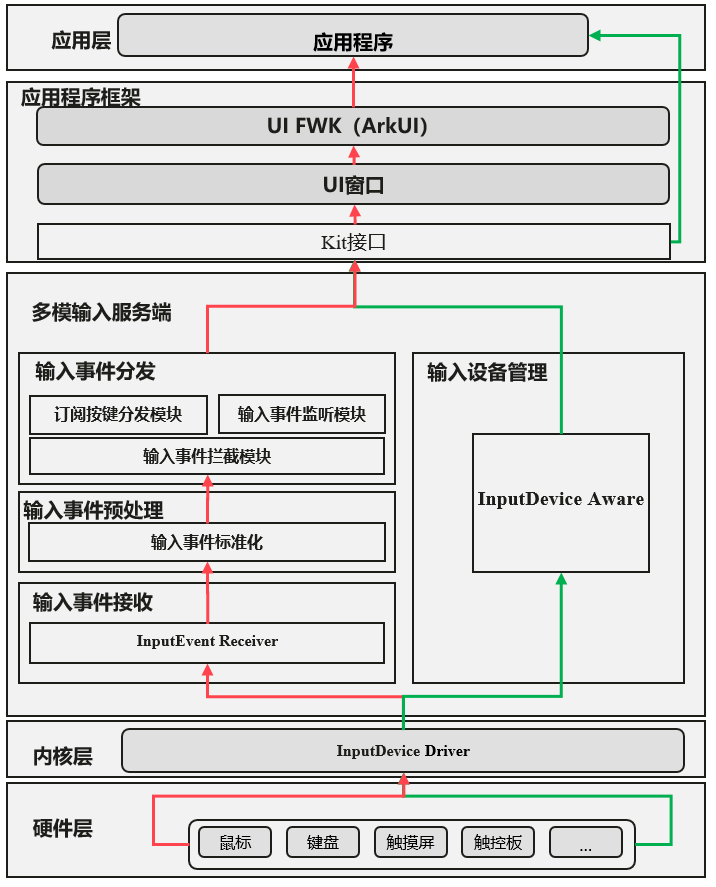
chart 1 Input event and device status data flow diagram
notes : Data flow diagram arrow schematic description
Enter the event pre-processing instructions of the event distribution module :
The input event distribution process will first pass through the input event interception module , When an interceptor is registered , Entering the event will terminate and continue to report , The corresponding interceptor will intercept all input events . This event interception feature currently mainly supports barrier free mode .
When there is no interceptor registration , The input event will be reported to the input event listening module , System level applications ( Such as : System settings 、 desktop ) By listening to input events , Support system level features ( Such as : The status bar is hidden / Disappear, etc ).
The event monitoring module will not prevent the event from continuing to report ; Support event monitoring at the same time , Input events will continue to be reported .
Key events will be reported to the subscription key distribution module for processing , Distribute to the corresponding application for processing , The event distribution process ends .
Other touch screen events and mouse events will not go through the subscription key distribution module , It will continue to be reported to the application window for processing .
3、 ... and 、 Multimode input event distribution principle
1. mouse / Touch screen event distribution principles
mouse / Which target does the touch screen coordinate point to , The input event is distributed to the corresponding target .
mouse / Touch screen event distribution special scenario description :
If there is no button on the mouse to press , Which target is the current mouse pointing to , Mouse input events are distributed to coordinate locked targets .
If a button on the mouse is pressed , Take the target locked by the mouse coordinate when the first button is pressed as the distribution target , Until all the buttons are lifted .
Touch screen input , Press the locked target with the first finger as the input event distribution target , Until all fingers are raised .
2. Key event distribution principle
The key event distribution takes the focus in the current user visual interface as the distribution target , Which target is the focus of the current interface , Key events are distributed to the corresponding target .
Four 、OpenHarmony 3.1 Interface description added in version
In order to better support upper layer applications and system services, real-time detection and processing of input device hot plug status change events , stay OpenHarmony 3.1 The new version is open JS API Interface , It can support passing JS API Monitor the hot plug event of the device . At the same time, it provides the way to obtain the unique identification of the hot plug input device by registering the callback interface . Input device hot plug monitoring interface and inputDevice.getDevice The detailed information of the hot plug device can be obtained by interface coordination , Include : Enter device name 、 Input types supported by the device ( keyboard | Touch screen | mouse | Game handle ) etc. .
1. New interface description of multi-mode input subsystem
Input peripheral hot plug monitoring interface :function on(type: "change", listener: Callback<DeviceListener>): void; Input peripheral to cancel listening interface :function off(type: “change”, listener?: CallbackDeviceListener): void;
2. Add interface parameter description
【DeviceListener】
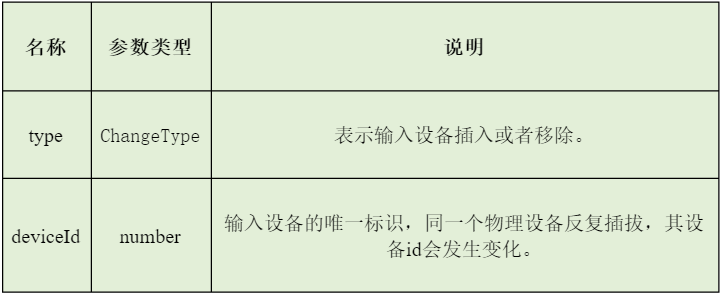
【ChangeType】
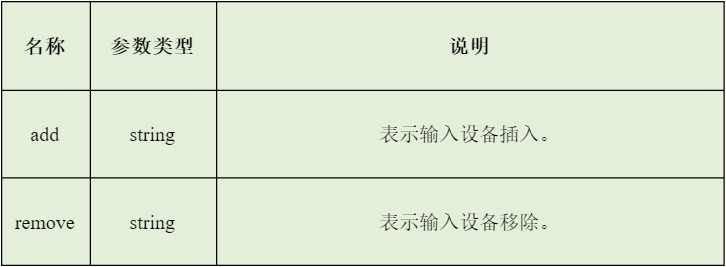
3. Input device hot plug interface application scenario
Soft keyboard adaptive display : In the text editing scenario , The input method monitors the hot plug operation of the physical keyboard input device , It can adaptively decide whether the soft keyboard is displayed . When there is a physical keyboard device , The soft keyboard does not need to be displayed , The user input operation is completed through the physical keyboard . When there is no physical keyboard , Input method pop-up soft keyboard , The user completes the input operation through the soft keyboard .
4. Example of hot plug interface of input device
After having a preliminary understanding of the mouse hot plug monitoring interface , Let's learn more about , How to use input device hot plug interface in actual development :
Import module first
import inputDevice from '@ohos.multimodalInput.inputDevice';
2) The input device hot plug event monitoring is realized through the monitoring interface :
// Input method in the soft keyboard display logic by subscribing to the status of the physical keyboard : Insert / Pull out // according to isPhysicalkeyboardExist The value of determines whether the soft keyboard pops up ...let isPhysicalkeyboardExist = false;inputDevice.on("change", (callback) => { console.log("type: " + callback.type + ", deviceId: " + callback.deviceId); inputDevice.getDevice(callback.deviceId, (ret) => { console.log("The keyboard type of the device is: " + ret); if (ret == keyboard.ALPHABETIC_KEYBOARD && callback.type == 'add') { // The hot plug device is keyboard isPhysicalkeyboardExist = true; } else if (ret == keyboard.ALPHABETIC_KEYBOARD && callback.type == 'remove') { isPhysicalkeyboardExist = false; } });});...
3) By canceling the listening interface, the input device hot plug event cancels listening :
listener: function(data) { console.log("type: " + data.type + ", deviceId: " + data.deviceId);}// Cancel alone listener Listening in .inputDevice.off("change", this.listener);// Cancel all listening inputDevice.off("change");// After canceling listening , The soft keyboard pops up by default notes : Cancel hot plug event listening interface , Enter the reference listener Optional ; When entering the reference belt listener On behalf of canceling a specific listening callback . When entering the reference, do not bring listener, It means to cancel all listening callbacks .
Through the above introduction , I'm sure you're right OpenHarmony We have a comprehensive understanding of the input event processing and distribution mechanism of the multi-mode input subsystem . At the same time, we are also interested in OpenHarmony 3.1 The new version of the input device hot plug monitoring interface is introduced in detail , More about the multimode input subsystem for developers API Welcome to the interface Gitee Learn more about :
https://gitee.com/openharmony/docs/blob/master/zh-cn/application-dev/reference/apis/js-apis-inputdevice.md
I believe you have the above basic knowledge as a cushion in the subsequent development , In the subsequent development, it can be more flexible , Develop applications with better interactive experience . Looking forward to working with developers to build the ultimate user experience . Last , We look forward to working together to build , Can be found in OpenHarmony Community (https://gitee.com/openharmony) Discuss with each other .
边栏推荐
猜你喜欢
《论文笔记》Multi-UAV Collaborative Monocular SLAM
![[paper reading] Tun det: a novel network for meridian ultra sound nodule detection](/img/25/e2366cabf00e55664d16455a6049e0.png)
[paper reading] Tun det: a novel network for meridian ultra sound nodule detection
dotnet-exec 0.6.0 released
It's too convenient. You can complete the code release and approval by nailing it!
Operator explanation
Date time type and format in MySQL
大专学历,33岁宝妈又怎样?我照样销售转测试,月入13k+
![[selenium automation] common notes](/img/d3/6699792e85b5ee5a2d6192f4e4d07c.png)
[selenium automation] common notes
Parameter passing mechanism of member methods
Pycharm professional download and installation tutorial
随机推荐
Apifox (postman + swagger + mock + JMeter), an artifact of full stack development and efficiency improvement
NPM install error forced installation
Learn C language from scratch day 024
【报错】 “TypeError: Cannot read properties of undefined (reading ‘split‘)“
两个数相互替换
【selenium自动化】常用注解
Acwing164. Accessibility Statistics (topological sorting +bitset)
Hisilicon 3559 universal platform construction: YUV422 pit stepping record
GDB常用命令
Pycharm professional download and installation tutorial
实战模拟│JWT 登录认证
多模输入事件分发机制详解
[Yocto RM]11 - Features
[Yocto RM]10 - Images
dotnet-exec 0.6.0 released
[论文阅读] TUN-Det: A Novel Network for Thyroid Ultrasound Nodule Detection
Actual combat simulation │ JWT login authentication
Hologres query management and timeout processing
MongoDB系列之学习笔记教程汇总
Some basic functions of enterprise projects are developed, and important things are saved to online first a