当前位置:网站首页>Positioning (relative positioning, absolute positioning, fixed positioning, Z-index) 2022-2-11
Positioning (relative positioning, absolute positioning, fixed positioning, Z-index) 2022-2-11
2022-07-03 03:17:00 【Try your best】
One 、 location
1.1 Relative positioning position: relative;
Relative to the original position , Make the specified offset , In terms of relative positioning , It's still in the standard document stream , The original position will be preserved
            top:-20px;
            left: 20px;
            bottom: -10px;
            right: 20px;
<!DOCTYPE html>
<html lang="en">
<head>
    <meta charset="UTF-8">
    <title>Title</title>
    <!-- Relative positioning
     Offset from your original position
    -->
    <style>
        body{
            padding: 20px;
        }
        div{
            margin: 10px;
            padding: 5px;
            font-size: 26px;
            line-height: 100px;
        }
        #father{
            border: 2px solid black;
            padding: 0;
        }
        #first{
            border: 1px solid #3a1fe8;
            background: #a2bef3;
            position: relative;
            top:-20px;
            left: 20px;

        }
        #second{
            border: 1px dashed #c907ff;
            background: #E0C3FC;
        }
        #third{
            border: 1px dashed #fddc6c;
            background: aqua;
            position: relative;
            bottom: -10px;
            right: 20px;
        }
    </style>
</head>
<body>
<div id="father">
    <div id="first"> The first box </div>
    <div id="second"> The second box </div>
    <div id="third"> The third box </div>

</div>
</body>
</html>

practice 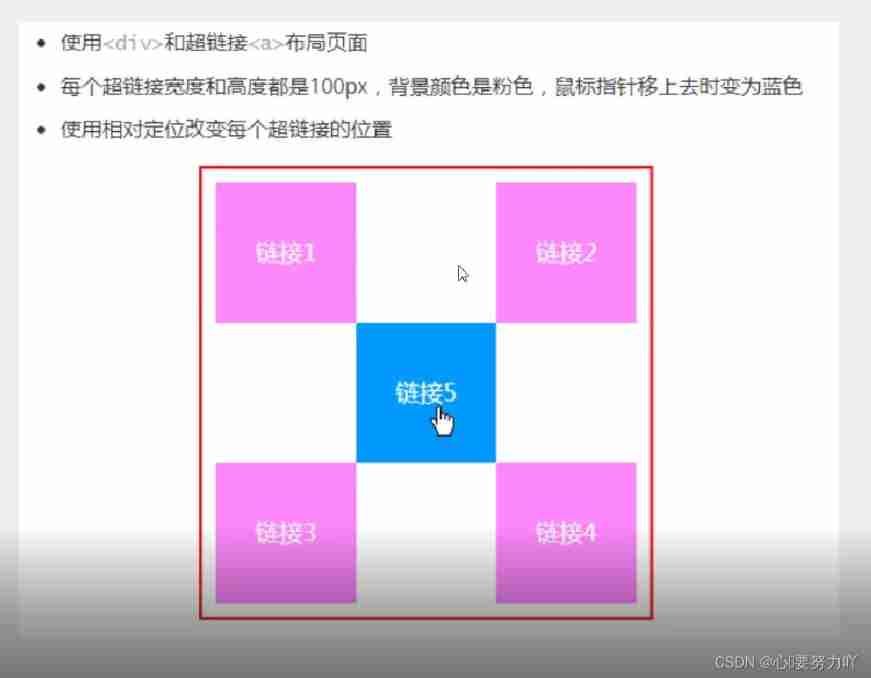
<!DOCTYPE html>
<html lang="en">
<head>
    <meta charset="UTF-8">
    <title> practice </title>
    <style>
        #dad{
            width: 300px;
            height: 300px;
            border: 2px solid red;
            padding: 10px;
        }
        a{
            width: 100px;
            height: 100px;
            background: #ea77b0;
            line-height: 100px;
            text-align: center;
            color: white;
            text-decoration: none;
            display: block;
        }
        a:hover{
            background: #8EC5FC;
        }
        .a2,.a4{
            position: relative;
            left: 200px;
            top: -100px;
        }
        .a5{
            position: relative;
            right: -100px;
            bottom: 300px;
        }
    </style>
</head>
<body>
<div id="dad">
    <a href="#" class="a1"> Link one </a>
    <a href="#" class="a2"> Link 2 </a>
    <a href="#" class="a3"> Link three </a>
    <a href="#" class="a4"> Link four </a>
    <a href="#" class="a5"> Link five </a>
</div>
</body>
</html>

1.2 Absolute positioning (position: absolute;)
location : be based on xxx location , The up and down or so
- Without parent element positioning , Relative to browser positioning
#second{
            border: 1px dashed #c907ff;
            background: #E0C3FC;
            position: absolute;
            right: 30px;
        }
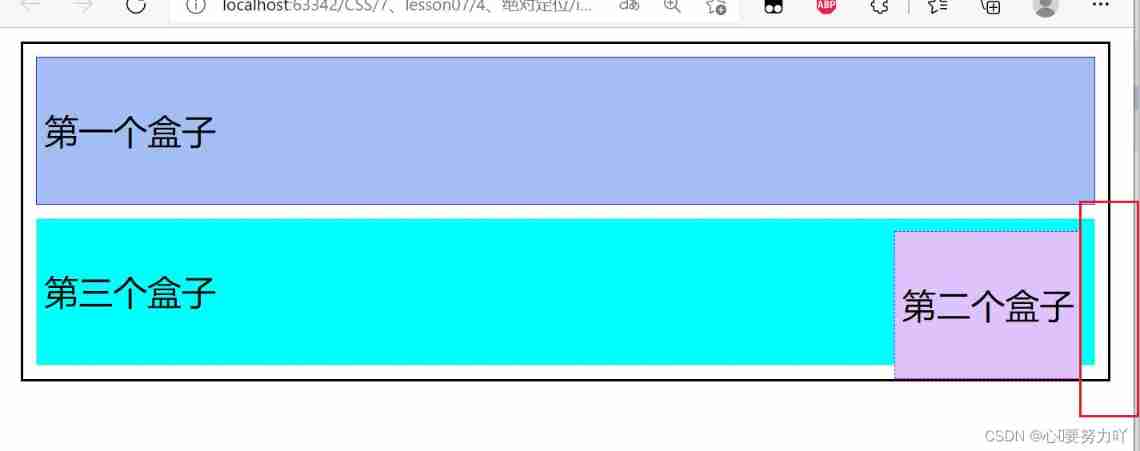
Absolute positioning is added after the second block , Is the distance for browsers 
- Suppose the parent element has a location , We usually offset relative to the parent element
 The parent add
position: relative;

#second{
            border: 1px dashed #c907ff;
            background: #E0C3FC;
            position: absolute;
            right: 30px;
        }

3、 Move within the scope of the parent element
Location relative to the parent or browser , Make the specified offset , If you're absolutely positioned , It's not in the standard document stream , The original position will not be preserved
1.3 Fixed position (position: fixed;)
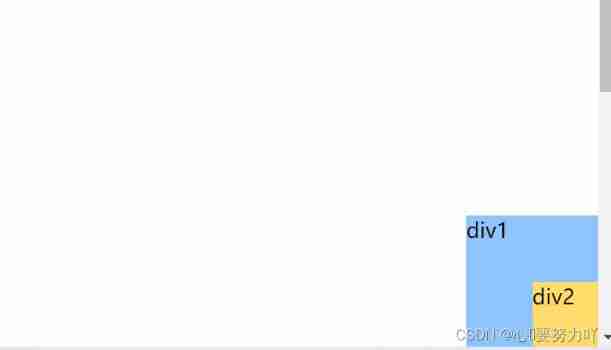
Example : Comparison between absolute positioning and fixed positioning
fixed, Fixed position
<!DOCTYPE html>
<html lang="en">
<head>
    <meta charset="UTF-8">
    <title> Fixed position </title>
    <style>
        body{
            height: 1000px;
        }
        div:nth-of-type(1){/* Absolute positioning , Relative to the browser */
            width: 100px;
            height: 100px;
            background: #8EC5FC;
            position: absolute;
            right: 0;
            bottom: 0;
        }
        div:nth-of-type(2){/*fixed, Fixed position */
            width: 50px;
            height: 50px;
            background: #fddc6c;
            position: fixed;
        }
    </style>
</head>
<body>
<div>div1</div>
<div>div2</div>
</body>
</html>

Two 、z-index
Hierarchical concept 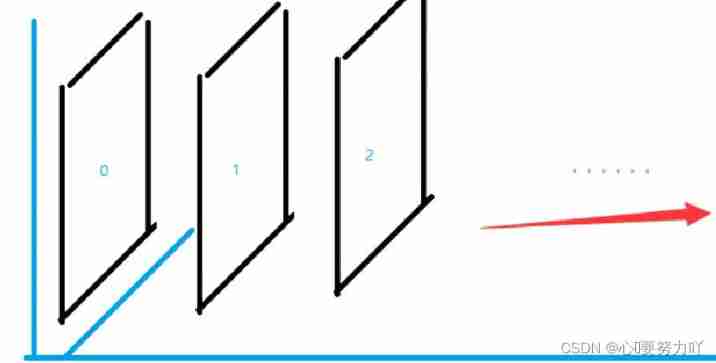
2.1 Put the text on the top z-index: 999;
<!DOCTYPE html>
<html lang="en">
<head>
    <meta charset="UTF-8">
    <title>zindex</title>
    <link rel="stylesheet" href="css/style.css">
</head>
<body>
<div id="context">
    <ul>
        <li><img src="image/1.jpg" alt=""></li>
        <li class="tipText"> Early learning </li>
        <li class="tipbg"></li>
        <li> Time :2025-1-2</li>
        <li> place : The earth </li>
    </ul>
</div>
</body>
</html>
#context{
    width: 400px;
    padding: 0px;
    margin: 0px;
    overflow: hidden;
    font-size: 12px;
    line-height: 25px;
    border: 1px solid #090909;
}
ul,li{
    padding: 0;
    margin: 0;
    list-style: none;
}
#content ul{
    position: absolute;
}

.tipText,.tipbg{
    position: absolute;
    width: 400px;
    height: 25px;
    top:384px;
}
.tipText{
    color: white;
    z-index: 999;/* Put the text on the top */
}
2.2 Background transparency (opacity: 0.5; or filter: alpha(opacity=1); All possible )
.tipbg{
    background: #090909;
    opacity: 0.5;/* Background transparency */
    /*filter: alpha(opacity=1);*/    /* ditto , Background transparency */
}
边栏推荐
- Are there any recommended term life insurance products? I want to buy a term life insurance.
- Force freeing memory in PHP
- 模型转换onnx2engine
- 基于QT的tensorRT加速的yolov5
- Don't use the new Dede collection without the updated Dede plug-in
- PAT乙级“1104 天长地久”DFS优化思路
- 403 error displayed when vs cloning
- softmax的近似之NCE详解
- Limit of one question per day
- 为什么线程崩溃不会导致 JVM 崩溃
猜你喜欢

Yiwen takes you to know ZigBee

Opengauss database development and debugging tool guide
![MySQL practice 45 lecture [transaction isolation]](/img/a5/5420651d6be51e892976f02be8c43c.png)
MySQL practice 45 lecture [transaction isolation]

The idea cannot be loaded, and the market solution can be applied (pro test)
idea 加载不了应用市场解决办法(亲测)

VS 2019配置tensorRT

Force deduction ----- the minimum path cost in the grid
Segmentation fault occurs during VFORK execution

别再用 System.currentTimeMillis() 统计耗时了,太 Low,StopWatch 好用到爆!

Creation and destruction of function stack frame
随机推荐
VS 2019 配置tensorRT生成engine
Are there any recommended term life insurance products? I want to buy a term life insurance.
VS 2019配置tensorRT
LVGL使用心得
C # general interface call
How to make backgroundworker return an object
MySql實戰45講【SQL查詢和更新執行流程】
I2C 子系统(一):I2C spec
The difference between componentscan and componentscans
[pyg] understand the messagepassing process, GCN demo details
MySQL practice 45 lecture [row lock]
Learning notes of C programming [compiled by Mr. Tan Haoqiang] (Chapter III sequence programming) 04 C sentence
The file marked by labelme is converted to yolov5 format
C # webrequest post mode, based on "basic auth" password authentication mode, uploads files and submits other data using multipart / form data mode
I2C subsystem (II): I3C spec
Last update time of all sqlserver tables
Edit and preview in the back pipe to get the value writing method of the form
labelimg生成的xml文件转换为voc格式
模糊查询时报错Parameter index out of range (1 > number of parameters, which is 0)
Stop using system Currenttimemillis() takes too long to count. It's too low. Stopwatch is easy to use!